PostgreSQL 14 Internals
PostgreSQL 14 Internals
Egor Rogov
PostgreSQL 14 · 2023
Start reading · Print the whole book · Original PDF
Contents
Figures
- Figure 1.1 — Databases
- Figure 1.2 — Tablespaces
- Figure 1.3 — Files and Forks
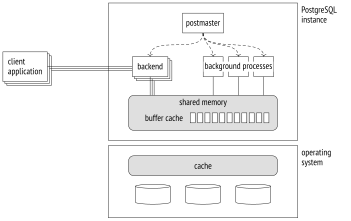
- Figure 1.4 — 1.2 Processes and Memory
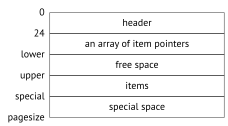
- Figure 3.1 — Page Header
- Figure 4.1 — 4.1 What is a Snapshot?
- Figure 4.2 — 4.2 Row Version Visibility
- Figure 4.3 — 4.3 Snapshot Structure
- Figure 4.4 — 4.3 Snapshot Structure
- Figure 4.5 — 4.5 Transaction Horizon
- Figure 7.1 — 7.1 Transaction ID Wraparound
- Figure 7.2 — 7.2 Tuple Freezing and Visibility Rules
- Figure 7.3 — Age for Forced Autovacuum
- Figure 9.1 — 9.2 Buffer Cache Design
- Figure 9.2 — 9.3 Cache Hits
- Figure 9.3 — Buffer Search and Eviction
- Figure 10.1 — 10.3 Checkpoint
- Figure 10.2 — 10.3 Checkpoint
- Figure 10.3 — Configuring Checkpoints
- Figure 13.1 — Exclusive Modes
- Figure 13.2 — Exclusive Modes
- Figure 13.3 — Exclusive Modes
- Figure 13.4 — Shared Modes
- Figure 13.5 — 13.6 Deadlocks
- Figure 15.1 — Buffer Cache
- Figure 15.2 — WAL Buffers
- Figure 16.1 — 16.2 Simple Query Protocol
- Figure 16.2 — Parsing
- Figure 16.3 — Transformation
- Figure 16.4 — Planning
- Figure 16.5 — Planning
- Figure 16.6 — Planning
- Figure 16.7 — Planning
- Figure 16.8 — Execution
- Figure 17.1 — 17.3 Distinct Values
- Figure 17.2 — 17.4 Most Common Values
- Figure 17.3 — 17.5 Histogram
- Figure 17.4 — 17.5 Histogram
- Figure 18.1 — 18.2 Sequential Scans
- Figure 18.2 — 18.3 Parallel Plans
- Figure 18.3 — Cost Estimation
- Figure 19.1 — 19.1 Indexes and Extensibility
- Figure 20.1 — Good Scenario: High Correlation
- Figure 20.2 — Bad Scenario: Low Correlation
- Figure 20.3 — Bad Scenario: Low Correlation
- Figure 20.4 — Cost Estimation
- Figure 20.5 — Cost Estimation
- Figure 20.6 — 20.5 Comparison of Various Access Methods
- Figure 22.1 — One-Pass Hash Joins
- Figure 22.2 — One-Pass Hash Joins
- Figure 22.3 — Two-Pass Hash Joins
- Figure 22.4 — Two-Pass Hash Joins
- Figure 22.5 — Two-Pass Hash Joins
- Figure 22.6 — Parallel One-Pass Hash Joins
- Figure 22.7 — Parallel One-Pass Hash Joins
- Figure 22.8 — Parallel Two-Pass Hash Joins
- Figure 22.9 — Parallel Two-Pass Hash Joins
- Figure 22.10 — Parallel Two-Pass Hash Joins
- Figure 22.11 — Parallel Two-Pass Hash Joins
- Figure 23.1 — External Sorting
- Figure 23.2 — External Sorting
- Figure 23.3 — External Sorting
- Figure 23.4 — External Sorting
- Figure 23.5 — 23.4 Comparison of Join Methods
- Figure 24.1 — 24.2 Page Layout
- Figure 24.2 — 24.2 Page Layout
- Figure 24.3 — 24.2 Page Layout
- Figure 25.1 — 25.1 Overview
- Figure 25.2 — Search by Equality
- Figure 25.3 — Search by Inequality
- Figure 25.4 — Search by Range
- Figure 25.5 — Insertions
- Figure 25.6 — 25.3 Page Layout
- Figure 26.1 — 26.2 R-Trees for Points
- Figure 26.2 — 26.2 R-Trees for Points
- Figure 26.3 — 26.2 R-Trees for Points
- Figure 26.4 — Search for Contained Elements
- Figure 26.5 — Search for Contained Elements
- Figure 26.6 — Search for Contained Elements
- Figure 26.7 — Search for Contained Elements
- Figure 26.8 — Nearest Neighbor Search
- Figure 26.9 — Nearest Neighbor Search
- Figure 26.10 — Nearest Neighbor Search
- Figure 26.11 — Insertion
- Figure 26.12 — Insertion
- Figure 26.13 — Indexing tsvector Data
- Figure 26.14 — Indexing tsvector Data
- Figure 26.15 — Indexing tsvector Data
- Figure 26.16 — Indexing tsvector Data
- Figure 27.1 — 27.2 Quadtrees for Points
- Figure 27.2 — 27.2 Quadtrees for Points
- Figure 27.3 — 27.2 Quadtrees for Points
- Figure 27.4 — Operator Class
- Figure 27.5 — Operator Class
- Figure 27.6 — Page Layout
- Figure 27.7 — Search
- Figure 27.8 — Search
- Figure 27.9 — Insertion
- Figure 27.10 — Insertion
- Figure 27.11 — Insertion
- Figure 27.12 — Insertion
- Figure 27.13 — 27.3 K-Dimensional Trees for Points
- Figure 27.14 — 27.3 K-Dimensional Trees for Points
- Figure 27.15 — 27.3 K-Dimensional Trees for Points
- Figure 27.16 — 27.4 Radix Trees for Strings
- Figure 27.17 — Search
- Figure 27.18 — Insertion
- Figure 27.19 — Insertion
- Figure 27.20 — Insertion
- Figure 28.1 — 28.2 Index for Full-Text Search
- Figure 28.2 — Search
- Figure 28.3 — Frequent and Rare Lexemes
- Figure 28.4 — Insertions
- Figure 28.5 — jsonb_ops Operator Class
- Figure 28.6 — jsonb_path_ops Operator Class
- Figure 29.1 — 29.3 Page Layout
- Figure 29.2 — Value Insertion
- Figure 29.3 — Range Size and Search Efficiency
- Figure 29.4 — 29.7 Minmax-Multi Classes
- Figure 29.5 — 29.7 Minmax-Multi Classes
- Figure 29.6 — 29.9 Bloom Classes
Tables
- Table 2.1 — Isolation levels and anomalies in the SQL standard
- Table 2.2 — Isolation levels and anomalies in PostgreSQL
- Table 12.1 — Transaction ID lock compatibility (× marks a conflict)
- Table 12.2 — Relation-level lock compatibility (× marks a conflict)
- Table 13.1 — Row-level lock compatibility (× marks a conflict)
- Table 18.1 — Table size and number of parallel processes
- Table 26.1 — Lexeme signatures
- Table 26.2 — Document signatures
- Table 28.1 — Consistency function for “everywher” or “oink”
- Table 28.2 — Consistency function for mandatory and optional lexemes
About this edition
© Postgres Professional, 2022–2023. The English text and illustrations are reproduced from the PostgreSQL 14 · 2023 PDF. This web edition keeps the original chapter order, examples, and version-specific behavior. Figure and table numbers are added for web navigation; the PDF’s diagrams and tables are unnumbered. Original page references link to their corresponding locations in the chapters.
About This Book
Books are not made to be believed, but to be subjected to inquiry. — Umberto Eco, The Name of the Rose
For Whom Is This Book?
This book is for those who will not settle for a black-box approach when working with a database. If you are eager to learn, prefer not to take expert advice for granted, and would like to figure out everything yourself, follow along.
I assume that the reader has already tried using PostgreSQL and has at least some general understanding of how it works. Entry-level users may find the text a bit difficult. For example, I will not tell anything about how to install the server, enter psql commands, or set configuration parameters.
I hope that the book will also be useful for those who are familiar with another database system, but switch over to PostgreSQL and would like to understand how they differ. A book like this would have saved me a lot of time several years ago. And that’s exactly why I finally wrote it.
What This Book Will Not Provide
This book is not a collection of recipes. You cannot find ready-made solutions for every possible occasion, but if you understand inner mechanisms of a complex system, you will be able to analyze and critically evaluate other people’s experience and come to your own conclusions. For this reason, I explain such details that may at first seem to be of no practical use.
But this book is not a tutorial either. While delving deeply into some fields (in which I am more interested myself), it may say nothing at all about the other.
By no means is this book a reference. I tried to be precise, but I did not aim at replacing documentation, so I could easily leave out some details that I considered insignificant. In any unclear situation read the documentation.
This book will not teach you how to develop the PostgreSQL core. I do not expect any knowledge of the C language, as this book is mainly intended for database administrators and application developers. But I do provide multiple references to the source code, which can give you as many details as you like, and even more.
What This Book Does Provide
In the introductory chapter, I briefly touch upon the main database concepts that will serve as the foundation for all the further narration. I do not expect you to get much new information from this chapter but still include it to complete the big picture. Besides, this overview can be found useful by those who are migrating from other database systems.
Part I is devoted to questions of data consistency and isolation. I first cover them from the user’s perspective (you will learn which isolation levels are available and what are the implications) and then dwell on their internals. For this purpose, I have to explain implementation details of multiversion concurrency control and snapshot isolation, paying special attention to cleanup of outdated row versions.
Part II describes buffer cache and WAL, which is used to restore data consistency after a failure.
Part III goes into details about the structure and usage of various types of locks: lightweight locks for RAM, heavyweight locks for relations, and row-level locks.
Part IV explains how the server plans and executes SQL queries. I will tell you which data access methods are available, which join methods can be used, and how the collected statistics are applied.
Part V extends the discussion of indexes from the already covered B-trees to other access methods. I will explain some general principles of extensibility that define the boundaries between the core of the indexing system, index access methods, and data types (which will bring us to the concept of operator classes), and then elaborate on each of the available methods.
PostgreSQL includes multiple “introspective” extensions, which are not used in routine work, but give us an opportunity to peek into the server’s internal behavior. This book uses quite a few of them. Apart from letting us explore the server internals, these extensions can also facilitate troubleshooting in complex usage scenarios.
Conventions
I tried to write this book in a way that would allow reading it page by page, from start to finish. But it is hardly possible to uncover all the truth at once, so I had to get back to the same topic several times. Writing that “it will be considered later” over and over again would inevitably make the text much longer, that’s why in such cases I simply put the page number in the margin to refer you to further discussion. A similar number pointing backwards will take you to the page where something has been already said on the subject. (p. 17)
Both the text and all the code examples in this book apply to PostgreSQL 14. Next to some paragraphs, you can see a version number in the page margin. It means that the provided information is relevant starting from the indicated PostgreSQL version, while all the previous versions either did not have the described feature at all, or used a different implementation. Such notes can be useful for those who have not upgraded their systems to the latest release yet. (v. 14)
I also use the margins to show the default values of the discussed parameters. The names of both regular and storage parameters are printed in italics: work_mem. (default: 4MB)
In footnotes, I provide multiple links to various sources of information. There are several of them, but first and foremost, I list the PostgreSQL documentation,1 which is a wellspring of knowledge. Being an essential part of the project, it is always kept up-to-date by PostgreSQL developers themselves. However, the primary reference is definitely the source code.2 It is amazing how many answers you can find by simply reading comments and browsing through README files, even if you do not know C. Sometimes I also refer to commitfest entries:3 you can always trace the history of all changes and understand the logic of decisions taken by developers if you read the related discussions in the psql-hackers mailing list, but it requires digging through piles of emails.
Side notes that can lead the discussion astray (which I could not help but include into the book) are printed like this, so they can be easily skipped.
Naturally, the book contains multiple code examples, mainly in SQL. The code is provided with the prompt =>; the server response follows if necessary:
If you carefully repeat all the provided commands in PostgreSQL 14, you should get exactly the same results (down to transaction IDs and other inessential details). Anyway, all the code examples in this book have been generated by the script containing exactly these commands.
When it is required to illustrate concurrent execution of several transactions, the code run in another session is indented and marked off by a vertical line.
To try out such commands (which is useful for self-study, just like any experimentation), it is convenient to open two psql terminals.
The names of commands and various database objects (such as tables and columns, functions, or extensions) are highlighted in the text using a sans-serif font: UPDATE, pg_class.
If a utility is called from the operating system, it is shown with a prompt that ends with $:
I use Linux, but without any technicalities; having some basic understanding of this operating system will be enough.
Acknowledgments
It is impossible to write a book alone, and now I have an excellent opportunity to thank good people.
I am very grateful to Pavel Luzanov who found the right moment and offered me to start doing something really worthwhile.
I am obliged to Postgres Professional for the opportunity to work on this book beyond my free time. But there are actual people behind the company, so I would like to express my gratitude to Oleg Bartunov for sharing ideas and infinite energy, and to Ivan Panchenko for thorough support and LATEX.
I would like to thank my colleagues from the education team for the creative atmosphere and discussions that shaped the scope and format of our training courses, which also got reflected in the book. Special thanks to Pavel Tolmachev for his meticulous review of the drafts.
Many chapters of this book were first published as articles in the Habr blog,4 and I am grateful to the readers for their comments and feedback. It showed the importance of this work, highlighted some gaps in my knowledge, and helped me improve the text.
I would also like to thank Liudmila Mantrova who has put much effort into polishing this book’s language. If you do not stumble over every other sentence, the credit goes to her. Besides, Liudmila took the trouble to translate this book into English, for which I am very grateful too.
I do not provide any names, but each function or feature mentioned in this book has required years of work done by particular people. I admire PostgreSQL developers, and I am very glad to have the honor of calling many of them my colleagues.
1 Introduction
1.1 Data Organization
Databases
PostgreSQL is a program that belongs to the class of database management systems. When this program is running, we call it a PostgreSQL server, or instance.
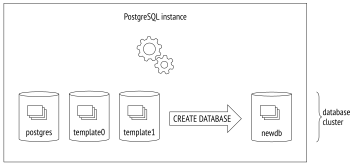
Data managed by PostgreSQL is stored in databases.1 A single PostgreSQL instance can serve several databases at a time; together they are called a database cluster.
To be able to use the cluster, you must first initialize2 (create) it. The directory that contains all the files related to the cluster is usually called PGDATA, after the name of the environment variable pointing to this directory.
Installations from pre-built packages can add their own “abstraction layers” over the regular PostgreSQL mechanism by explicitly setting all the parameters required by utilities. In this case, the database server runs as an operating system service, and you may never come across the PGDATA variable directly. But the term itself is well-established, so I am going to use it.
After cluster initialization, PGDATA contains three identical databases:
template0 is used for cases like restoring data from a logical backup or creating a database with a different encoding; it must never be modified.
template1 serves as a template for all the other databases that a user can create in the cluster.
postgres is a regular database that you can use at your discretion.
System Catalog
Metadata of all cluster objects (such as tables, indexes, data types, or functions) is stored in tables that belong to the system catalog.3 Each database has its own set of tables (and views) that describe the objects of this database. Several system catalog tables are common to the whole cluster; they do not belong to any particular database (technically, a dummy database with a zero ID is used), but can be accessed from all of them.
The system catalog can be viewed using regular SQL queries, while all modifications in it are performed by DDL commands. The psql client also offers a whole range of commands that display the contents of the system catalog.
Names of all system catalog tables begin with pg_,like in pg_database. Column names start with a three-letter prefix that usually corresponds to the table name, like in datname.
In all system catalog tables, the column declared as the primary key is called oid (object identifier); its type, which is also called oid, is a 32-bit integer.
The implementation of oid object identifiers is virtually the same as that of sequences, but it appeared in PostgreSQL much earlier. What makes it special is that the generated unique IDs issued by a common counter are used in different tables of the system catalog. When an assigned ID exceeds the maximum value, the counter is reset. To ensure that all values in a particular table are unique, the next issued oid is checked by the unique index; if it is already used in this table, the counter is incremented, and the check is repeated.4
Schemas
Schemas5 are namespaces that store all objects of a database. Apart from user schemas, PostgreSQL offers several predefined ones:
public is the default schema for user objects unless other settings are specified.
pg_catalog is used for system catalog tables.
information_schema provides an alternative view for the system catalog as defined by the SQL standard.
pg_toast is used for objects related to TOAST. (p. 28)
pg_temp comprises temporary tables. Although different users create temporary tables in different schemas called pg_temp_N, everyone refers to their objects using the pg_temp alias.
Each schema is confined to a particular database, and all database objects belong to this or that schema.
If the schema is not specified explicitly when an object is accessed, PostgreSQL selects the first suitable schema from the search path. The search path is based on the value of the search_path parameter, which is implicitly extended with pg_catalog and (if necessary) pg_temp schemas. It means that different schemas can contain objects with the same names.
Tablespaces
Unlike databases and schemas, which determine logical distribution of database objects, tablespaces define physical data layout. A tablespace is virtually a directory in a file system. You can distribute your data between tablespaces in such a way that archive data is stored on slow disks, while the data that is being actively updated goes to fast disks.
One tablespace can be used by different databases, and each database can store data in several tablespaces. It means that logical structure and physical data layout do not depend on each other.
Each database has the so-called default tablespace. All database objects are created in this tablespace unless another location is specified. System catalog objects related to this database are also stored there.
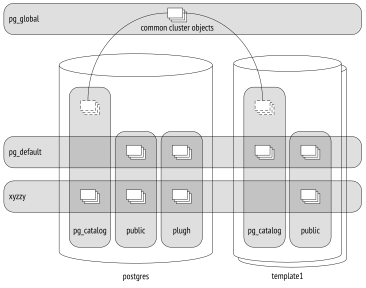
During cluster initialization, two tablespaces are created:
pg_default is located in the PGDATA/base directory; it is used as the default tablespace unless another tablespace is explicitly selected for this purpose.
pg_global is located in the PGDATA/global directory; it stores system catalog objects that are common to the whole cluster.
When creating a custom tablespace, you can specify any directory; PostgreSQL will create a symbolic link to this location in the PGDATA/pg_tblspc directory. In fact, all paths used by PostgreSQL are relative to the PGDATA directory, which allows you to move it to a different location (provided that you have stopped the server, of course).
The illustration above puts together databases, schemas, and tablespaces. Here the postgres database uses tablespace xyzzy as the default one, whereas the template1 database uses pg_default. Various database objects are shown at the intersections of tablespaces and schemas.
Relations
For all of their differences, tables and indexes—the most important database objects—have one thing in common: they consist of rows. This point is quite self-evident when we think of tables, but it is equally true for B-tree nodes, which contain indexed values and references to other nodes or table rows.
Some other objects also have the same structure; for example, sequences (virtually one-row tables) and materialized views (which can be thought of as tables that “keep” the corresponding queries). Besides, there are regular views, which do not store any data but otherwise are very similar to tables.
In PostgreSQL, all these objects are referred to by the generic term relation.
In my opinion, it is not a happy term because it confuses database tables with “genuine” relations defined in the relational theory. Here we can feel the academic legacy of the project and the inclination of its founder, Michael Stonebraker, to see everything as a relation. In one of his works, he even introduced the concept of an “ordered relation” to denote a table in which the order of rows is defined by an index.
The system catalog table for relations was originally called pg_relation, but following the object orientation trend, it was soon renamed to pg_class, which we are now used to. Its columns still have the REL prefix though.
Files and Forks
All information associated with a relation is stored in several different forks,6 each containing data of a particular type.
At first, a fork is represented by a single file. Its filename consists of a numeric ID (oid), which can be extended by a suffix that corresponds to the fork’s type.
The file grows over time, and when its size reaches 1 GB, another file of this fork is created (such files are sometimes called segments). The sequence number of the segment is added to the end of its filename.
The file size limit of 1 GB was historically established to support various file systems that could not handle large files. You can change this limit when you are building PostgreSQL (./configure --with-segsize).
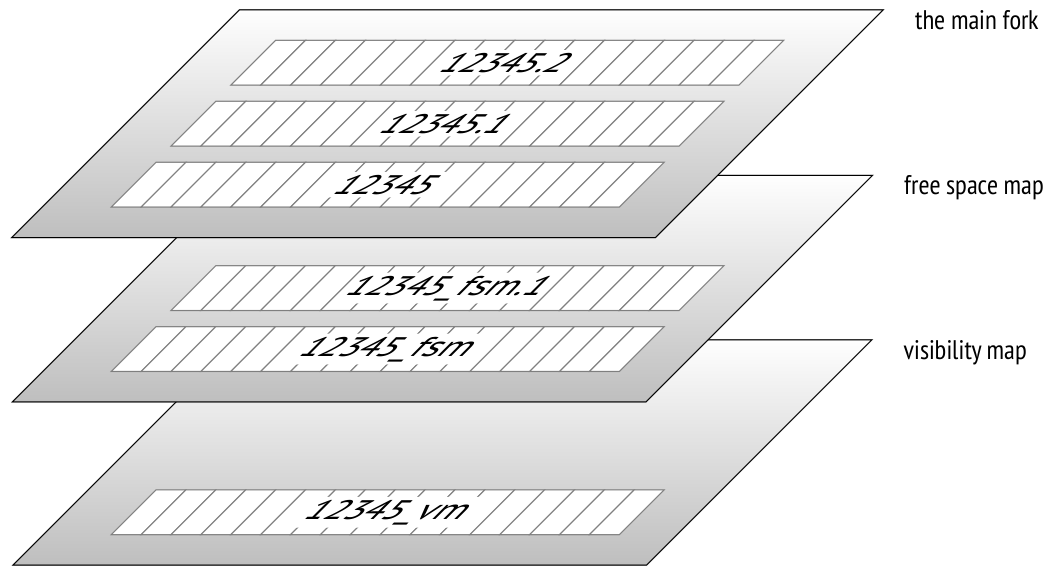
Thus, a single relation is represented on disk by several files. Even a small table without indexes will have at least three files, by the number of mandatory forks.
Each tablespace directory (except for pg_global) contains separate subdirectories for particular databases. All files of the objects belonging to the same tablespace and database are located in the same subdirectory. You must take it into account because too many files in a single directory may not be handled well by file systems.
There are several standard types of forks.
The main fork represents actual data: table rows or index rows. This fork is available for any relations (except for views, which contain no data).
Files of the main fork are named by their numeric IDs, which are stored as relfilenode values in the pg_class table.
Let’s take a look at the path to a file that belongs to a table created in the pg_default tablespace:
The base directory corresponds to the pg_default tablespace, the next subdirectory is used for the database, and it is here that we find the file we are looking for:
Here is the corresponding file in the file system:
The initialization fork7 is available only for unlogged tables (created with the UNLOGGED clause) and their indexes. Such objects are the same as regular ones, except that any actions performed on them are not written into the write-ahead log. It makes these operations considerably faster, but you will not be able to restore consistent data in case of a failure. Therefore, PostgreSQL simply deletes all forks of such objects during recovery and overwrites the main fork with the initialization fork, thus creating a dummy file. (p. 164)
The t table is created as unlogged, so the initialization fork is present. It has the same name as the main fork, but with the _init suffix:
The free space map8 keeps track of available space within pages. Its volume changes all the time, growing after vacuuming and getting smaller when new row versions appear. The free space map is used to quickly find a page that can accommodate new data being inserted.
All files related to the free space map have the _fsm suffix. Initially, no such files are created; they appear only when necessary. The easiest way to get them is to vacuum a table: (p. 108)
To speed up search, the free space map is organized as a tree; it takes at least three pages (hence its file size for an almost empty table).
The free space map is provided for both tables and indexes. But since an index row cannot be added into an arbitrary page (for example, B-trees define the place of insertion by the sort order), PostgreSQL tracks only those pages that have been fully emptied and can be reused in the index structure.
The visibility map9 can quickly show whether a page needs to be vacuumed or frozen. For this purpose, it provides two bits for each table page.
The first bit is set for pages that contain only up-to-date row versions. Vacuum skips such pages because there is nothing to clean up. Besides, when a transaction tries to read a row from such a page, there is no point in checking its visibility, so an index-only scan can be used. (p. 107) (p. 337)
The second bit is set for pages that contain only frozen row versions. I will use the term freeze map to refer to this part of the fork. (v. 9.6) (p. 123)
Visibility map files have the _vm suffix. They are usually the smallest ones:
The visibility map is provided for tables, but not for indexes. (p. 74)
Pages
To facilitate I/O, all files are logically split into pages (or blocks), which represent the minimum amount of data that can be read or written. Consequently, many internal PostgreSQL algorithms are tuned for page processing. (p. 62)
The page size is usually 8 kB. It can be configured to some extent (up to 32 kB), but only at build time (./configure --with-blocksize), and nobody usually does it. Once built and launched, the instance can work only with pages of the same size; it is impossible to create tablespaces that support different page sizes.
Regardless of the fork they belong to, all the files are handled by the server in roughly the same way. Pages are first moved to the buffer cache (where they can be read and updated by processes) and then flushed back to disk as required. (p. 147)
TOAST
Each row must fit a single page: there is no way to continue a row on the next page. To store long rows, PostgreSQL uses a special mechanism called TOAST10 (The Oversized Attributes Storage Technique).
TOAST implies several strategies. You can move long attribute values into a separate service table, having sliced them into smaller “toasts.” Another option is to compress a long value in such a way that the row fits the page. Or you can do both: first compress the value, and then slice and move it.
If the main table contains potentially long attributes, a separate TOAST table is created for it right away, one for all the attributes. For example, if a table has a column of the numeric or text type, a TOAST table will be created even if this column will never store any long values.
For indexes, the TOAST mechanism can offer only compression; moving long attributes into a separate table is not supported. It limits the size of the keys that can be indexed (the actual implementation depends on a particular operator class). (p. 315)
By default, the TOAST strategy is selected based on the data type of a column. The easiest way to review the used strategies is to run the \d+ command in psql, but I will query the system catalog to get an uncluttered output:
PostgreSQL supports the following strategies:
plain means that TOAST is not used (this strategy is applied to data types that are known to be “short,” such as the integer type).
extended allows both compressing attributes and storing them in a separate TOAST table.
external implies that long attributes are stored in the TOAST table in an uncompressed state.
main requires long attributes to be compressed first; they will be moved to the TOAST table only if compression did not help.
In general terms, the algorithm looks as follows.11 PostgreSQL aims at having at least four rows in a page. So if the size of the row exceeds one fourth of the page, excluding the header (for a standard-size page it is about 2000 bytes), we must apply the TOAST mechanism to some of the values. Following the workflow described below, we stop as soon as the row length does not exceed the threshold anymore:
First of all, we go through attributes with
externalandextendedstrategies, starting from the longest ones.Extendedattributes get compressed, and if the resulting value (on its own, without taking other attributes into account) exceeds one fourth of the page, it is moved to the TOAST table right away.Externalattributes are handled in the same way, except that the compression stage is skipped.If the row still does not fit the page after the first pass, we move the remaining attributes that use
externalorextendedstrategies into the TOAST table, one by one.
If it did not help either, we try to compress the attributes that use the
mainstrategy, keeping them in the table page.If the row is still not short enough, the
mainattributes are moved into the TOAST table.
The threshold value is 2000 bytes, but it can be redefined at the table level using the toast_tuple_target storage parameter. (v. 11)
It may sometimes be useful to change the default strategy for some of the columns. If it is known in advance that the data in a particular column cannot be compressed (for example, the column stores JPEG images), you can set the external strategy for this column; it allows you to avoid futile attempts to compress the data. The strategy can be changed as follows:
If we repeat the query, we will get the following result:
TOAST tables reside in a separate schema called pg_toast; it is not included into the search path, so TOAST tables are usually hidden. For temporary tables, pg_toast_temp_N schemas are used, by analogy with pg_temp_N.
Let’s take a look at the inner mechanics of the process. Suppose table t contains three potentially long attributes; it means that there must be a corresponding TOAST table. Here it is:
It is only logical that the resulting chunks of the toasted row use the plain strategy: there is no second-level TOAST.
Apart from the TOAST table itself, PostgreSQL creates the corresponding index in the same schema. This index is always used to access TOAST chunks. The name of the index is displayed in the output, but you can also view it by running the following query:
Thus, a TOAST table increases the minimum number of fork files used by the table up to eight: three for the main table, three for the TOAST table, and two for the TOAST index.
Column c uses the extended strategy, so its values will be compressed:
The TOAST table is empty: repeated symbols have been compressed by the LZ algorithm, so the value fits the table page.
And now let’s construct this value of random symbols:
This sequence cannot be compressed, so it gets into the TOAST table:
We can see that the characters are sliced into chunks. The chunk size is selected in such a way that the page of the TOAST table can accommodate four rows. This value varies a little from version to version depending on the size of the page header.
When a long attribute is accessed, PostgreSQL automatically restores the original value and returns it to the client; it all happens seamlessly for the application. If long attributes do not participate in the query, the TOAST table will not be read at all. It is one of the reasons why you should avoid using the asterisk in production solutions.
If the client queries one of the first chunks of a long value, PostgreSQL will read the required chunks only, even if the value has been compressed. (v. 13)
Nevertheless, data compression and slicing require a lot of resources; the same goes for restoring the original values. That’s why it is not a good idea to keep bulky data in PostgreSQL, especially if this data is being actively used and does not require transactional logic (like scanned accounting documents). A potentially better alternative is to store such data in the file system, keeping in the database only the names of the corresponding files. But then the database system cannot guarantee data consistency.
1.2 Processes and Memory
A PostgreSQL server instance consists of several interacting processes.
The first process launched at the server start is postgres, which is traditionally called postmaster. It spawns all the other processes (Unix-like systems use the fork system call for this purpose) and supervises them: if any process fails, postmaster restarts it (or the whole server if there is a risk that the shared data has been damaged).
Because of its simplicity, the process model has been used in PostgreSQL from the very beginning, and ever since there have been unending discussions about switching over to threads.
The current model has several drawbacks: static shared memory allocation does not allow resizing structures like buffer cache on the fly; parallel algorithms are hard to implement and less efficient than they could be; sessions are tightly bound to processes. Using threads sounds promising, even though it involves some challenges related to isolation, OS compatibility, and resource management. However, their implementation would require a radical code overhaul and years of work, so conservative views prevail for now: no such changes are expected in the near future.
Server operation is maintained by background processes. Here are the main ones:
startup restores the system after a failure.
autovacuum removes stale data from tables and indexes. (p. 109)
wal writer writes WAL entries to disk. (p. 183)
checkpointer executes checkpoints. (p. 170)
writer flushes dirty pages to disk. (p. 176)
stats collector collects usage statistics for the instance.
wal sender sends WAL entries to a replica.
wal receiver gets WAL entries on a replica.
Some of these processes are terminated once the task is complete, others run in the background all the time, and some can be switched off.
Each process is managed by configuration parameters, sometimes by dozens of them. To set up the server in a comprehensive manner, you have to be aware of its inner workings. But general considerations will only help you select more or less adequate initial values; later on, these settings have to be fine-tuned based on monitoring data.
To enable process interaction, postmaster allocates shared memory, which is available to all the processes.
Since disks (especially HDD, but SSD too) are much slower than RAM, PostgreSQL uses caching: some part of the shared RAM is reserved for recently read pages, in hope that they will be needed more than once and the overhead of repeated disk access will be reduced. Modified data is also flushed to disk after some delay, not immediately. (p. 147)
Buffer cache takes the greater part of the shared memory, which also contains other buffers used by the server to speed up disk access.
The operating system has its own cache too. PostgreSQL (almost) never bypasses the operating system mechanisms to use direct I/O, so it results in double caching.
In case of a failure (such as a power outage or an operating system crash), the data kept in RAM is lost, including that of the buffer cache. The files that remain on disk have their pages written at different points in time. To be able to restore data consistency, PostgreSQL maintains the write-ahead log (WAL) during its operation, which makes it possible to repeat lost operations when necessary. (p. 164)
1.3 Clients and the Client-Server Protocol
Another task of the postmaster process is to listen for incoming connections. Once a new client appears, postmaster spawns a separate backend process.12 The client establishes a connection and starts a session with this backend. The session continues until the client disconnects or the connection is lost.
The server has to spawn a separate backend for each client. If many clients are trying to connect, it can turn out to be a problem.
Each process needs RAM to cache catalog tables, prepared statements, intermediate query results, and other data. The more connections are open, the more memory is required. (p. 266) (p. 265)
If connections are short and frequent (a client performs a small query and disconnects), the cost of establishing a connection, spawning a new process, and performing pointless local caching is unreasonably high.
The more processes are started, the more time is required to scan their list, and this operation is performed very often. As a result, performance may decline as the number of clients grows. (p. 82)
This problem can be resolved by connection pooling, which limits the number of spawned backends. PostgreSQL has no such built-in functionality, so we have to rely on third-party solutions: pooling managers integrated into the application server or external tools (such as PgBouncer13 or Odyssey14). This approach usually means that each server backend can execute transactions of different clients, one after another. It imposes some restrictions on application development since it is only allowed to use resources that are local to a transaction, not to the whole session.
To understand each other, a client and a server must use the same interfacing protocol.15 It is usually based on the standard libpq library, but there are also other custom implementations.
Speaking in the most general terms, the protocol allows clients to connect to the server and execute SQL queries.
A connection is always established to a particular database on behalf of a particular role, or user. Although the server supports a database cluster, it is required to establish a separate connection to each database that you would like to use in your application. At this point, authentication is performed: the backend process verifies the user’s identity (for example, by asking for the password) and checks whether this user has the right to connect to the server and to the specified database.
SQL queries are passed to the backend process as text strings. The process parses the text, optimizes the query, executes it, and returns the result to the client.
backend/catalog/catalog.c, GetNewOidWithIndex function ↩︎
postgresql.org/docs/14/storage-fsm.html backend/storage/freespace/README ↩︎
postgresql.org/docs/14/storage-toast.html include/access/heaptoast.h ↩︎
backend/tcop/postgres.c, PostgresMain function ↩︎
Part I Isolation and MVCC
2 Isolation
2.1 Consistency
The key feature of relational databases is their ability to ensure data consistency, that is, data correctness.
It is a known fact that at the database level it is possible to create integrity constraints, such as NOT NULL or UNIQUE. The database system ensures that these constraints are never broken, so data integrity is never compromised.
If all the required constraints could be formulated at the database level, consistency would be guaranteed. But some conditions are too complex for that, for example, they touch upon several tables at once. And even if a constraint can be defined in the database, but for some reason it is not, it does not mean that this constraint may be violated.
Thus, data consistency is stricter than integrity, but the database system has no idea what “consistency” actually means. If an application breaks it without breaking the integrity, there is no way for the database system to find out. Consequently, it is the application that must lay down the criteria for data consistency, and we have to believe that it is written correctly and will never have any errors.
But if the application always executes only correct sequences of operators, where does the database system come into play?
First of all, a correct sequence of operators can temporarily break data consistency, and— strange as it may seem—it is perfectly normal.
A hackneyed but clear example is a transfer of funds from one account to another. A consistency rule may sound as follows: a money transfer must never change the total balance of the affected accounts. It is quite difficult (although possible) to formulate this rule as an integrity constraint in SQL, so let’s assume that it is defined at the application level and remains opaque to the database system. A transfer consists of two operations: the first one draws some money from one of the accounts, whereas the second one adds this sum to another account. The first operation breaks data consistency, whereas the second one restores it.
If the first operation succeeds, but the second one does not (because of some failure), data consistency will be broken. Such situations are unacceptable, but it takes a great deal of effort to detect and address them at the application level. Luckily it is not required—the problem can be completely solved by the database system itself if it knows that these two operations constitute an indivisible whole, that is, a transaction.
But there is also a more subtle aspect here. Being absolutely correct on their own, transactions can start operating incorrectly when run in parallel. That’s because operations belonging to different transactions often get intermixed. There would be no such issues if the database system first completed all operations of one transaction and then moved on to the next one, but performance of sequential execution would be implausibly low.
A truly simultaneous execution of transactions can only be achieved on systems with suitable hardware: a multi-core processor, a disk array, and so on. But the same reasoning is also true for a server that executes commands sequentially in the time-sharing mode. For generalization purposes, both these situations are sometimes referred to as concurrent execution.
Correct transactions that behave incorrectly when run together result in concurrency anomalies, or phenomena.
Here is a simple example. To get consistent data from the database, the application must not see any changes made by other uncommitted transactions, at the very minimum. Otherwise (if some transactions are rolled back), it would see the database state that has never existed. Such an anomaly is called a dirty read. There are also many other anomalies, which are more complex.
When running transactions concurrently, the database must guarantee that the result of such execution will be the same as the outcome of one of the possible sequential executions. In other words, it must isolate transactions from one another, thus taking care of any possible anomalies.
To sum it up, a transaction is a set of operations that takes the database from one correct state to another correct state (consistency), provided that it is executed in full (atomicity) and without being affected by other transactions (isolation). This definition combines the requirements implied by the first three letters of the ACID acronym. They are so intertwined that it makes sense to discuss them together. In fact, the durability requirement is hardly possible to split off either: after a crash, the system may still contain some changes made by uncommitted transactions, and you have to do something about it to restore data consistency. (p. 164)
Thus, the database system helps the application maintain data consistency by taking transaction boundaries into account, even though it has no idea about the implied consistency rules.
Unfortunately, full isolation is hard to implement and can negatively affect performance. Most real-life systems use weaker isolation levels, which prevent some anomalies, but not all of them. It means that the job of maintaining data consistency partially falls on the application. And that’s exactly why it is very important to understand which isolation level is used in the system, what is guaranteed at this level and what is not, and how to ensure that your code will be correct in such conditions.
2.2 Isolation Levels and Anomalies in SQL Standard
The SQL standard specifies four isolation levels.1 These levels are defined by the list of anomalies that may or may not occur during concurrent transaction execution. So when talking about isolation levels, we have to start with anomalies.
We should bear in mind that the standard is a theoretical construct: it affects the practice, but the practice still diverges from it in lots of ways. That’s why all examples here are rather hypothetical. Dealing with transactions on bank accounts, these examples are quite self-explanatory, but I have to admit that they have nothing to do with real banking operations.
It is interesting that the actual database theory also diverges from the standard: it was developed after the standard had been adopted, and the practice was already well ahead.
Lost Update
The lost update anomaly occurs when two transactions read the same table row, then one of the transactions updates this row, and finally the other transaction updates the same row without taking into account any changes made by the first transaction.
Suppose that two transactions are going to increase the balance of the same account by $100. The first transaction reads the current value ($1,000), then the second transaction reads the same value. The first transaction increases the balance (making it $1,100) and writes the new value into the database. The second transaction does the same: it gets $1,100 after increasing the balance and writes this value. As a result, the customer loses $100.
Lost updates are forbidden by the standard at all isolation levels.
Dirty Reads and Read Uncommitted
The dirty read anomaly occurs when a transaction reads uncommitted changes made by another transaction.
For example, the first transaction transfers $100 to an empty account but does not commit this change. Another transaction reads the account state (which has been updated but not committed) and allows the customer to withdraw the money—even though the first transaction gets interrupted and its changes are rolled back, so the account is empty.
The standard allows dirty reads at the Read Uncommitted level.
Non-Repeatable Reads and Read Committed
The non-repeatable read anomaly occurs when a transaction reads the same row twice, whereas another transaction updates (or deletes) this row between these reads and commits the change. Consequently, the first transaction gets different results.
For example, suppose there is a consistency rule that forbids having a negative balance in bank accounts. The first transaction is going to reduce the account balance by $100. It checks the current value, gets $1,000, and decides that this operation is possible. At the same time, another transaction withdraws all the money from this account and commits the changes. If the first transaction checked the balance again at this point, it would get $0 (but the decision to withdraw the money is already taken, and this operation causes an overdraft).
The standard allows non-repeatable reads at the Read Uncommitted and Read Committed levels.
Phantom Reads and Repeatable Read
The phantom read anomaly occurs when the same transaction executes two identical queries returning a set of rows that satisfy a particular condition, while another transaction adds some other rows satisfying this condition and commits the changes in the time interval between these queries. As a result, the first transaction gets two different sets of rows.
For example, suppose there is a consistency rule that forbids a customer to have more than three accounts. The first transaction is going to open a new account, so it checks how many accounts are currently available (let’s say there are two of them) and decides that this operation is possible. At this very moment, the second transaction also opens a new account for this client and commits the changes. If the first transaction double-checked the number of open accounts, it would get three (but it is already opening another account, and the client ends up having four of them).
The standard allows phantom reads at the Read Uncommitted, Read Committed, and Repeatable Read isolation levels.
No Anomalies and Serializable
The standard also defines the Serializable level, which does not allow any anomalies. It is not the same as the ban on lost updates and dirty, non-repeatable, and phantom reads. In fact, there is a much higher number of known anomalies than the standard specifies, and an unknown number of still unknown ones.
The Serializable level must prevent any anomalies. It means that the application developer does not have to take isolation into account. If transactions execute correct operator sequences when run on their own, concurrent execution cannot break data consistency either.
To illustrate this idea, I will use a well-known table provided in the standard; the last column is added here for clarity:
| Isolation level | Lost update | Dirty read | Non-repeatable read | Phantom read | Other anomalies |
|---|---|---|---|---|---|
| Read Uncommitted | — | yes | yes | yes | yes |
| Read Committed | — | — | yes | yes | yes |
| Repeatable Read | — | — | — | yes | yes |
| Serializable | — | — | — | — | — |
Why These Anomalies?
Of all the possible anomalies, why does the standard mentions only some, and why exactly these ones?
No one seems to know it for sure. But it is not unlikely that other anomalies were simply not considered when the first versions of the standard were adopted, as theory was far behind practice at that time.
Besides, it was assumed that isolation had to be based on locks. The widely used two-phase locking protocol (2PL) requires transactions to lock the affected rows during execution and release the locks upon completion. In simplistic terms, the more locks a transaction acquires, the better it is isolated from other transactions. And consequently, the worse is the system performance, as transactions start queuing to get access to the same rows instead of running concurrently.
I believe that to a great extent the difference between the standard isolation levels is defined by the number of locks required for their implementation.
If the rows to be updated are locked for writes but not for reads, we get the Read Uncommitted isolation level, which allows reading data before it is committed.
If the rows to be updated are locked for both reads and writes, we get the Read Committed level: it is forbidden to read uncommitted data, but a query can return different values if it is run more than once (non-repeatable reads).
Locking the rows to be read and to be updated for all operations gives us the Repeatable Read level: a repeated query will return the same result.
However, the Serializable level poses a problem: it is impossible to lock a row that does not exist yet. It leaves an opportunity for phantom reads to occur: a transaction can add a row that satisfies the condition of the previous query, and this row will appear in the next query result.
Thus, regular locks cannot provide full isolation: to achieve it, we have to lock conditions (predicates) rather than rows. Such predicate locks were introduced as early as 1976 when System R was being developed; however, their practical applicability is limited to simple conditions for which it is clear whether two different predicates may conflict. As far as I know, predicate locks in their intended form have never been implemented in any system. (p. 235)
2.3 Isolation Levels in PostgreSQL
Over time, lock-based protocols for transaction management got replaced with the Snapshot Isolation (SI) protocol. The idea behind this approach is that each transaction accesses a consistent snapshot of data as it appeared at a particular point in time. The snapshot includes all the current changes committed before the snapshot was taken.
Snapshot isolation minimizes the number of required locks. In fact, a row will be locked only by concurrent update attempts. In all other cases, operations can be executed concurrently: writes never lock reads, and reads never lock anything. (p. 210)
PostgreSQL uses a multiversion flavor of the SI protocol. Multiversion concurrency control implies that at any moment the database system can contain several versions of the same row, so PostgreSQL can include an appropriate version into the snapshot rather than abort transactions that attempt to read stale data.
Based on snapshots, PostgreSQL isolation differs from the requirements specified in the standard—in fact, it is even stricter. Dirty reads are forbidden by design. Technically, you can specify the Read Uncommitted level, but its behavior will be the same as that of Read Committed, so I am not going to mention this level anymore. Repeatable Read allows neither non-repeatable nor phantom reads (even though it does not guarantee full isolation). But in some cases, there is a risk of losing changes at the Read Committed level. (p. 133)
| Isolation level | Lost update | Dirty read | Non-repeatable read | Phantom read | Other anomalies |
|---|---|---|---|---|---|
| Read Committed | yes | — | yes | yes | yes |
| Repeatable Read | — | — | — | — | yes |
| Serializable | — | — | — | — | — |
Before exploring the internal mechanisms of isolation, let’s discuss each of the three isolation levels from the user’s perspective. (p. 80)
For this purpose, we are going to create the accounts table; Alice and Bob will have $1,000 each, but Bob will have two accounts:
Read Committed
No dirty reads. It is easy to check that reading dirty data is not allowed. Let’s start a transaction. By default, it uses the Read Committed2 isolation level:
To be more exact, the default level is set by the following parameter, which can be changed as required:
The opened transaction withdraws some funds from the customer account but does not commit these changes yet. It will see its own changes though, as it is always allowed:
In the second session, we start another transaction that will also run at the Read Committed level:
Predictably, the second transaction does not see any uncommitted changes—dirty reads are forbidden.
Non-repeatable reads. Now let the first transaction commit the changes. Then the second transaction will repeat the same query:
The query receives an updated version of the data—and it is exactly what is understood by the non-repeatable read anomaly, which is allowed at the Read Committed level.
A practical insight: in a transaction, you must not take any decisions based on the data read by the previous operator, as everything can change in between. Here is an example whose variations appear in the application code so often that it can be considered a classic anti-pattern:
During the time that passes between the check and the update, other transactions can freely change the state of the account, so such a “check” is absolutely useless. For better understanding, you can imagine that random operators of other transactions are “wedged” between the operators of the current transaction. For example, like this:
If everything goes wrong as soon as the operators are rearranged, then the code is incorrect. Do not delude yourself that you will never get into this trouble: anything that can go wrong will go wrong. Such errors are very hard to reproduce, and consequently, fixing them is a real challenge.
How can you correct this code? There are several options:
- Replace procedural code with declarative one.
For example, in this particular case it is easy to turn an IF statement into a CHECK constraint:
Now you do not need any checks in the code: it is enough to simply run the command and handle the exception that will be raised if an integrity constraint violation is attempted.
- Use a single SQL operator.
Data consistency can be compromised if a transaction gets committed within the time gap between operators of another transaction, thus changing data visibility. If there is only one operator, there are no such gaps.
PostgreSQL has enough capabilities to solve complex tasks with a single SQL statement. In particular, it offers common table expressions (CTE) that can contain operators like INSERT, UPDATE, DELETE, as well as the INSERT ON CONFLICT operator that implements the following logic: insert the row if it does not exist, otherwise perform an update.
- Apply explicit locks.
The last resort is to manually set an exclusive lock on all the required rows (SELECT FOR UPDATE) or even on the whole table (LOCK TABLE). This approach always works, but it nullifies all the advantages of MVCC: some operations that could be executed concurrently will run sequentially. (p. 210) (p. 204)
Read skew. However, it is not all that simple. The PostgreSQL implementation allows other, less known anomalies, which are not regulated by the standard.
Suppose the first transaction has started a money transfer between Bob’s accounts:
Meanwhile, the other transaction starts looping through all Bob’s accounts to calculate their total balance. It begins with the first account (seeing its previous state, of course):
At this moment, the first transaction completes successfully:
The second transaction reads the state of the second account (and sees the already updated value):
As a result, the second transaction gets $1,100 because it has read incorrect data. Such an anomaly is called read skew.
How can you avoid this anomaly at the Read Committed level? The answer is obvious: use a single operator. For example, like this:
I have been stating so far that data visibility can change only between operators, but is it really so? What if the query is running for a long time? Can it see different parts of data in different states in this case?
Let’s check it out. A convenient way to do it is to add a delay to an operator by calling the pg_sleep function. Then the first row will be read at once, but the second row will have to wait for two seconds:
While this statement is being executed, let’s start another transaction to transfer the money back:
The result shows that the operator has seen all the data in the state that corresponds to the beginning of its execution, which is certainly correct:
But it is not all that simple either. If the query contains a function that is declared VOLATILE, and this function executes another query, then the data seen by this nested query will not be consistent with the result of the main query.
Let’s check the balance in Bob’s accounts using the following function:
We will transfer the money between the accounts once again while our delayed query is being executed:
In this case, we are going to get inconsistent data—$100 has been lost:
I would like to emphasize that this effect is possible only at the Read Committed isolation level, and only if the function is VOLATILE. The trouble is that PostgreSQL uses exactly this isolation level and this volatility category by default. So we have to admit that the trap is set in a very cunning way.
Read skew instead of lost updates. The read skew anomaly can also occur within a single operator during an update—even though in a somewhat unexpected way.
Let’s see what happens if two transactions try to modify the same row. Bob currently has a total of $1,000 in two accounts:
Start a transaction that will reduce Bob’s balance:
At the same time, the other transaction will be calculating the interest for all customer accounts with the total balance of $1,000 or more:
The UPDATE operator execution virtually consists of two stages. First, the rows to be updated are selected based on the provided condition. Since the first transaction is not committed yet, the second transaction cannot see its result, so the selection of rows picked for interest accrual is not affected. Thus, Bob’s accounts satisfy the condition, and his balance must be increased by $10 once the UPDATE operation completes.
At the second stage, the selected rows are updated one by one. The second transaction has to wait because the row with id = 3 is locked: it is being updated by the first transaction.
Meanwhile, the first transaction commits its changes:
On the one hand, the UPDATE command must not see any changes made by the first transaction. But on the other hand, it must not lose any committed changes.
Once the lock is released, the UPDATE operator re-reads the row to be updated (but only this row!). As a result, Bob gets $9 of interest, based on the total of $900. But if he had $900, his accounts should not have been included into the query results in the first place. (p. 219)
Thus, our transaction has returned incorrect data: different rows have been read from different snapshots. Instead of a lost update, we observe the read skew anomaly again.
Lost updates. However, the trick of re-reading the locked row will not help against lost updates if the data is modified by different SQL operators.
Here is an example that we have already seen. The application reads and registers (outside of the database) the current balance of Alice’s account: (p. 41)
Meanwhile, the other transaction does the same:
The first transaction increases the previously registered value by $100 and commits this change:
The second transaction does the same:
Unfortunately, Alice has lost $100. The database system does not know that the registered value of $800 is somehow related to accounts.amount, so it cannot prevent the lost update anomaly. At the Read Committed isolation level, this code is incorrect.
Repeatable Read
No non-repeatable and phantom reads. As its name suggests, the Repeatable Read3 isolation level must guarantee repeatable reading. Let’s check it and make sure that phantom reads cannot occur either. For this purpose, we are going to start a transaction that will revert Bob’s accounts to their previous state and create a new account for Charlie:
In the second session, let’s start another transaction, with the Repeatable Read level explicitly specified in the BEGIN command (the level of the first transaction is not important):
Now the first transaction commits its changes, and the second transaction repeats the same query:
The second transaction still sees the same data as before: neither new rows nor row updates are visible. At this isolation level, you do not have to worry that something will change between operators.
Serialization failures instead of lost updates. As we have already seen, if two transactions update the same row at the Read Committed level, it can cause the read skew anomaly: (p. 50)
the waiting transaction has to re-read the locked row, so it sees the state of this row at a different point in time as compared to other rows.
Such an anomaly is not allowed at the Repeatable Read isolation level, and if it does happen, the transaction can only be aborted with a serialization failure. Let’s check it out by repeating the scenario with interest accrual:
The data remains consistent:
The same error will be raised by any concurrent row updates, even if they affect different columns.
We will also get this error if we try to update the balance based on the previously stored value:
A practical insight: if your application is using the Repeatable Read isolation level for write transactions, it must be ready to retry transactions that have been completed with a serialization failure. For read-only transactions, such an outcome is impossible.
Write skew. As we have seen, the PostgreSQL implementation of the Repeatable Read isolation level prevents all the anomalies described in the standard. But not all possible ones: no one knows how many of them exist. However, one important fact is proved for sure: snapshot isolation does not prevent only two anomalies, no matter how many other anomalies are out there.
The first one is write skew.
Let’s define the following consistency rule: it is allowed to have a negative balance in some of the customer’s accounts as long as the total balance is non-negative.
The first transaction gets the total balance of Bob’s accounts:
The second transaction gets the same sum:
The first transaction fairly assumes that it can debit one of the accounts by $600:
The second transaction comes to the same conclusion, but debits the other account:
Bob’s total balance is now negative, although both transactions would have been correct if run separately.
Read-only transaction anomaly. The read-only transaction anomaly is the second and the last one allowed at the Repeatable Read isolation level. To observe this anomaly, we have to run three transactions: two of them are going to update the data, while the third one will be read-only.
But first let’s restore Bob’s balance:
The first transaction calculates the interest to be accrued on Bob’s total balance and adds this sum to one of his accounts:
Then the second transaction withdraws some money from Bob’s other account and commits this change:
If the first transaction gets committed at this point, there will be no anomalies: we could assume that the first transaction is committed before the second one (but not vice versa— the first transaction had seen the state of account with id = 3 before any updates were made by the second transaction).
But let’s imagine that at this very moment we start a ready-only transaction to query an account that is not affected by the first two transactions:
And only now will the first transaction get committed:
Which state should the third transaction see at this point? Having started, it could see the changes made by the second transaction (which had already been committed), but not by the first one (which had not been committed yet). But as we have already established, the second transaction should be treated as if it were started after the first one. Any state seen by the third transaction will be inconsistent—this is exactly what is meant by the read-only transaction anomaly:
Serializable
The Serializable4 isolation level prevents all possible anomalies. This level is virtually built on top of snapshot isolation. Those anomalies that do not occur at the Repeatable Read isolation level (such as dirty, non-repeatable, or phantom reads) cannot occur at the Serializable level either. And those two anomalies that do occur (write skew and read-only transaction anomalies) get detected in a special way to abort the transaction, causing an already familiar serialization failure.
No anomalies. Let’s make sure that our write skew scenario will eventually end with a serialization failure: (p. 55)
The scenario with the read-only transaction anomaly will lead to the same error.
Deferring a read-only transaction. To avoid situations when a read-only transaction can cause an anomaly that compromises data consistency, PostgreSQL offers an interesting solution: this transaction can be deferred until its execution becomes safe. It is the only case when a SELECT statement can be blocked by row updates.
We are going to check it out by repeating the scenario that demonstrated the read-only transaction anomaly:
Let’s explicitly declare the third transaction as READ ONLY and DEFERRABLE:
An attempt to run the query blocks the transaction—otherwise, it would have caused an anomaly.
And only when the first transaction is committed, the third one can continue its execution:
Thus, if an application uses the Serializable isolation level, it must be ready to retry transactions that have ended with a serialization failure. (The Repeatable Read level requires the same approach unless the application is limited to read-only transactions.)
The Serializable isolation level brings ease of programming, but the price you pay is the overhead incurred by anomaly detection and forced termination of a certain fraction of transactions. You can lower this impact by explicitly using the READ ONLY clause when declaring read-only transactions. But the main questions is, of course, how big the fraction of aborted transactions is—since these transactions will have to be retried. It would have been not so bad if PostgreSQL aborted only those transactions that result in data conflicts and are really incompatible. But such an approach would inevitably be too resource-intensive, as it would involve tracking operations on each row.
The current implementation allows false positives: PostgreSQL can abort some absolutely safe transactions that are simply out of luck. Their “luck” depends on many factors, such as the presence of appropriate indexes or the amount of RAM available, so the actual behavior is hard to predict in advance. (p. 235)
If you use the Serializable level, it must be observed by all transactions of the application. When combined with other levels, Serializable behaves as Repeatable Read without any notice. So if you decide to use the Serializable level, it makes sense to modify the default_transaction_isolation parameter value accordingly—even though someone can still overwrite it by explicitly setting a different level. (default: read committed)
There are also other restrictions; for example, queries run at the Serializable level cannot be executed on replicas. And although the functionality of this level is constantly being improved, the current limitations and overhead make it less attractive. (v. 12)
2.4 Which Isolation Level to Use?
Read Committed is the default isolation level in PostgreSQL, and apparently it is this level that is used in the vast majority of applications. This level can be convenient because it allows aborting transactions only in case of a failure; it does not abort any transactions to preserve data consistency. In other words, serialization failures cannot occur, so you do not have to take care of transaction retries.
The downside of this level is a large number of possible anomalies, which have been discussed in detail above. A developer has to keep them in mind all the time and write the code in a way that prevents their occurrence. If it is impossible to define all the needed actions in a single SQL statement, then you have to resort to explicit locking. The toughest part is that the code is hard to test for errors related to data inconsistency; such errors can appear in unpredictable and barely reproducible ways, so they are very hard to fix too.
The Repeatable Read isolation level eliminates some of the inconsistency problems, but alas, not all of them. Therefore, you must not only remember about the remaining anomalies, but also modify the application to correctly handle serialization failures, which is certainly inconvenient. However, for read-only transactions this level is a perfect complement to the Read Committed level; it can be very useful for cases like building reports that involve multiple SQL queries.
And finally, the Serializable isolation level allows you not to worry about data consistency at all, which simplifies writing the code to a great extent. The only thing required from the application is the ability to retry any transaction that is aborted with a serialization failure. However, the number of aborted transactions and associated overhead can significantly reduce system throughput. You should also keep in mind that the Serializable level is not supported on replicas and cannot be combined with other isolation levels.
3 Pages and Tuples
3.1 Page Structure
Each page has a certain inner layout that usually consists of the following parts:1
page header
an array of item pointers
free space
items (row versions)
special space
Page Header
The page header is located in the lowest addresses and has a fixed size. It stores various information about the page, such as its checksum and the sizes of all the other parts of the page. (p. 104)
These sizes can be easily displayed using the pageinspect extension.2 Let’s take a look at the first page of the table (page numbering is zero-based):
Special Space
The special space is located in the opposite part of the page, taking its highest addresses. It is used by some indexes to store auxiliary information; in other indexes and table pages this space is zero-sized.
In general, the layout of index pages is quite diverse; their content largely depends on a particular index type. Even the same index can have different kinds of pages: for example, B-trees have a metadata page of a special structure (page zero) and regular pages that are very similar to table pages.
Tuples
Rows contain the actual data stored in the database, together with some additional information. They are located just before the special space.
In the case of tables, we have to deal with row versions rather than rows because multiversion concurrency control implies having several versions of the same row. Indexes do not use this MVCC mechanism; instead, they have to reference all the available row versions, falling back on visibility rules to select the appropriate ones.
Both table row versions and index entries are often referred to as tuples. This term is borrowed from the relational theory—it is yet another legacy of PostgreSQL’s academic past.
Item Pointers
The array of pointers to tuples serves as the page’s table of contents. It is located right after the header.
Index entries have to refer to particular heap tuples somehow. PostgreSQL employs six-byte tuple identifiers (TIDs) for this purpose. Each TID consists of the page number of the main fork and a reference to a particular row version located in this page. (p. 25)
In theory, tuples could be referred to by their offset from the start of the page. But then it would be impossible to move tuples within pages without breaking these references, which in turn would lead to page fragmentation and other unpleasant consequences.
For this reason, PostgreSQL uses indirect addressing: a tuple identifier refers to the corresponding pointer number, and this pointer specifies the current offset of the tuple. If the tuple is moved within the page, its TID still remains the same; it is enough to modify the pointer, which is also located in this page.
Each pointer takes exactly four bytes and contains the following data:
tuple offset from the start of the page
tuple length
several bits defining the tuple status
Free Space
Pages can have some free space left between pointers and tuples (which is reflected in the free space map). There is no page fragmentation: all the free space available is always aggregated into one chunk.3 (p. 26)
3.2 Row Version Layout
Each row version contains a header followed by actual data. The header consists of multiple fields, including the following:
xmin, xmax represent transaction IDs; they are used to differentiate between this and other versions of the same row.
infomask provides a set of information bits that define version properties.
ctid is a pointer to the next updated version of the same row.
null bitmap is an array of bits marking the columns that can contain NULL values.
As a result, the header turns out quite big: it requires at least 23 bytes for each tuple, and this value is often exceeded because of the null bitmap and the mandatory padding used for data alignment. In a “narrow” table, the size of various metadata can easily beat the size of the actual data stored.
Data layout on disk fully coincides with data representation in RAM. The page along with its tuples is read into the buffer cache as is, without any transformations. That’s why data files are incompatible between different platforms.4
One of the sources of incompatibility is the byte order. For example, the x86 architecture is little-endian, z/Architecture is big-endian, and ARM has configurable byte order.
Another reason is data alignment by machine word boundaries, which is required by many architectures. For example, in a 32-bit x86 system, integer numbers (the integer type, takes four bytes) are aligned by the boundary of four-byte words, just like double-precision floating-point numbers (the double precision type, eight bytes). But in a 64-bit system, double values are aligned by the boundary of eight-byte words.
Data alignment makes the size of a tuple dependent on the order of fields in the table. This effect is usually negligible, but in some cases it can lead to a significant size increase. Here is an example:
I have used the heap_page_items function of the pageinspect extension to display some details about pointers and tuples.
In PostgreSQL, tables are often referred to as heap. This is yet another obscure term that hints at the similarity between space allocation for tuples and dynamic memory allocation. Some analogy can certainly be seen, but tables are managed by completely different algorithms. We can interpret this term in the sense that “everything is piled up into a heap,” by contrast with ordered indexes.
The size of the row is 40 bytes. Its header takes 24 bytes, a column of the integer type takes 4 bytes, and boolean columns take 1 byte each. It makes 34 bytes, and 6 bytes are wasted on four-byte alignment of integer columns.
If we rebuild the table, the space will be used more efficiently:
Another possible micro-optimization is to start the table with the fixed-length columns that cannot contain NULL values. Access to such columns will be more efficient because it is possible to cache their offset within the tuple.5
3.3 Operations on Tuples
To identify different versions of the same row, PostgreSQL marks each of them with two values: xmin and xmax. These values define “validity time” of each row version, but instead of the actual time, they rely on ever-increasing transaction IDs. (p. 123)
When a row is created, its xmin value is set to the transaction ID of the INSERT command.
When a row is deleted, the xmax value of its current version is set to the transaction ID of the DELETE command.
With a certain degree of abstraction, the UPDATE command can be regarded as two separate operations: DELETE and INSERT. First, the xmax value of the current row version is set to the transaction ID of the UPDATE command. Then a new version of this row is created; its xmin value will be the same as the xmax value of the previous version.
Now let’s get down to some low-level details of different operations on tuples.6
For these experiments, we will need a two-column table with an index created on one of the columns:
Insert
Start a transaction and insert one row:
Here is the current transaction ID:
To denote the concept of a transaction, PostgreSQL uses the term xact, which can be found both in SQL function names and in the source code. Consequently, a transaction ID can be called xact ID, TXID, or simply XID. We are going to come across these abbreviations over and over again.
Let’s take a look at the page contents. The heap_page_items function can give us all the required information, but it shows the data “as is,” so the output format is a bit hard to comprehend:
To make it more readable, we can leave out some information and expand a few columns:
This is what has been done here:
The
lppointer is converted to the standard format of a tuple ID:(page number, pointer number).The
lp_flagsstate is spelled out. Here it is set to thenormalvalue, which means that it really points to a tuple.Of all the information bits, we have singled out just two pairs so far. The
xmin_committedandxmin_abortedbits show whether thexmintransaction is committed or aborted. Thexmax_committedandxmax_abortedbits give similar information about thexmaxtransaction. (v. 13)
The pageinspect extension provides the heap_tuple_infomask_flags function that explains all the information bits, but I am going to retrieve only those that are required at the moment, showing them in a more concise form.
Let’s get back to our experiment. The INSERT command has added pointer 1 to the heap page; it refers to the first tuple, which is currently the only one.
The xmin field of the tuple is set to the current transaction ID. This transaction is still active, so the xmin_committed and xmin_aborted bits are not set yet.
The xmax field contains 0, which is a dummy number showing that this tuple has not been deleted and represents the current version of the row. Transactions will ignore this number because the xmax_aborted bit is set.
It may seem strange that the bit corresponding to an aborted transaction is set for the transaction that has not happened yet. But there is no difference between such transactions from the isolation standpoint: an aborted transaction leaves no trace, hence it has never existed.
We will use this query more than once, so I am going to wrap it into a function. And while being at it, I will also make the output more concise by hiding the information bit columns and displaying the status of transactions together with their IDs.
Now it is much clearer what is happening in the tuple header:
You can get similar but less detailed information from the table itself by querying the xmin and xmax pseudocolumns:
Commit
Once a transaction has been completed successfully, its status has to be stored somehow— it must be registered that the transaction is committed. For this purpose, PostgreSQL employs a special CLOG (commit log) structure.7 It is stored as files in the PGDATA/pg_xact directory rather than as a system catalog table.
Previously, these files were located in PGDATA/pg_clog, but in version 10 this directory got renamed:8 it was not uncommon for database administrators unfamiliar with PostgreSQL to delete it in search of free disk space, thinking that a “log” is something unnecessary.
CLOG is split into several files solely for convenience. These files are accessed page by page via buffers in the server’s shared memory.9 (p. 132)
Just like a tuple header, CLOG contains two bits for each transaction: committed and aborted.
Once committed, a transaction is marked in CLOG with the committed bit. When any other transaction accesses a heap page, it has to answer the question: has the xmin transaction already finished?
- If not, then the created tuple must not be visible.
To check whether the transaction is still active, PostgreSQL uses yet another structure located in the shared memory of the instance; it is called ProcArray. This structure contains the list of all the active processes, with the corresponding current (active) transaction specified for each process.
- If yes, was it committed or aborted? In the latter case, the corresponding tuple cannot be visible either.
It is this check that requires CLOG. But even though the most recent CLOG pages are stored in memory buffers, it is still expensive to perform this check every time. Once determined, the transaction status is written into the tuple header—more specifically, into xmin_committed and xmin_aborted information bits, which are also called hint bits. If one of these bits is set, then the xmin transaction status is considered to be already known, and the next transaction will have to access neither CLOG nor ProcArray.
Why aren’t these bits set by the transaction that performs row insertion? The problem is that it is not known yet at that time whether this transaction will complete successfully. And when it is committed, it is already unclear which tuples and pages have been changed. If a transaction affects many pages, it may be too expensive to track them. Besides, some of these pages may be not in the cache anymore; reading them again to simply update the hint bits would seriously slow down the commit.
The flip side of this cost reduction is that any transaction (even a read-only SELECT command) can start setting hint bits, thus leaving a trail of dirtied pages in the buffer cache.
Finally, let’s commit the transaction started with the INSERT statement:
Nothing has changed in the page (but we know that the transaction status has already been written into CLOG):
Now the first transaction that accesses the page (in a “standard” way, without using pageinspect) has to determine the status of the xmin transaction and update the hint bits:
Delete
When a row is deleted, the xmax field of its current version is set to the transaction ID that performs the deletion, and the xmax_aborted bit is unset. (p. 210)
While this transaction is active, the xmax value serves as a row lock. If another transaction is going to update or delete this row, it will have to wait until the xmax transaction is complete.
Let’s delete a row:
The transaction ID has already been written into the xmax field, but the information bits have not been set yet:
Abort
The mechanism of aborting a transaction is similar to that of commit and happens just as fast, but instead of committed it sets the aborted bit in CLOG. Although the corresponding command is called ROLLBACK, no actual data rollback is happening: all the changes made by the aborted transaction in data pages remain in place.
When the page is accessed, the transaction status is checked, and the tuple receives the xmax_aborted hint bit. The xmax number itself still remains in the page, but no one is going to pay attention to it anymore:
Update
An update is performed in such a way as if the current tuple is deleted, and then a new one is inserted:
The query returns a single row (its new version):
But the page keeps both versions:
The xmax field of the previously deleted version contains the current transaction ID. This value is written on top of the old one because the previous transaction was aborted. The xmax_aborted bit is unset since the status of the current transaction is still unknown.
To complete this experiment, let’s commit the transaction.
3.4 Indexes
Regardless of their type, indexes do not use row versioning; each row is represented by exactly one tuple. In other words, index row headers do not contain xmin and xmax fields. Index entries point to all the versions of the corresponding table row. To figure out which row version is visible, transactions have to access the table (unless the required page appears in the visibility map). (p. 95)
For convenience, let’s create a simple function that will use pageinspect to display all the index entries in the page (B-tree index pages store them as a flat list):
The page references both heap tuples, the current and the previous one:
Since BAR < FOO, the pointer to the second tuple comes first in the index.
3.5 TOAST
A TOAST table is virtually a regular table, and it has its own versioning that does not depend on row versions of the main table. However, rows of TOAST tables are handled in such a way that they are never updated; they can be either added or deleted, so their versioning is somewhat artificial. (p. 28)
Each data modification results in creation of a new tuple in the main table. But if an update does not affect any long values stored in TOAST, the new tuple will reference an existing toasted value. Only when a long value gets updated will PostgreSQL create both a new tuple in the main table and new “toasts.”
3.6 Virtual Transactions
To consume transaction IDs sparingly, PostgreSQL offers a special optimization.
If a transaction is read-only, it does not affect row visibility in any way. That’s why such a transaction is at first given a virtual XID10, which consists of the backend process ID and a sequential number. Assigning a virtual XID does not require any synchronization between different processes, so it happens very fast. At this point, the transaction does not have a real ID yet: (p. 202)
At different points in time, the system can contain some virtual XIDs that have already been used. And it is perfectly normal: virtual XIDs exist only in RAM, and only while the corresponding transactions are active; they are never written into data pages and never get to disk.
Once the transaction starts modifying data, it receives an actual unique ID:
3.7 Subtransactions
Savepoints
SQL supports savepoints, which enable canceling some of the operations within a transaction without aborting this transaction as a whole. But such a scenario does not fit the course of action described above: the status of a transaction applies to all its operations, and no physical data rollback is performed.
To implement this functionality, a transaction containing a savepoint is split into several subtransactions,11 so their status can be managed separately.
Subtransactions have their own IDs (which are bigger than the ID of the main transaction). The status of a subtransaction is written into CLOG in the usual manner; however, committed subtransactions receive both the committed and the aborted bits at once. The final decision depends on the status of the main transaction: if it is aborted, all its subtransactions will be considered aborted too.
The information about subtransactions is stored under the PGDATA/pg_subtrans directory. File access is arranged via buffers that are located in the instance’s shared memory and have the same structure as CLOG buffers.12
Do not confuse subtransactions with autonomous ones. Unlike subtransactions, the latter do not depend on each other in any way. Vanilla PostgreSQL does not support autonomous transactions, and it is probably for the best: they are required in very rare cases, but their availability in other database systems often provokes misuse, which can cause a lot of trouble.
Let’s truncate the table, start a new transaction, and insert a row:
Now create a savepoint and insert another row:
Note that the pg_current_xact_id function returns the ID of the main transaction, not that of a subtransaction.
Let’s roll back to the savepoint and insert the third row:
The page still contains the row added by the aborted subtransaction.
Commit the changes:
Now we can clearly see that each subtransaction has its own status.
SQL does not allow using subtransactions directly, that is, you cannot start a new transaction before completing the current one:
Subtransactions are employed implicitly: to implement savepoints, handle exceptions in PL/pgSQL, and in some other, more exotic cases.
Errors and Atomicity
What happens if an error occurs during execution of a statement?
After a failure, the whole transaction is considered aborted and cannot perform any further operations:
And even if you try to commit the changes, PostgreSQL will report that the transaction is rolled back:
Why is it forbidden to continue transaction execution after a failure? Since the already executed operations are never rolled back, we would get access to some changes made before the error—it would break the atomicity of the statement, and hence that of the transaction itself.
For example, in our experiment the operator has managed to update one of the two rows before the failure:
On a side note, psql provides a special mode that allows you to continue a transaction after a failure as if the erroneous statement were rolled back:
As you can guess, psql simply adds an implicit savepoint before each command when run in this mode; in case of a failure, a rollback is initiated. This mode is not used by default because issuing savepoints (even if they are not rolled back to) incurs significant overhead.
postgresql.org/docs/14/storage-page-layout.html include/storage/bufpage.h ↩︎
backend/storage/page/bufpage.c, PageRepairFragmentation function ↩︎
backend/access/common/heaptuple.c, heap_deform_tuple function ↩︎
4 Snapshots
4.1 What is a Snapshot?
A data page can contain several versions of the same row, although each transaction must see only one of them at the most. Together, visible versions of all the different rows constitute a snapshot. A snapshot includes only the current data committed by the time it was taken, thus providing a consistent (in the ACID sense) view of the data for this particular moment. (p. 44)
To ensure isolation, each transaction uses its own snapshot. It means that different transactions can see different snapshots taken at different points in time, which are nevertheless consistent.
At the Read Committed isolation level, a snapshot is taken at the beginning of each statement, and it remains active only for the duration of this statement.
At the Repeatable Read and Serializable levels, a snapshot is taken at the beginning of the first statement of a transaction, and it remains active until the whole transaction is complete.
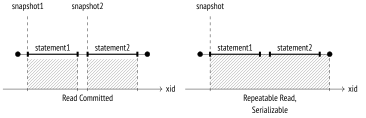
4.2 Row Version Visibility
A snapshot is not a physical copy of all the required tuples. Instead, it is defined by several numbers, while tuple visibility is determined by certain rules.
Tuple visibility is defined by xmin and xmax fields of the tuple header (that is, IDs of transactions that perform insertion and deletion) and the corresponding hint bits. Since xmin–xmax intervals do not intersect, each row is represented in any snapshot by only one of its versions.
The exact visibility rules are quite complex,1 as they take into account a variety of different scenarios and corner cases. Very roughly, we can describe them as follows: a tuple is visible in a snapshot that includes xmin transaction changes but excludes xmax transaction changes (in other words, the tuple has already appeared and has not been deleted yet).
In their turn, transaction changes are visible in a snapshot if this transaction was committed before the snapshot creation. As an exception, transactions can see their own uncommitted changes. If a transaction is aborted, its changes will not be visible in any snapshot.
Let’s take a look at a simple example. In this illustration line segments represent transactions (from their start time till commit time):
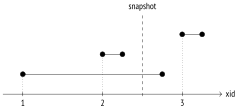
Here visibility rules are applied to transactions as follows:
Transaction 2 was committed before the snapshot creation, so its changes are visible.
Transaction 1 was active at the time of the snapshot creation, so its changes are not visible.
Transaction 3 was started after the snapshot creation, so its changes are not visible either (it makes no difference whether this transaction is completed or not).
4.3 Snapshot Structure
Unfortunately, the previous illustration has nothing to do with the way PostgreSQL actually sees this picture.2 The problem is that the system does not know when transactions got committed. It is only known when they were started (this moment is defined by the transaction ID), while their completion is not registered anywhere. (default: off)
Commit times can be tracked3 if you enable the track_commit_timestamp parameter, but they do not participate in visibility checks in any way (although it can still be useful to track them for other purposes, for example, to apply in external replication solutions).
Besides, PostgreSQL always logs commit and rollback times in the corresponding WAL entries, but this information is used only for point-in-time recovery.
It is only the current status of a transaction that we can learn. This information is available in the server’s shared memory: the ProcArray structure contains the list of all the active sessions and their transactions. Once a transaction is complete, it is impossible to find out whether it was active at the time of the snapshot creation. (p. 164)
So to create a snapshot, it is not enough to register the moment when it was taken: it is also necessary to collect the status of all the transactions at that moment. Otherwise, later it will be impossible to understand which tuples must be visible in the snapshot, and which must be excluded.
Take a look at the information available to the system when the snapshot was taken and some time afterwards (the white circle denotes an active transaction, whereas the black circles stand for completed ones):
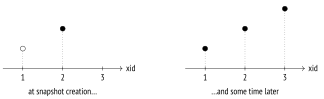
Suppose we did not know that at the time the snapshot was taken the first transaction was still being executed and the third transaction had not started yet. Then it would seem that they were just like the second transaction (which was committed at that time), and it would be impossible to filter them out.
For this reason, PostgreSQL cannot create a snapshot that shows a consistent state of data at some arbitrary point in the past, even if all the required tuples are present in heap pages. Consequently, it is impossible to implement retrospective queries (which are sometimes also called temporal or flashback queries).
Intriguingly, such functionality was declared as one of the objectives of Postgres and was implemented at the very start, but it was removed from the database system when the project support was passed on to the community.4
Thus, a snapshot consists of several values saved at the time of its creation:5
xmin is the snapshot’s lower boundary, which is represented by the ID of the oldest active transaction.
All the transactions with smaller IDs are either committed (so their changes are included into the snapshot) or aborted (so their changes are ignored). (p. 123)
xmax is the snapshot’s upper boundary, which is represented by the value that exceeds the ID of the latest committed transaction by one. The upper boundary defines the moment when the snapshot was taken.
All the transactions whose IDs are equal to or greater than xmax are either still running or do not exist, so their changes cannot be visible.
xip_list is the list of IDs of all the active transactions except for virtual ones, which do not affect visibility in any way. (p. 75)
Snapshots also include several other parameters, but we will ignore them for now.
In a graphical form, a snapshot can be represented as a rectangle that comprises transactions from xmin to xmax:
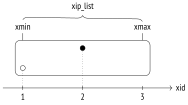
To understand how visibility rules are defined by the snapshot, we are going to reproduce the above scenario on the accounts table.
The first transaction inserts the first row into the table and remains open:
The second transaction inserts the second row and commits this change immediately:
At this point, let’s create a new snapshot in another session. We could simply run any query for this purpose, but we will use a special function to take a look at this snapshot right away:
This function displays the following snapshot components, separated by colons: xmin, xmax, and xip_list (the list of active transactions; in this particular case it consists of a single item).
Once the snapshot is taken, commit the first transaction:
The third transaction is started after the snapshot creation. It modifies the second row, so a new tuple appears:
Our snapshot sees only one tuple:
But the table contains three of them:
So how does PostgreSQL choose which versions to show? By the above rules, changes are included into a snapshot only if they are made by committed transactions that satisfy the following criteria:
If
xid<xmin, changes are shown unconditionally (like in the case of the transaction that created theaccountstable).If
xmin⩽xid<xmax, changes are shown only if the corresponding transaction IDs are not inxip_list.
The first row (0,1) is invisible because it is inserted by a transaction that appears in xip_list (even though this transaction falls into the snapshot range).
The latest version of the second row (0,3) is invisible because the corresponding transaction ID is above the upper boundary of the snapshot.
But the first version of the second row (0,2) is visible: row insertion was performed by a transaction that falls into the snapshot range and does not appear in xip_list (the insertion is visible), while row deletion was performed by a transaction whose ID is above the upper boundary of the snapshot (the deletion is invisible).
4.4 Visibility of Transactions’ Own Changes
Things get a bit more complicated when it comes to defining visibility rules for transactions’own changes: in some cases, only part of such changes must be visible. For example, a cursor that was opened at a particular point in time must not see any changes that happened later, regardless of the isolation level.
To address such situations, tuple headers provide a special field (displayed as cmin and cmax pseudocolumns) that shows the sequence number of the operation within the transaction. The cmin column identifies insertion, while cmax is used for deletion operations. To save space, these values are stored in a single field of the tuple header rather than in two different ones. It is assumed that a particular row almost never gets both inserted and deleted within a single transaction. (If it does happen, PostgreSQL writes a special combo identifier into this field, and the actual cmin and cmax values are stored by the backend in this case.6)
As an illustration, let’s start a transaction and insert a row into the table:
Open a cursor to run the query that returns the number of rows in this table:
Insert one more row:
Now extend the output by another column to display the cmin value for the rows inserted by our transaction (it makes no sense for other rows):
The cursor query gets only three rows; the row inserted when the cursor was already open does not make it into the snapshot because the cmin < 1 condition is not satisfied:
Naturally, this cmin number is also stored in the snapshot, but it is impossible to display it using any SQL means.
4.5 Transaction Horizon
As mentioned earlier, the lower boundary of the snapshot is represented by xmin, which is the ID of the oldest transaction that was active at the moment of the snapshot creation. This value is very important because it defines the horizon of the transaction that uses this snapshot.
If a transaction has no active snapshot (for example, at the Read Committed isolation level between statement execution), its horizon is defined by its own ID if it is assigned.
All the transactions that are beyond the horizon (those with xid < xmin) are guranteed to be committed. It means that a transaction can see only the current row versions beyond its horizon.
As you can guess, this term is inspired by the concept of event horizon in physics.
PostgreSQL tracks the current horizons of all its processes; transactions can see their own horizons in the pg_stat_activity table:
Virtual transactions have no real IDs, but they still use snapshots just like regular transactions, so they have their own horizons. The only exception is virtual transactions without an active snapshot: the concept of the horizon makes no sense for them, and they are fully “transparent” to the system when it comes to snapshots and visibility (even though pg_stat_activity.backend_xmin may still contain an xmin of an old snapshot).
We can also define the database horizon in a similar manner. For this purpose, we should take the horizons of all the transactions in this database and select the most remote one, which has the oldest xmin.7 Beyond this horizon, outdated heap tuples will never be visible to any transaction in this database. Such tuples can be safely cleaned up by vacuum—this is exactly why the concept of the horizon is so important from a practical standpoint.
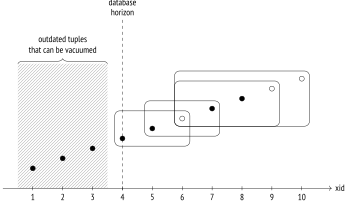
Let’s draw some conclusions:
If a transaction (no matter whether it is real or virtual) at the
Repeatable ReadorSerializableisolation level is running for a long time, it thereby holds the database horizon and defers vacuuming.A real transaction at the
Read Committedisolation level holds the database horizon in the same way, even if it is not executing any operators (being in the “idle in transaction” state).A virtual transaction at the
Read Committedisolation level holds the horizon only while executing operators.
There is only one horizon for the whole database, so if it is being held by a transaction, it is impossible to vacuum any data within this horizon—even if this data has not been accessed by this transaction.
Cluster-wide tables of the system catalog have a separate horizon that takes into account all transactions in all databases. Temporary tables, on the contrary, do not have to pay attention to any transactions except those that are being executed by the current process.
Let’s get back to our current experiment. The active transaction of the first session still holds the database horizon; we can see it by incrementing the transaction counter:
And only when this transaction is complete, the horizon moves forward, and outdated tuples can be vacuumed:
In a perfect world, you should avoid combining long transactions with frequent updates (that spawn new row versions), as it will lead to table and index bloating. (p. 141)
4.6 System Catalog Snapshots
Although the system catalog consists of regular tables, they cannot be accessed via a snapshot used by a transaction or an operator. The snapshot must be “fresh” enough to include all the latest changes, otherwise transactions could see outdated definitions of table columns or miss newly added integrity constraints.
Here is a simple example:
The integrity constraint that appeared after the snapshot creation was visible to the INSERT command. It may seem that such behavior breaks isolation, but if the inserting transaction had managed to reach the accounts table before the ALTER TABLE command, the latter would have been blocked until this transaction completed. (p. 204)
In general, the server behaves as if a separate snapshot is created for each system catalog query. But the implementation is, of course, much more complex8 since frequent snapshot creation would negatively affect performance; besides, many system catalog objects get cached, and it must also be taken into account.
4.7 Exporting Snapshots
In some situations, concurrent transactions must see the same snapshot by all means. For example, if the pg_dump utility is run in the parallel mode, all its processes must see the same database state to produce a consistent backup.
We cannot assume that snapshots will be identical simply because transactions were started “simultaneously.” To ensure that all the transactions see the same data, we must employ the snapshot export mechanism.
The pg_export_snapshot function returns a snapshot ID, which can be passed to another transaction (outside of the database system):
Before executing the first statement, the other transaction can import the snapshot by running the SET TRANSACTION SNAPSHOT command. The isolation level must be set to Repeatable Read or Serializable because operators use their own snapshots at the Read Committed level:
Now the second transaction is going to use the snapshot of the first transaction, and consequently, it will see four rows (instead of zero):
Clearly, the second transaction will not see any changes made by the first transaction after the snapshot export (and vice versa): regular visibility rules still apply.
The exported snapshot’s lifetime is the same as that of the exporting transaction.
Joseph M. Hellerstein, Looking Back at Postgres. https://arxiv.org/pdf/1901.01973.pdf ↩︎
backend/storage/ipc/procarray.c, GetSnapshotData function ↩︎
backend/storage/ipc/procarray.c, ComputeXidHorizons function ↩︎
backend/utils/time/snapmgr.c, GetCatalogSnapshot function ↩︎
5 Page Pruning and HOT Updates
5.1 Page Pruning
While a heap page is being read or updated, PostgreSQL can perform some quick page cleanup, or pruning.1 It happens in the following cases:
The previous
UPDATEoperation did not find enough space to place a new tuple into the same page. This event is reflected in the page header.The heap page contains more data than allowed by the fillfactor storage parameter. (default:
100)
An INSERT operation can add a new row into the page only if this page is filled for less than fillfactor percent. The rest of the space is kept for UPDATE operations (no such space is reserved by default).
Page pruning removes the tuples that cannot be visible in any snapshot anymore (that is, that are beyond the database horizon). It never goes beyond a single heap page, but in return it is performed very fast. Pointers to pruned tuples remain in place since they may be referenced from an index—which is already a different page. (p. 88)
For the same reason, neither the visibility map nor the free space map is refreshed (so the recovered space is set aside for updates, not for insertions).
Since a page can be pruned during reads, any SELECT statement can cause page modifications. This is yet another such case in addition to deferred setting of information bits. (p. 71)
Let’s take a look at how page pruning actually works. We are going to create a two-column table and build an index on each of the columns:
If the s column contains only Latin letters, each heap tuple will have a fixed size of 2004 bytes, plus 24 bytes of the header. The fillfactor storage parameter is set to 75 %. It means that the page has enough free space for four tuples, but we can insert only three.
Let’s insert a new row and update it several times:
Now the page contains four tuples:
Expectedly, we have just exceeded the fillfactor threshold. You can tell it by the difference between the pagesize and upper values—it is bigger than 75 % of the page size, which is 6144 bytes: (p. 62)
The next page access triggers page pruning that removes all the outdated tuples. Then a new tuple (0,5) is added into the freed space:
The remaining heap tuples are physically moved towards the highest addresses so that all the free space is aggregated into a single continuous chunk. The tuple pointers are also modified accordingly. As a result, there is no free space fragmentation in the page.
The pointers to the pruned tuples cannot be removed yet because they are still referenced from the indexes; PostgreSQL changes their status from normal to dead. Let’s take a look at the first page of the hot_s index (the zero page is used for metadata):
We can see the same picture in the other index too:
An index scan can return (0,1), (0,2), and (0,3) as tuple identifiers. The server tries to read the corresponding heap tuple but sees that the pointer has the dead status; it means that this tuple does not exist anymore and should be ignored. And while being at it, the server also changes the pointer status in the index page to avoid repeated heap page access.2
Let’s extend the function displaying index pages so that it also shows whether the pointer is dead: (v. 13)
All the pointers in the index page are active so far. But as soon as the first index scan occurs, their status changes:
Although the heap tuple referenced by the fourth pointer is still unpruned and has the normal status, it is already beyond the database horizon. That’s why this pointer is also marked as dead in the index.
5.2 HOT Updates
It would be very inefficient to keep references to all heap tuples in an index.
To begin with, each row modification triggers updates of all the indexes created on the table: once a new heap tuple appears, each index must include a reference to this tuple, even if the modified fields are not indexed.
Furthermore, indexes accumulate references to historic heap tuples, so they have to be pruned together with these tuples. (p. 102)
Things get worse as you create more indexes on a table.
But if the updated column is not a part of any index, there is no point in creating another index entry that contains the same key value. To avoid such redundancies, PostgreSQL provides an optimization called Heap-Only Tuple updates.3
If such an update is performed, an index page contains only one entry for each row. This entry points to the very first row version; all the subsequent versions located in the same page are bound into a chain by ctid pointers in the tuple headers.
Row versions that are not referenced from any index are tagged with the Heap-Only Tuple bit. If a version is included into the HOT chain, it is tagged with the Heap Hot Updated bit.
If an index scan accesses a heap page and finds a row version marked as Heap Hot Updated, it means that the scan should continue, so it goes further along the chain of HOT updates. Obviously, all the fetched row versions are checked for visibility before the result is returned to the client.
To take a look at how HOT updates are performed, let’s delete one of the indexes and truncate the table.
For convenience, we will redefine the heap_page function so that its output includes three more fields: ctid and the two bits related to HOT updates:
Let’s repeat the insert and update operations:
The page now contains a chain of HOT updates:
The
Heap Hot Updatedbit shows that the executor should follow the CTID chain.The
Heap Only Tuplebit indicates that this tuple is not referenced from any indexes.
As we make further updates, the chain will grow—but only within the page limits:
The index still contains only one reference, which points to the head of this chain:
A HOT update is possible if the modified fields are not a part of any index. Otherwise, some of the indexes would contain a reference to a heap tuple that appears in the middle of the chain, which contradicts the idea of this optimization. Since a HOT chain can grow only within a single page, traversing the whole chain never requires access to other pages and thus does not hamper performance.
5.3 Page Pruning for HOT Updates
A special case of page pruning—which is nevertheless important—is pruning of HOT update chains.
In the example above, the fillfactor threshold is already exceeded, so the next update should trigger page pruning. But this time the page contains a chain of HOT updates. The head of this chain must always remain in its place since it is referenced from the index, but other pointers can be released because they are sure to have no external references.
To avoid moving the head, PostgreSQL uses dual addressing: the pointer referenced from the index (which is (0,1) in this case) receives the redirect status since it points to the tuple that currently starts the chain:
The tuples (0,1), (0,2), and (0,3) have been pruned; the head pointer 1 remains for redirection purposes, while pointers 2 and 3 have been deallocated (received the unused status) since they are guaranteed to have no references from indexes. The new tuple is written into the freed space as tuple (0,2).
Let’s perform some more updates:
The next update is going to trigger page pruning:
Again, some of the tuples are pruned, and the pointer to the head of the chain is shifted accordingly.
If unindexed columns are modified frequently, it makes sense to reduce the fillfactor value, thus reserving some space in the page for updates. Obviously, you have to keep in mind that the lower the fillfactor value is, the more free space is left in the page, so the physical size of the table grows.
5.4 HOT Chain Splits
If the page has no more space to accommodate a new tuple, the chain will be cut off. PostgreSQL will have to add a separate index entry to refer to the tuple located in another page.
To observe this situation, let’s start a concurrent transaction with a snapshot that blocks page pruning:
Now we are going to perform some updates in the first session:
When the next update happens, this page will not be able to accommodate another tuple, and page pruning will not manage to free any space:
Tuple (0,5) contains the (1,1) reference that goes to page 1:
However, this reference is not used: the Heap Hot Updated bit is not set for tuple (0,5). As for tuple (1,1), it can be accessed from the index that now has two entries. Each of them points to the head of their own HOT chain:
5.5 Page Pruning for Indexes
I have declared that page pruning is confined to a single heap page and does not affect indexes. However, indexes have their own pruning,4 which also cleans up a single page— an index one in this case.
Index pruning happens when an insertion into a B-tree is about to split the page into two, as the original page does not have enough space anymore. The problem is that even if some index entries are deleted later, two separate index pages will not be merged into one. It leads to index bloating, and once bloated, the index cannot shrink even if a large part of the data is deleted. But if pruning can remove some of the tuples, a page split may be deferred.
There are two types of tuples that can be pruned from an index.
First of all, PostgreSQL prunes those tuples that have been tagged as dead.5 As I have already said, PostgreSQL sets such a tag during an index scan if it detects an index entry pointing to a tuple that is not visible in any snapshot anymore or simply does not exist.
If no tuples are known to be dead, PostgreSQL checks those index entries that reference different versions of the same table row.6 Because of MVCC, update operations may generate a large number of row versions, and many of them are soon likely to disappear behind the database horizon. HOT updates cushion this effect, but they are not always applicable: if the column to update is a part of an index, the corresponding references are propagated to all the indexes. Before splitting the page, it makes sense to search for the rows that are not tagged as dead yet but can already be pruned. To achieve this, PostgreSQL has to check visibility of heap tuples. Such checks require table access, so they are performed only for “promising” index tuples, which have been created as copies of the existing ones for MVCC purposes. It is cheaper to perform such a check than to allow an extra page split. (v. 14)
backend/access/heap/pruneheap.c, heap_page_prune_opt function ↩︎
backend/access/index/indexam.c, index_fetch_heap function ↩︎
postgresql.org/docs/14/btree-implementation.html#BTREE-DELETION ↩︎
backend/access/nbtree/README, Simple deletion section ↩︎
backend/access/nbtree/README, Bottom-Up deletion section include/access/tableam.h ↩︎
6 Vacuum and Autovacuum
6.1 Vacuum
Page pruning happens very fast, but it frees only part of the space that can be potentially reclaimed. Operating within a single heap page, it does not touch upon indexes (or vice versa, it cleans up an index page without affecting the table).
Routine vacuuming,1 which is the main vacuuming procedure, is performed by the VACUUM command.2 It processes the whole table and eliminates both outdated heap tuples and all the corresponding index entries.
Vacuuming is performed in parallel with other processes in the database system. While being vacuumed, tables and indexes can be used in the usual manner, both for read and write operations (but concurrent execution of such commands as CREATE INDEX, ALTER TABLE, and some others is not allowed). (p. 204)
To avoid scanning extra pages, PostgreSQL uses a visibility map. Pages tracked in this map are skipped since they are sure to contain only the current tuples, so a page will only be vacuumed if it does not appear in this map. If all the tuples remaining in a page after vacuuming are beyond the database horizon, the visibility map is refreshed to include this page. (p. 27)
The free space map also gets updated to reflect the space that has been cleared.
Let’s create a table with an index on it:
The autovacuum_enabled storage parameter turns off autovacuum; we are doing it here solely for the purpose of experimentation to precisely control vacuuming start time.
Let’s insert a row and make a couple of updates:
Now the table contains three tuples:
Each tuple is referenced from the index:
Vacuuming has removed all the dead tuples, leaving only the current one:
In the case of page pruning, the first two pointers would be considered dead, but here they have the unused status since no index entries are referring to them now:
Pointers with the unused status are treated as free and can be reused by new row versions.
Now the heap page appears in the visibility map; we can check it using the pg_visibility extension:
The page header has also received an attribute showing that all its tuples are visible in all snapshots:
6.2 Database Horizon Revisited
Vacuuming detects dead tuples based on the database horizon. This concept is so fundamental that it makes sense to get back to it once again.
Let’s restart our experiment from the very beginning:
But this time, before updating the row, we are going to open another transaction that will hold the database horizon (it can be almost any transaction, except for a virtual one executed at the Read Committed isolation level). For example, this transaction can modify some rows in another table. (p. 88)
Now our table contains three tuples, and the index contains three references. Let’s vacuum the table and see what changes:
While the previous run left only one tuple in the page, now we have two of them: VACUUM has decided that version (0,2) cannot be removed yet. The reason is the database horizon, which is defined by an unfinished transaction in this case:
We can use the VERBOSE clause when calling VACUUM to observe what is going on:
The output shows the following information:
VACUUMhas detected no tuples that can be removed (0 removable).Two tuples must not be removed (
2 nonremovable).One of the nonremovable tuples is dead (
1 dead), the other is in use.
- The current horizon respected by
VACUUM(oldest xmin) is the horizon of the active transaction.
Once the active transaction completes, the database horizon moves forward, and vacuuming can continue:
VACUUM has detected and removed a dead tuple beyond the new database horizon.
Now the page does not contain any outdated row versions; the only version remaining is the current one:
The index also contains only one entry:
6.3 Vacuum Phases
The mechanism of vacuuming seems quite simple, but this impression is misleading. After all, both tables and indexes have to be processed concurrently, without blocking other processes. To enable such operation, vacuuming of each table is carried out in several phases.3
It all starts with scanning a table in search of dead tuples; if found, they are first removed from indexes and then from the table itself. If too many dead tuples have to be vacuumed in one go, this process is repeated. Eventually, heap truncation may be performed.
Heap Scan
In the first phase, a heap scan is performed.4 The scanning process takes the visibility map into account: all pages tracked in this map are skipped because they are sure to contain no outdated tuples. If a tuple is beyond the horizon and is not required anymore, its ID is added to a special tid array. Such tuples cannot be removed yet because they may still be referenced from indexes.
The tid array resides in the local memory of the VACUUM process; the size of the allocated memory chunk is defined by the maintenance_work_mem parameter. The whole chunk is allocated at once rather than on demand. However, the allocated memory never exceeds the volume required in the worst-case scenario, so if the table is small, vacuuming may use less memory than specified in this parameter. (default: 64MB)
Index Vacuuming
The first phase can have two outcomes: either the table is scanned in full, or the memory allocated for the tid array is filled up before this operation completes. In any case, index vacuuming begins.5 In this phase, each of the indexes created on the table is fully scanned to find all the entries that refer to the tuples registered in the tid array. These entries are removed from index pages.
An index can help you quickly get to a heap tuple by its index key, but there is no way to quickly find an index entry by the corresponding tuple ID. This functionality is currently being implemented for B-trees,6 but this work is not completed yet.
If there are several indexes bigger than the min_parallel_index_scan_size value, they can be vacuumed by background workers running in parallel. Unless the level of parallelism is explicitly defined by the parallel N clause, VACUUM launches one worker per suitable index (within the general limits imposed on the number of background workers).7 One index cannot be processed by several workers. (default: 512kB) (v. 13)
During the index vacuuming phase, PostgreSQL updates the free space map and calculates statistics on vacuuming. However, this phase is skipped if rows are only inserted (and are neither deleted nor updated) because the table contains no dead tuples in this case. Then an index scan will be forced only once at the very end, as part of a separate phase of index cleanup.8
The index vacuuming phase leaves no references to outdated heap tuples in indexes, but the tuples themselves are still present in the table. It is perfectly normal: index scans cannot find any dead tuples, while sequential scans of the table rely on visibility rules to filter them out.
Heap Vacuuming
Then the heap vacuuming phase begins.9 The table is scanned again to remove the tuples registered in the tid array and free the corresponding pointers. Now that all the related index references have been removed, it can be done safely.
The space recovered by VACUUM is reflected in the free space map, while the pages that now contain only the current tuples visible in all snapshots are tagged in the visibility map.
If the table was not read in full during the heap scan phase, the tid array is cleared, and the heap scan is resumed from where it left off last time.
Heap Truncation
Vacuumed heap pages contain some free space; occasionally, you may be lucky to clear the whole page. If you get several empty pages at the end of the file, vacuuming can “bite off” this tail and return the reclaimed space to the operating system. It happens during heap truncation,10 which is the final vacuum phase.
Heap truncation requires a short exclusive lock on the table. To avoid holding other processes for too long, attempts to acquire a lock do not exceed five seconds. (p. 204)
Since the table has to be locked, truncation is only performed if the empty tail takes at least of the table or has reached the length of 1,000 pages. These thresholds are hardcoded and cannot be configured.
If, despite all these precautions, table locks still cause any issues, you can disable truncation altogether using the vacuum_truncate and toast.vacuum_truncate storage parameters. (v. 12)
6.4 Analysis
When talking about vacuuming, we have to mention yet another task that is closely related to it, even though there is no formal connection between them. It is analysis,11 or gathering statistical information for the query planner. The collected statistics include the number of rows (pg_class.reltuples) and pages (pg_class.relpages) in relations, data distribution within columns, and some other information. (p. 271)
You can run the analysis manually using the ANALYZE command,12 or combine it with vacuuming by calling VACUUM ANALYZE. However, these two tasks are still performed sequentially, so there is no difference in terms of performance.
Historically, VACUUM ANALYZE appeared first, in version 6.1, while a separate ANALYZE command was not implemented until version 7.2. In earlier versions, statistics were collected by a TCL script.
Automatic vacuum and analysis are set up in a similar way, so it makes sense to discuss them together.
6.5 Automatic Vacuum and Analysis
Unless the database horizon is held up for a long time, routine vacuuming should cope with its work. But how often do we need to call the VACUUM command?
If a frequently updated table is vacuumed too seldom, it will grow bigger than desired. Besides, it may accumulate too many changes, and then the next VACUUM run will have to make several passes over the indexes.
If the table is vacuumed too often, the server will be busy with maintenance instead of useful work.
Furthermore, typical workloads may change over time, so having a fixed vacuuming schedule will not help anyway: the more often the table is updated, the more often it has to be vacuumed.
This problem is solved by autovacuum,13 which launches vacuum and analysis processes based on the intensity of table updates.
About the Autovacuum Mechanism
When autovacuum is enabled (autovacuum configuration parameter is on), the autovacuum launcher process is always running in the system. This process defines the autovacuum schedule and maintains the list of “active” databases based on usage statistics. Such statistics are collected if the track_counts parameter is enabled. Do not switch off these parameters, otherwise autovacuum will not work. (default: on) (default: on)
Once in autovacuum_naptime, the autovacuum launcher starts an autovacuum worker14 for each active database in the list (these workers are spawned by postmaster, as usual). Consequently, if there are N active databases in the cluster, N workers are spawned within the autovacuum_naptime interval. But the total number of autovacuum workers running in parallel cannot exceed the threshold defined by the autovacuum_max_workers parameter. (default: 1min) (default: 3)
Autovacuum workers are very similar to regular background workers, but they appeared much earlier than this general mechanism of task management. It was decided to leave the autovacuum implementation unchanged, so autovacuum workers do not use max_worker_processes slots.
Once started, the background worker connects to the specified database and builds two lists:
the list of all tables, materialized views, and TOAST tables to be vacuumed
the list of all tables and materialized views to be analyzed (TOAST tables are not analyzed because they are always accessed via an index)
Then the selected objects are vacuumed or analyzed one by one (or undergo both operations), and once the job is complete, the worker is terminated.
Automatic vacuuming works similar to the manual one initiated by the VACUUM command, but there are some nuances:
- When manual vacuuming is performed, tuple IDs are accummulated in a memory chunk of the maintenance_work_mem size. Using the same limit for autovacuum is undesirable, as it can lead to excessive memory consumption: there may be several autovacuum workers running in parallel, and each of them will get maintenance_work_mem of memory at once. Instead, PostgreSQL provides a separate memory limit for autovacuum processes, which is defined by the autovacuum_work_mem parameter.
By default, the autovacuum_work_mem parameter falls back on the regular limit of maintenance_work_mem, so if the autovacuum_max_workers value is high, you may have to adjust the autovacuum_work_mem value accordingly. (default: -1)
- Concurrent processing of several indexes created on one table can be performed only by manual vacuuming; using autovacuum for this purpose would result in a large number of parallel processes, so it is not allowed.
If a worker fails to complete all the scheduled tasks within the autovacuum_naptime interval, the autovacuum launcher spawns another worker to be run in parallel in that database. The second worker will build its own lists of objects to be vacuumed and analyzed and will start processing them. There is no parallelism at the table level; only different tables can be processed concurrently.
Which Tables Need to be Vacuumed?
You can disable autovacuum at the table level—although it is hard to imagine why it could be necessary. There are two storage parameters provided for this purpose, one for regular tables and the other for TOAST tables:
autovacuum_enabled
toast.autovacuum_enabled
In usual circumstances, autovacuum is triggered either by accumulation of dead tuples or by insertion of new rows. (p. 129)
Dead tuple accumulation. Dead tuples are constantly being counted by the statistics collector; their current number is shown in the system catalog table called pg_stat_all_tables.
It is assumed that dead tuples have to be vacuumed if they exceed the threshold defined by the following two parameters:
autovacuum_vacuum_threshold, which specifies the number of dead tuples (an absolute value) (default:
50)autovacuum_vacuum_scale_factor, which sets the fraction of dead tuples in a table (default:
0.2)
Vacuuming is required if the following condition is satisfied:
pg_stat_all_tables.n_dead_tup >
autovacuum_vacuum_threshold +
autovacuum_vacuum_scale_factor × pg_class.reltuples
The main parameter here is of course autovacuum_vacuum_scale_factor: its value is important for large tables (and it is large tables that are likely to cause the majority of issues). The default value of 20 % seems too big and may have to be significantly reduced.
For different tables, optimal parameter values may vary: they largely depend on the table size and workload type. It makes sense to set more or less adequate initial values and then override them for particular tables using storage parameters:
autovacuum_vacuum_threshold and toast.autovacuum_vacuum_threshold
autovacuum_vacuum_scale_factor and toast.autovacuum_vacuum_scale_factor
Row insertions. If rows are only inserted and are neither deleted nor updated, the table contains no dead tuples. But such tables should also be vacuumed to freeze heap tuples in advance and update the visibility map (thus enabling index-only scans). (v. 13) (p. 123) (p. 337)
A table will be vacuumed if the number of rows inserted since the previous vacuuming exceeds the threshold defined by another similar pair of parameters:
autovacuum_vacuum_insert_threshold (default:
1000)autovacuum_vacuum_insert_scale_factor (default:
0.2)
The formula is as follows:
pg_stat_all_tables.n_ins_since_vacuum >
autovacuum_vacuum_insert_threshold +
autovacuum_vacuum_insert_scale_factor × pg_class.reltuples
Like in the previous example, you can override these values at the table level using storage parameters:
autovacuum_vacuum_insert_threshold and its TOAST counterpart
autovacuum_vacuum_insert_scale_factor and its TOAST counterpart
Which Tables Need to Be Analyzed?
Automatic analysis needs to process only modified rows, so the calculations are a bit simpler than those for autovacuum.
It is assumed that a table has to be analyzed if the number of rows modified since the previous analysis exceeds the threshold defined by the following two configuration parameters:
autovacuum_analyze_threshold (default:
50)autovacuum_analyze_scale_factor (default:
0.1)
Autoanalysis is triggered if the following condition is met:
pg_stat_all_tables.n_mod_since_analyze >
autovacuum_analyze_threshold +
autovacuum_analyze_scale_factor × pg_class.reltuples
To override autoanalysis settings for particular tables, you can use the same-name storage parameters:
autovacuum_analyze_threshold
autovacuum_analyze_scale_factor
Since TOAST tables are not analyzed, they have no corresponding parameters.
Autovacuum in Action
To formalize everything said in this section, let’s create two views that show which tables currently need to be vacuumed and analyzed.15 The function used in these views returns the current value of the passed parameter, taking into account that this value can be redefined at the table level:
This is how a vacuum-related view can look like:
The max_dead_tup column shows the number of dead tuples that will trigger autovacuum, whereas the max_ins_tup column shows the threshold value related to insertion.
Here is a similar view for analysis:
The max_mod_tup column shows the threshold value for autoanalysis.
To speed up the experiment, we will be starting autovacuum every second:
Let’s truncate the vac table and then insert 1,000 rows. Note that autovacuum is turned off at the table level.
Here is what our vacuum-related view will show:
The actual threshold value is max_dead_tup = 50, although the formula listed above suggests that it should be 50 + 0.2 × 1000 = 250. The thing is that statistics on this table are not available yet since the INSERT command does not update it:
The pg_class.reltuples value is set to −1; this special constant is used instead of zero to differentiate between a table without any statistics and a really empty table that has already been analyzed. For the purpose of calculation, the negative value is taken as zero, which gives us 50 + 0.2 × 0 = 50. (v. 14)
The value of max_ins_tup = 1000 differs from the projected value of 1,200 for the same reason.
Let’s have a look at the analysis view:
We have updated (inserted in this case) 1,000 rows; as a result, the threshold is exceeded: since the table size is unknown, it is currently set to 50. It means that autoanalysis will be triggered immediately when we turn it on:
Once the table analysis completes, the threshold is reset to an adequate value of 150 rows.
Let’s get back to autovacuum:
The max_dead_tup and max_ins_tup values have also been updated based on the actual table size discovered by the analysis.
Vacuuming will be started if at least one of the following conditions is met:
More than 250 dead tuples are accumulated.
More than 200 rows are inserted into the table. (v. 13)
Let’s turn off autovacuum again and update 251 rows so that the threshold value is exceeded by one:
Now the trigger condition is satisfied. Let’s enable autovacuum; after a while, we will see that the table has been processed, and its usage statistics has been reset:
6.6 Managing the Load
Operating at the page level, vacuuming does not block other processes; but nevertheless, it increases the system load and can have a noticeable impact on performance.
Vacuum Throttling
To control vacuuming intensity, PostgreSQL makes regular pauses in table processing. After completing about vacuum_cost_limit units of work, the process falls asleep and remains idle for the vacuum_cost_delay time interval. (default: 200) (default: 0)
The default zero value of vacuum_cost_delay means that routine vacuuming actually never sleeps, so the exact vacuum_cost_limit value makes no difference. It is assumed that if administrators have to resort to manual vacuuming, they are likely to expect its completion as soon as possible.
If the sleep time is set, then the process will pause each time it has spent vacuum_cost_limit units of work on page processing in the buffer cache. The cost of each page read operation is estimated at vacuum_cost_page_hit units if the page is found in the buffer cache, (p. 147) (default: 1)
or vacuum_cost_page_miss units otherwise.16 If a clean page is dirtied by vacuum, it adds another vacuum_cost_page_dirty units.17 (default: 2) (default: 20)
If you keep the default value of the vacuum_cost_limit parameter, VACUUM can process up to 200 pages per cycle in the best-case scenario (if all the pages are cached, and no pages are dirtied by VACUUM) and only nine pages in the worst case (if all the pages are read from disk and become dirty).
Autovacuum Throttling
Throttling for autovacuum18 is quite similar to VACUUM throttling. However, autovacuum can be run with a different intensity as it has its own set of parameters:
autovacuum_vacuum_cost_limit (default:
-1)autovacuum_vacuum_cost_delay (default:
2ms)
If any of these parameters is set to −1, it falls back on the corresponding parameter for regular VACUUM. It means that the autovacuum_vacuum_cost_limit parameter relies on the vacuum_cost_limit value by default.
Prior to version 12, the default value of autovacuum_vacuum_cost_delay was 20 ms, and it led to very poor performance on modern hardware.
Autovacuum work units are limited to autovacuum_vacuum_cost_limit per cycle, and since they are shared between all the workers, the overall impact on the system remains roughly the same, regardless of their number. So if you need to speed up autovacuum, both the autovacuum_max_workers and autovacuum_vacuum_cost_limit values should be increased proportionally.
If required, you can override these settings for particular tables by setting the following storage parameters:
autovacuum_vacuum_cost_delay and toast.autovacuum_vacuum_cost_delay
autovacuum_vacuum_cost_limit and toast.autovacuum_vacuum_cost_limit
6.7 Monitoring
If vacuuming is monitored, you can detect situations when dead tuples cannot be removed in one go, as references to them do not fit the maintenance_work_mem memory chunk. In this case, all the indexes will have to be fully scanned several times. It can take a substantial amount of time for large tables, thus creating a significant load on the system. Even though queries will not be blocked, extra I/O operations can seriously limit system throughput.
Such issues can be corrected either by vacuuming the table more often (so that each run cleans up fewer tuples) or by allocating more memory.
Monitoring Vacuum
When run with the VERBOSE clause, the VACUUM command performs the cleanup and displays the status report, whereas the pg_stat_progress_vacuum view shows the current state of the started process. (v. 9.6)
There is also a similar view for analysis (pg_stat_progress_analyze), even though it is usually performed very fast and is unlikely to cause any issues. (v. 13)
Let’s insert more rows into the table and update them all so that VACUUM has to run for a noticeable period of time:
For the purpose of this demonstration, we will limit the amount of memory allocated for the tid array by 1 MB:
Launch the VACUUM command and query the pg_stat_progress_vacuum view several times while it is running:
In particular, this view shows:
phase—the name of the current vacuum phase (I have described the main ones, but there are actually more of them19)heap_blks_total—the total number of pages in a tableheap_blks_scanned—the number of scanned pagesheap_blks_vacuumed—the number of vacuumed pagesindex_vacuum_count—the number of index scans
The overall vacuuming progress is defined by the ratio of heap_blks_vacuumed to heap_blks_total, but you have to keep in mind that it changes in spurts because of index scans. In fact, it is more important to pay attention to the number of vacuum cycles: if this value is greater than one, it means that the allocated memory was not enough to complete vacuuming in one go.
You can see the whole picture in the output of the VACUUM VERBOSE command, which has already finished by this time:
index vacuum
table
vacuum
index vacuum
table
vacuum
index vacuum
table
vacuum
All in all, there have been three index scans; each scan has removed 174,522 pointers to dead tuples at the most. This value is defined by the number of tid pointers (each of them takes 6 bytes) that can fit into an array of the maintenance_work_mem size. The maximum size possible is shown by pg_stat_progress_vacuum.max_dead_tuples, but the actually used space is always a bit smaller. It guarantees that when the next page is read, all its pointers to dead tuples, no matter how many of them are located in this page, will fit into the remaining memory.
Monitoring Autovacuum
The main approach to monitoring autovacuum is to print its status information (which is similar to the output of the VACUUM VERBOSE command) into the server log for further analysis. If the log_autovacuum_min_duration parameter is set to zero, all autovacuum runs are logged: (default: -1)
To track the list of tables to be vacuumed and analyzed, you can use the need_vacuum and need_analyze views, which we have already reviewed. If this list grows, it means that autovacuum does not cope with the load and has to be sped up by either reducing the gap (autovacuum_vacuum_cost_delay) or increasing the amount of work done between the gaps (autovacuum_vacuum_cost_limit). It is not unlikely that the degree of parallelism will also have to be increased (autovacuum_max_workers).
postgresql.org/docs/14/sql-vacuum.html backend/commands/vacuum.c ↩︎
backend/access/heap/vacuumlazy.c, heap_vacuum_rel function ↩︎
backend/access/heap/vacuumlazy.c, lazy_scan_heap function ↩︎
backend/access/heap/vacuumlazy.c, lazy_vacuum_all_indexes function ↩︎
backend/access/heap/vacuumlazy.c, lazy_cleanup_all_indexes function backend/access/nbtree/nbtree.c, btvacuumcleanup function ↩︎
backend/access/heap/vacuumlazy.c, lazy_vacuum_heap function ↩︎
backend/access/heap/vacuumlazy.c, lazy_truncate_heap function ↩︎
postgresql.org/docs/14/routine-vacuuming.html#VACUUM-FOR-STATISTICS ↩︎
backend/postmaster/autovacuum.c, relation_needs_vacanalyze function ↩︎
backend/storage/buffer/bufmgr.c, ReadBuffer_common function ↩︎
backend/storage/buffer/bufmgr.c, MarkBufferDirty function ↩︎
backend/postmaster/autovacuum.c, autovac_balance_cost function ↩︎
postgresql.org/docs/14/progress-reporting.html#VACUUM-PHASES ↩︎
7 Freezing
7.1 Transaction ID Wraparound
In PostgreSQL, a transaction ID takes 32 bits. Four billions seems to be quite a big number, but it can be exhausted very fast if the system is being actively used. For example, for an average load of 1,000 transactions per second (excluding virtual ones), it will happen in about six weeks of continuous operation.
Once all the numbers are used up, the counter has to be reset to start the next round (this situation is called a “wraparound”). But a transaction with a smaller ID can only be considered older than another transaction with a bigger ID if the assigned numbers are always increasing. So the counter cannot simply start using the same numbers anew after being reset.
Allocating 64 bits for transaction IDs would have eliminated this problem altogether, so why doesn’t PostgreSQL take advantage of it? The thing is that each tuple header has to store IDs for two transactions: xmin and xmax. The header is quite big already (at least 24 bytes if data alignment is taken into account), and adding more bits would have given another 8 bytes. (p. 62)
PostgreSQL does implement 64-bit transaction IDs1 that extend a regular ID by a 32-bit epoch, but they are used only internally and never get into data pages.
To correctly handle wraparound, PostgreSQL has to compare the age of transactions (defined as the number of subsequent transactions that have appeared since the start of this transaction) rather than transaction IDs. Thus, instead of the terms less than and greater than we should use the concepts of older (precedes) and younger (follows).
In the code, this comparison is implemented by simply using the 32-bit arithmetic: first the difference between 32-bit transaction IDs is found, and then this result is compared to zero.2
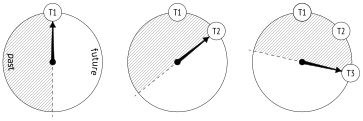
To better visualize this idea, you can imagine a sequence of transaction IDs as a clock face. For each transaction, half of the circle in the clockwise direction will be in the future, while the other half will be in the past.
However, this visualization has an unpleasant catch. An old transaction (T1) is in the remote past as compared to more recent transactions. But sooner or later a new transaction will see it in the half of the circle related to the future. If it were really so, it would have a catastrophic impact: from now on, all newer transactions would not see the changes made by transaction T1.
7.2 Tuple Freezing and Visibility Rules
To prevent such “time travel,” vacuuming performs one more task (in addition to page cleanup):3 it searches for tuples that are beyond the database horizon (so they are visible in all snapshots) and tags them in a special way, that is, freezes them. (p. 215)
For frozen tuples, visibility rules do not have to take xmin into account since such tuples are known to be visible in all snapshots, so this transaction ID can be safely reused.
You can imagine that the xmin transaction ID is replaced in frozen tuples by a hypothetical “minus infinity” (pictured as a snowflake below); it is a sign that this tuple is created by a transaction that is so far in the past that its actual ID does not matter anymore. Yet in reality xmin remains unchanged, whereas the freezing attribute is defined by a combination of two hint bits: committed and aborted.
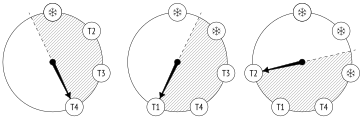
Many sources (including the documentation) mention FrozenTransactionId = 2. It is the “minus infinity”that I have already referred to—this value used to replace xmin in versions prior to 9.4, but now hint bits are employed instead. As a result, the original transaction ID remains in the tuple, which is convenient for both debugging and support. Old systems can still contain the obsolete FrozenTransactionId, even if they have been upgraded to higher versions.
The xmax transaction ID does not participate in freezing in any way. It is only present in outdated tuples, and once such tuples stop being visible in all snapshots (which means that the xmax ID is beyond the database horizon), they will be vacuumed away.
Let’s create a new table for our experiments. The fillfactor parameter should be set to the lowest value so that each page can accommodate only two tuples—it will be easier to track the progress this way. We will also disable autovacuum to make sure that the table is only cleaned up on demand.
We are going to create yet another flavor of the function that displays heap pages using pageinspect. Dealing with a range of pages, it will show the values of the freezing attribute (f) and the xmin transaction age for each tuple (it will have to call the age system function—the age itself is not stored in heap pages, of course):
Now let’s insert some rows into the table and run the VACUUM command that will immediately create the visibility map.
We are going to observe the first two heap pages using the pg_visibility extension. When vacuuming completes, both pages get tagged in the visibility map (all_visible) but not in the freeze map (all_frozen), as they still contain some unfrozen tuples: (v. 9.6)
The xmin_age of the transaction that has created the rows equals 1 because it is the latest transaction performed in the system:
7.3 Managing Freezing
There are four main parameters that control freezing. All of them represent transaction age and define when the following events happen:
Freezing starts (vacuum_freeze_min_age).
Aggressive freezing is performed (vacuum_freeze_table_age).
Freezing is forced (autovacuum_freeze_max_age).
Freezing receives priority (vacuum_failsafe_age). (v. 14)
Minimal Freezing Age
The vacuum_freeze_min_age parameter defines the minimal freezing age of xmin transactions. The lower its value, the higher the overhead: if a row is “hot” and is actively being changed, then freezing all its newly created versions will be a wasted effort. Setting this parameter to a relatively high value allows you to wait for a while. (default: 50 million)
To observe the freezing process, let’s reduce this parameter value to one:
Now update one row in the zero page. The new row version will get into the same page because the fillfactor value is quite small:
The age of all transactions has been increased by one, and the heap pages now look as follows:
At this point, the tuples that are older than vacuum_freeze_min_age = 1 are subject to freezing. But vacuum will not process any pages tagged in the visibility map: (p. 107)
The previous UPDATE command has removed the visibility bit of the zero page, so the tuple that has an appropriate xmin age in this page will be frozen. But the first page will be skipped altogether:
Now the zero page appears in the visibility map again, and if nothing changes in it, vacuuming will not return to this page anymore:
Age for Aggressive Freezing
As we have just seen, if a page contains only the current tuples that are visible in all snapshots, vacuuming will not freeze them. To overcome this constraint, PostgreSQL provides the vacuum_freeze_table_age parameter. It defines the transaction age that allows vacuuming to ignore the visibility map, so any heap page can be frozen. (default: 150 million)
For each table, the system catalog keeps a transaction ID for which it is known that all the older transactions are sure to be frozen. It is stored as relfrozenxid:
It is the age of this transaction that is compared to the vacuum_freeze_table_age value to decide whether the time has come for aggressive freezing.
Thanks to the freeze map, there is no need to perform a full table scan during vacuuming: it is enough to check only those pages that do not appear in the map. Apart from this important optimization, the freeze map also brings fault tolerance: if vacuuming is interrupted, its next run will not have to get back to the pages that have already been processed and are tagged in the map. (v. 9.6)
PostgreSQL performs aggressive freezing of all pages in a table each time when the number of transactions in the system reaches the vacuum_freeze_table_age−vacuum_freeze_min_age limit (if the default values are used, it happens after each 100 million transactions). Thus, if the vacuum_freeze_min_age value is too big, it can lead to excessive freezing and increased overhead.
To freeze the whole table, let’s reduce the vacuum_freeze_table_age value to four; then the condition for aggressive freezing will be satisfied:
Run the VACUUM command:
Now that the whole table has been analyzed, the relfrozenxid value can be advanced—heap pages are guaranteed to have no older unfrozen xmin transactions:
The first page now contains only frozen tuples:
Besides, this page is tagged in the freeze map:
Age for Forced Autovacuum
Sometimes it is not enough to configure the two parameters discussed above to timely freeze tuples. Autovacuum might be switched off, while regular VACUUM is not being called at all (it is a very bad idea, but technically it is possible). Besides, some inactive databases (like template0) may not be vacuumed. PostgreSQL can handle such situations by forcing autovacuum in the aggressive mode. (p. 110)
Autovacuum is forced4 (even if it is switched off) when there is a risk that the age of some unfrozen transaction IDs in the database will exceed the autovacuum_freeze_max_age value. The decision is taken based on the age of the oldest pg_class.relfrozenxid transaction in all the tables, as all the older transactions are guaranteed to be frozen. The ID of this transaction is stored in the system catalog: (default: 200 million)
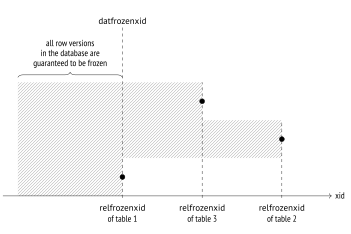
The autovacuum_freeze_max_age limit is set to 2 billion transactions (a bit less than half of the circle), while the default value is 10 times smaller. It is done for good reason: a big value increases the risk of transaction ID wraparound, as PostgreSQL may fail to timely freeze all the required tuples. In this case, the server must stop immediately to prevent possible issues and will have to be restarted by an administrator.
The autovacuum_freeze_max_age value also affects the size of CLOG. There is no need to keep the status of frozen transactions, and all the transactions that precede the one with the oldest datfrozenxid in the cluster are sure to be frozen. Those CLOG files that are not required anymore are removed by autovacuum.5 (p. 70)
Changing the autovacuum_freeze_max_age parameter requires a server restart. However, all the freezing settings discussed above can also be adjusted at the table level via the corresponding storage parameters. Note that the names of all these parameters start with “auto”:
autovacuum_freeze_min_age and toast.autovacuum_freeze_min_age
autovacuum_freeze_table_age and toast.autovacuum_freeze_table_age
autovacuum_freeze_max_age and toast.autovacuum_freeze_max_age
Age for Failsafe Freezing
If autovacuum is already struggling to prevent transaction ID wraparound and it is clearly a race against time, a safety switch is pulled: autovacuum will ignore the value of the autovacuum_vacuum_cost_delay (vacuum_cost_delay) parameter and will stop vacuuming indexes to freeze heap tuples as soon as possible. (v. 14)
A failsafe freezing mode6 is enabled if there is a risk that the age of an unfrozen transaction in the database will exceed the vacuum_failsafe_age value. It is assumed that this value must be higher than autovacuum_freeze_max_age. (default: 1.6 billion)
7.4 Manual Freezing
It is sometimes more convenient to manage freezing manually rather than rely on autovacuum.
Freezing by Vacuum
You can initiate freezing by calling the VACUUM FREEZE command. It will freeze all the heap tuples regardless of their transaction age, as if vacuum_freeze_min_age = 0.
If the purpose of such a call is to freeze heap tuples as soon as possible, it makes sense to disable index vacuuming altogether, like it is done in the failsafe mode. You can do it either explicitly, by running the VACUUM (freeze, index_cleanup false) command, or via the vacuum_index_cleanup storage parameter. It is rather obvious that it should not be done on a regular basis since in this case VACUUM will not be coping well with its main task of page cleanup. (v. 12)
Freezing Data at the Initial Loading
The data that is not expected to change can be frozen at once, while it is being loaded into the database. It is done by running the COPY command with the FREEZE option.
Tuples can be frozen during the initial loading only if the resulting table has been created or truncated within the same transaction, as both these operations acquire an exclusive lock on the table. This restriction is necessary because frozen tuples are expected to be visible in all snapshots, regardless of the isolation level; otherwise, transactions would suddenly see freshly-frozen tuples right as they are being uploaded. But if the lock is acquired, other transactions will not be able to get access to this table. (p. 204)
Nevertheless, it is still technically possible to break isolation. Let’s start a new transaction at the Repeatable Read isolation level in a separate session:
Truncate the tfreeze table and insert new rows into this table within the same transaction. (If the read-only transaction had already accessed the tfreeze table, the TRUNCATE command will be blocked.)
Now the reading transaction sees the new data as well:
It does break isolation, but since data loading is unlikely to happen regularly, in most cases it will not cause any issues.
If you load data with freezing, the visibility map is created at once, and page headers receive the visibility attribute: (v. 14) (p. 104)
Thus, if the data has been loaded with freezing, the table will not be processed by vacuum (as long as the data remains unchanged). Unfortunately, this functionality is not supported for TOAST tables yet: if an oversized value is loaded, vacuum will have to rewrite the whole TOAST table to set visibility attributes in all page headers. (v. 14)
include/access/transam.h, FullTransactionId type ↩︎
backend/access/transam/transam.c, TransactionIdPrecedes function ↩︎
postgresql.org/docs/14/routine-vacuuming.html#VACUUM-FOR-WRAPAROUND ↩︎
backend/access/transam/varsup.c, SetTransactionIdLimit function ↩︎
backend/commands/vacuum.c, vac_truncate_clog function ↩︎
backend/access/heap/vacuumlazy.c, lazy_check_wraparound_failsafe function ↩︎
8 Rebuilding Tables and Indexes
8.1 Full Vacuuming
Why is Routine Vacuuming not Enough?
Routine vacuuming can free more space than page pruning, but sometimes it may still be not enough.
If table or index files have grown in size, VACUUM can clean up some space within pages, but it can rarely reduce the number of pages. The reclaimed space can only be returned to the operating system if several empty pages appear at the very end of the file, which does not happen too often.
An excessive size can lead to unpleasant consequences:
Full table (or index) scan will take longer.
A bigger buffer cache may be required (pages are cached as a whole, so data density decreases).
B-trees can get an extra level, which slows down index access.
Files take up extra space on disk and in backups.
If the fraction of useful data in a file has dropped below some reasonable level, an administrator can perform full vacuuming by running the VACUUM FULL command.1 In this case, the table and all its indexes are rebuilt from scratch, and the data is packed as densely as possible (taking the fillfactor parameter into account). (p. 92)
When full vacuuming is performed, PostgreSQL first fully rebuilds the table and then each of its indexes. While an object is being rebuilt, both old and new files have to be stored on disk,2 so this process may require a lot of free space.
You should also keep in mind that this operation fully blocks access to the table, both for reads and writes.
Estimating Data Density
For the purpose of illustration, let’s insert some rows into the table:
Storage density can be estimated using the pgstattuple extension:
The function reads the whole table and displays statistics on space distribution in its files. The tuple_percent field shows the percentage of space taken up by useful data (heap tuples). This value is inevitably less than 100 % because of various metadata within pages, but in this example it is still quite high.
For indexes, the displayed information differs a bit, but the avg_leaf_density field has the same meaning: it shows the percentage of useful data (in B-tree leaf pages).
The previously used pgstattuple functions read the table or index in full to get the precise statistics. For large objects, it can turn out to be too expensive, so the extension also provides another function called pgstattuple_approx, which skips the pages tracked in the visibility map to show approximate figures.
A faster but even less accurate method is to roughly estimate the ratio between the data volume and the file size using the system catalog.3
Here are the current sizes of the table and its index:
Now let’s delete 90 % of all the rows:
Routine vacuuming does not affect the file size because there are no empty pages at the end of the file:
However, data density has dropped about 10 times:
The table and the index are currently located in the following files:
Let’s check what we will get after VACUUM FULL. While the command is running, its progress can be tracked in the pg_stat_progress_cluster view (which is similar to the pg_stat_progress_vacuum view provided for VACUUM): (v. 12)
Expectedly, VACUUM FULL phases4 differ from those of routine vacuuming.
Full vacuuming has replaced old files with new ones:
Both index and table sizes are much smaller now:
As a result, data density has increased. For the index, it is even higher than the original one: it is more efficient to create a B-tree from scratch based on the available data than to insert entries row by row into an already existing index:
Freezing
When the table is being rebuilt, PostgreSQL freezes its tuples because this operation costs almost nothing compared to the rest of the work:
But pages are registered neither in the visibility map nor in the freeze map, and the page header does not receive the visibility attribute (as it happens when the COPY command is executed with the FREEZE option): (p. 133)
The situation improves only after VACUUM is called (or autovacuum is triggered):
It essentially means that even if all tuples in a page are beyond the database horizon, such a page will still have to be rewritten.
8.2 Other Rebuilding Methods
Alternatives to Full Vacuuming
In addition to VACUUM FULL, there are several other commands that can fully rebuild tables and indexes. All of them exclusively lock the table, all of them delete old data files and recreate them anew.
The CLUSTER command is fully analogous to VACUUM FULL, but it also reorders tuples in files based on one of the available indexes. In some cases, it can help the planner use index scans more efficiently. But you should bear in mind that clusterization is not supported: all further table updates will be breaking the physical order of tuples. (p. 326) (p. 331)
Programmatically, VACUUM FULL is simply a special instance of the CLUSTER command that does not require tuple reordering.5
The REINDEX command rebuilds one or more indexes.6 In fact, VACUUM FULL and CLUSTER use this command under the hood when rebuilding indexes.
The TRUNCATE command7 deletes all table rows; it is a logical equivalent of DELETE run without the WHERE clause. But while DELETE simply marks heap tuples as deleted (so they still have to be vacuumed), TRUNCATE creates a new empty file, which is usually faster. (p. 72)
Reducing Downtime During Rebuilding
VACUUM FULL is not meant to be run regularly, as it exclusively locks the table (even for queries) for the whole duration of its operation. This is usually not an option for highly available systems. (p. 204)
There are several extensions (such as pg_repack8) that can rebuild tables and indexes with almost zero downtime. An exclusive lock is still required, but only at the beginning and at the end of this process, and only for a short time. It is achieved by a more complex implementation: all the changes made on the original table while it is being rebuilt are saved by a trigger and then applied to the new table. To complete the operation, the utility replaces one table with the other in the system catalog.
An unconventional solution is offered by the pgcompacttable utility.9 It performs multiple fake row updates (that do not change any data) so that current row versions gradually move towards the start of the file.
Between these update series, vacuuming removes outdated tuples and truncates the file little by little. This approach takes much more time and resources, but it requires no extra space for rebuilding the table and does not lead to load spikes. Short-time exclusive locks are still acquired while the table is being truncated, but vacuuming handles them rather smoothly. (p. 108)
8.3 Precautions
Read-Only Queries
One of the reasons for file bloating is executing long-running transactions that hold the database horizon alongside intensive data updates. (p. 88)
As such, long-running (read-only) transactions do not cause any issues. So a common approach is to split the load between different systems: keep fast OLTP queries on the primary server and direct all OLAP transactions to a replica. Although it makes the solution more expensive and complicated, such measures may turn out to be indispensable.
In some cases, long transactions are the result of application or driver bugs rather than a necessity. If an issue cannot be resolved in a civilized way, the administrator can resort to the following two parameters:
The old_snapshot_threshold parameter defines the maximum lifetime of a snapshot. Once this time is up, the server has the right to remove outdated tuples; if a long-running transaction still requires them, it will get an error (“snapshot too old”). (v. 9.6)
The idle_in_transaction_session_timeout parameter limits the lifetime of an idle transaction. The transaction is aborted upon reaching this threshold. (v. 9.6)
Data Updates
Another reason for bloating is simultaneous modification of a large number of tuples. If all table rows get updated, the number of tuples can double, and vacuuming will not have enough time to interfere. Page pruning can reduce this problem, but not resolve it entirely.
Let’s extend the output with another column to keep track of the processed rows:
Once all the rows are updated, the table gets almost two times bigger:
To address this situation, you can reduce the number of changes performed by a single transaction, spreading them out over time; then vacuuming can delete outdated tuples and free some space for new ones within the already existing pages. Assuming that each row update can be committed separately, we can use the following query that selects a batch of rows of the specified size as a template:
This code snippet selects and immediately locks a set of rows that does not exceed the specified size. The rows that are already locked by other transactions are skipped: they will get into another batch next time. It is a rather flexible and convenient solution that allows you to easily change the batch size and restart the operation in case of a failure. Let’s unset the processed attribute and perform full vacuuming to restore the original size of the table: (p. 224)
Once the first batch is updated, the table size grows a bit:
But from now on, the size remains almost the same because new tuples replace the removed ones:
Part II Buffer Cache and WAL
9 Buffer Cache
9.1 Caching
In modern computing systems, caching is omnipresent—both at the hardware and at the software level. The processor alone can have up to three or four levels of cache. RAID controllers and disks add their own cache too.
Caching is used to even out performance difference between fast and slow types of memory. Fast memory is expensive and has smaller volume, while slow memory is bigger and cheaper. Therefore, fast memory cannot accommodate all the data stored in slow memory. But in most cases only a small portion of data is being actively used at each particular moment, so allocating some fast memory for cache to keep hot data can significantly reduce the overhead incurred by slow memory access.
In PostgreSQL, buffer cache1 holds relation pages, thus balancing access times to disks (milliseconds) and RAM (nanoseconds).
The operating system has its own cache that serves the same purpose. For this reason, database systems are usually designed to avoid double caching: the data stored on disk is usually queried directly, bypassing the OS cache. But PostgreSQL uses a different approach: it reads and writes all data via buffered file operations. (p. 341)
Double caching can be avoided if you apply direct I/O. It will reduce the overhead, as PostgreSQL will use direct memory access (DMA) instead of copying buffered pages into the OS address space; besides, you will gain immediate control over physical writes on disk. However, direct I/O does not support data prefetching enabled by bufferization, so you have to implement it separately via asynchronous I/O, which requires massive code modifications in PostgreSQL core, as well as handling OS incompatibilities when it comes to direct and asynchronous I/O support. But once the asynchronous communication is set up, you can enjoy additional benefits of no-wait disk access.
The PostgreSQL community has already started this major effort,2 but it will take a long time for the actual results to appear.
9.2 Buffer Cache Design
Buffer cache is located in the server’s shared memory, where it is accessible to all the processes. It takes the major part of the shared memory and is surely one of the most important and complex data structures in PostgreSQL. Understanding how cache works is important in its own right, but even more so as many other structures (such as subtransactions, CLOG transaction status, and WAL entries) use a similar caching mechanism, albeit a simpler one.
The name of this cache is inspired by its inner structure, as it consists of an array of buffers. Each buffer reserves a memory chuck that can accommodate a single data page together with its header.3
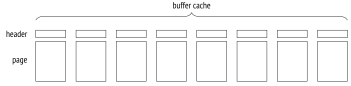
A header contains some information about the buffer and the page in it, such as:
physical location of the page (file ID, fork, and block number in the fork)
the attribute showing that the data in the page has been modified and sooner or later has to be written back to disk (such a page is called dirty)
buffer usage count
pin count (or reference count)
To get access to a relation’s data page, a process requests it from the buffer manager4 and receives the ID of the buffer that contains this page. Then it reads the cached data and modifies it right in the cache if needed. While the page is in use, its buffer is pinned. Pins forbid eviction of the cached page and can be applied together with other locks. Each pin increments the usage count as well. (p. 241)
As long as the page is cached, its usage does not incur any file operations.
We can explore the buffer cache using the pg_buffercache extension:
Let’s create a table and insert a row:
Now the buffer cache contains a heap page with the newly inserted row. You can see it for yourself by selecting all the buffers related to a particular table. We will need such a query again, so let’s wrap it into a function:
The page is dirty: it has been modified, but is not written to disk yet. Its usage count is set to one.
9.3 Cache Hits
When the buffer manager has to read a page,5 it first checks the buffer cache.
All buffer IDs are stored in a hash table,6 which is used to speed up their search.
Many modern programming languages include hash tables as one of the basic data types. Hash tables are often called associative arrays, and indeed, from the user’s perspective they do look like an array; however, their index (a hash key) can be of any data type, for example, a text string rather than an integer.
While the range of possible key values can be quite large, hash tables never contain that many different values at a time. The idea of hashing is to convert a key value into an integer number using a hash function. This number (or some of its bits) is used as an index of a regular array. The elements of this array are called hash table buckets.
A good hash function distributes hash keys between buckets more or less uniformly, but it can still assign the same number to different keys, thus placing them into the same bucket; it is called a collision. For this reason, values are stored in buckets together with hash keys; to access a hashed value by its key, PostgreSQL has to check all the keys in the bucket.
There are multiple implementations of hash tables; of all the possible options, the buffer cache uses the extendible table that resolves hash collisions by chaining.7
A hash key consists of the ID of the relation file, the type of the fork, and the ID of the page within this fork’s file. Thus, knowing the page, PostgreSQL can quickly find the buffer containing this page or make sure that the page is not currently cached.
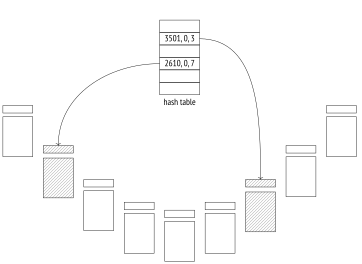
The buffer cache implementation has long been criticized for relying on a hash table: this structure is of no use when it comes to finding all the buffers taken by pages of a particular relation, which is required to remove pages from cache when running DROP and TRUNCATE commands or truncating a table during vacuuming.8 Yet no one has suggested an adequate alternative so far.
If the hash table contains the required buffer ID, the buffer manager pins this buffer and returns its ID to the process. Then this process can start using the cached page without incurring any I/O traffic.
To pin a buffer, PostgreSQL has to increment the pin counter in its header; a buffer can be pinned by several processes at a time. While its pin counter is greater than zero, the buffer is assumed to be in use, and no radical changes in its contents are allowed. For example, a new tuple can appear (it will be invisible following the visibility rules), but the page itself cannot be replaced.
When run with the analyze and buffers options, the EXPLAIN command executes the displayed query plan and shows the number of used buffers:
Here hit=1 means that the only page that had to be read was found in the cache.
Buffer pinning increases the usage count by one:
To observe pinning in action during query execution, let’s open a cursor—it will hold the buffer pin, as it has to provide quick access to the next row in the result set:
If a process cannot use a pinned buffer, it usually skips it and simply chooses another one. We can see it during table vacuuming:
The page was skipped because its tuples could not be physically removed from the pinned buffer.
But if it is exactly this buffer that is required, the process joins the queue and waits for getting exclusive access to this buffer. An example of such an operation is vacuuming with freezing.9 (p. 123)
Once the cursor closes or moves on to another page, the buffer gets unpinned. In this example, it happens at the end of the transaction:
Page modifications are protected by the same pinning mechanism. For example, let’s insert another row into the table (it will get into the same page):
PostgreSQL does not perform any immediate writes to disk: a page remains dirty in the buffer cache for a while, providing some performance gains for both reads and writes.
9.4 Cache Misses
If the hash table has no entry related to the queried page, it means that this page is not cached. In this case, a new buffer is assigned (and immediately pinned), the page is read into this buffer, and the hash table references are modified accordingly.
Let’s restart the instance to clear its buffer cache:
An attempt to read a page will result in a cache miss, and the page will be loaded into a new buffer:
Instead of hit, the plan now shows the read status, which denotes a cache miss. Besides, this page has become dirty, as the query has modified some hint bits. (p. 71)
A buffer cache query shows that the usage count for the newly added page is set to one:
The pg_statio_all_tables view contains the complete statistics on buffer cache usage by tables:
PostgreSQL provides similar views for indexes and sequences. They can also display statistics on I/O operations, but only if track_io_timing is enabled. (default: off)
Buffer Search and Eviction
Choosing a buffer for a page is not so trivial.10 There are two possible scenarios:
- Right after the server start all the buffers are empty and are bound into a list.
While some buffers are still free, the next page read from disk will occupy the first buffer, and it will be removed from the list.
A buffer can return to the list11 only if its page disappears, without being replaced by another page. It can happen if you call DROP or TRUNCATE commands, or if the table is truncated during vacuuming.
- Sooner or later no free buffers will be left (since the size of the database is usually bigger than the memory chunk allocated for cache). Then the buffer manager will have to select one of the buffers that is already in use and evict the cached page from this buffer. It is performed using the clock sweep algorithm, which is well illustrated by the clock metaphor. Pointing to one of the buffers, the clock hand starts going around the buffer cache and reduces the usage count for each cached page by one as it passes. The first unpinned buffer with the zero count found by the clock hand will be cleared.
Thus, the usage count is incremented each time the buffer is accessed (that is, pinned), and reduced when the buffer manager is searching for pages to evict. As a result, the least recently used pages are evicted first, while those that have been accessed more often will remain in the cache longer.
As you can guess, if all the buffers have a non-zero usage count, the clock hand has to complete more than one full circle before any of them finally reaches the zero value. To avoid running multiple laps, PostgreSQL limits the usage count by 5.
Once the buffer to evict is found, the reference to the page that is still in this buffer must be removed from the hash table.
But if this buffer is dirty, that is, it contains some modified data, the old page cannot be simply thrown away—the buffer manager has to write it to disk first. (p. 176)
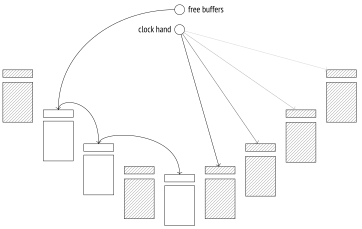
Then the buffer manager reads a new page into the found buffer—no matter if it had to be cleared or was still free. It uses buffered I/O for this purpose, so the page will be read from disk only if the operating system cannot find it in its own cache.
Those database systems that use direct I/O and do not depend on the OS cache differentiate between logical reads (from RAM, that is, from the buffer cache) and physical reads (from disk). From the standpoint of PostgreSQL, a page can be either read from the buffer cache or requested from the operating system, but there is no way to tell whether it was found in RAM or read from disk in the latter case.
The hash table is updated to refer to the new page, and the buffer gets pinned. Its usage count is incremented and is now set to one, which gives this buffer some time to increase this value while the clock hand is traversing the buffer cache.
9.5 Bulk Eviction
If bulk reads or writes are performed, there is a risk that one-time data can quickly oust useful pages from the buffer cache.
As a precaution, bulk operations use rather small buffer rings, and eviction is performed within their boundaries, without affecting other buffers.
Alongside the “buffer ring,” the code also uses the term “ring buffer”. However, this synonym is rather ambiguous because the ring buffer itself consists of several buffers (that belong to the buffer cache). The term “buffer ring” is more accurate in this respect.
A buffer ring of a particular size consists of an array of buffers that are used one after another. At first, the buffer ring is empty, and individual buffers join it one by one, after being selected from the buffer cache in the usual manner. Then eviction comes into play, but only within the ring limits.12
Buffers added into a ring are not excluded from the buffer cache and can still be used by other operations. So if the buffer to be reused turns out to be pinned, or its usage count is higher than one, it will be simply detached from the ring and replaced by another buffer.
PostgreSQL supports three eviction strategies.
Bulk reads strategy is used for sequential scans of large tables if their size exceeds of the buffer cache. The ring buffer takes 256 kB (32 standard pages). (p. 296)
This strategy does not allow writing dirty pages to disk to free a buffer; instead, the buffer is excluded from the ring and replaced by another one. As a result, reading does not have to wait for writing to complete, so it is performed faster.
If it turns out that the table is already being scanned, the process that starts another scan joins the existing buffer ring and gets access to the currently available data, without incurring extra I/O operations.13 When the first process completes the scan, the second one gets back to the skipped part of the table.
Bulk writes strategy is applied by COPY FROM, CREATE TABLE AS SELECT, and CREATE MATERIALIZED VIEW commands, as well as by those ALTER TABLE flavors that cause table rewrites. The allocated ring is quite big, its default size being 16 MB (2048 standard pages), but it never exceeds of the total size of the buffer cache.
Vacuuming strategy is used by the process of vacuuming when it performs a full table scan without taking the visibility map into account. The ring buffer is assigned 256 kB of RAM (32 standard pages).
Buffer rings do not always prevent undesired eviction. If UPDATE or DELETE commands affect a lot of rows, the performed table scan applies the bulk reads strategy, but since the pages are constantly being modified, buffer rings virtually become useless.
Another example worth mentioning is storing oversized data in TOAST tables. In spite of a potentially large volume of data that has to be read, toasted values are always accessed via an index, so they bypass buffer rings. (p. 28)
Let’s take a closer look at the bulk reads strategy. For simplicity, we will create a table in such a way that an inserted row takes the whole page. By default, the buffer cache size is 16,384 pages, 8 kB each. So the table must take more than 4096 pages for the scan to use a buffer ring.
Let’s analyze the table:
Restart the server to clear the cache, as now it contains some heap pages that have been read during analysis.
Once the server is restarted, let’s read the whole table:
Heap pages take only 32 buffers, which make up the buffer ring for this operation:
But in the case of an index scan the buffer ring is not used:
As a result, the buffer cache ends up containing the whole table and the whole index:
9.6 Choosing the Buffer Cache Size
The size of the buffer cache is defined by the shared_buffers parameter. Its default value is known to be low, so it makes sense to increase it right after the PostgreSQL installation. (default: 128MB)
You will have to reload the server in this case because shared memory is allocated for cache at the server start.
But how can we determine an appropriate value?
Even a very large database has a limited set of hot data that is being used simultaneously. In the perfect world, it is this set that must fit the buffer cache (with some space being reserved for one-time data). If the cache size is smaller, the actively used pages will be evicting each other all the time, thus leading to excessive I/O operations. But thoughtless increase of the cache size is not a good idea either: RAM is a scarce resource, and besides, larger cache incurs higher maintenance costs.
The optimal buffer cache size differs from system to system: it depends on things like the total size of the available memory, data profiles, and workload types. Unfortunately, there is no magic value or formula to suit everyone equally well.
You should also keep in mind that a cache miss in PostgreSQL does not necessarily trigger a physical I/O operation. If the buffer cache is quite small, the OS cache uses the remaining free memory and can smooth things out to some extent. But unlike the database, the operating system knows nothing about the read data, so it applies a different eviction strategy.
A typical recommendation is to start with of RAM and then adjust this setting as required.
The best approach is experimentation: you can increase or decrease the cache size and compare the system performance. Naturally, it requires having a test system that is fully analogous to the production one, and you must be able to reproduce typical workloads.
You can also run some analysis using the pg_buffercache extension. For example, explore buffer distribution depending on their usage:
NULL usage count values correspond to free buffers. They are quite expected in this case because the server was restarted and remained idle most of the time. The majority of the used buffers contain pages of the system catalog tables read by the backend to fill its system catalog cache and to perform queries.
We can check what fraction of each relation is cached, and whether this data is hot (a page is considered hot here if its usage count is bigger than one):
This example shows that the big table and its index are fully cached, but their pages are not being actively used.
Analyzing data from different angles, you can gain some useful insights. However, make sure to follow these simple rules when running pg_buffercache queries:
Repeat such queries several times since the returned figures will vary to some extent.
Do not run such queries non-stop because the
pg_buffercacheextension locks the viewed buffers, even if only briefly.
9.7 Cache Warming
After a server restart, the cache requires some time to warm up, that is, to accumulate the actively used data. It may be helpful to cache certain tables right away, and the pg_prewarm extension serves exactly this purpose:
Apart from loading tables into the buffer cache (or into the OS cache only), this extension can write the current cache state to disk and then restore it after the server restart. To enable this functionality, you have to add this extension’s library to shared_preload_libraries and restart the server: (v. 11)
If the pg_prewarm.autoprewarm setting has not changed, a process called autoprewarm leader will be started automatically after the server is reloaded; this process will flush the list of cached pages to disk once in pg_prewarm.autoprewarm_interval seconds (using one of the max_parallel_processes slots). (default: on) (default: 300s)
Now that the server has been restarted, the big table is not cached anymore:
If you have well-grounded assumptions that the whole table is going to be actively used and disk access will make response times unacceptably high, you can load this table into the buffer cache in advance:
The list of pages is dumped into the PGDATA/autoprewarm.blocks file. You can wait until the autoprewarm leader completes for the first time, but we will initiate the dump manually:
The number of flushed pages is bigger than 4097 because all the used buffers are taken into account. The file is written in a text format; it contains the IDs of the database, tablespace, and file, as well as the fork and segment numbers:
Let’s restart the server again.
The table appears in the cache right away:
It is again the autoprewarm leader that does all the preliminary work: it reads the file, sorts the pages by databases, reorders them (so that disk reads happen sequentially if possible), and then passes them to the autoprewarm worker for processing.
9.8 Local Cache
Temporary tables do not follow the workflow described above. Since temporary data is visible to a single process only, there is no point in loading it into the shared buffer cache. Therefore, temporary data uses the local cache of the process that owns the table.14
In general, local buffer cache works similar to the shared one:
Page search is performed via a hash table.
Eviction follows the standard algorithm (except that buffer rings are not used).
Pages can be pinned to avoid eviction.
However, local cache implementation is much simpler because it has to handle neither locks on memory structures (buffers can be accessed by a single process only) nor fault tolerance (temporary data exists till the end of the session at the most). (p. 241) (p. 164)
Since only few sessions typically use temporary tables, local cache memory is assigned on demand. The maximum size of the local cache available to a session is limited by the temp_buffers parameter. (default: 8MB)
Despite a similar name, the temp_file_limit parameter has nothing to do with temporary tables; it is related to files that may be created during query execution to temporarily store intermediate data.
In the EXPLAIN command output, all calls to the local buffer cache are tagged as local instead of shared:
www.postgresql.org/message-id/flat/20210223100344.llw5an2aklengrmn%40alap3.anarazel.de ↩︎
backend/storage/buffer/bufmgr.c, ReadBuffer_common function ↩︎
backend/storage/buffer/bufmgr.c, DropRelFileNodeBuffers function ↩︎
backend/storage/buffer/bufmgr.c, LockBufferForCleanup function ↩︎
backend/storage/buffer/freelist.c, StrategyGetBuffer function ↩︎
backend/storage/buffer/freelist.c, StrategyFreeBuffer function ↩︎
backend/storage/buffer/freelist.c, GetBufferFromRing function ↩︎
10 Write-Ahead Log
10.1 Logging
In case of a failure, such as a power outage, an OS error, or a database server crash, all the contents of RAM will be lost; only the data written to disk will persist. To start the server after a failure, you have to restore data consistency. If the disk itself has been damaged, the same issue has to be resolved by backup recovery.
In theory, you could maintain data consistency on disk at all times. But in practice it means that the server has to constantly write random pages to disk (even though sequential writing is cheaper), and the order of such writes must guarantee that consistency is not compromised at any particular moment (which is hard to achieve, especially if you deal with complex index structures).
Just like the majority of database systems, PostgreSQL uses a different approach.
While the server is running, some of the current data is available only in RAM, its writing to permanent storage being deferred. Therefore, the data stored on disk is always inconsistent during server operation, as pages are never flushed all at once. But each change that happens in RAM (such as a page update performed in the buffer cache) is logged: PostgreSQL creates a log entry that contains all the essential information required to repeat this operation if the need arises.1
A log entry related to a page modification must be written to disk ahead of the modified page itself. Hence the name of the log: write-ahead log, or WAL. This requirement guarantees that in case of a failure PostgreSQL can read WAL entries from disk and replay them to repeat the already completed operations whose results were still in RAM and did not make it to disk before the crash.
Keeping a write-ahead log is usually more efficient than writing random pages to disk. WAL entries constitute a continuous stream of data, which can be handled even by HDDs. Besides, WAL entries are often smaller than the page size.
It is required to log all operations that can potentially break data consistency in case of a failure. In particular, the following actions are recorded in WAL:
page modifications performed in the buffer cache—since writes are deferred
transaction commits and rollbacks—since the status change happens in CLOG buffers and does not make it to disk right away
file operations (like creation and deletion of files and directories when tables get added or removed)—since such operations must be in sync with data changes
The following actions are not logged:
operations on
UNLOGGEDtablesoperations on temporary tables—since their lifetime is anyway limited by the session that spawns them
Prior to PostgreSQL 10, hash indexes were not logged either. Their only purpose was to match hash functions to different data types.
Apart from crash recovery, WAL can also be used for point-in-time recovery from a backup and replication.
10.2 WAL Structure
Logical Structure
Speaking about its logical structure, we can describe WAL2 as a stream of log entries of variable length. Each entry contains some data about a particular operation preceded by a standard header.3 Among other things, the header provides the following information:
transaction ID related to the entry
the resource manager that interprets the entry4
the checksum to detect data corruption
entry length
a reference to the previous WAL entry
WAL is usually read in the forward direction, but some utilities like pg_rewind may scan it backwards.
WAL data itself can have different formats and meaning. For example, it can be a page fragment that has to replace some part of the page at the specified offset. The corresponding resource manager must know how to interpret and replay a particular entry. There are separate managers for tables, various index types, transaction status, and other entities.
WAL files take up special buffers in the server’s shared memory. The size of the cache used by WAL is defined by the wal_buffers parameter. By default, this size is chosen automatically as of the total buffer cache size. (default: -1)
WAL cache is quite similar to buffer cache, but it usually operates in the ring buffer mode: new entries are added to its head, while older entries are saved to disk starting at the tail. If WAL cache is too small, disk synchronization will be performed more often than necessary.
Under low load, the insert position (the buffer’s head) is almost always the same as the position of the entries that have already been saved to disk (the buffer’s tail):
Prior to PostgreSQL 10, all function names contained the XLOG acronym instead of WAL.
To refer to a particular entry, PostgreSQL uses a special data type: pg_lsn (log sequence number, LSN). It represents a 64-bit offset in bytes from the start of the WAL to an entry. An LSN is displayed as two 32-bit numbers in the hexadecimal notation separated by a slash.
Let’s create a table:
Start a transaction and note the LSN of the WAL insert position:
Now run some arbitrary command, for example, update a row:
The page modification is performed in the buffer cache in RAM. This change is logged in a WAL page, also in RAM. As a result, the insert LSN is advanced:
To ensure that the modified data page is flushed to disk strictly after the corresponding WAL entry, the page header stores the LSN of the latest WAL entry related to this page. You can view this LSN using pageinspect:
There is only one WAL for the whole database cluster, and new entries constantly get appended to it. For this reason, the LSN stored in the page may turn out to be smaller than the one returned by the pg_current_wal_insert_lsn function some time ago. But if nothing has happened in the system, these numbers will be the same.
Now let’s commit the transaction:
The commit operation is also logged, and the insert LSN changes again:
A commit updates transaction status in CLOG pages, which are kept in their own cache.5 The CLOG cache usually takes 128 pages in the shared memory.6 To make sure that a CLOG page is not flushed to disk before the corresponding WAL entry, the LSN of the latest WAL (p. 70)
entry has to be tracked for CLOG pages too. But this information is stored in RAM, not in the page itself.
At some point WAL entries will make it to disk; then it will be possible to evict CLOG and data pages from the cache. If they had to be evicted earlier, it would have been discovered, and WAL entries would have been forced to disk first.7 (p. 182)
If you know two LSN positions, you can calculate the size of WAL entries between them (in bytes) by simply subtracting one position from the other. You just have to cast them to the pg_lsn type:
In this particular case, WAL entries related to UPDATE and COMMIT operations took about a hundred of bytes.
You can use the same approach to estimate the volume of WAL entries generated by a particular workload per unit of time. This information will be required for the checkpoint setup.
Physical Structure
On disk, the WAL is stored in the PGDATA/pg_wal directory as separate files, or segments. Their size is shown by the read-only wal_segment_size parameter. (default: 16MB)
For high-load systems, it makes sense to increase the segment size since it may reduce the overhead, but this setting can be modified only during cluster initialization (initdb --wal-segsize). (v. 11)
WAL entries get into the current file until it runs out of space; then PostgreSQL starts a new file.
We can learn in which file a particular entry is located, and at what offset from the start of the file:
timeline log sequence number
The name of the file consists of two parts. The highest eight hexadecimal digits define the timeline used for recovery from a backup, while the rest represent the highest LSN bits (the lowest LSN bits are shown in the file_offset field).
To view the current WAL files, you can call the following function: (v. 10)
Now let’s take a look at the headers of the newly created WAL entries using the pg_waldump utility, which can filter WAL entries both by the LSN range (like in this example) and by a particular transaction ID.
The pg_waldump utility should be started on behalf of the postgres OS user, as it needs access to WAL files on disk.
Here we can see the headers of two entries.
The first one is the HOT_UPDATE operation handled by the Heap resource manager. The blkref field shows the filename and the page ID of the updated heap page: (p. 95)
The second entry is the COMMIT operation supervised by the Transaction resource manager.
10.3 Checkpoint
To restore data consistency after a failure (that is, to perform recovery), PostgreSQL has to replay the WAL in the forward direction and apply the entries that represent lost changes to the corresponding pages. To find out what has been lost, the LSN of the page stored on disk is compared to the LSN of the WAL entry. But at which point should we start the recovery? If we start too late, the pages written to disk before this point will fail to receive all the changes, which will lead to irreversible data corruption. Starting from the very beginning is unrealistic: it is impossible to store such a potentially huge volume of data, and neither is it possible to accept such a long recovery time. We need a checkpoint that is gradually moving forward, thus making it safe to start the recovery from this point and remove all the previous WAL entries.
The most straightforward way to create a checkpoint is to periodically suspend all system operations and force all dirty pages to disk. This approach is of course unacceptable, as the system will hang for an indefinite but quite significant time.
For this reason, the checkpoint is spread out over time, virtually constituting an interval. Checkpoint execution is performed by a special background process called checkpointer.8
Checkpoint start. The checkpointer process flushes to disk everything that can be written instantaneously: CLOG transaction status, subtransactions’metadata, and a few other structures.
Checkpoint execution. Most of the checkpoint execution time is spent on flushing dirty pages to disk.9
First, a special tag is set in the headers of all the buffers that were dirty at the checkpoint start. It happens very fast since no I/O operations are involved.
Then checkpointer traverses all the buffers and writes the tagged ones to disk. Their pages are not evicted from the cache: they are simply written down, so usage and pin counts can be ignored.
Pages are processed in the order of their IDs to avoid random writing if possible. For better load balancing, PostgreSQL alternates between different tablespaces (as they may be located on different physical devices). (v. 9.6)
Backends can also write tagged buffers to disk—if they get to them first. In any case, buffer tags are removed at this stage, so for the purpose of the checkpoint each buffer will be written only once.
Naturally, pages can still be modified in the buffer cache while the checkpoint is in progress. But since new dirty buffers are not tagged, checkpointer will ignore them.
Checkpoint completion. When all the buffers that were dirty at the start of the checkpoint are written to disk, the checkpoint is considered complete. From now on (but not earlier!), the start of the checkpoint will be used as a new starting point of recovery. All the WAL entries written before this point are not required anymore.
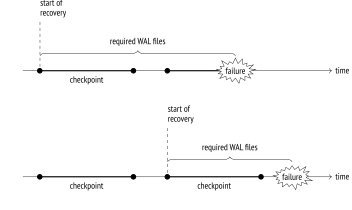
Finally, checkpointer creates a WAL entry that corresponds to the checkpoint completion, specifying the checkpoint’s start LSN. Since the checkpoint logs nothing when it starts, this LSN can belong to a WAL entry of any type.
The PGDATA/global/pg_control file also gets updated to refer to the latest completed checkpoint. (Until this process is over, pg_control keeps the previous checkpoint.)
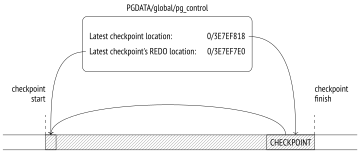
To figure out once and for all what points where, let’s take a look at a simple example. We will make several cached pages dirty:
Note the current WAL position:
Now let’s complete the checkpoint manually. All the dirty pages will be flushed to disk; since nothing happens in the system, new dirty pages will not appear:
Let’s see how the checkpoint is reflected in the WAL:
The latest WAL entry is related to the checkpoint completion (CHECKPOINT_ONLINE). The start LSN of this checkpoint is specified after the word redo; this position corresponds to the latest inserted WAL entry at the time of the checkpoint start.
The same information can also be found in the pg_control file:
10.4 Recovery
The first process launched at the server start is postmaster. In its turn, postmaster spawns the startup process,10 which takes care of data recovery in case of a failure.
To determine whether recovery is needed, the startup process reads the pg_control file and checks the cluster status. The pg_controldata utility enables us to view the content of this file:
A properly stopped server has the “shut down” status; the “in production” status of a non-running server indicates a failure. In this case, the startup process will automatically initiate recovery from the start LSN of the latest completed checkpoint found in the same pg_control file.
If the PGDATA directory contains a backup_label file related to a backup, the start LSN position is taken from that file.
The startup process reads WAL entries one by one, starting from the defined position, and applies them to data pages if the LSN of the page is smaller than the LSN of the WAL entry. If the page contains a bigger LSN, WAL should not be applied; in fact, it must not be applied because its entries are designed to be replayed strictly sequentially.
However, some WAL entries constitute a full page image, or FPI. Entries of this type can be applied to any state of the page since all the page contents will be erased anyway. Such modifications are called idempotent. Another example of an idempotent operation is registering transaction status changes: each transaction status is defined in CLOG by certain bits that are set regardless of their previous values, so there is no need to keep the LSN of the latest change in CLOG pages.
WAL entries are applied to pages in the buffer cache, just like regular page updates during normal operation.
Files get restored from WAL in a similar manner: for example, if a WAL entry shows that the file must exit, but it is missing for some reason, it will be created anew.
Once the recovery is over, all unlogged relations are overwritten by the corresponding initialization forks. (p. 26)
Finally, the checkpoint is executed to secure the recovered state on disk.
The job of the startup process is now complete.
In its classic form, the recovery process consists of two phases. In the roll-forward phase, WAL entries are replayed, repeating the lost operations. In the roll-back phase, the server aborts the transactions that were not yet committed at the time of the failure.
In PostgreSQL, the second phase is not required. After the recovery, the CLOG will contain neither commit nor abort bits for an unfinished transaction (which technically denotes an active transaction),but since it is known for sure that the transaction is not running anymore, it will be considered aborted.11
We can simulate a failure by forcing the server to stop in the immediate mode:
Here is the new cluster state:
When we launch the server, the startup process sees that a failure has occurred and enters the recovery mode:
If the server is being stopped normally, postmaster disconnects all clients and then executes the final checkpoint to flush all dirty pages to disk.
Note the current WAL position:
Now let’s stop the server properly:
Here is the new cluster state:
At the end of the WAL, we can see the CHECKPOINT_SHUTDOWN entry, which denotes the final checkpoint:
The latest pg_waldump message shows that the utility has read the WAL to the end.
Let’s start the instance again:
10.5 Background Writing
If the backend needs to evict a dirty page from a buffer, it has to write this page to disk. Such a situation is undesired because it leads to waits—it is much better to perform writing asynchronously in the background.
This job is partially handled by checkpointer, but it is still not enough.
Therefore, PostgreSQL provides another process called bgwriter,12 specifically for background writing. It relies on the same buffer search algorithm as eviction, except for the two main differences:
The
bgwriterprocess uses its own clock hand that never lags behind that of eviction and typically overtakes it.As the buffers are being traversed, the usage count is not reduced.
A dirty page is flushed to disk if the buffer is not pinned and has zero usage count. Thus, bgwriter runs before eviction and proactively writes to disk those pages that are highly likely to be evicted soon.
It raises the odds of the buffers selected for eviction being clean.
10.6 WAL Setup
Configuring Checkpoints
The checkpoint duration (to be more exact, the duration of writing dirty buffers to disk) is defined by the checkpoint_completion_target parameter. Its value specifies the fraction of time between the starts of two neighboring checkpoints that is allotted to writing. Avoid setting this parameter to one: as a result, the next checkpoint may be due before the previous one is complete. No disaster will happen, as it is impossible to execute more than one checkpoint at a time, but normal operation may still be disrupted. (default: 0.9) (v. 14)
When configuring other parameters, we can use the following approach. First, we define an appropriate volume of WAL files to be stored between two neighboring checkpoints. The bigger the volume, the smaller the overhead, but this value will anyway be limited by the available free space and the acceptable recovery time.
To estimate the time required to generate this volume by normal load, you need to note the initial insert LSN and check the difference between this and the current insert positions from time to time.
The received figure is assumed to be a typical interval between checkpoints, so we will use it as the checkpoint_timeout parameter value. The default setting is likely to be too small; it is usually increased, for example, to 30 minutes. (default: 5min) (p. 190)
However, it is quite possible (and even probable) that the load will sometimes be higher, so the size of WAL files generated during this interval will be too big. In this case, the checkpoint must be executed more often. To set up such a trigger, we will limit the size of WAL files required for recovery by the max_wal_size parameter. When this threshold is exceeded, the server invokes an extra checkpoint.13 (default: 1GB)
WAL files required for recovery contain all the entries both for the latest completed checkpoint and for the current one, which is not completed yet. Therefore, to estimate their total volume you should multiply the calculated WAL size between checkpoints by 1 + checkpoint_completion_target. (v. 11)
Prior to version 11, PostgreSQL kept WAL files for two completed checkpoints, so the multiplier was 2 + checkpoint_completion_target.
Following this approach, most checkpoints are executed on schedule, once per the checkpoint_timeout interval; but should the load increase, the checkpoint is triggered when WAL size exceeds the max_wal_size value.
The actual progress is periodically checked against the expected figures:14
The actual progress is defined by the fraction of cached pages that have already been processed.
The expected progress (by time) is defined by the fraction of time that has already elapsed, proceeding from the assumption that the checkpoint must be completed within the checkpoint_timeout × checkpoint_completion_target interval.
The expected progress (by size) is defined by the fraction of WAL files that are filled already, their expected number being estimated based on the max_wal_size × checkpoint_completion_target value.
If dirty pages get written to disk ahead of schedule, checkpointer is paused for a while; if there is any delay by either of the parameters, it catches up as soon as possible.15 Since both time and data size are taken into account, PostgreSQL can manage scheduled and on-demand checkpoints using the same approach.
Once the checkpoint has been completed, WAL files that are not required for recovery anymore are deleted;16 however, several files (up to min_wal_size in total) are kept for reuse and are simply renamed. (default: 80MB)
Such renaming reduces the overhead incurred by constant file creation and deletion, but you can turn off this feature using the wal_recycle parameter if you do not need it. (v. 12) (default: on)
The following figure shows how the size of WAL files stored on disk changes under normal conditions.
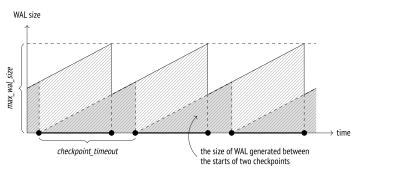
It is important to keep in mind that the actual size of WAL files on disk may exceed the max_wal_size value:
The max_wal_size parameter specifies the desired target value rather than a hard limit. If the load spikes, writing may lag behind the schedule.
The server has no right to delete WAL files that are yet to be replicated or handled by continuous archiving. If enabled, this functionality must be constantly monitored, as it can easily cause a disk overflow.
You can reserve a certain amount of space for storing WAL files by configuring the wal_keep_size parameter. (v. 12) (default:
0MB)
Configuring Background Writing
Once checkpointer is configured, you should also set up bgwriter. Together, these processes must be able to cope with writing dirty buffers to disk before backends need to reuse them.
During its operation, bgwriter makes periodic pauses, sleeping for bgwriter_delay units of time. (default: 200ms)
The number of pages written between two pauses depends on the average number of buffers accessed by backends since the previous run (PostgreSQL uses a moving average to level out possible spikes and avoid depending on very old data at the same time). The calculated number is then multiplied by bgwriter_lru_multiplier. But in any case, the number of pages written in a single run cannot exceed the bgwriter_lru_maxpages value. (default: 2) (default: 100)
If no dirty buffers are detected (that is, nothing happens in the system), bgwriter sleeps until one of the backends accesses a buffer. Then it wakes up and continues its regular operation.
Monitoring
Checkpoint settings can and should be tuned based on monitoring data.
If size-triggered checkpoints have to be performed more often than defined by the value of the checkpoint_warning parameter, PostgreSQL issues a warning. This setting should be brought in line with the expected peak load. (default: 30s)
The log_checkpoints parameter enables printing checkpoint-related information into the server log. Let’s turn it on: (default: off)
Now we will modify some data and execute a checkpoint:
The server log shows the number of written buffers, some statistics on WAL file changes after the checkpoint, the duration of the checkpoint, and the distance (in bytes) between the starts of two neighboring checkpoints:
The most useful data that can affect your configuration decisions is statistics on background writing and checkpoint execution provided in the pg_stat_bgwriter view.
Prior to version 9.2, both tasks were performed by bgwriter; then a separate checkpointer process was introduced, but the common view remained unchanged.
Among other things, this view displays the number of completed checkpoints:
The
checkpoints_timedfield shows scheduled checkpoints (which are triggered when the checkpoint_timeout interval is reached).The
checkpoints_reqfield shows on-demand checkpoints (including those triggered when the max_wal_size size is reached).
A large checkpoint_req value (as compared to checkpoints_timed) indicates that checkpoints are performed more often than expected.
The following statistics on the number of written pages are also very important:
buffers_checkpointpages written bycheckpointerbuffers_backendpages written by backendsbuffers_cleanpages written bybgwriter
In a well-configured system, the buffers_backend value must be considerably lower than the sum of buffers_checkpoint and buffers_clean.
When setting up background writing, pay attention to the maxwritten_clean value: it shows how many times bgwriter had to stop because of exceeding the threshold defined by bgwriter_lru_maxpages.
The following call will drop the collected statistics:
postgresql.org/docs/14/wal-internals.html backend/access/transam/README ↩︎
backend/access/transam/clog.c, CLOGShmemBuffers function ↩︎
backend/storage/buffer/bufmgr.c, FlushBuffer function ↩︎
backend/postmaster/checkpointer.c backend/access/transam/xlog.c, CreateCheckPoint function ↩︎
backend/storage/buffer/bufmgr.c, BufferSync function ↩︎
backend/postmaster/startup.c backend/access/transam/xlog.c, StartupXLOG function ↩︎
backend/access/heap/heapam_visibility.c, HeapTupleSatisfiesMVCC function ↩︎
backend/access/transam/xlog.c, LogCheckpointNeeded & CalculateCheckpointSegments functions ↩︎
backend/postmaster/checkpointer.c, IsCheckpointOnSchedule function ↩︎
backend/postmaster/checkpointer.c, CheckpointWriteDelay function ↩︎
backend/access/transam/xlog.c, RemoveOldXlogFiles function ↩︎
11 WAL Modes
11.1 Performance
While the server is running normally, WAL files are being constantly written to disk. However, these writes are sequential: there is almost no random access, so even HDDs can cope with this task. Since this type of load is very different from a typical data file access, it may be worth setting up a separate physical storage for WAL files and replacing the PGDATA/pg_wal catalog by a symbolic link to a directory in a mounted file system.
There are a couple of situations when WAL files have to be both written and read. The first one is the obvious case of crash recovery; the second one is stream replication. The walsender1 process reads WAL entries directly from files.2 So if a replica does not receive WAL entries while the required pages are still in the OS buffers of the primary server, the data has to be read from disk. But the access will still be sequential rather than random.
WAL entries can be written in one of the following modes:
The synchronous mode forbids any further operations until a transaction commit saves all the related WAL entries to disk.
The asynchronous mode implies instant transaction commits, with WAL entries being written to disk later in the background.
The current mode is defined by the synchronous_commit parameter. (default: on)
Synchronous mode. To reliably register the fact of a commit, it is not enough to simply pass WAL entries to the operating system; you have to make sure that disk synchronization has completed successfully. Since synchronization implies actual I/O operations (which are quite slow), it is beneficial to perform it as seldom as possible.
For this purpose, the backend that completes the transaction and writes WAL entries to disk can make a small pause as defined by the commit_delay parameter. However, it will only happen if there are at least commit_siblings active transactions in the system:3 during this pause, some of them may finish, and the server will manage to synchronize all the WAL entries in one go. It is a lot like holding doors of an elevator for someone to rush in. (default: 0s) (default: 5)
By default, there is no pause. It makes sense to modify the commit_delay parameter only for systems that perform a lot of short OLTP transactions.
After a potential pause, the process that completes the transaction flushes all the accumulated WAL entries to disk and performs synchronization (it is important to save the commit entry and all the previous entries related to this transaction; the rest is written just because it does not increase the cost).
From this time on, the ACID’s durability requirement is guaranteed—the transaction is considered to be reliably committed.4 That’s why the synchronous mode is the default one.
The downside of the synchronous commit is longer latencies (the COMMIT command does not return control until the end of synchronization) and lower system throughput, especially for OLTP loads.
Asynchronous mode. You have to turn off the synchronous_commit parameter to enable asynchronous commits.5
In the asynchronous mode, WAL entries are written to disk by the walwriter6 process, which alternates between work and sleep. The duration of pauses is defined by the wal_writer_delay value. (default: 200ms)
Waking up from a pause, the process checks the cache for new completely filled WAL pages. If any such pages have appeared, the process writes them to disk, skipping the current page. Otherwise, it writes the current half-empty page since it has woken up anyway.7
The purpose of this algorithm is to avoid flushing the same page several times, which brings noticeable performance gains for workloads with intensive data changes.
Although WAL cache is used as a ring buffer, walwriter stops when it reaches the last page of the cache; after a pause, the next writing cycle starts from the first page. So in the worst case walwriter needs three runs to get to a particular WAL entry: first, it will write all full pages located at the end of the cache, then it will get back to the beginning, and finally, it will handle the underfilled page containing the entry. But in most cases it takes one or two cycles.
Synchronization is performed each time the wal_writer_flush_after amount of data is written, and once again at the end of the writing cycle. (default: 1MB)
Asynchronous commits are faster than synchronous ones since they do not have to wait for physical writes to disk. But reliability suffers: you can lose the data committed within the 3 × wal_writer_delay timeframe before a failure (which is 0.6 seconds by default).
In the real world, these two modes complement each other. In the synchronous mode, WAL entries related to a long transaction can still be written asynchronously to free WAL buffers. And vice versa, a WAL entry related to a page that is about to be evicted from the buffer cache will be immediately flushed to disk even in the asynchronous mode— otherwise, it is impossible to continue operation.
In most cases, a hard choice between performance and durability has to be made by the system designer.
The synchronous_commit parameter can also be set for particular transactions. If it is possible to classify all transactions at the application level as either absolutely critical (such as handling financial data) or less important, you can boost performance while risking to lose only non-critical transactions.
To get some idea of potential performance gains of the asynchronous commit, let’s compare latency and throughput in the two modes using a pgbench test.8
First, initialize the required tables:
Start a 30-second test in the synchronous mode:
And now run the same test in the asynchronous mode:
In the asynchronous mode, this simple benchmark shows a significantly lower latency and higher throughput (TPS). Naturally, each particular system will have its own figures depending on the current load, but it is clear that the impact on short OLTP transactions can be quite tangible.
Let’s restore the default settings:
11.2 Fault Tolerance
It is self-evident that write-ahead logging must guarantee crash recovery under any circumstances (unless the persistent storage itself is broken). There are many factors that can affect data consistency, but I will cover only the most important ones: caching, data corruption, and non-atomic writes.9
Caching
Before reaching a non-volatile storage (such as a hard disk), data can pass through various caches.
A disk write simply instructs the operating system to place the data into its cache (which is also prone to crashes, just like any other part of RAM). The actual writing is performed asynchronously, as defined by the settings of the I/O scheduler of the operating system.
Once the scheduler decides to flush the accumulated data, this data is moved to the cache of a storage device (like an HDD). Storage devices can also defer writing, for example, to group of adjacent pages together. A RAID controller adds one more caching level between the disk and the operating system.
Unless special measures are taken, the moment when the data is reliably stored on disk remains unknown. It is usually not so important because we have the WAL, but WAL entries themselves must be reliably saved on disk right away.10 It is equally true for the asynchronous mode—otherwise, it is impossible to guarantee that WAL entries get do disk ahead of the modified data.
The checkpointer process must also save the data in a reliable way, ensuring that dirty pages make it to disk from the OS cache. Besides, it has to synchronize all the file operations that have been performed by other processes (such as page writes or file deletions): when the checkpoint completes, the results of all these actions must be already saved on disk.11
There are also some other situations that demand fail-safe writing, such as executing unlogged operations at the minimal WAL level.
Operating systems provide various means to guarantee immediate writing of data into a non-volatile storage. All of them boil down to the following two main approaches: either a separate synchronization command is called after writing (such as fsync or fdatasync), or the requirement to perform synchronization (or even direct writing that bypasses OS cache) is specified when the file is being opened or written into.
The pg_test_fsync utility can help you determine the best way to synchronize the WAL depending on the particular OS and file system; the preferred method can be specified in the wal_sync_method parameter. For other operations, an appropriate synchronization method is selected automatically and cannot be configured.12
A subtle aspect here is that in each particular case the most suitable method depends on the hardware. For example, if you use a controller with a backup battery, you can take advantage of its cache, as the battery will protect the data in case of a power outage.
You should keep in mind that the asynchronous commit and lack of synchronization are two totally different stories. Turning off synchronization (by the fsync parameter) boosts system performance, yet any failure will lead to fatal data loss. The asynchronous mode guarantees crash recovery up to a consistent state, but some of the latest data updates may be missing. (default: on)
Data Corruption
Technical equipment is imperfect, and data can get damaged both in memory and on disk, or while it is being transferred via interface cables. Such errors are usually handled at the hardware level, yet some can escape.
To catch issues in good time, PostgreSQL always protects WAL entries by checksums.
Checksums can be calculated for data pages as well.13 It is done either during cluster initialization or by running the pg_checksums14 utility when the server is stopped.15 (v. 12)
In production systems, checksums must always be enabled, despite some (minor) calculation and verification overhead. It raises the chance of timely corruption discovery, even though some corner cases still remain:
Checksum verification is performed only when the page is accessed, so data corruption can go unnoticed for a long time, up to the point when it gets into all backups and leaves no source of correct data.
A zeroed page is considered correct, so if the file system zeroes out a page by mistake, this issue will not be discovered.
Checksums are calculated only for the main fork of relations; other forks and files (such as transaction status in CLOG) remain unprotected.
Let’s take a look at the read-only data_checksums parameter to make sure that checksums are enabled:
Now stop the server and zero out several bytes in the zero page of the main fork of the table:
Start the server again:
In fact, we could have left the server running—it is enough to write the page to disk and evict it from cache (otherwise, the server will continue using its cached version). But such a workflow is harder to reproduce.
Now let’s attempt to read the table:
If the data cannot be restored from a backup, it makes sense to at least try to read the damaged page (risking to get garbled output). For this purpose, you have to enable the ignore_checksum_failure parameter: (default: off)
Everything went fine in this case because we have damaged a non-critical part of the page header (the LSN of the latest WAL entry), not the data itself.
Non-Atomic Writes
A database page usually takes 8 kB, but at the low level writing is performed by blocks, which are often smaller (typically 512 bytes or 4 kB). Thus, if a failure occurs, a page may be written only partially. It makes no sense to apply regular WAL entries to such a page during recovery.
To avoid partial writes, PostgreSQL saves a full page image (FPI) in the WAL when this page is modified for the first time after the checkpoint start. This behavior is controlled by the full_page_writes parameter, but turning it off can lead to fatal data corruption. (p. 174) (default: on)
If the recovery process comes across an FPI in the WAL, it will unconditionally write it to disk (without checking its LSN); just like any WAL entry, FPIs are protected by checksums, so their damage cannot go unnoticed. Regular WAL entries will then be applied to this state, which is guaranteed to be correct.
There is no separate WAL entry type for setting hint bits: this operation is considered non-critical because any query that accesses a page will set the required bits anew. However, any hint bit change will affect the page’s checksum. So if checksums are enabled (or if the wal_log_hints parameter is on), hint bit modifications are logged as FPIs.16 (p. 71) (default: off)
Even though the logging mechanism excludes empty space from an FPI,17 the size of the generated WAL files still significantly increases. The situation can be greatly improved if you enable FPI compression via the wal_compression parameter. (default: off)
Let’s run a simple experiment using the pgbench utility. We will perform a checkpoint and immediately start a benchmark test with a hard-set number of transactions:
Here is the size of the generated WAL entries:
In this example, FPIs take more than half of the total WAL size. You can see it for yourself in the collected statistics that show the number of WAL entries (N), the size of regular entries (Record size), and the FPI size for each resource type (Type):
This ratio will be smaller if data pages get modified between checkpoints several times. It is yet another reason to perform checkpoints less often.
We will repeat the same experiment to see if compression can help.
Here is the WAL size with compression enabled:
To sum it up, when there is a large number of FPIs caused by enabled checksums or full_page_writes (that is, almost always), it makes sense to use compression despite some additional CPU overhead.
11.3 WAL Levels
The main objective of write-ahead logging is to enable crash recovery. But if you extend the scope of logged information, a WAL can be used for other purposes too. PostgreSQL provides minimal, replica, and logical logging levels. Each level includes everything that is logged on the previous one and adds some more information.
The level in use is defined by the wal_level parameter; its modification requires a server restart. (default: replica)
Minimal
The minimal level guarantees only crash recovery. To save space, the operations on relations that have been created or truncated within the current transaction are not logged if they incur insertion of large volumes of data (like in the case of CREATE TABLE AS SELECT and CREATE INDEX commands).18 Instead of being logged, all the required data is immediately flushed to disk, and system catalog changes become visible right after the transaction commit.
If such an operation is interrupted by a failure, the data that has already made it to disk remains invisible and does not affect consistency. If a failure occurs when the operation is complete, all the data required for applying the subsequent WAL entries is already saved to disk.
The volume of data that has to be written into a newly created relation for this optimization to take effect is defined by the wal_skip_threshold parameter. (v. 13) (default: 2MB)
Let’s see what gets logged at the minimal level.
By default, a higher replica level is used, which supports data replication. If you choose the minimal level, you also have to set the allowed number of walsender processes to zero in the max_wal_senders parameter: (v. 10) (default: 10)
The server has to be restarted for these changes to take effect:
Note the current WAL position:
Truncate the table and keep inserting new rows within the same transaction until the wal_skip_threshold is exceeded:
Instead of creating a new table, I run the TRUNCATE command as it generates fewer WAL entries.
Let’s examine the generated WAL using the already familiar pg_waldump utility.
The first entry logs creation of a new file for the relation (since TRUNCATE virtually rewrites the table). (p. 140)
The next four entries are associated with system catalog operations. They reflect the changes in the pg_class table and its three indexes.
Finally, there is a commit-related entry. Data insertion is not logged.
Replica
During crash recovery, WAL entries are replayed to restore the data on disk up to a consistent state. Backup recovery works in a similar way, but it can also restore the database state up to the specified recovery target point using a WAL archive. The number of archived WAL entries can be quite high (for example, they can span several days), so the recovery period will include multiple checkpoints. Therefore, the minimal WAL level is not enough: it is impossible to repeat an operation if it is unlogged. For backup recovery, WAL files must include all the operations.
The same is true for replication: unlogged commands will not be sent to a replica and will not be replayed on it.
Things get even more complicated if a replica is used for executing queries. First of all, it needs to have the information on exclusive locks acquired on the primary server since they may conflict with queries on the replica. Second, it must be able to capture snapshots, which requires the information on active transactions. When we deal with a replica, both local transactions and those running on the primary server have to be taken into account. (p. 204) (p. 80)
The only way to send this data to a replica is to periodically write it into WAL files.19 It is done by the bgwriter20 process, once in 15 seconds (the interval is hard-coded).
The ability to perform data recovery from a backup and use physical replication is guaranteed at the replica level.
The replica level is used by default, so we can simply reset the parameters configured above and restart the server: (v. 10)
Let’s repeat the same workflow as before (but now we will insert only one row to get a neater output):
Check out the generated WAL entries.
Apart from what we have seen at the minimal level, we have also got the following entries:
replication-related entries of the
Standbyresource manager:RUNNING_XACTS(active transactions) andLOCKthe entry that logs the
INSERT+INIToperation, which initializes a new page and inserts a new row into this page
Logical
Last but not least, the logical level enables logical decoding and logical replication. It has to be activated on the publishing server.
If we take a look at WAL entries, we will see that this level is almost the same as replica: it adds the entries related to replication sources and some arbitrary logical entries that may be generated by applications. For the most part, logical decoding depends on the information about active transactions (RUNNING_XACTS) because it requires capturing a snapshot to track system catalog changes.
backend/access/transam/xlog.c, XLogFlush function ↩︎
backend/access/transam/xlog.c, RecordTransactionCommit function ↩︎
backend/access/transam/xlog.c, XLogBackgroundFlush function ↩︎
backend/access/transam/xlog.c, issue_xlog_fsync function ↩︎
backend/storage/file/fd.c, pg_fsync function ↩︎
backend/storage/buffer/bufmgr.c, MarkBufferDirtyHint function ↩︎
backend/access/transam/xloginsert.c, XLogRecordAssemble function ↩︎
include/utils/rel.h, RelationNeedsWAL macro ↩︎
backend/storage/ipc/standby, LogStandbySnapshot function ↩︎
Part III Locks
12 Relation-Level Locks
12.1 About Locks
Locks control concurrent access to shared resources.
Concurrent access implies that several processes try to get the same resource at the same time. It makes no difference whether these processes are executed in parallel (if the hardware permits) or sequentially in the time-sharing mode. If there is no concurrent access, there is no need to acquire locks (for example, shared buffer cache requires locking, while local cache can do without it).
Before accessing a resource, the process must acquire a lock on it; when the operation is complete, this lock must be released for the resource to become available to other processes. If locks are managed by the database system, the established order of operations is maintained automatically; if locks are controlled by the application, the protocol must be enforced by the application itself.
At a low level, a lock is simply a chunk of shared memory that defines the lock status (whether it is acquired or not); it can also provide some additional information, such as the process number or acquisition time.
As you can guess, a shared memory segment is a resource in its own right. Concurrent access to such resources is regulated by synchronization primitives (such as semaphores or mutexes) provided by the operating system. They guarantee strictly consecutive execution of the code that accesses a shared resource. At the lowest level, these primitives are based on atomic CPU instructions (such as test-and-set or compare-and-swap).
In general, we can use locks to protect any resource as long as it can be unambiguously identified and assigned a particular lock address.
For example, we can lock a database object, such as a table (identified by oid in the system catalog), a data page (identified by a filename and a position within this file), a row version (identified by a page and an offset within this page). We can also lock a memory structure, such as a hash table or a buffer (identified by an assigned ID). We can even lock an abstract resource that has no physical representation.
But it is not always possible to acquire a lock at once: a resource can be already locked by someone else. Then the process either joins the queue (if it is allowed for this particular lock type) or tries again some time later. Either way, it has to wait for the lock to be released.
I would like to single out two factors that can greatly affect locking efficiency.
Granularity, or the “grain size” of a lock. Granularity is important if resources form a hierarchy.
For example, a table consists of pages, which, in their turn, consist of tuples. All these objects can be protected by locks. Table-level locks are coarse-grained; they forbid concurrent access even if the processes need to get to different pages or rows.
Row-level locks are fine-grained, so they do not have this drawback; however, the number of locks grows. To avoid using too much memory for lock-related metadata, PostgreSQL can apply various methods, one of them being lock escalation: if the number of fine-grained locks exceeds a certain threshold, they are replaced by a single lock of coarser granularity.
A set of modes in which a lock can be acquired.
As a rule, only two modes are applied. The exclusive mode is incompatible with all the other modes, including itself. The shared mode allows a resource to be locked by several processes at a time. The shared mode can be used for reading, while the exclusive mode is applied for writing.
In general, there may be other modes too. Names of modes are unimportant, it is their compatibility matrix that matters.
Finer granularity and support for multiple compatible modes give more opportunities for concurrent execution.
All locks can be classified by their duration.
Long-term locks are acquired for a potentially long time (in most cases, till the end of the transaction); they typically protect such resources as relations and rows. These locks are usually managed by PostgreSQL automatically, but a user still has some control over this process.
Long-term locks offer multiple modes that enable various concurrent operations on data. They usually have extensive infrastructure (including such features as wait queues, deadlock detection, and instrumentation) since its maintenance is anyway much cheaper than operations on protected data.
Short-term locks are acquired for fractions of a second and rarely last longer than several CPU instructions; they usually protect data structures in the shared memory. PostgreSQL manages such locks in a fully automated way.
Short-term locks typically offer very few modes and only basic infrastructure, which may have no instrumentation at all.
PostgreSQL supports various types of locks.1 Heavyweight locks (which are acquired on relations and other objects) and row-level locks are considered long-term. Short-term locks comprise various locks on memory structures. Besides, there is also a distinct group of predicate locks, which, despite their name, are not locks at all. (p. 210) (p. 240) (p. 235)
12.2 Heavyweight Locks
Heavyweight locks are long-term ones. Acquired at the object level, they are mainly used for relations, but can also be applied to some other types of objects. Heavyweight locks typically protect objects from concurrent updates or forbid their usage during restructuring, but they can address other needs too. Such a vague definition is deliberate: locks of this type are used for all kinds of purposes. The only thing they have in common is their internal structure.
Unless explicitly specified otherwise, the term lock usually implies a heavyweight lock.
Heavyweight locks are located in the server’s shared memory2 and can be displayed in the pg_locks view. Their total number is limited by the max_locks_per_transaction value multiplied by max_connections. (default: 64) (default: 100)
All transactions use a common pool of locks, so one transaction can acquire more than max_locks_per_transaction locks. What really matters is that the total number of locks in the system does not exceed the defined limit. Since the pool is initialized when the server is launched, changing any of these two parameters requires a server restart.
If a resource is already locked in an incompatible mode, the process trying to acquire another lock joins the queue. Waiting processes do not waste CPU time: they fall asleep until the lock is released and the operating system wakes them up.
Two transactions can find themselves in a deadlock if the first transaction is unable to continue its operation until it gets a resource locked by the other transaction, which, in its turn, needs a resource locked by the first transaction. This case is rather simple; a deadlock can also involve more than two transactions. Since deadlocks cause infinite waits, PostgreSQL detects them automatically and aborts one of the affected transactions to ensure that normal operation can continue. (p. 225)
Different types of heavyweight locks serve different purposes, protect different resources, and support different modes, so we will consider them separately.
The following list provides the names of lock types as they appear in the locktype column of the pg_locks view:
transactionid and virtualxid — a lock on a transaction ID (p. 202)
relation — a relation-level lock (p. 204)
tuple — a lock acquired on a tuple (p. 215)
object — a lock on an object that is not a relation (p. 231)
extend — a relation extension lock (p. 232)
page — a page-level lock used by some index types (p. 233)
advisory — an advisory lock (p. 234)
Almost all heavyweight locks are acquired automatically as needed and are released automatically when the corresponding transaction completes. There are some exceptions though: for example, a relation-level lock can be set explicitly, while advisory locks are always managed by users.
12.3 Locks on Transaction IDs
Each transaction always holds an exclusive lock on its own ID (both virtual and real, if available). (p. 75)
PostgreSQL offers two locking modes for this purpose, exclusive and shared. Their compatibility matrix is very simple: the shared mode is compatible with itself, while the exclusive mode cannot be combined with any mode.
| Mode | Shared | Exclusive |
|---|---|---|
| Shared | × | |
| Exclusive | × | × |
To track completion of a particular transaction, a process can request a lock on this transaction’s ID, in any mode. Since the transaction itself is already holding an exclusive lock on its own ID, another lock is impossible to acquire. The process requesting this lock joins the queue and falls asleep. Once the transaction completes, the lock is released, and the queued process wakes up. Clearly, it will not manage to acquire the lock because the corresponding resource has already disappeared, but this lock is not what is actually needed anyway.
Let’s start a transaction in a separate session and get the process ID (PID) of the backend:
The started transaction holds an exclusive lock on its own virtual ID:
Here locktype is the type of the lock, virtualxid is the virtual transaction ID (which identifies the locked resource), and mode is the locking mode (exclusive in this case). The granted flag shows whether the requested lock has been acquired.
Once the transaction gets a real ID, the corresponding lock is added to this list:
Now this transaction holds exclusive locks on both its IDs.
12.4 Relation-Level Locks
PostgreSQL provides as many as eight modes in which a relation (a table, an index, or any other object) can be locked.3 Such a variety allows you to maximize the number of concurrent commands that can be run on a relation.
The next page shows the compatibility matrix extended with examples of commands that require the corresponding locking modes. There is no point in memorizing all these modes or trying to find the logic behind their naming, but it is definitely useful to look through this data, draw some general conclusions, and refer to this table as required.
| Mode | AS | RS | RE | SUE | S | SRE | E | AE | Commands |
|---|---|---|---|---|---|---|---|---|---|
| Access Share | × | SELECT | |||||||
| Row Share | × | × | SELECT FOR UPDATE/SHARE | ||||||
| Row Exclusive | × | × | × | × | INSERT, UPDATE, DELETE | ||||
| Share Update Exclusive | × | × | × | × | × | VACUUM, CREATE INDEX CONCURRENTLY | |||
| Share | × | × | × | × | × | CREATE INDEX | |||
| Share Row Exclusive | × | × | × | × | × | × | CREATE TRIGGER | ||
| Exclusive | × | × | × | × | × | × | × | REFRESH MAT. VIEW CONCURRENTLY | |
| Access Exclusive | × | × | × | × | × | × | × | × | DROP, TRUNCATE, VACUUM FULL, LOCK TABLE, REFRESH MAT. VIEW |
The Access Share mode is the weakest one; it can be used with any other mode except Access Exclusive, which is incompatible with all the modes. Thus, a SELECT command can be run in parallel with almost any operation, but it does not let you drop a table that is being queried.
The first four modes allow concurrent heap modifications, while the other four do not. For example, the CREATE INDEX command uses the Share mode, which is compatible with itself (so you can create several indexes on a table concurrently) and with the modes used by read-only operations. As a result, SELECT commands can run in parallel with index creation, while INSERT, UPDATE, and DELETE commands will be blocked.
Conversely, unfinished transactions that modify heap data block the CREATE INDEX command. Instead, you can call CREATE INDEX CONCURRENTLY, which uses a weaker Share Update Exclusive mode: it takes longer to create an index (and this operation can even fail), but in return, concurrent data updates are allowed.
The ALTER TABLE command has multiple flavors that use different locking modes (Share Update Exclusive, Share Row Exclusive, Access Exclusive). All of them are described in the documentation.4
Examples in this part of the book rely on the accounts table again:
We will have to access the pg_locks table more than once, so let’s create a view that shows all IDs in a single column, thus making the output more concise:
The transaction that is still running in the first session updates a row. This operation locks the accounts table and all its indexes, which results in two new locks of the relation type acquired in the Row Exclusive mode:
12.5 Wait Queue
Heavyweight locks form a fair wait queue.5 A process joins the queue if it attempts to acquire a lock that is incompatible either with the current lock or with the locks requested by other processes already in the queue.
While the first session is working on an update, let’s try to create an index on this table in another session:
The command hangs, waiting for the resource to be released. The transaction tries to lock the table in the Share mode but cannot do it:
Now let the third session start the VACUUM FULL command. It will also join the queue because it requires the Access Exclusive mode, which conflicts with all the other modes:
All the subsequent contenders will now have to join the queue, regardless of their locking mode. Even simple SELECT queries will honestly follow VACUUM FULL, although they are compatible with the Row Exclusive lock held by the first session performing the update.
T1
UPDATE relation T2
CREATE INDEX T3
VACUUM FULL T4
SELECT
The pg_blocking_pids function gives a high-level overview of all waits. It shows the IDs of all processes queued before the specified one that are already holding or would like to acquire an incompatible lock: (v. 9.6)
To get more details, you can review the information provided in the pg_locks table.6
Once the transaction is completed (either committed or aborted), all its locks are released.7 The first process in the queue gets the requested lock and wakes up.
Here the transaction commit in the first session leads to sequential execution of all the queued processes:
postgresql.org/docs/14/explicit-locking.html#LOCKING-TABLES ↩︎
backend/storage/lmgr/lock.c, LockAcquire function ↩︎
backend/storage/lmgr/lock.c, LockReleaseAll & LockRelease functions ↩︎
13 Row-Level Locks
13.1 Lock Design
Thanks to snapshot isolation, heap tuples do not have to be locked for reading. However, two write transactions must not be allowed to modify the same row at the same time. Rows must be locked in this case, but heavyweight locks are not a very good choice for this purpose: each of them takes space in the server’s shared memory (hundreds of bytes, not to mention all the supporting infrastructure), and PostgreSQL internal mechanisms are not designed to handle a huge number of concurrent heavyweight locks.
Some database systems solve this problem by lock escalation: if row-level locks are too many, they are replaced by a single lock of finer granularity (for example, by a page-level or table-level lock). It simplifies the implementation, but can greatly limit system throughput at the same time.
In PostgreSQL, the information on whether a particular row is locked is kept only in the header of its current heap tuple. Row-level locks are virtually attributes in heap pages rather than actual locks, and they are not reflected in RAM in any way.
A row is typically locked when it is being updated or deleted. In both cases, the current version of the row is marked as deleted. The attribute used for this purpose is the current transaction’s ID specified in the xmax field, and it is the same ID (combined with additional hint bits) that indicates that the row is locked. If a transaction wants to modify a row but sees an active transaction ID in the xmax field of its current version, it has to wait for this transaction to complete. Once it is over, all the locks are released, and the waiting transaction can proceed. (p. 72)
This mechanism allows locking as many rows as required at no extra cost.
The downside of this solution is that other processes cannot form a queue, as RAM contains no information about such locks. Therefore, heavyweight locks are still required: a process waiting for a row to be released requests a lock on the ID of the transaction currently busy with this row. Once the transaction completes, the row becomes available again. Thus, the number of heavyweight locks is proportional to the number of concurrent processes rather than rows being modified.
13.2 Row-Level Locking Modes
Row-level locks support four modes.1 Two of them implement exclusive locks that can be acquired by only one transaction at a time, while the other two provide shared locks that can be held by several transactions simultaneously.
Here is the compatibility matrix of these modes:
| Mode | Key Share | Share | No Key Update | Update |
|---|---|---|---|---|
| Key Share | × | |||
| Share | × | × | ||
| No Key Update | × | × | × | |
| Update | × | × | × | × |
Exclusive Modes
The Update mode allows modifying any tuple fields and even deleting the whole tuple, while the No Key Update mode permits only those changes that do not involve any fields related to unique indexes (in other words, foreign keys must not be affected).
The UPDATE command automatically chooses the weakest locking mode possible; keys usually remain unchanged, so rows are typically locked in the No Key Update mode.
Let’s create a function that uses pageinspect to display some tuple metadata that we are interested in, namely the xmax field and several hint bits:
Now start a transaction on the accounts table to update the balance of the first account (the key remains the same) and the ID of the second account (the key gets updated):
The page now contains the following metadata:
The locking mode is defined by the keys_updated hint bit.
The SELECT FOR command uses the same xmax field as a locking attribute, but in this case the xmax_lock_only hint bit must also be set. This bit indicates that the tuple is locked but not deleted, which means that it is still current:
Shared Modes
The Share mode can be applied when a row needs to be read, but its modification by another transaction must be forbidden. The Key Share mode allows updating any tuple fields except key attributes.
Of all the shared modes, the PostgreSQL core uses only Key Share, which is applied when foreign keys are being checked. Since it is compatible with the No Key Update exclusive mode, foreign key checks do not interfere with concurrent updates of non-key attributes. As for applications, they can use any shared modes they like.
Let me stress once again that simple SELECT commands never use row-level locks.
Here is what we see in the heap tuples:
The xmax_keyshr_lock bit is set for both operations, but you can recognize the Share mode by other hint bits.2
13.3 Multitransactions
As we have seen, the locking attribute is represented by the xmax field, which is set to the ID of the transaction that has acquired the lock. So how is this attribute set for a shared lock held by several transactions at a time?
When dealing with shared locks, PostgreSQL applies so-called multitransactions (multixacts).3 A multitransaction is a group of transactions that is assigned a separate ID. Detailed information on group members and their locking modes is stored in files under the PGDATA/pg_multixact directory. For faster access, locked pages are cached in the shared memory of the server;4 all changes are logged to ensure fault tolerance.
Multixact IDs have the same 32-bit length as regular transaction IDs, but they are issued independently. It means that transactions and multitransactions can potentially have the same IDs. To differentiate between the two, PostgreSQL uses an additional hint bit: xmax_is_multi.
Let’s add one more exclusive lock acquired by another transaction (Key Share and No Key Update modes are compatible):
The xmax_is_multi bit shows that the first row uses a multitransaction ID instead of a regular one.
Without going into further implementation details, let’s display the information on all the possible row-level locks using the pgrowlocks extension:
It looks a lot like querying the pg_locks view, but the pgrowlocks function has to access heap pages, as RAM contains no information on row-level locks.
Since multixact IDs are 32-bit, they are subject to wraparound because of counter limits, just like regular transaction IDs. Therefore, PostgreSQL has to process multixact IDs in a way similar to freezing: old multixact IDs are replaced with new ones (or with a regular transaction ID if only one transaction is holding the lock by that time).5 (p. 123)
But while regular transaction IDs are frozen only in the xmin field (as a non-empty xmax indicates that the tuple is outdated and will soon be removed), it is the xmax field that has to be frozen for multitransactions: the current row version may be repeatedly locked by new transactions in a shared mode.
Freezing of multitransactions can be managed via configuration parameters, which are quite similar to those provided for regular freezing: vacuum_multixact_freeze_min_age, vacuum_multixact_freeze_table_age, autovacuum_multixact_freeze_max_age, and the newly added vacuum_multixact_failsafe_age parameter. (v. 14)
13.4 Wait Queue
Exclusive Modes
Since a row-level lock is just an attribute, the queue is arranged in a not-so-trivial way. When a transaction is about to modify a row, it has to follow these steps:6
- If the
xmaxfield and the hint bits indicate that the row is locked in an incompatible mode, acquire an exclusive heavyweight lock on the tuple that is being modified.
- If necessary, wait until all the incompatible locks are released by requesting a lock on the ID of the
xmaxtransaction (or several transactions ifxmaxcontains a mutixact ID).
Write its own ID into
xmaxin the tuple header and set the required hint bits.Release the tuple lock if it was acquired in the first step.
A tuple lock is yet another kind of heavyweight locks, which has the tuple type (not to be confused with a regular row-level lock).
It may seem that steps 1 and 4 are redundant and it is enough to simply wait until all the locking transactions are over. However, if several transactions are trying to update the same row, all of them will be waiting on the transaction currently processing this row. Once it completes, they will find themselves in a race condition for the right to lock the row, and some “unlucky” transactions may have to wait for an indefinitely long time. Such a situation is called resource starvation.
A tuple lock identifies the first transaction in the queue and guarantees that it will be the next one to get the lock.
But you can see it for yourself. Since PostgreSQL acquires many different locks during its operation, and each of them is reflected in a separate row in the pg_locks table, I am going to create yet another view on top of pg_locks. It will show this information in a more concise form, keeping only those locks that we are currently interested in (the ones related to the accounts table and to the transaction itself, except for any locks on virtual IDs):
Let’s start the first transaction and update a row:
The transaction has completed all the four steps of the workflow and is now holding a lock on the table:
Start the second transaction and try to update the same row. The transaction will hang, waiting on a lock:
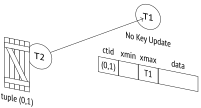
The second transaction only gets as far as the second step. For this reason, apart from locking the table and its own ID, it adds two more locks, which are also reflected in the pg_locks view: the tuple lock acquired at the first step and the lock of the ID of the second transaction requested at the second step:
The third transaction will get stuck on the first step. It will try to acquire a lock on the tuple and will stop at this point:
The fourth and all the subsequent transactions trying to update this row will not differ from the third transaction in this respect: all of them will be waiting on the same tuple lock.
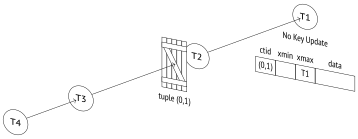
To get the full picture of the current waits, you can extend the pg_stat_activity view with the information on locking processes:
If the first transaction is aborted, everything will work as expected: all the subsequent transactions will move one step further without jumping the queue.
And yet it is more likely that the first transaction will be committed. At the Repeatable Read or Serializable isolation levels, it would result in a serialization failure, so the second transaction would have to be aborted7 (and all the subsequent transactions in the queue would get aborted too). But at the Read Committed isolation level the modified row will be re-read, and its update will be retried.
So, the first transaction is committed:
The second transaction wakes up and successfully completes the third and the fourth steps of the workflow:
As soon as the second transaction releases the tuple lock, the third one also wakes up, but it sees that the xmax field of the new tuple contains a different ID already. At this point, the above workflow is over. At the Read Committed isolation level, one more attempt to lock the row is performed,8 but it does not follow the outlined steps. The third transaction is now waiting for the second one to complete without trying to acquire a tuple lock:
The fourth transaction does the same:
Now both the third and the fourth transactions are waiting for the second one to complete, risking to get into a race condition. The queue has virtually fallen apart.
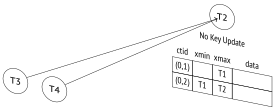
If other transactions had joined the queue while it still existed, all of them would have been dragged into this race.
Conclusion: it is not a good idea to update the same table row in multiple concurrent processes. Under high load, this hotspot can quickly turn into a bottleneck that causes performance issues.
Let’s commit all the started transactions.
Shared Modes
PostgreSQL acquires shared locks only for referential integrity checks. Using them in a high-load application can lead to resource starvation, and a two-level locking model cannot prevent such an outcome.
Let’s recall the steps a transaction should take to lock a row:
- If the
xmaxfield and hint bits indicate that the row is locked in the exclusive mode, acquire an exclusive heavyweight tuple lock.
- If required, wait for all the incompatible locks to be released by requesting a lock on the ID of the
xmaxtransaction (or several transactions ifxmaxcontains a multixact ID).
Write its own ID into
xmaxin the tuple header and set the required hint bits.Release the tuple lock if it was acquired in the first step.
The first two steps imply that if the locking modes are compatible, the transaction will jump the queue.
Let’s repeat our experiment from the very beginning.
Start the first transaction:
The row is now locked in a shared mode:
The second transaction tries to update the same row, but it is not allowed: Share and No Key Update modes are incompatible:
Waiting for the first transaction to complete, the second transaction is holding the tuple lock, just like in the previous example:
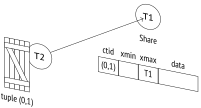
Now let the third transaction lock the row in a shared mode. Such a lock is compatible with the already acquired lock, so this transaction jumps the queue:
We have got two transactions locking the same row:
T1 T3
Share ctid xmin xmax T2 data (0,1) multi
tuple (0,1)
If the first transaction completes at this point, the second one will wake up to see that the row is still locked and will get back to the queue—but this time it will find itself behind the third transaction:
And only when the third transaction completes will the second one be able to perform an update (unless other shared locks appear within this time interval).
Foreign key checks are unlikely to cause any issues, as key attributes usually remain unchanged and Key Share can be used together with No Key Update. But in most cases, you should avoid shared row-level locks in applications.
13.5 No-Wait Locks
SQL commands usually wait for the requested resources to be freed. But sometimes it makes sense to cancel the operation if the lock cannot be acquired immediately. For this purpose, commands like SELECT, LOCK, and ALTER offer the NOWAIT clause.
Let’s lock a row:
The command with the NOWAIT clause immediately completes with an error if the requested resource is locked:
Such an error can be captured and handled by the application code.
The UPDATE and DELETE commands do not have the NOWAIT clause. Instead, you can try to lock the row using the SELECT FOR UPDATE NOWAIT command and then update or delete it if the attempt is successful.
In some rare cases, it may be convenient to skip the already locked rows and start processing the available ones right away. This is exactly what SELECT FOR does when run with the SKIP LOCKED clause:
In this example, the first (already locked) row was skipped, and the query locked and returned the second row.
This approach enables us to process rows in batches or set up parallel processing of event queues. However, avoid inventing other use cases for this command—most tasks can be addressed using much simpler methods. (p. 142)
Last but not least, you can avoid long waits by setting a timeout:
The command completes with an error because it has failed to acquire a lock within one second. A timeout can be set not only at the session level, but also at lower levels, for example, for a particular transaction.
This method prevents long waits during table processing when the command requiring an exclusive lock is executed under load. If an error occurs, this command can be retried after a while.
While statement_timeout limits the total time of operator execution, the lock_timeout parameter defines the maximum time that can be spent waiting on a lock.
13.6 Deadlocks
A transaction may sometimes require a resource that is currently being used by another transaction, which, in its turn, may be waiting on a resource locked by the third transaction, and so on. Such transactions get queued using heavyweight locks.
But occasionally a transaction already in the queue may need yet another resource, so it has to join the same queue again and wait for this resource to be released. A deadlock9 occurs: the queue now has a circular dependency that cannot resolve on its own.
For better visualization, let’s draw a wait-for graph. Its nodes represent active processes, while the edges shown as arrows point from the processes waiting on locks to the processes holding these locks. If the graph has a cycle, that is, a node can reach itself following the arrows, it means that a deadlock has occurred.
The illustrations here show transactions rather than processes. This substitution is usually acceptable because one transaction is executed by one process, and locks can only be acquired within a transaction. But in general, it is more correct to talk about processes, as some locks may not be released right away when the transaction is complete.
If a deadlock has occurred, and none of its participants has set a timeout, transactions will be waiting on each other forever. That’s why the lock manager10 performs automatic deadlock detection.
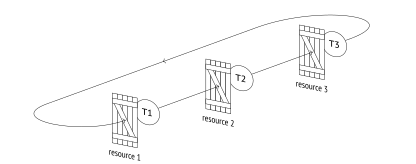
However, this check requires some effort, which should not be wasted each time a lock is requested (after all, deadlocks do not happen too often). So if the process makes an unsuccessful attempt to acquire a lock and falls asleep after joining the queue, PostgreSQL automatically sets a timeout as defined by the deadlock_timeout parameter.11 If the resource becomes available earlier—great, then the extra cost of the check will be avoided. But if the wait continues after the deadlock_timeout units of time, the waiting process wakes up and initiates the check.12 (default: 1s)
This check effectively consists in building a wait-for graph and searching it for cycles.13 To “freeze” the current state of the graph, PostgreSQL stops any processing of heavyweight locks for the whole duration of the check.
If no deadlocks are detected, the process falls asleep again; sooner or later its turn will come.
If a deadlock is detected, one of the transactions will be forced to terminate, thus releasing its locks and enabling other transactions to continue their execution. In most cases, it is the transaction initiating the check that gets interrupted, but if the cycle includes an autovacuum process that is not currently freezing tuples to prevent wraparound, the server terminates autovacuum as having lower priority.
Deadlocks usually indicate bad application design. To discover such situations, you have two things to watch out for: the corresponding messages in the server log and an increasing deadlocks value in the pg_stat_database table.
Deadlocks by Row Updates
Although deadlocks are ultimately caused by heavyweight locks, it is mostly row-level locks acquired in different order that lead to them.
Suppose a transaction is going to transfer $100 between two accounts. It starts by drawing this sum from the first account:
At the same time, another transaction is going to transfer $10 from the second account to the first one. It begins by drawing this sum from the second account:
Now the first transaction attempts to increase the amount in the second account but sees that the corresponding row is locked:
Then the second transaction tries to update the first account but also gets locked:
This circular wait will never resolve on its own. Unable to obtain the resource within one second, the first transaction initiates a deadlock check and gets aborted by the server:
Now the second transaction can continue. It wakes up and performs an update:
Let’s complete the transactions.
The right way to perform such operations is to lock resources in the same order. For example, in this particular case the accounts could have been locked in ascending order based on their numbers.
Deadlocks Between Two UPDATE Statements
In some cases deadlocks seem impossible, and yet they do occur.
We usually assume that SQL commands are atomic, but are they really? Let’s take a closer look at UPDATE: this command locks rows as they are being updated rather than all at once, and it does not happen simultaneously. So if one UPDATE command modifies several rows in one order while the other is doing the same in a different order, a deadlock can occur.
Let’s reproduce this scenario. First, we are going to build an index on the amount column, in descending order:
To be able to observe the process, we can write a function that slows things down:
The first UPDATE command is going to update all the tuples. The execution plan relies on a sequential scan of the whole table.
To make sure that the heap page stores the rows in ascending order based on the amount column, we have to truncate the table and insert the rows anew:
The sequential scan will update the rows in the same order (it is not always true for large tables though). (p. 156)
Let’s start the update:
Meanwhile, we are going to forbid sequential scans in another session:
As a result, the planner chooses an index scan for the next UPDATE command.
The second and third rows satisfy the condition; since the index is descending, the rows will get updated in the reverse order.
Let’s start the next update:
The pgrowlocks extension shows that the first operator has already updated the first row (0,1), while the second one has managed to update the last row (0,3):
(0,1) | 122883 | {"No Key Update"} first (0,3) | 122884 | {"No Key Update"} second
Another second passes. The first operator has updated the second row, and the other one would like to do it too, but it is not allowed.
(0,2) | 122883 | {"No Key Update"} the first one wins
Now the first operator would like to update the last table row, but it is already locked by the second operator. A deadlock has occurred.
One of the transactions is aborted:
And the other completes its execution:
Although such situations seem impossible, they do occur in high-load systems when batch row updates are performed.
postgresql.org/docs/14/explicit-locking.html#LOCKING-ROWS ↩︎
backend/access/heap/heapam.c, FreezeMultiXactId function ↩︎
backend/executor/nodeModifyTable.c, ExecUpdate function ↩︎
backend/access/heap/heapam_handler.c, heapam_tuple_lock function ↩︎
postgresql.org/docs/14/explicit-locking.html#LOCKING-DEADLOCKS ↩︎
backend/storage/lmgr/proc.c, ProcSleep function ↩︎
backend/storage/lmgr/proc.c, CheckDeadLock function ↩︎
14 Miscellaneous Locks
14.1 Non-Object Locks
To lock a resource that is not considered a relation, PostgreSQL uses heavyweight locks of the object type.1 You can lock almost anything that is stored in the system catalog: tablespaces, subscriptions, schemas, roles, policies, enumerated data types, and so on.
Let’s start a transaction that creates a table:
Now take a look at non-relation locks in the pg_locks table:
The locked resource is defined here by three values:
database — the oid of the database that contains the object being locked (or zero if this object is common to the whole cluster)
classid — the oid listed in pg_class that corresponds to the name of the system catalog table defining the type of the resource
objid — the oid listed in the system catalog table referenced by classid
The database value points to the internals database; it is the database to which the current session is connected. The classid column points to the pg_namespace table, which lists schemas.
Now we can decipher the objid:
Thus, PostgreSQL has locked the public schema to make sure that no one can delete it while the transaction is still running.
Similarly, object deletion requires exclusive locks on both the object itself and all the resources it depends on.2
14.2 Relation Extension Locks
As the number of tuples in a relation grows, PostgreSQL inserts new tuples into free space in the already available pages whenever possible. But it is clear that at some point it will have to add new pages, that is, to extend the relation. In terms of the physical layout, new pages get added to the end of the corresponding file (which, in turn, can lead to creation of a new file).
For new pages to be added by only one process at a time, this operation is protected by a special heavyweight lock of the extend type.3 Such a lock is also used by index vacuuming to forbid adding new pages during an index scan.
Relation extension locks behave a bit differently from what we have seen so far:
They are released as soon as the extension is created, without waiting for the transaction to complete.
They cannot cause a deadlock, so they are not included into the wait-for graph. (v. 9.6)
However, a deadlock check will still be performed if the procedure of extending a relation is taking longer than deadlock_timeout. It is not a typical situation, but it can happen if a large number of processes perform multiple insertions concurrently. In this case, the check can be called multiple times, virtually paralyzing normal system operation.
To minimize this risk, heap files are extended by several pages at once (in proportion to the number of processes awaiting the lock, but by not more than 512 pages per operation).4 An exception to this rule is B-tree index files, which are extended by one page at a time.5
14.3 Page Locks
A page-level heavyweight lock of the page type6 is applied only by GIN indexes, and only in the following case.
GIN indexes can speed up search of elements in compound values, such as words in text documents. They can be roughly described as B-trees that store separate words rather than the whole documents. When a new document is added, the index has to be thoroughly updated to include each word that appears in this document.
To improve performance, GIN indexes allow deferred insertion, which is controlled by the fastupdate storage parameter. New words are first quickly added into an unordered pending list, and after a while all the accumulated entries are moved into the main index structure. Since different documents are likely to contain duplicate words, this approach proves to be quite cost-effective. (default: on)
To avoid concurrent transfer of words by several processes, the index metapage is locked in the exclusive mode until all the words are moved from the pending list to the main index. This lock does not interfere with regular index usage.
Just like relation extension locks, page locks are released immediately when the task is complete, without waiting for the end of the transaction, so they never cause deadlocks.
14.4 Advisory Locks
Unlike other heavyweight locks (such as relation locks), advisory locks7 are never acquired automatically: they are controlled by the application developer. These locks are convenient to use if the application requires dedicated locking logic for some particular purpose.
Suppose we need to lock a resource that does not correspond to any database object (which we could lock using SELECT FOR or LOCK TABLE commands). In this case, the resource needs to be assigned a numeric ID. If the resource has a unique name, the easiest way to do it is to generate a hash code for this name:
PostgreSQL provides a whole class of functions for managing advisory locks.8 Their names begin with the pg_advisory prefix and can contain the following words that hint at the function purpose:
lock — acquire a lock
try — acquire a lock if it can be done without waits
unlock — release the lock
share — use a shared locking mode (by default, the exclusive mode is used)
xact — acquire and hold a lock till the end of the transaction (by default, the lock is held till the end of the session)
Let’s acquire an exclusive lock until the end of the session:
For advisory locks to actually work, other processes must also observe the established order when accessing the resource; it must be guaranteed by the application.
The acquired lock will be held even after the transaction is complete:
Once the operation on the resource is over, the lock has to be explicitly released:
14.5 Predicate Locks
The term predicate lock appeared as early as the first attempts to implement full isolation based on locks.9 The problem confronted at that time was that locking all the rows to be read and updated still could not guarantee full isolation. Indeed, if new rows that satisfy the filter condition get inserted into the table, they will become phantoms. (p. 42)
For this reason, it was suggested to lock conditions (predicates) rather than rows. If you run a query with the a > 10 predicate, locking this predicate will not allow adding new rows into the table if they satisfy this condition, so phantoms will be avoided. The trouble is that if a query with a different predicate appears, such as a < 20, you have to find out whether these predicates overlap. In theory, this problem is algorithmically unsolvable; in practice, it can be solved only for a very simple class of predicates (like in this example).
In PostgreSQL, the Serializable isolation level is implemented in a different way: it uses the Serializable Snapshot Isolation (SSI) protocol.10 The term predicate lock still remains, but its sense has radically changed. In fact, such “locks” do not lock anything: they are used to track data dependencies between different transactions.
It is proved that snapshot isolation at the Repeatable Read level allows no anomalies except for the write skew and the read-only transaction anomaly. These two anomalies result in (p. 55)
certain patterns in the data dependence graph that can be discovered at a relatively low cost.
The problem is that we must differentiate between two types of dependencies:
The first transaction reads a row that is later updated by the second transaction (RW dependency).
The first transaction modifies a row that is later read by the second transaction (WR dependency).
WR dependencies can be detected using regular locks, but RW dependencies have to be tracked via predicate locks. Such tracking is turned on automatically at the Serializable isolation level, and that’s exactly why it is important to use this level for all transactions (or at least all the interconnected ones). If any transaction is running at a different level, it will not set (or check) predicate locks, so the Serializable level will be downgraded to Repeatable Read.
I would like to stress once again that despite their name, predicate locks do not lock anything. Instead, a transaction is checked for “dangerous” dependencies when it is about to be committed, and if PostgreSQL suspects an anomaly, this transaction will be aborted.
Let’s create a table with an index that will span several pages (it can be achieved by using a low fillfactor value):
If the query performs a sequential scan, a predicate lock is acquired on the whole table (even if some of the rows do not satisfy the provided filter conditions).
Although predicate locks have their own infrastructure, the pg_locks view displays them together with heavyweight locks. All predicate locks are always acquired in the SIRead mode, which stands for Serializable Isolation Read:
Note that predicate locks may be held longer than the transaction duration, as they are used to track dependencies between transactions. But anyway, they are managed automatically.
If the query performs an index scan, the situation improves. For a B-tree index, it is enough to set a predicate lock on the read heap tuples and on the scanned leaf pages of the index. It will “lock” the whole range that has been read, not only the exact values.
The number of leaf pages corresponding to the already scanned tuples can change: for example, an index page can be split when new rows get inserted into the table. However, PostgreSQL takes it into account and locks newly appeared pages too:
Each read tuple is locked separately, and there may be quite a few of such tuples. Predicate locks use their own pool allocated at the server start. The total number of predicate locks is limited by the value of max_pred_locks_per_transaction parameter multiplied by max_connections (despite the parameter names, predicate locks are not being counted per separate transactions). (default: 64) (default: 100)
Here we get the same problem as with row-level locks, but it is solved in a different way: lock escalation is applied.11
As soon as the number of tuple locks related to one page exceeds the value of the max_pred_locks_per_page parameter, they are replaced by a single page-level lock. (v. 10) (default: 2)
Instead of three locks of the tuple type we now have one lock of the page type:
Escalation of page-level locks follows the same principle. If the number of such locks for a particular relation exceeds the max_pred_locks_per_relation value, they get replaced by a single relation-level lock. (If this parameter is set to a negative value, the threshold is calculated as max_pred_locks_per_transaction divided by the absolute value of max_pred_locks_per_relation; thus, the default threshold is 32). (v. 10) (default: -2) (default: 64)
Lock escalation is sure to lead to multiple false-positive serialization errors, which negatively affects system throughput. So you have to find an appropriate balance between performance and spending the available RAM on locks.
Predicate locks support the following index types:
B-trees
hash indexes, GiST, and GIN (v. 11)
If an index scan is performed, but the index does not support predicate locks, the whole index will be locked. It is only to be expected that the number of transactions aborted for no good reason will also increase in this case.
For more efficient operation at the Serializable level, it makes sense to explicitly declare read-only transactions as such using the READ ONLY clause. If the lock manager sees that a read-only transaction will not conflict with other transactions,12 it can release the already set predicate locks and refrain from acquiring new ones. And if such a transaction is also declared DEFERRABLE, the read-only transaction anomaly will be avoided too. (p. 59)
backend/storage/lmgr/lmgr.c, LockDatabaseObject & LockSharedObject functions ↩︎
backend/catalog/dependency.c, performDeletion function ↩︎
backend/storage/lmgr/lmgr.c, LockRelationForExtension function ↩︎
backend/access/heap/hio.c, RelationAddExtraBlocks function ↩︎
backend/access/nbtree/nbtpage.c, _bt_getbuf function ↩︎
backend/storage/lmgr/lmgr.c, LockPage function ↩︎
postgresql.org/docs/14/explicit-locking.html#ADVISORY-LOCKS ↩︎
postgresql.org/docs/14/functions-admin.html#FUNCTIONS-ADVISORY-LOCKS ↩︎
K. P. Eswaran, J. N. Gray, R. A. Lorie, I. L. Traiger. The notions of consistency and predicate locks in a database system ↩︎
backend/storage/lmgr/README-SSI backend/storage/lmgr/predicate.c ↩︎
backend/storage/lmgr/predicate.c, PredicateLockAcquire function ↩︎
backend/storage/lmgr/predicate.c, SxactIsROSafe macro ↩︎
15 Locks on Memory Structures
15.1 Spinlocks
To protect data structures in shared memory, PostgreSQL uses several types of lighter and less expensive locks rather than regular heavyweight ones.
The simplest locks are  spinlocks. They are usually acquired for a very short time interval (no longer than several CPU cycles) to protect particular memory cells from concurrent updates.
Spinlocks are based on atomic CPU instructions, such as compare-and-swap.1 They only support the exclusive locking mode. If the required resource is already locked, the process busy-waits, repeating the command (it “spins” in the loop, hence the name). If the lock cannot be acquired within the specified time interval, the process pauses for a while and then starts another loop.
This strategy makes sense if the probability of a conflict is estimated as very low, so after an unsuccessful attempt the lock is likely to be acquired within several instructions.
Spinlocks have neither deadlock detection nor instrumentation. From the practical standpoint, we should simply know about their existence; the whole responsibility for their correct implementation lies with PostgreSQL developers.
15.2 Lightweight Locks
Next, there are so-called  lightweight locks, or lwlocks.2 Acquired for the time needed to process a data structure (for example, a hash table or a list of pointers), lightweight locks are typically short; however, they can take longer when used to protect I/O operations.
Lightweight locks support two modes: exclusive (for data modification) and shared (for read-only operations). There is no queue as such: if several processes are waiting on a lock, one of them will get access to the resource in a more or less random fashion. In high-load systems with multiple concurrent processes, it can lead to some unpleasant effects.
Deadlock checks are not provided; we have to trust PostgreSQL developers that lightweight locks are implemented correctly. However, these locks do have instrumentation, so, unlike spinlocks, they can be observed.
15.3 Examples
To get some idea of how and where spinlocks and lightweight locks can be used, let’s take a look at two shared memory structures: buffer cache and WAL buffers. I will name only some of the locks; the full picture is too complex and is likely to interest only PostgreSQL core developers.
Buffer Cache
To access a hash table used to locate a particular buffer in the cache, the process must acquire a 
BufferMapping lightweight lock either in the shared mode for reading or in the exclusive mode if any modifications are expected. (p. 147)
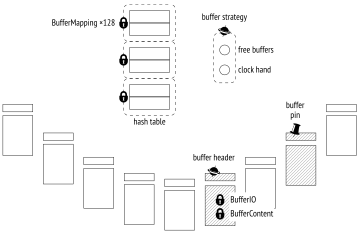
The hash table is accessed very frequently, so this lock often becomes a bottleneck. To maximize granularity, it is structured as a tranche of 128 individual lightweight locks, each protecting a separate part of the hash table.3
A hash table lock was converted into a tranche of 16 locks as early as 2006, in PostgreSQL 8.2; ten years later, when version 9.5 was released, the size of the tranche was increased to 128, but it may still be not enough for modern multi-core systems.
To get access to the buffer header, the process acquires a 
buffer header spinlock4 (the name is arbitrary, as spinlocks have no user-visible names). Some operations, such as incrementing the usage counter, do not require explicit locks and can be performed using atomic CPU instructions.
To read a page in a buffer, the process acquires a 
BufferContent lock in the header of this buffer.5 It is usually held only while tuple pointers are being read; later on, the protection provided by  buffer pinning will be enough. If the buffer content has to be modified, the
 BufferContent lock must be acquired in the exclusive mode. (p. 148)
When a buffer is read from disk (or written to disk), PostgreSQL also acquires a 
BufferIO lock in the buffer header; it is virtually an attribute used as a lock rather than an actual lock.6 It signals other processes requesting access to this page that they have to wait until the I/O operation is complete.
The pointer to free buffers and the clock hand of the eviction mechanism are protected by a single common 
buffer strategy spinlock.7
WAL Buffers
WAL cache also uses a hash table to map pages to buffers. Unlike the buffer cache hash table, it is protected by a single 
WALBufMapping lightweight lock because WAL cache is smaller (it usually takes of the buffer cache size) and buffer access is more ordered.8
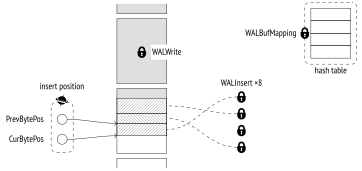
Writing of WAL pages to disk is protected by a 
WALWrite lightweight lock, which ensures that this operation is performed by one process at a time.
To create a WAL entry, the process first reserves some space within the WAL page and then fills it with data. Space reservation is strictly ordered; the process must acquire an 
insert position spinlock that protects the insertion pointer.9 But once the space is reserved, it can be filled by several concurrent processes. For this purpose, each process must acquire any of the eight lightweight locks constituting the 
WALInsert tranche.10
15.4 Monitoring Waits
Without doubt, locks are indispensable for correct PostgreSQL operation, but they can lead to undesirable waits. It is useful to track such waits to understand their origin.
The easiest way to get an overview of long-term locks is to turn the log_lock_waits parameter on; it enables extensive logging of all the locks that cause a transaction to wait for more than deadlock_timeout. This data is displayed when a deadlock check completes, hence the parameter name. (default: off) (default: 1s) (p. 225)
However, the pg_stat_activity view provides much more useful and complete information. Whenever a process—either a system process or a backend—cannot proceed with its task because it is waiting for something, this wait is reflected in the wait_event_type and wait_event fields, which show the type and name of the wait, respectively. (v. 9.6)
All waits can be classified as follows.11
Waits on various locks constitute quite a large group:
Lock — heavyweight locks
LWLock — lightweight locks
BufferPin — pinned buffers
But processes can be waiting for other events too:
IO — input/output, when it is required to read or write some data
Client — data sent by the client (psql spends in this state most of the time)
IPC — data sent by another process
Extension — a specific event registered by an extension
Sometimes a process simply does not perform any useful work. Such waits are usually “normal,” meaning that they do not indicate any issues. This group comprises the following waits:
Activity — background processes in their main cycle
Timeout — timer
Locks of each wait type are further classified by wait names. For example, waits on lightweight locks get the name of the lock or the corresponding tranche.12
You should bear in mind that the pg_stat_activity view displays only those waits that are handled in the source code in an appropriate way.13 Unless the name of the wait appears in this view, the process is not in the state of wait of any known type. Such time should be considered unaccounted for; it does not necessarily mean that the process is not waiting on anything—we simply do not know what is happening at the moment.
Here all the background processes were idle when the view was sampled, while the client backend was busy executing the query and was not waiting on anything.
15.5 Sampling
Unfortunately, the pg_stat_activity view shows only the current information on waits; statistics are not accumulated. The only way to collect wait data over time is to sample the view at regular intervals.
We have to take into account the stochastic nature of sampling. The shorter the wait as compared to the sampling interval, the lower the chance to detect this wait. Thus, longer sampling intervals require more samples to reflect the actual state of things (but as you increase the sampling rate, the overhead also rises). For the same reason, sampling is virtually useless for analyzing short-lived sessions.
PostgreSQL provides no built-in tools for sampling; however, we can still try it out using the pg_wait_sampling14 extension. To do so, we have to specify its library in the shared_preload_libraries parameter and restart the server:
Now let’s install the extension into the database:
This extension can display the history of waits, which is saved in its ring buffer. However, it is much more interesting to get the waiting profile—the accumulated statistics for the whole duration of the session.
For example, let’s take a look at the waits during benchmarking. We have to start the pgbench utility and determine its process ID while it is running:
Once the test is complete, the waits profile will look as follows:
By default (set by the pg_wait_sampling.profile_period parameter) samples are taken 100 times per second. So to estimate the duration of waits in seconds, you have to divide the count value by 100. (default: 10ms)
In this particular case, most of the waits are related to flushing WAL entries to disk. It is a good illustration of the unaccounted-for wait time: the WALSync event was not instrumented until PostgreSQL 12; for lower versions, a waits profile would not contain the first row, although the wait itself would still be there. (v. 12)
And here is how the profile will look like if we artificially slow down the file system for each I/O operation to take 0.1 seconds (I use slowfs15 for this purpose):
Now I/O operations are the slowest ones—mainly those that are related to writing WAL files to disk in the synchronous mode. Since WAL writing is protected by a WALWrite lightweight lock, the corresponding row also appears in the profile.
Clearly, the same lock is acquired in the previous example too, but since the wait is shorter than the sampling interval, it either is sampled very few times or does not make it into the profile at all. It illustrates once again that to analyze short waits you have to sample them for quite a long time.
backend/storage/buffer/bufmgr.c include/storage/buf_internals.h, BufMappingPartitionLock function ↩︎
backend/storage/buffer/bufmgr.c, LockBufHdr function ↩︎
backend/storage/buffer/bufmgr.c, StartBufferIO function ↩︎
backend/access/transam/xlog.c, AdvanceXLInsertBuffer function ↩︎
backend/access/transam/xlog.c, ReserveXLogInsertLocation function ↩︎
backend/access/transam/xlog.c, WALInsertLockAcquire function ↩︎
postgresql.org/docs/14/monitoring-stats.html#WAIT-EVENT-TABLE ↩︎
postgresql.org/docs/14/monitoring-stats.html#WAIT-EVENT-LWLOCK-TABLE ↩︎
Part IV Query Execution
16 Query Execution Stages
16.1 Demo Database
The examples in the previous parts of the book were based on simple tables with only a handful of rows. This and subsequent parts deal with query execution, which is more demanding in this respect: we need related tables that have a much larger number of rows. Instead of inventing a new data set for each example, I took an existing demo database that illustrates passenger air traffic in Russia.1 It has several versions; we will use the bigger one created on August 15, 2017. To install this version, you have to extract the file containing the database copy from the archive2 and run this file in psql.
When developing this demo database, we tried to make its schema simple enough to be understood without extra explanations; at the same time, we wanted it to be complex enough to allow writing meaningful queries. The database is filled with true-to-life data, which makes the examples more comprehensive and should be interesting to work with.
Here I will cover the main database objects only briefly; if you would like to review the whole schema, you can take a look at its full description referenced in the footnote.
The main entity is a booking (mapped to the bookings table). One booking can include several passengers, each with a separate electronic ticket (tickets). A passenger does not constitute a separate entity; for the purpose of our experiments, we will assume that all passengers are unique.
Each ticket includes one or more flight segments (mapped to the ticket_flights table). A single ticket can have several flight segments in two cases: either it is a round-trip ticket, or it is issued for connecting flights. Although there is no corresponding constraint in the schema, all tickets in a booking are assumed to have the same flight segments.
Each flight (flights) goes from one airport (airports) to another. Flights with the same flight number have the same points of departure and destination but different departure dates.
The routes view is based on the flights table; it displays the information on routes that does not depend on particular flight dates.
At check-in, each passenger is issued a boarding pass (boarding_passes) with a seat number. A passenger can check in for a flight only if this flight is included into the ticket. Flight-seat combinations must be unique, so it is impossible to issue two boarding passes for the same seat.
The number of seats (seats) in an aircraft and their distribution between different travel classes depend on the particular model of the aircraft (aircrafts) that performs the flight. It is assumed that each aircraft model can have only one cabin configuration.
Some tables have surrogate primary keys, while others use natural ones (some of them being composite). It is done solely for demonstration purposes and is by no means an example to follow.
The demo database can be thought of as a dump of a real system: it contains a snapshot of data taken at a particular time in the past. To display this time, you can call the bookings.now() function. Use this function in demo queries that would demand the now() function in real life.
The names of airports, cities, and aircraft models are stored in the airports_data and aircrafts_data tables; they are provided in two languages, English and Russian. To construct examples for this chapter, I will typically query the airports and aircrafts views shown in the entity-relationship diagram; these views choose the output language based on the bookings.lang parameter value. The names of some base tables can still appear in query plans though. (default: en)
16.2 Simple Query Protocol
A simple version of the client-server protocol3 enables SQL query execution: it sends the text of a query to the server and gets the full execution result in response, no matter how many rows it contains.4 A query sent to the server passes several stages: it is parsed, transformed, planned, and then executed.
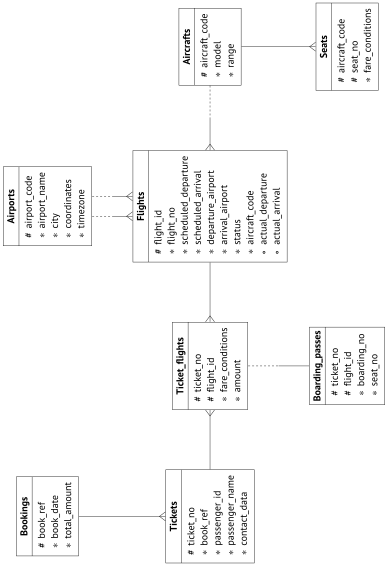
Parsing
First of all, PostgreSQL has to parse5 the query text to understand what needs to be executed.
Lexical and syntactic analysis. The lexer splits the query text into a set of lexemes6 (such as keywords, string literals, and numeric literals), while the parser validates this set against the SQL language grammar.7 PostgreSQL relies on standard parsing tools, namely Flex and Bison utilities.
The parsed query is reflected in the backend’s memory as an abstract syntax tree.
For example, let’s take a look at the following query:
The lexer singles out five keywords, five identifiers, a string literal, and three single-letter lexemes (a comma, an equals sign, and a semicolon). The parser uses these lexemes to build the parse tree, which is shown in the illustration below in a very simplified form. The captions next to the tree nodes specify the corresponding parts of the query:
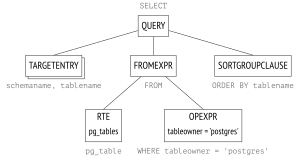
A rather obscure RTE abbreviation stands for Range Table Entry. PostgreSQL source code uses the term range table to refer to tables, subqueries, join results—in other words, to any sets of rows that can be processed by SQL operators.8
Semantic analysis. The purpose of semantic analysis9 is to find out whether the database contains any tables or other objects that this query refers to by name, and whether the user has permission to access these objects. All the information required for semantic analysis is stored in the system catalog. (p. 21)
Having received the parse tree, the semantic analyzer performs its further restructuring, which includes adding references to specific database objects, data types, and other information.
If you enable the debug_print_parse parameter, you can view the full parse tree in the server log, but it has little practical sense.
Transformation
At the next stage, the query can be transformed (rewritten).10
PostgreSQL core uses transformations for several purposes. One of them is to replace the name of the view in the parse tree with the subtree corresponding to the base query of this view.
Another case of using transformations is row-level security implementation.11
The SEARCH and CYCLE clauses of recursive queries also get transformed during this stage.12 (v. 14)
In the example above, pg_tables is a view; if we placed its definition into the query text, it would look as follows:
However, the server does not process the text representation of the query; all manipulations are performed on the parse tree. The illustration shows a reduced version of the transformed tree (you can view its full version in the server log if you enable the debug_print_rewritten parameter).
The parse tree reflects the syntactic structure of the query, but it says nothing about the order in which the operations should be performed.
PostgreSQL also supports custom transformations, which the user can implement via the rewrite rule system.13
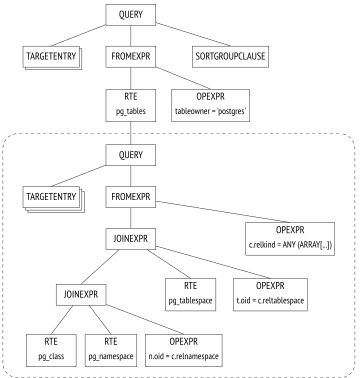
The rule system support was proclaimed as one of the main objectives of Postgres development;14 it was still an academic project when the rules were first implemented, but since then they have
been redesigned multiple times. The rule system is a very powerful mechanism, but it is rather hard to comprehend and debug. It was even proposed to remove the rules from PostgreSQL altogether, but the idea did not find unanimous support. In most cases, it is safer and easier to use triggers instead of rules.
Planning
SQL is a declarative language: queries specify what data to fetch, but not how to fetch it.
Any query has several execution paths. Each operation shown in the parse tree can be completed in a number of ways: for example, the result can be retrieved by reading the whole table (and filtering out redundancies), or by finding the required rows via an index scan. Data sets are always joined in pairs, so there is a huge number of options that differ in the order of joins. Besides, there are various join algorithms: for example, the executor can scan the rows of the first data set and search for the matching rows in the other set, or both data sets can be first sorted and then merged together. For each algorithm, we can find a use case where it performs better than others.
The execution times of optimal and non-optimal plans can differ by orders of magnitude, so the planner15 that optimizes the parsed query is one of the most complex components of the system.
Plan tree. The execution plan is also represented as a tree, but its nodes deal with physical operations on data rather than logical ones.
If you would like to explore full plan trees, you can dump them into the server log by enabling the debug_print_plan parameter. But in practice it is usually enough to view the text representation of the plan displayed by the EXPLAIN command.16
The following illustration highlights the main nodes of the tree. It is exactly these nodes that are shown in the output of the EXPLAIN command provided below.
For now, let’s pay attention to the following two points:
The tree contains only two queried tables out of three: the planner saw that one of the tables is not required for retrieving the result and removed it from the plan tree.
For each node of the tree, the planner provides the estimated
costand the number ofrowsexpected to be processed.
Seq Scan nodes shown in the query plan correspond to reading the table, while the Nested Loop node represents the join operation. (p. 296) (p. 351)
![Planning: PLANNEDSTMT; SORT; TARGETENTRYNESTLOOP; SEQSCANSEQSCANOPEXPR; TARGETENTRY; pg\_classpg\_namespacen.oid = c.relnamespace; OPEXPR; relkind = ANY (‘r,p’::“char”\[\]) AND pg\_get\_userbyid(relowner) = ‘postgres’::name](/images/internal/p258-04.svg)
Plan search. PostgreSQL uses a cost-based optimizer;17 it goes over potential plans and estimates the resources required for their execution (such as I/O operations or CPU cycles). Normalized to a numeric value, this estimation is called the cost of the plan. Of all the considered plans, the one with the lowest cost is selected.
The problem is that the number of potentially available plans grows exponentially with the number of joined tables, so it is impossible to consider them all—even for relatively simple queries. The search is typically narrowed down using the dynamic programming algorithm combined with some heuristics. It allows the planner to find a mathematically accurate solution for queries with a larger number of tables within acceptable time.
An accurate solution does not guarantee that the selected plan is really the optimal one, as the planner uses simplified mathematical models and may lack reliable input data.
Managing the order of joins. A query can be structured in a way that limits the search scope to some extent (at a risk of missing the optimal plan).
Common table expressions and the main query can be optimized separately; to guarantee such behavior, you can specify the
MATERIALIZEDclause.18 (v. 12)Subqueries run within non-SQL functions are always optimized separately. (SQL functions can sometimes be inlined into the main query.19)
If you set the join_collapse_limit parameter and use explicit
JOINclauses in the query, the order of some joins will be defined by the syntax structure of the query; the from_collapse_limit parameter has the same effect on subqueries.20
The latter point may have to be explained. Let’s take a look at the query that does not specify any explicit joins for tables listed in the FROM clause:
Here the planner will have to consider all the possible pairs of joins. The query is represented by the following part of the parse tree (shown schematically):
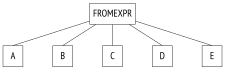
In the next example, joins have a certain structure defined by the JOIN clause:
The parse tree reflects this structure:
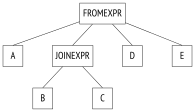
The planner typically flattens the join tree, so that it looks like the one in the first example. The algorithm recursively traverses the tree and replaces each JOINEXPR node with a flat list of its elements.21
However, such collapsing is performed only if the resulting flat list has no more than join_collapse_limit elements. In this particular case, the JOINEXPR node would not be collapsed if the join_collapse_limit value were less than five. (default: 8)
For the planner, it means the following:
Table
Bmust be joined with tableC(or vice versa,Cmust be joined withB; the order of joins within a pair is not restricted).Tables
A,D,Eand the result of joiningBandCcan be joined in any order.
If the join_collapse_limit parameter is set to one, the order defined by explicit JOIN clauses is preserved.
As for FULL OUTER JOIN operands, they are never collapsed, regardless of the value of the join_collapse_limit parameter.
The from_collapse_limit parameter controls subquery flattening in a similar way. Although subqueries do not look like JOIN clauses, the similarity becomes apparent at the parse tree level. (default: 8)
Here is a sample query:
The corresponding join tree is shown below. The only difference here is that this tree contains the FROMEXPR node instead of JOINEXPR (hence the parameter name).
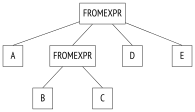
Genetic query optimization. Once flattened, the tree may contain too many elements at one level—either tables or join results, which have to be optimized separately. Planning time depends exponentially on the number of data sets that have to be joined, so it can grow beyond all reasonable limits.
If the geqo parameter is enabled and the number of elements at one level exceeds the geqo_threshold value, the planner will use the genetic algorithm to optimize the query.22 This algorithm is much faster than its dynamic programming counterpart, but it cannot guarantee that the found plan will be optimal. So the rule of thumb is to avoid using the genetic algorithm by reducing the number of elements that have to be optimized. (default: on) (default: 12)
The genetic algorithm has several configurable parameters,23 but I am not going to cover them here.
Choosing the best plan. Whether the plan can be considered optimal or not depends on how a particular client is going to use the query result. If the client needs the full result at once (for example, to create a report), the plan should optimize retrieval of all the rows. But if the priority is to return the first rows as soon as possible (for example, to display them on screen), the optimal plan might be completely different.
To make this choice, PostgreSQL calculates two components of the cost:
The first component (the startup cost) represents the price you pay to prepare for node execution, while the second component (the total cost) comprises all the expenses incurred by fetching the result.
It is sometimes stated that the startup cost is the cost of retrieving the first row of the result set, but it is not quite accurate.
To single out the preferred plans, the optimizer checks whether the query uses a cursor (either via the DECLARE command provided in SQL or declared explicitly in PL/pgSQL).24 If not, the client is assumed to need the whole result at once, and the optimizer chooses the plan with the least total cost.
If the query is executed with a cursor, the selected plan must optimize retrieval of only cursor_tuple_fraction of all rows. To be more exact, PostgreSQL chooses the plan with the smallest value of the following expression:25 (default: 0.1)
startup cost + cursor_tuple_fraction (total cost − startup cost)
An outline of cost estimation. To estimate the total cost of a plan, we have to get cost estimations for all its nodes. The cost of a node depends on its type (it is obvious that the cost of reading heap data is not the same as the sorting cost) and on the amount of data processed by this node (larger data volumes typically incur higher costs). While node types are known, the amount of data can only be projected based on the estimated cardinality of input sets (the number of rows the node takes as input) and the selectivity of the node (the fraction of rows remaining at the output). These calculations rely on the collected statistics, such as table sizes and data distribution in table columns. (p. 271)
Thus, the performed optimization depends on correctness of statistical data that is gathered and updated by autovacuum.
If cardinality estimation is accurate for each node, the calculated cost is likely to adequately reflect the actual cost. The main planning flaws usually result from incorrect estimation of cardinality and selectivity, which can be caused by inaccurate or outdated statistics, inability to use it, or—to a lesser extent—by imperfect planning models.
Cardinality estimation. To calculate the cardinality of a node, the planner has to recursively complete the following steps:
Estimate the cardinality of each child node and assess the number of input rows that the node will receive from them.
Estimate the selectivity of the node, that is, the fraction of input rows that will remain at the output.
The cardinality of the node is the product of these two values.
Selectivity is represented by a number from 0 to 1. The smaller the number, the higher the selectivity, and vice versa, a number that is close to one denotes low selectivity. It may seem illogical, but the idea is that a highly selective condition rejects almost all the rows, while the one that dismisses only a few has low selectivity.
First, the planner estimates cardinalities of leaf nodes that define data access methods. These calculations rely on the collected statistics, such as the total size of the table.
Selectivity of filter conditions depends on their types. In the most trivial case, it can be assumed to be a constant value, although the planner tries to use all the available information to refine the estimation. In general, it is enough to know how to estimate simple filter conditions; if a condition includes logical operations, its selectivity is calculated by the following formulas:26
selx and y = selx sely selx or y = 1 −(1 − selx)(1 − sely) = selx + sely − selx sely
Unfortunately, these formulas assume that predicates x and y do not depend on each other. For correlated predicates, such estimations will be inaccurate. (p. 288)
To estimate the cardinality of joins, the planner has to get the cardinality of the Cartesian product (that is, the product of cardinalities of two data sets) and estimate the selectivity of join conditions, which is again dependent on condition types.
Cardinality of other nodes (such as sorting or aggregation) is estimated in a similar way.
It is important to note that incorrect cardinality estimation for lower plan nodes affects all the subsequent calculations, leading to inaccurate total cost estimation and a poor plan choice. To make things worse, the planner has no statistics on join results, only on tables.
Cost estimation. The process of estimating the cost is also recursive. To calculate the cost of a subtree, it is required to calculate and sum up the costs of all its child nodes and then add the cost of the parent node itself.
To estimate the cost of a node, PostgreSQL applies the mathematical model of the operation performed by this node, using the already estimated node cardinality as input. For each node, both startup and total costs are calculated.
Some operations have no prerequisites, so their execution starts immediately; such nodes have zero startup cost.
Other operations, on the contrary, need to wait for some preliminary actions to complete. For example, a sort node usually has to wait for all the data from its child nodes before it can proceed to its own tasks. The startup cost of such nodes is usually higher than zero: this price has to be paid even if the above node (or the client) needs only one row of the whole output.
All calculations performed by the planner are simply estimations, which may have nothing to do with the actual execution time. Their only purpose is to enable comparison of different plans for the same query in the same conditions. In other cases, it makes no sense to compare queries (especially different ones) in terms of their cost. For example, the cost could have been underestimated because of outdated statistics; once the statistics are refreshed, the calculated figure may rise, but since the estimation becomes more accurate, the server will choose a better plan.
Execution
The plan built during query optimization now has to be executed.27
The executor opens a portal in the backend’s memory;28 it is an object that keeps the state of the query currently being executed. This state is represented as a tree that repeats the structure of the plan tree. The nodes of this tree operate like an assembly line, requesting and sending rows from one another.
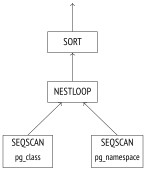
Query execution starts at the root. The root node (which represents the SORT operation in this example) pulls the data from its child node. Having received all the rows, it sorts them and passes them on to the client.
Some nodes (like the NESTLOOP node shown in this illustration) join data sets received from different sources. Such a node pulls the data from two child nodes, and, having received a pair of rows that satisfy the join condition, passes the resulting row upwards right away (unlike sorting, which has to get all the rows first). At this point, the execution of the node is interrupted until its parent requests the next row. If only a partial result is required (for example, there is a LIMIT clause in the query), the operation will not be performed in full.
The two SEQSCAN leaf nodes of the tree are responsible for table scans. When the parent node requests the data from these nodes, they fetch the subsequent row from the corresponding table.
Thus, some nodes do not store any rows, passing them upwards immediately, but others (such as SORT) have to keep potentially large volumes of data. For this purpose, a work_mem chunk is allocated in the backend’s memory; if it is not enough, the remaining data is spilled into temporary files on disk.29 (default: 4MB)
A plan can have several nodes that need a data storage, so PostgreSQL may allocate several memory chunks, each of the work_mem size. The total size of RAM that a query can use is not limited in any way.
16.3 Extended Query Protocol
When using the simple query protocol, each command (even if it is being repeated multiple times) has to go through all the aforementioned stages:
1 parsing
2 transformation
3 planning
4 execution
However, there is no point in parsing the same query time and again. Repeated parsing of queries that differ only in constants does not make much sense either—the parse tree structure still remains the same.
Another downside of the simple query protocol is that the client receives the whole result at once, regardless of the number of rows it may contain.
In general, it is possible to get over these limitations using SQL commands. To deal with the first one, you can PREPARE the query before running the EXECUTE command; the second concern can be addressed by creating a cursor with DECLARE and returning rows via FETCH. But in this case, naming of these newly created objects must be handled by the client, while the server gets additional overhead of parsing extra commands.
The extended client-server protocol provides an alternative solution, enabling precise control over separate operator execution stages at the command level of the protocol itself.
Preparation
During the preparation stage, the query is parsed and transformed as usual, but the resulting parse tree is kept in the backend’s memory.
PostgreSQL has no global cache for queries. The disadvantage of this architecture is obvious: each backend has to parse all the incoming queries, even if the same query has been already parsed by another backend. But there are some benefits too. Global cache can easily become a bottleneck because of locks. A client running multiple small but different queries (like the ones varying only in constants) generates much traffic and can negatively affect performance of the whole instance. In PostgreSQL, queries are parsed locally, so there is no impact on other processes. (p. 240)
A prepared query can be parameterized. Here is a simple example using SQL commands (although it is not the same as preparation at the protocol level, the ultimate effect is the same):
All the named prepared statements are shown in the pg_prepared_statements view:
You will not find any unnamed statements here (the ones that use the extended query protocol or PL/pgSQL). The statements prepared by other backends are not displayed either: it is impossible to access the other session’s memory.
Parameter Binding
Before a prepared statement gets executed, the actual parameter values have to be bound.
The advantage of binding parameters in prepared statements over concatenating literals with query strings is that it makes SQL injections absolutely impossible: a bound parameter value cannot modify the already built parse tree in any way. To reach the same security level without prepared statements, you would have to carefully escape each value received from an untrusted source.
Planning and Execution
When it comes to prepared statement execution, query planning is performed based on the actual parameter values; then the plan is passed on to the executor.
Different parameter values may imply different optimal plans, so it is important to take the exact values into account. For example, when looking for expensive bookings, the planner assumes that there are not so many matching rows and uses an index scan:
But if the provided condition is satisfied by all the bookings, there is no point in using an index, as the whole table has to be scanned:
In some cases, the planner may keep both the parse tree and the query plan to avoid repeated planning. Such a plan does not take parameter values into account, so it is called a generic plan (as compared to custom plans based on the actual values).30
An obvious case when the server can use a generic plan without compromising performance is a query with no parameters.
The first five optimizations of parameterized prepared statements always rely on the actual parameter values; the planner calculates the average cost of custom plans based on these values. Starting from the sixth execution, if the generic plan turns out to be more efficient than custom plans on average (taking into account that custom plans have to be built anew every time),31 the planner keeps the generic plan and continues using it, skipping the optimization stage.
The plane prepared statement has already been executed once. After the next three executions, the server still uses custom plans—you can tell by the parameter value in the query plan:
After the fifth execution, the planner switches to the generic plan: it does not differ from the custom ones and has the same cost, but the backend can build it once and skip the optimization stage, thus reducing planning overhead. The EXPLAIN command now shows that the parameter is referred to by position rather than by its value:
We can easily imagine an unhappy turn of events when the first several custom plans are more expensive than the generic plan; subsequent plans could have been more efficient, but the planner will not consider them at all. Besides, it compares estimations rather than actual costs, which can also lead to miscalculations.
However, if the planner makes a mistake, you can override the automatic decision and select either the generic or a custom plan by setting the plan_cache_mode parameter accordingly: (v. 12) (default: auto)
Among other things, the pg_prepared_statements view shows statistics on chosen plans: (v. 14)
Getting the Results
The extended query protocol allows retrieving data in batches rather than all at once. SQL cursors have almost the same effect (except that there is some extra work for the server, and the planner optimizes fetching of the first cursor_tuple_fraction rows, not the whole result set):
If the query returns many rows and the client needs them all, the system throughput highly depends on the batch size. The more rows in a batch, the less communication overhead is incurred by accessing the server and getting the response. But as the batch size grows, these benefits become less tangible: while the difference between fetching rows one by one and in batches of ten rows can be enormous, it is much less noticeable if you compare batches of 100 and 1000 rows.
backend/tcop/postgres.c, exec_simple_query function ↩︎
postgresql.org/docs/14/parser-stage.html backend/parser/README ↩︎
backend/optimizer/plan/initsplan.c, deconstruct_jointree function ↩︎
postgresql.org/docs/14/geqo.html backend/optimizer/geqo/geqo_main.c ↩︎
postgresql.org/docs/14/runtime-config-query.html#RUNTIME-CONFIG-QUERY-GEQO ↩︎
backend/optimizer/plan/planner.c, standard_planner function ↩︎
backend/optimizer/util/pathnode.c, compare_fractional_path_costs function ↩︎
backend/optimizer/path/clausesel.c, clauselist_selectivity_ext & clauselist_selectivity_or functions ↩︎
postgresql.org/docs/14/executor.html backend/executor/README ↩︎
backend/utils/cache/plancache.c, choose_custom_plan function ↩︎
backend/utils/cache/plancache.c, cached_plan_cost function ↩︎
17 Statistics
17.1 Basic Statistics
Basic relation-level statistics1 are stored in the pg_class table of the system catalog and include the following data:
number of tuples in a relation (
reltuples)relation size, in pages (
relpages)number of pages tagged in the visibility map (
relallvisible) (p. 27)
Here are these values for the flights table:
If the query does not impose any filter conditions, the reltuples value serves as the cardinality estimation:
Statistics are collected during table analysis, both manual and automatic.2 Furthermore, since basic statistics are of paramount importance, this data is calculated during some (p. 109)
other operations as well (VACUUM FULL and CLUSTER,3 CREATE INDEX and REINDEX4) and is refined during vacuuming.5
For analysis purposes, 300×default_statistics_target random rows are sampled. The sample size required to build statistics of a particular accuracy has low dependency on the volume of analyzed data, so the size of the table is not taken into account.6 (default: 100)
Sampled rows are picked from the same number (300 × default_statistics_target) of random pages.7 Obviously, if the table itself is smaller, fewer pages may be read, and fewer rows will be selected for analysis.
In large tables, statistics collection does not include all the rows, so estimations can diverge from actual values. It is perfectly normal: if the data is changing, statistics cannot be accurate all the time anyway. Accuracy of up to an order of magnitude is usually enough to choose an adequate plan.
Let’s create a copy of the flights table with autovacuum disabled, so that we can control the autoanalysis start time:
There is no statistics for the new table yet:
The value reltuples = −1 is used to differentiate between a table that has not been analyzed yet and a really empty table without any rows. (v. 14)
It is highly likely that some rows will get inserted into the table right after its creation. So being unaware of the current state of things, the planner assumes that the table contains 10 pages:
The number of rows is estimated based on the size of a single row, which is shown in the plan as width. Row width is typically an average value calculated during analysis, but since no statistics have been collected yet, here it is just an approximation based on the column data types.8
Now let’s copy the data from the flights table and perform the analysis:
The collected statistics reflects the actual number of rows (the table size is small enough for the analyzer to gather statistics on all the data):
The relallvisible value is used to estimate the cost of an index-only scan. This value is updated by VACUUM: (p. 337)
Now let’s double the number of rows without updating statistics and check the cardinality estimation in the query plan:
Despite the outdated pg_class data, the estimation turns out to be accurate:
The thing is that if the planner sees a gap between relpages and the actual file size, it can scale the reltuples value to improve estimation accuracy.9 Since the file size has doubled as compared to relpages, the planner adjusts the estimated number of rows, assuming that data density remains the same:
Naturally, such an adjustment may not always work (for example, if we delete some rows, the estimation will remain the same), but in some cases it allows the planner to hold on until significant changes trigger the next analysis run.
17.2 NULL Values
Frowned upon by theoreticians,10 NULL values still play an important role in relational databases: they provide a convenient way to reflect the fact that a value is either unknown or does not exist.
However, a special value demands special treatment. Apart from theoretical inconsistencies, there are also multiple practical challenges that have to be taken into account. Regular Boolean logic is replaced by the three-valued one, so NOT IN behaves unexpectedly.
It is unclear whether NULL values should be treated as greater than or less than regular values (hence the NULLS FIRST and NULLS LAST clauses for sorting). It is not quite obvious whether NULL values must be taken into account by aggregate functions. Strictly speaking, NULL values are not values at all, so the planner requires additional information to process them.
Apart from the simplest basic statistics collected at the relation level, the analyzer also gathers statistics for each column of the relation. This data is stored in the pg_statistic table of the system catalog,11 but you can also access it via the pg_stats view, which provides this information in a more convenient format.
The fraction of NULL values belongs to column-level statistics; calculated during the analysis, it is shown as the null_frac attribute.
For example, when searching for the flights that have not departed yet, we can rely on their departure times being undefined:
To estimate the result, the planner multiplies the total number of rows by the fraction of NULL values:
And here is the actual row count:
17.3 Distinct Values
The n_distinct field of the pg_stats view shows the number of distinct values in a column.
If n_distinct is negative, its absolute value denotes the fraction of distinct values in a column rather than their actual count. For example, −1 indicates that all column values are unique, while −3 means that each value appears in three rows on average. The analyzer uses fractions if the estimated number of distinct values exceeds 10 % of the total row count; in this case, further data updates are unlikely to change this ratio.12
If uniform data distribution is expected, the number of distinct values is used instead. For example, when estimating the cardinality of the “column = expression” condition, the planner assumes that the expression can take any column value with equal probability if its exact value is unknown at the planning stage:13
Here the InitPlan node is executed only once, and the calculated value is used in the main plan.
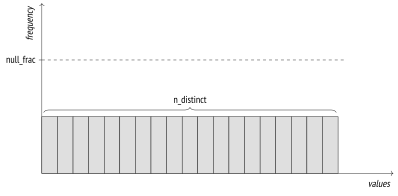
If the estimated number of distinct values is incorrect (because a limited number of rows have been analyzed), it can be overridden at the column level:
If all data always had uniform distribution, this information (coupled with minimal and maximal values) would be sufficient. However, for non-uniform distribution (which is much more common in practice), such estimation is inaccurate:
17.4 Most Common Values
If data distribution is non-uniform, the estimation is fine-tuned based on statistics on most common values (MCV) and their frequencies. The pg_stats view displays these arrays in the most_common_vals and most_common_freqs fields, respectively.
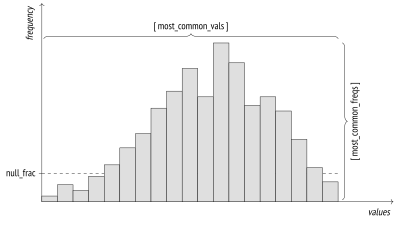
Here is an example of such statistics on various types of aircraft:
To estimate the selectivity of the “column = value”condition, it is enough to find this value in the most_common_vals array and take its frequency from the most_common_freqs array element with the same index:14
It is obvious that such estimation will be close to the actual value:
The MCV list is also used to estimate selectivity of inequality conditions. For example, a condition like “column < value” requires the analyzer to search through most_common_vals for all the values that are smaller than the target one and sum up the corresponding frequencies listed in most_common_freqs.15
MCV statistics work best when distinct values are not too many. The maximum size of arrays is defined by the default_statistics_target parameter, which also limits the number of rows to be randomly sampled for the purpose of analysis. (default: 100)
In some cases, it makes sense to increase the default parameter value, thus expanding the MCV list and improving the accuracy of estimations. You can do it at the column level:
The sample size will also grow, but only for the specified table.
Since the MCV array stores actual values, it may take quite a lot of space. To keep the pg_statistic size under control and avoid loading the planner with useless work, values that are larger than 1 kB are excluded from analysis and statistics. But since such large values are likely to be unique, they would probably not make it into most_common_vals anyway.
17.5 Histogram
If distinct values are too many to be stored in an array, PostgreSQL employs a histogram. In this case, values are distributed between several buckets of the histogram. The number of buckets is also limited by the default_statistics_target parameter.
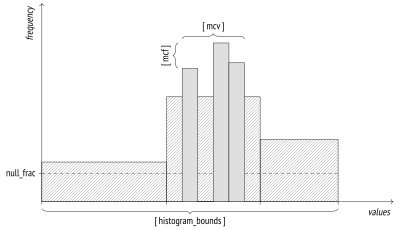
The bucket width is selected in such a way that each bucket gets approximately the same number of values (this property is reflected in the diagram by the equality of areas of big hatched rectangles). The values included into MCV lists are not taken into account. As a result, the cumulative frequency of values in each bucket equals .
The histogram is stored in the histogram_bounds field of the pg_stats view as an array of buckets’ boundary values:
Combined with the MCV list, the histogram is used for operations like estimating the selectivity of greater than and less than conditions.16
For example, let’s take a look at the number of boarding passes issued for back rows:
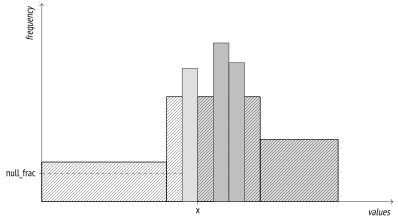
I have intentionally selected the seat number that lies right on the boundary between two histogram buckets.
The selectivity of this condition will be estimated at , where N is the number of buckets holding the values that satisfy the condition (that is, the ones located to the right of the specified value). It must also be taken into account that MCVs are not included into the histogram.
Incidentally, NULL values do not appear in the histogram either, but the seat_no column contains no such values anyway:
First, let’s find the fraction of MCVs that satisfy the condition:
The overall MCV share (ignored by the histogram) is:
Since the values that conform to the specified condition take exactly 𝑁 buckets (out of 100 buckets possible), we get the following estimation:
In the generic case of non-boundary values, the planner applies linear interpolation to take into account the fraction of the bucket that contains the target value.
Here is the actual number of back seats:
As you increase the default_statistics_target value, estimation accuracy may improve, but as our example shows, the histogram combined with the MCV list usually gives good results even if the column contains many unique values:
It makes sense to improve estimation accuracy only if it leads to better planning. Increasing the default_statistics_target value without giving it much thought may slow down planning and analysis without bringing any benefits in return. That said, reducing this parameter value (down to zero) can lead to a bad plan choice, even though it does speed up planning and analysis. Such savings are usually unjustified.
17.6 Statistics for Non-Scalar Data Types
For non-scalar data types, PostgreSQL can gather statistics not only on the distribution of values, but also on the distribution of elements used to construct these values. It improves planning accuracy when you query columns that do not conform to the first normal form.
- The
most_common_elemsandmost_common_elem_freqsarrays show the list of the most common elements and the frequency of their usage.
These statistics are collected and used to estimate selectivity of operations on arrays17 and tsvector18 data types.
- The
elem_count_histogramarray shows the histogram of the number of distinct elements in a value.
This data is collected and used for estimating selectivity of operations on arrays only.
- For range types, PostgreSQL builds distribution histograms for range length and lower and upper boundaries of the range. These histograms are used for estimating selectivity of various operations on these types,19 but the
pg_statsview does not display them.
Similar statistics are also collected for multirange data types.20 (v. 14)
17.7 Average Field Width
The avg_width field of the pg_stats view shows the average size of values stored in a column. Naturally, for types like integer or char(3) this size is always the same, but for data types of variable length, such as text, it can vary a lot from column to column:
This statistic is used to estimate the amount of memory required for operations like sorting or hashing.
17.8 Correlation
The correlation field of the pg_stats view shows the correlation between the physical order of data and the logical order defined by comparison operations. If values are stored strictly in ascending order, their correlation will be close to 1; if they are arranged in descending order, their correlation will be close to −1. The more chaotic is data distribution on disk, the closer is the correlation to zero.
Note that this statistic is not gathered for the coordinates column: less than and greater than operators are not defined for the point type.
Correlation is used for cost estimation of index scans. (p. 331)
17.9 Expression Statistics
Column-level statistics can be used only if either the left or the right part of the comparison operation refers to the column itself and does not contain any expressions. For example, the planner cannot predict how computing a function of a column will affect statistics, so for conditions like “function-call = constant” the selectivity is always estimated at 0.5 %:21
The planner knows nothing about semantics of functions, even of standard ones. Our general knowledge suggests that the flights performed in January will make roughly of the total number of flights, which exceeds the projected value by one order of magnitude.
To improve the estimation, we have to collect expression statistics rather than rely on the column-level one. There are two ways to do it.
Extended Expression Statistics
The first option is to use extended expression statistics.22 Such statistics are not collected by default; you have to manually create the corresponding database object by running the CREATE STATISTICS command: (v. 14)
Once the data is gathered, the estimation accuracy improves:
For the collected statistics to be applied, the query must specify the expression in exactly the same form that was used by the CREATE STATISTICS command.
The size limit for extended statistics can be adjusted separately, by running the ALTER STATISTICS command. For example: (v. 13)
All the metadata related to extended statistics is stored in the pg_statistic_ext table of the system catalog, while the collected data itself resides in a separate table called pg_statistic_ext_data. This separation is used to implement access control for sensitive information. (v. 12)
Extended expression statistics available to a particular user can be displayed in a more convenient format in a separate view:
Statistics for Expression Indexes
Another way to improve cardinality estimation is to use special statistics collected for expression indexes; these statistics are gathered automatically when such an index is created, just like it is done for a table. If the index is really needed, this approach turns out to be very convenient. (p. 319)
Statistics on expression indexes are stored in the same way as statistics on tables. For example, you can get the number of distinct values by specifying the index name as tablename when querying pg_stats:
You can adjust the accuracy of index-related statistics using the ALTER INDEX command. If you do not know the column name that corresponds to the indexed expression, you have to first find it out. (v. 11)
For example:
17.10 Multivariate Statistics
It is also possible to collect multivariate statistics, which span several table columns. As a prerequisite, you have to manually create the corresponding extended statistics using the CREATE STATISTICS command.
PostgreSQL implements three types of multivariate statistics.
Functional Dependencies Between Columns
If values in one column depend (fully or partially) on values in another column and the filter conditions include both these columns, cardinality will be underestimated. (v. 10)
Let’s consider a query with two filter conditions:
The value is hugely underestimated:
It is a well-known problem of correlated predicates. The planner assumes that predicates do not depend on each other, so the overall selectivity is estimated at the product of selectivities of filter conditions combined by logical AND. The plan above clearly illustrates this issue: the value estimated by the Bitmap Index Scan node for the condition on the flight_no column is significantly reduced once the Bitmap Heap Scan node filters the results by the condition on the departure_airport column. (p. 263)
However, we do understand that airports are unambiguously defined by flight numbers: the second condition is virtually redundant (unless there is a mistake in the airport name, of course). In such cases, we can improve the estimation by applying extended statistics on functional dependencies.
Let’s create an extended statistic on the functional dependency between the two columns:
The next analysis run gathers this statistic, and the estimation improves:
The collected statistics is stored in the system catalog and can be accessed like this:
Here 2 and 5 are column numbers stored in the pg_attribute table, whereas the corresponding values define the degree of functional dependency: from 0 (no dependency) to 1 (values in the second columns fully depend on values in the first column).
Multivariate Number of Distinct Values
Statistics on the number of unique combinations of values stored in different columns improves cardinality estimation of a GROUP BY operation performed on several columns. (v. 10)
For example, here the estimated number of possible pairs of departure and arrival airports is the square of the total number of airports; however, the actual value is much smaller, as not all the pairs are connected by direct flights:
Let’s define and collect an extended statistic on distinct values:
The cardinality estimation has improved:
You can view the collected statistic in the system catalog:
Multivariate MCV Lists
If the distribution of values is non-uniform, it may be not enough to rely on the functional dependency alone, as the estimation accuracy will highly depend on a particular pair of values. For example, the planner underestimates the number of flights performed by Boeing 737 from Sheremetyevo airport: (v. 12)
In this case, you can improve the estimation by collecting statistics on multivariate MCV lists:23
The new cardinality estimation is much more accurate:
To get this estimation, the planner relies on the frequency values stored in the system catalog:
Just like a regular MCV list, a multivariate list holds default_statistics_target values (if this parameter is also set at the column level, the largest of its values is used). (default: 100)
If required, you can also change the size of the list, like it is done for extended expression statistics: (v. 13)
In all these examples, I have used only two columns, but you can collect multivariate statistics on a larger number of columns too.
To combine statistics of several types in one object, you can provide a comma-separated list of these types in its definition. If no type is specified, PostgreSQL will collect statistics of all the possible types for the specified columns.
Apart from the actual column names, multivariate statistics can also use arbitrary expressions, just like expression statistics. (v. 14)
backend/commands/analyze.c, do_analyze_rel function ↩︎
backend/commands/cluster.c, copy_table_data function ↩︎
backend/catalog/heap.c, index_update_stats function ↩︎
backend/access/heap/vacuumlazy.c, heap_vacuum_rel function ↩︎
backend/commands/analyze.c, std_typanalyze function ↩︎
backend/commands/analyze.c, acquire_sample_rows function backend/utils/misc/sampling.c ↩︎
backend/access/table/tableam.c, table_block_relation_estimate_size function ↩︎
backend/access/table/tableam.c, table_block_relation_estimate_size function ↩︎
sigmodrecord.org/publications/sigmodRecord/0809/p20.date.pdf ↩︎
backend/commands/analyze.c, compute_distinct_stats function ↩︎
backend/utils/adt/selfuncs.c, var_eq_non_const function ↩︎
backend/utils/adt/selfuncs.c, var_eq_const function ↩︎
backend/utils/adt/selfuncs.c, scalarineqsel function ↩︎
backend/utils/adt/selfuncs.c, ineq_histogram_selectivity function ↩︎
postgresql.org/docs/14/arrays.html backend/utils/adt/array_typanalyze.c backend/utils/adt/array_selfuncs.c ↩︎
postgresql.org/docs/14/datatype-textsearch.html backend/tsearch/ts_typanalyze.c backend/tsearch/ts_selfuncs.c ↩︎
postgresql.org/docs/14/rangetypes.html backend/utils/adt/rangetypes_typanalyze.c backend/utils/adt/rangetypes_selfuncs.c ↩︎
backend/utils/adt/selfuncs.c, eqsel function ↩︎
postgresql.org/docs/14/planner-stats#PLANNER-STATS-EXTENDED.html backend/statistics/README ↩︎
18 Table Access Methods
18.1 Pluggable Storage Engines
The data layout used by PostgreSQL is neither the only possible nor the best one for all load types. Following the idea of extensibility, PostgreSQL allows you to create and plug in various table access methods (pluggable storage engines), but there is only one available out of the box at the moment: (v. 12)
You can specify the engine to use when creating a table (CREATE TABLE ... USING); otherwise, the default engine listed in the default_table_access_method parameter will be applied. (default: heap)
For the PostgreSQL core to work with various engines in the same way, table access methods must implement a special interface.1 The function specified in the amhandler column returns the interface structure2 that contains all the information required by the core.
The following core components can be used by all table access methods:
transaction manager, including ACID and snapshot isolation support
buffer manager
I/O subsystem
TOAST
optimizer and executor
index support
These components always remain at the disposal of the engine, even if it does not use them all.
In their turn, engines define:
tuple format and data structure
table scan implementation and cost estimation
implementation of insert, delete, update, and lock operations
visibility rules
vacuum and analysis procedures
Historically, PostgreSQL used a single built-in data storage without any proper programming interface, so now it is very hard to come up with a good design that takes all the specifics of the standard engine into account and does not interfere with other methods.
For example, it is still unclear how to deal with the WAL. New access methods may need to log their own operations that the core is unaware of. The existing generic WAL mechanism3 is usually a bad choice, as it incurs too much overhead. You can add yet another interface for handling new types of WAL entries, but then crash recovery will depend on external code, which is highly undesirable. The only plausible solution so far is patching the core for each particular engine.
For this reason, I did not strive to provide any strict distinction between table access methods and the core. Many features described in the previous parts of the book formally belong to the heap access method rather than to the core itself. This method is likely to always remain the ultimate standard engine for PostgreSQL, while other methods will fill separate niches to address challenges of specific load types.
Of all the new engines that are currently being developed, I would like to mention the following:
Zheap is aimed at fighting table bloating.4 It implements in-place row updates and moves historic MVCC-related data into a separate undo storage. Such an engine will be useful for loads that involve frequent data updates.
Zheap architecture will seem familiar to Oracle users, although it does have some nuances (for example, the interface of index access methods does not allow creating indexes with their own versioning). (p. 313)
Zedstore implements columnar storage,5 which is likely to be most efficient with OLAP queries.
The stored data is structured as a B-tree of tuple IDs; each column is stored in its own B-tree associated with the main one. In the future, it might be possible to store several columns in one B-tree, thus getting a hybrid storage.
18.2 Sequential Scans
The storage engine defines the physical layout of table data and provides an access method to it. The only supported method is a sequential scan, which reads the file (or files) of the table’s main fork in full. In each read page, the visibility of each tuple is checked; those tuples that do not satisfy the query are filtered out. (p. 80)
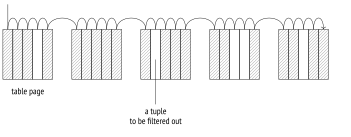
A scanning process goes through the buffer cache; to ensure that large tables do not oust useful data, a small-sized buffer ring is employed. Other processes scanning the same table join this buffer ring, thus avoiding extra disk reads; such scans are called synchronized. Thus, scanning does not always have to begin at the start of the file. (p. 156)
Sequential scanning is the most efficient way to read the whole table or the best part of it. In other words, sequential scans bring the most value when the selectivity is low. (If the selectivity is high, meaning that the query has to select only a few rows, it is preferable to use an index.) (p. 313)
Cost Estimation
In the query execution plan, a sequential scan is represented by the Seq Scan node:
The estimated number of rows is provided as part of the basic statistics:
When estimating the cost, the optimizer takes the following two components into account: disk I/O and CPU resources.6
I/O cost is calculated by multiplying the number of pages in a table and the cost of reading a single page assuming that pages are being read sequentially. When the buffer manager requests a page, the operating system actually reads more data from disk, so several subsequent pages are highly likely to be found in the operating system cache. For this reason, the cost of reading a single page using sequential scanning (which the planner estimates at seq_page_cost) is lower than the random access cost (defined by the random_page_cost value). (default: 1) (default: 4)
The default settings work well for HDDs; if you are using SSDs, it makes sense to significantly reduce the random_page_cost value (the seq_page_cost parameter is usually left as is, serving as a reference value). Since the optimal ratio between these parameters depends on the hardware, they are usually set at the tablespace level (ALTER TABLESPACE ... SET).
These calculations clearly show the consequences of table bloating caused by untimely vacuuming: the larger the main fork of the table, the more pages have to be scanned, regardless of the number of live tuples they contain. (p. 135)
CPU resource estimation comprises the costs of processing each tuple (which the planner estimates at cpu_tuple_cost): (default: 0.01)
The sum of these two estimates represents the total cost of the plan. The startup cost is zero because sequential scans have no prerequisites.
If the scanned table needs to be filtered, the applied filter conditions appear in the plan under the Filter section of the Seq Scan node. The estimated row count depends on the selectivity of these conditions, while the cost estimation includes the related computation expenses. (p. 271)
The EXPLAIN ANALYZE command displays both the actual number of returned rows and the number of rows that have been filtered out:
Let’s take a look at a more complex execution plan that uses aggregation:
The plan consists of two nodes: the upper node (Aggregate), which computes the count function, pulls the data from the lower node (Seq Scan), which scans the table.
The startup cost of the Aggregate node includes the aggregation itself: it is impossible to return the first row (which is the only one in this case) without getting all the rows from the lower node. The aggregation cost is estimated based on the execution cost of a conditional operation (estimated at cpu_operator_cost) for each input row:7 (default: 0.0025)
The received estimate is added to the total cost of the Seq Scan node.
The total cost of the Aggregate node also includes the cost of processing a row to be returned, which is estimated at cpu_tuple_cost: (default: 0.01)
Thus, cost estimation dependencies can be pictured as follows:
18.3 Parallel Plans
PostgreSQL supports parallel query execution.8 The leading process that performs the query spawns (via postmaster) several worker processes that execute the same parallel part of the plan simultaneously. The results are passed to the leader, which puts them together in the Gather9 node. When not accepting the data, the leader may also participate in the execution of the parallel part of the plan. (v. 9.6)
If required, you can forbid the leader’s contributions to the parallel plan execution by turning off the parallel_leader_participation parameter. (v. 11) (default: on)
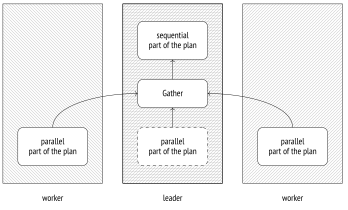
Naturally, starting these processes and sending data between them is not free, so not all queries by far should be parallelized.
Besides, not all parts of the plan can be processed concurrently, even if parallel execution is allowed. Some of the operations are performed by the leader alone, in the sequential mode.
PostgreSQL does not support the other approach to parallel plan execution, which consists in performing data processing by several workers that virtually form an assembly line (roughly speaking, each plan node is performed by a separate process); this mechanism was deemed inefficient by PostgreSQL developers.
18.4 Parallel Sequential Scans
One of the nodes designed for parallel processing is the Parallel Seq Scan node, which performs a parallel sequential scan.
The name sounds a bit controversial (is the scan sequential or parallel after all?), but nevertheless, it reflects the essence of the operation. If we take a look at the file access, table pages are read sequentially, following the order in which they would have been read by a simple sequential scan. However, this operation is performed by several concurrent processes. To avoid scanning the same page twice, the executor synchronizes these processes via shared memory.
A subtle aspect here is that the operating system does not get the big picture typical of sequential scanning; instead, it sees several processes that perform random reads. Therefore, data prefetching that usually speeds up sequential scans becomes virtually useless. To minimize this unpleasant effect, PostgreSQL assigns each process not just one but several consecutive pages to read.10 (v. 14)
As such, parallel scanning does not make much sense because the usual read costs are further increased by the overhead incurred by data transfer from process to process. However, if workers perform any post-processing on the fetched rows (such as aggregation), the total execution time may turn out to be much shorter.
Cost Estimation
Let’s take a look at a simple query that performs aggregation on a large table. The execution plan is parallelized:
All the nodes below Gather belong to the parallel part of the plan. They are executed by each of the workers (two of them are planned here) and possibly by the leader process (unless this functionality is turned off by the parallel_leader_participation parameter). The Gather node itself and all the nodes above it make the sequential part of the plan and are executed by the leader process alone.
Let’s take a look at this query plan once again:
The Parallel Seq Scan node represents a parallel heap scan. The rows field shows the estimated average number of rows to be processed by a single process. All in all, the execution must be performed by three processes (one leader and two workers), but the leader process will handle fewer rows: its share gets smaller as the number of workers grows.11 In this particular case, the factor is 2.4.
The Parallel Seq Scan cost is calculated similar to that of a sequential scan. The received value is smaller, as each process handles fewer rows; the I/O part is included in full since the whole table still has to be read, page by page:
Next, the Partial Aggregate node performs aggregation of the fetched data; in this particular case, it counts the number of rows.
The aggregation cost is estimated in the usual manner and is added to the cost estimation of the table scan:
The next node (Gather) is executed by the leader process. This node is responsible for launching workers and gathering the data they return.
For the purpose of planning, the cost estimation of starting processes (regardless of their number) is defined by the parallel_setup_cost parameter, while the cost of each row transfer between the processes is estimated at parallel_tuple_cost. (default: 1000) (default: 0.1)
In this example, the startup cost (spent on starting the processes) prevails; this value is added to the startup cost of the Partial Aggregate node. The total cost also includes the cost of transferring two rows; this value is added to the total cost of the Partial Aggregate node:12
Last but not least, the Finalize Aggregate node aggregates all the partial results received by the Gather node from the parallel processes.
The final aggregation is estimated just like any other. Its startup cost is based on the cost of aggregating three rows; this value is added to the total cost of Gather (since all the rows are needed to compute the result). The total cost of Finalize Aggregate also includes the cost of returning one row.
Dependencies between cost estimations are determined by whether the node has to accumulate the data before passing the result to its parent node. Aggregation cannot return the result until it gets all the input rows, so its startup cost is based on the total cost of the lower node. The Gather node, on the contrary, starts sending rows upstream as soon as they are fetched. Therefore, the startup cost of this operation depends on the startup cost of the lower node, while its total cost is based on the lower node’s total cost.
Here is the dependency graph:
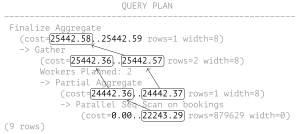
18.5 Parallel Execution Limitations
Number of Background Workers
The number of processes is controlled by a hierarchy of three parameters. The maximal number of background workers running concurrently is defined by the max_worker_processes value. (default: 8)
However, parallel query execution is not the only operation that needs background workers. For example, they also participate in logical replication and can be used by extensions. The number of processes allocated specifically for parallel plan execution is limited to the max_parallel_workers value. (default: 8)
Out of this number, up to max_parallel_workers_per_gather processes can serve one leader. (default: 2)
The choice of these parameter values depends on the following factors:
Hardware capabilities: the system must have free cores dedicated to parallel execution.
Table sizes: the database must contain large tables.
A typical load: there must be queries that potentially benefit from parallel execution.
These criteria are typically met by OLAP systems rather than OLTP ones.
The planner will not consider parallel execution at all if the estimated volume of heap data to be read does not exceed the min_parallel_table_scan_size value. (default: 8MB)
Unless the parallel_workers storage parameter is set to explicitly specify the number of processes for a particular table, this value will be calculated by the following formula:
It means that each time a table grows three times, PostgreSQL assigns one more parallel worker for its processing. The default settings give us these figures:
| Table, MB | Number of processes |
|---|---|
| 8 | 1 |
| 24 | 2 |
| 72 | 3 |
| 216 | 4 |
| 648 | 5 |
| 1944 | 6 |
In any case, the number of parallel workers cannot exceed the limit defined by the max_parallel_workers_per_gather parameter.
If we query a small table of 19 MB, only one worker will be planned and launched:
A query on a table of 105 MB gets only two processes because it hits the limit of max_parallel_workers_per_gather workers: (default: 2)
If we remove this limit, we will get the estimated three processes:
If the number of slots that are free during query execution turns out to be smaller than the planned value, only the available number of workers will be launched.
Let’s limit the total number of parallel processes to five and run two queries simultaneously:
Although three processes were expected in both cases, one of the queries managed to get only two slots.
Let’s restore the default settings:
Non-Parallelizable Queries
Not all queries can be parallelized.13 In particular, parallel plans cannot be used for the following query types:
- Queries that modify or lock data (
UPDATE,DELETE,SELECT FOR UPDATE, and the like).
This restriction does not apply to subqueries within the following commands:
– CREATE TABLE AS, SELECT INTO, CREATE MATERIALIZED VIEW (v. 11)
– REFRESH MATERIALIZED VIEW (v. 14)
However, row insertion is still performed sequentially in all these cases.
Queries that can be paused. It applies to queries run within cursors, including
FORloops in PL/pgSQL.Queries that call
PARALLEL UNSAFEfunctions. By default, these are all user-defined functions and a few standard ones. You can get the full list of unsafe functions by querying the system catalog:
- Queries within functions if these functions are called from a parallelized query (to avoid recursive growth of the number of workers).
Some of these limitations may be removed in the future versions of PostgreSQL. For example, the ability to parallelize queries at the Serializable isolation level is already there. (v. 12)
Parallel insertion of rows using such commands as INSERT and COPY is currently under development.14
A query may remain unparallelized for several reasons:
This type of a query does not support parallelization at all.
Parallel plan usage is forbidden by the server configuration (for example, because of the imposed table size limit).
- A parallel plan is more expensive than a sequential one.
To check whether a query can be parallelized at all, you can temporarily switch on the force_parallel_mode parameter. Then the planner will build parallel plans whenever possible: (default: off)
Parallel Restricted Queries
The bigger is the parallel part of the plan, the more performance gains can be potentially achieved. However, certain operations are executed strictly sequentially by the leader process alone,15 even though they do not interfere with parallelization as such. In other words, they cannot appear in the plan tree below the Gather node.
Non-expandable subqueries. The most obvious example of a non-expandable subquery16 is scanning a CTE result (represented in the plan by the CTE Scan node):
If a CTE is not materialized, the plan does not contain the CTE Scan node, so this limitation does not apply. (v. 12)
Note, however, that a CTE itself can be computed in the parallel mode if it turns out to be less expensive:
Another example of a non-expandable subquery is shown under by the SubPlan node in the plan below:
The first two rows represent the plan of the main query: the flights table is scanned sequentially, and each of its rows is checked against the provided filter. The filter condition includes a subquery; the plan of this subquery starts on the third row. So the SubPlan node is executed several times, once for each row fetched by sequential scanning in this case.
The upper Seq Scan node of this plan cannot participate in parallel execution because it relies on the data returned by the SubPlan node.
Last but not least, here is one more non-expandable subquery represented by the InitPlan node:
Unlike the SubPlan node, InitPlan is evaluated only once (in this particular example, once per each execution of the SubPlan 2 node).
The parent node of InitPlan cannot participate in parallel execution (but those nodes that receive the result of the InitPlan evaluation can, like in this example).
Temporary tables. Temporary tables do not support parallel scanning, as they can be accessed exclusively by the process that has created them. Their pages are processed in the local buffer cache. Making the local cache accessible to several processes would require a locking mechanism like in the shared cache, which would make its other benefits less prominent. (p. 163) (p. 240)
Parallel restricted functions. Functions defined as PARALLEL RESTRICTED are allowed only in the sequential part of the plan. You can get the list of such functions from the system catalog by running the following query:
Only label your functions as PARALLEL RESTRICTED (to say nothing of PARALLEL SAFE) if you are fully aware of all the implications and have carefully studied all the imposed restrictions.17
backend/optimizer/path/costsize.c, cost_seqscan function ↩︎
backend/optimizer/path/costsize.c, cost_agg function ↩︎
postgresql.org/docs/14/parallel-query.html backend/access/transam/README.parallel ↩︎
backend/access/heap/heapam.c, table_block_parallelscan_startblock_init & table_block_parallelscan_nextpage functions ↩︎
backend/optimizer/path/costsize.c, get_parallel_divisor function ↩︎
backend/optimizer/path/costsize.c, cost_gather function ↩︎
postgresql.org/docs/14/when-can-parallel-query-be-used.html ↩︎
commitfest.postgresql.org/32/2844 commitfest.postgresql.org/32/2841 commitfest.postgresql.org/32/2610 ↩︎
postgresql.org/docs/14/parallel-safety.html#PARALLEL-LABELING ↩︎
19 Index Access Methods
19.1 Indexes and Extensibility
Indexes are database objects that mainly serve the purpose of accelerating data access. These are auxiliary structures: any index can be deleted and recreated based on heap data. In addition to data access speedup, indexes are also used to enforce some integrity constraints.
The PostgreSQL core provides six built-in index access methods (index types):
PostgreSQL’s extensibility implies that new access methods can be added without modifying the core. One such extension (the bloom method) is included into the standard set of modules. (v. 9.6)
Despite all the differences between various index types, all of them eventually match a key (such as a value of an indexed column) against heap tuples that contain this key. Tuples are referred to by six-byte tuple IDs, or TIDs. Knowing the key or some information about the key, it is possible to quickly read the tuples that are likely to contain the required data without scanning the whole table. (p. 342)
To ensure that a new access method can be added as an extension, PostgreSQL implements a common indexing engine. Its main objective is to retrieve and process TIDs returned by a particular access method:
read data from the corresponding heap tuples
check tuple visibility against a particular snapshot (p. 80)
recheck conditions if their evaluation by the method is indecisive
The indexing engine also participates in execution of plans built at the optimization stage. When assessing various execution paths, the optimizer needs to know the properties of all potentially applicable access methods: can the method return the data in the required order, or do we need a separate sorting stage? is it possible to return several first values right away, or do we have to wait for the whole result set to be fetched? and so on.
It is not only the optimizer that needs to know specifics of the access method. Index creation poses more questions to answer: does the access method support multicolumn indexes? can this index guarantee uniqueness?
The indexing engine allows using a variety of access methods; in order to be supported, an access method must implement a particular interface to declare its features and properties.
Access methods are used to address the following tasks:
implement algorithms for building indexes, as well as inserting and deleting index entries
distribute index entries between pages (to be further handled by the buffer cache manager) (p. 147)
implement the algorithm of vacuuming (p. 102)
acquire locks to ensure correct concurrent operation (p. 240)
generate WAL entries (p. 164)
search indexed data by the key
estimate index scan costs
Extensibility also manifests itself as the ability to add new data types, which the access method knows nothing of in advance. Therefore, access methods have to define their own interfaces for plugging in arbitrary data types.
To enable usage of a new data type with a particular access method, you have to implement the corresponding interface—that is, provide operators that can be used with an index, and possibly some auxiliary support functions. Such a set of operators and functions is called an operator class.
The indexing logic is partially implemented by the access method itself, but some of it is outsourced to operator classes. This distribution is rather arbitrary: while B-trees have all the logic wired into the access method, some other methods may provide only the main framework, leaving all the implementation details at the discretion of particular operator classes. One and the same data type is often supported by several operator classes, and the user can select the one with the most suitable behavior.
Here is a small fraction of the overall picture:
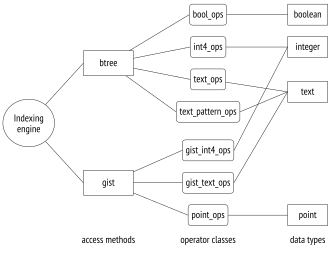
19.2 Operator Classes and Families
Operator Classes
An access method interface1 is implemented by an operator class,2 which is a set of operators and support functions applied by the access method to a particular data type.
Classes of operators are stored in the pg_opclass table in the system catalog. The following query returns the complete data for the above illustration:
In most cases, we do not have to know anything about operator classes. We simply create an index that uses some operator class by default.
For example, here are B-tree operator classes that support the text type. One of the classes is always marked as the default one:
A typical command for index creation looks as follows:
But it is just a shorthand notation that expands to the following syntax:
If you would like to use an index of a different type or achieve some custom behavior, you have to specify the desired access method or operator class explicitly.
Each operator class defined for a particular access method and data type must contain a set of operators that take parameters of this type and implement the semantics of this access method.
For example, the btree access method defines five mandatory comparison operators. Any btree operator class must contain all the five:
The semantics of an operator implied by the access method is reflected by the strategy number shown as amopstrategy.3 For example, strategy 1 for btree means less than, 2 denotes less than or equal to, and so on. Operators themselves can have arbitrary names.
The example above shows two kinds of operators. The difference between regular operators and those with a tilde is that the latter do not take collation4 into account and perform bitwise comparison of strings. Nevertheless, both flavors implement the same logical operations of comparison.
The text_pattern_ops operator class is designed to address the limitation in support of the ~~ operator (which corresponds to the LIKE operator). In a database using any collation other than C, this operator cannot use a regular index on a text field:
An index with the text_pattern_ops operator class behaves differently:
Note how the filter expression has changed in the Index Cond condition. The search now uses only the template’s prefix before %, while false-positive hits are filtered out during a recheck based on the Filter condition. The operator class for the btree access method provides no operator for comparing templates, and the only way to apply a B-tree here is to rewrite this condition using comparison operators. The operators of the text_pattern_ops class do not take collation into account, which gives us an opportunity to use an equivalent condition instead.5
An index can be used to speed up access by a filter condition if the following two prerequisites are met:
1 the condition is written as “indexed-column operator expression” (if the operator has a commuting counterpart specified,6 the condition can also have the form of “expression operator indexed-column”)7
2 and the operator belongs to the operator class specified for the indexed-column in the index declaration.
For example, the following query can use an index:
Note the position of arguments in the Index Cond condition: at the execution stage, the indexed field must be on the left. When the arguments are permuted, the operator is replaced by a commuting one; in this particular case, it is the same operator because the equality relation is commutative.
In the next query, it is technically impossible to use a regular index because the column name in the condition is replaced by a function call:
Here you can use an expression index,8 which has an arbitrary expression specified in its declaration instead of a column:
An index expression can depend only on heap tuple values and must be affected by neither other data stored in the database nor configuration parameters (such as locale settings).
In other words, if the expression contains any function calls, these functions must be IMMUTABLE,9 and they must observe this volatility category. Otherwise, an index scan and a heap scan may return different results for the same query.
Apart from regular operators, an operator class can provide support functions10 required by the access method. For example, the btree access method defines five support functions;11 the first one (which compares two values) is mandatory, while all the rest can be absent:
Operator Families
Each operator class always belongs to some operator family12 (listed in the system catalog in the pg_opfamily table). A family can comprise several classes that handle similar data types in the same way.
For example, the integer_ops family includes several classes for integral data types that have the same semantics but differ in size:
The datetime_ops family comprises operator classes that process dates:
While each operator class supports a single data type, a family can comprise operator classes for different data types:
Thanks to such grouping of various operators into a single family, the planner can do without type casting when an index is used for conditions involving values of different types.
19.3 Indexing Engine Interface
Just like for table access methods, the amhandler column of the pg_am table contains the name of the function that implements the interface:13 (v. 9.6)
This function fills placeholders in the interface structure14 with actual values. Some of them are functions responsible for separate tasks related to index access (for example, they can perform an index scan and return heap tuple IDs), while others are index method properties that the indexing engine must be aware of.
All properties are grouped into three categories:15
access method properties
properties of a particular index
column-level properties of an index
The distinction between access method and index-level properties is provided with a view to the future: right now, all the indexes based on a particular access method always have the same properties at these two levels.
Access Method Properties
The following five properties are defined at the access method level (shown for the B-tree method here): (v. 11)
CAN ORDER The ability to receive sorted data.16 This property is currently supported only by B-trees.
To get the results in the required order, you can always scan the table and then sort the fetched data:
But if there is an index that supports this property, the data can be returned in the desired order at once:
CAN UNIQUE Support for unique and primary key constraints.17 This property applies only to B-trees.
Each time a unique or primary key constraint is declared, PostgreSQL automatically creates a unique index to support this constraint.
That said, if you simply create a unique index without explicitly declaring an integrity constraint, the effect will seem to be exactly the same: the indexed column will not allow duplicates. So what is the difference?
An integrity constraint defines the property that must never be violated, while an index is just a mechanism to guarantee it. In theory, a constraint could be imposed using other means.
For example, PostgreSQL does not support global indexes for partitioned tables, but nevertheless, you can create a unique constraint on such tables (if it includes the partition key). In this case, the global uniqueness is ensured by local unique indexes of each partition, as different partitions cannot have the same partition keys.
CAN MULTI COL The ability to build a multicolumn index.18
A multicolumn index can speed up search by several conditions imposed on different table columns. For example, the ticket_flights table has a composite primary key, so the corresponding index is built on more than one column:
A flight search by a ticket number and a flight ID is performed using an index:
As a rule, a multicolumn index can speed up search even if filter conditions involve only some of its columns. In the case of a B-tree, the search will be efficient if the filter condition spans a range of columns that appear first in the index declaration:
In all other cases (for example, if the condition includes only flights_id), search will be virtually limited to the initial columns (if the query includes the corresponding conditions), while other conditions will only be used to filter out the returned results. Indexes of other types may behave differently though.
CAN EXCLUDE Support for EXCLUDE constraints.19
An EXCLUDE constraint guarantees that a condition defined by an operator will not be satisfied for any pair of table rows. To impose this constraint, PostgreSQL automatically creates an index; there must be an operator class that contains the operator used in the constraint’s condition.
It is the intersection operator && that usually serves this purpose. For instance, you can use it to explicitly declare that a conference room cannot be booked twice for the same time, or that buildings on a map cannot overlap.
With the equality operator, the exclusion constraint takes on the meaning of uniqueness: the table is forbidden to have two rows with the same key values. Nevertheless, it is not the same as a UNIQUE constraint: in particular, the exclusion constraint key cannot be referred to from foreign keys, and neither can it be used in the ON CONFLICT clause.
CAN INCLUDE The ability to add non-key columns to an index, which make this index covering. (v. 11) (p. 339)
Using this property, you can extend a unique index with additional columns. Such an index still guarantees that all the key column values are unique, while data retrieval from the included columns incurs no heap access:
Index-Level Properties
Here are the properties related to an index (shown for an existing one):
CLUSTERABLE The ability to physically move heap tuples in accordance with the order in which their IDs are returned by an index scan. (p. 284)
This property shows whether the CLUSTER command is supported.
INDEX SCAN Index scan support. (p. 330)
This property implies that the access method can return TIDs one by one. Strange as it may seem, some indexes do not provide this functionality.
BITMAP SCAN Bitmap scan support. (p. 340)
This property defines whether the access method can build and return a bitmap of all TIDs at once.
BACKWARD SCAN The ability to return results in reverse order as compared to the one specified at index creation.
This property makes sense only if the access method supports index scans.
Column-Level Properties
And finally, let’s take a look at the column properties:
ASC, DESC, NULLS FIRST, NULLS LAST Ordering column values.
These properties define whether column values should be stored in ascending or descending order, and whether NULL values should appear before or after regular values. All these properties are applicable only to B-trees. (p. 274)
ORDERABLE The ability to sort column values using the ORDER BY clause.
This property is applicable only to B-trees.
DISTANCE ORDERABLE Support for ordering operators.20 (p. 327)
Unlike regular indexing operators that return logical values, ordering operators return a real number that denotes the “distance” from one argument to another. Indexes support such operators specified in the ORDER BY clause of a query.
For example, the ordering operator <-> can find the airports located at the shortest distance to the specified point:
RETURNABLE The ability to return data without accessing the table (index-only scan support). (p. 337)
This property defines whether an index structure allows retrieving indexed values. It is not always possible: for example, some indexes may store hash codes rather than actual values. In this case, the CAN INCLUDE property will not be available either.
SEARCH ARRAY Support for searching several elements in an array.
An explicit use of arrays is not the only case when it might be necessary. For example, the planner transforms the IN (list) expression into an array scan:
If the index method does not support such operators, the executor may have to perform several iterations to find particular values (which can make the index scan less efficient).
SEARCH NULLS Search for IS NULL and IS NOT NULL conditions.
Should we index NULL values? On the one hand, it allows us to perform index scans for conditions like IS [NOT] NULL, as well as use the index as a covering one if no filter conditions are provided (in this case, the index has to return the data of all the heap tuples, including those that contain NULL values). But on the other hand, skipping NULL values can reduce the index size.
The decision remains at the discretion of access method developers, but more often than not NULL values do get indexed.
If you do not need NULL values in an index, you can exclude them by building a partial index21 that covers only those rows that are required. For example:
A partial index is smaller than the full one, and it gets updated only if the modified row is indexed, which can sometimes lead to tangible performance gains. Obviously, apart from NULL checks, the WHERE clause can provide any condition (that can be used with immutable functions).
The ability to build partial indexes is provided by the indexing engine, so it does not depend on the access method.
Naturally, the interface includes only those properties of index methods that must be known in advance for a correct decision to be taken. For example, it does not list any properties that enable such features as support for predicate locks or non-blocking index creation (CONCURRENTLY). Such properties are defined in the code of the functions that implement the interface.
postgresql.org/docs/14/collation.html postgresql.org/docs/14/indexes-collations.html ↩︎
postgresql.org/docs/14/xoper-optimization.html#id-1.8.3.18.6 ↩︎
backend/optimizer/path/indxpath.c, match_clause_to_indexcol function ↩︎
backend/utils/adt/amutils.c, indexam_property function ↩︎
postgresql.org/docs/14/ddl-constraints.html#DDL-CONSTRAINTS-EXCLUSION ↩︎
20 Index Scans
20.1 Regular Index Scans
There are two basic ways of accessing TIDs provided by an index. The first one is to perform an index scan. Most of the index access methods (but not all of them) have the INDEX SCAN property to support this operation. (p. 326)
Index scans are represented in the plan by the Index Scan1 node:
During an index scan, the access method returns TIDs one by one.2 Upon receiving a TID, the indexing engine accesses the heap page this TID refers to, gets the corresponding tuple, and, if the visibility rules are met, returns the requested set of fields of this tuple. This process continues until the access method runs out of TIDs that matches the query.
The Index Cond line includes only those filter conditions that can be checked using an index. Other conditions that have to be rechecked against the heap are listed separately in the Filter line.
As this example shows, both index and heap access operations are handled by a common Index Scan node rather by two different ones. But there is also a separate Tid Scan node,3 which fetches tuples from the heap if their IDs are known in advance:
Cost Estimation
Cost estimation of an index scan comprises the estimated costs of index access operations and heap page reads.
Obviously, the index-related part of the estimation fully depends on the particular access method. For B-trees, the cost is mostly incurred by fetching index pages and processing their entries. The number of pages and rows to be read can be determined by the total volume of data and the selectivity of the applied filters. Index pages are accessed at random (pages that follow each other in the logical structure are physically scattered on disk). The estimation is further increased by CPU resources spent on getting from the root to the leaf node and computing all the required expressions.4 (p. 262)
The heap-related part of the estimation includes the cost of heap page access and the CPU time required to process all the fetched tuples. It is important to note that I/O estimation depends on both the index scan selectivity and the correlation between the physical order of tuples on disk and the order in which the access method returns their IDs.
Good Scenario: High Correlation
If the physical order of tuples on disk has a perfect correlation with the logical order of TIDs in the index, each page will be accessed only once: the Index Scan node will sequentially go from one page to another, reading the tuples one by one.
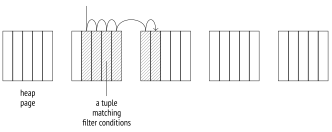
PostgreSQL collects statistics on correlation: (p. 284)
The correlation is high if the corresponding absolute value is close to one (like in the case of book_ref); values that are close to zero are a sign of chaotic data distribution.
In this particular case, high correlation in the book_ref column is of course due to the fact that the data has been loaded into the table in ascending order based on this column, and there have been no updates yet. We would see the same picture if we executed the CLUSTER command for the index created on this column.
However, the perfect correlation does not guarantee that all queries will be returning results in ascending order of book_ref values. First of all, any row update moves the resulting tuple to the end of the table. Second, the plan that relies on an index scan based on some other column returns the results in a different order. And even a sequential scan may not start at the beginning of the table. So if you need a particular order, you should explicitly define it in the ORDER BY clause.
Here is an example of an index scan that processes a large number of rows: (p. 156)
The condition’s selectivity is estimated as follows:
This value is close to , which we could have guessed knowing that book_ref values range from 000000 to FFFFFF. (p. 280)
For B-trees, the index-related part of the I/O cost estimation includes the cost of reading all the required pages. Index entries that satisfy any condition supported by B-trees are stored in pages bound into an ordered list, so the number of index pages to be read is estimated at the index size multiplied by the selectivity. But since these pages are not physically ordered, reading happens in a random fashion.
CPU resources are spent on processing all the index entries that are read (the cost of processing a single entry is estimated at the cpu_index_tuple_cost value) and computing the condition for each of these entries (in this case, the condition contains a single operator; its cost is estimated at the cpu_operator_cost value). (default: 0.005) (default: 0.0025)
Table access is regarded as sequential reading of the required number of pages. In the case of a perfect correlation, heap tuples will follow each other on disk, so the number of pages is estimated at the size of the table multiplied by the selectivity.
The I/O cost is further extended by the expenses incurred by tuple processing; they are estimated at the cpu_tuple_cost value per tuple. (default: 0.01)
These calculations illustrate the logic behind the cost estimation, so the result is aligned with the estimation provided by the planner, even if it is approximated. Getting the exact value would require taking other details into account, which we are not going to discuss here.
Bad Scenario: Low Correlation
Everything changes if the correlation is low. Let’s create an index on the book_date column, which has almost zero correlation with this index, and then take a look at the query that selects almost the same fraction of rows as in the previous example. Index access turns out to be so expensive that the planner chooses it only if all the other alternatives are explicitly forbidden:
The thing is that low correlation increases the chances of the next tuple returned by the access method to be located in a different page. Therefore, the Index Scan node has to hop between pages instead of reading them sequentially; in the worst-case scenario, the number of page accesses can reach the number of fetched tuples.
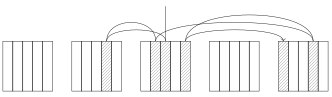
However, we cannot simply replace seq_page_cost with random_page_cost and relpages with reltuples in the good-scenario calculations. The cost that we see in the plan is much lower than the value we would have estimated this way:
The reason is that the model takes caching into account. Frequently used pages are kept in the buffer cache (and in the OS cache), so the bigger the cache size, the more chances to find the required page in it, thus avoiding an extra disk access operation. For planning purposes, the cache size is defined by the effective_cache_size parameter. The smaller its value, the more pages are expected to be read. (default: 4GB)
The graph that follows shows the dependency between the estimation of the number of pages to be read and the table size (for the selectivity of and the page containing 10 rows).5 The dashed lines show the access count in the best scenario possible (half of the page count if the correlation is perfect) and in the worst scenario (half of the row count if there is zero correlation and no cache).
It is assumed that the effective_cache_size value indicates the total volume of memory that can be used for caching (including both the PostgreSQL buffer cache and OS cache). But since this parameter is used solely for estimation purposes and does not affect memory allocation itself, you do not have to take actual figures into account when changing this setting.
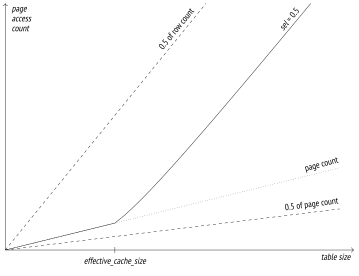
If you reduce effective_cache_size to the minimum, the plan estimation will be close to the low-end value shown above for the no-caching case:
The planner calculates the table I/O cost for both worst-case and best-case scenarios and then takes an intermediate value based on the actual correlation.6
Thus, an index scan can be a good choice if only a fraction of rows has to be read. If heap tuples are correlated with the order in which the access method returns their IDs, this fraction can be quite substantial. However, if the correlation is low, index scanning becomes much less attractive for queries with low selectivity.
20.2 Index-Only Scans
If an index contains all the heap data required by the query, it is called a covering index for this particular query. If such an index is available, extra table access can be avoided: instead of TIDs, the access method can return the actual data directly. Such a type of an index scan is called an index-only scan.7 It can be used by those access methods that support the RETURNABLE property. (p. 328)
In the plan, this operation is represented by the Index Only Scan8 node:
The name suggests that this node never has to access the heap, but it is not so. In PostgreSQL, indexes contain no information on tuple visibility, so the access method returns the data of all the heap tuples that satisfy the filter condition, even if the current transaction cannot see them. Their visibility is then checked by the indexing engine. (p. 74)
However, if this method had to access the table to check visibility of each tuple, it would not be any different from a regular index scan. Instead, it employs the visibility map provided for tables, in which the vacuum process marks the pages that contain only all-visible tuples (that is, those tuples that are accessible to all transactions, regardless of the snapshot used). If the TID returned by the index access method belongs to such a page, there is no need to check its visibility. (p. 27)
The cost estimation of an index-only scan depends on the fraction of all-visible pages in the heap. PostgreSQL collects such statistics:
The cost estimation of an index-only scan differs from that of a regular index scan: its I/O cost related to table access is taken in proportion to the fraction of pages that do not appear in the visibility map. (The cost estimation of tuple processing is the same.)
Since in this particular example all pages contain only all-visible tuples, the cost of heap I/O is in fact excluded from the cost estimation:
Any unvacuumed changes that have not disappeared behind the database horizon yet increase the estimated cost of the plan (and, consequently, make this plan less attractive to the optimizer). The EXPLAIN ANALYZE command can show the actual heap access count. (p. 88)
In a newly created table, PostgreSQL has to check visibility of all the tuples:
But once the table has been vacuumed, such a check becomes redundant and is not performed as long as all the pages remain all-visible.
Indexes with the Include Clause
It is not always possible to extend an index with all the columns required by a query:
For a unique index, adding a new column would compromise the uniqueness of the original key columns.
The index access method may not provide an operator class for the data type of the column to be added.
In this case, you can still include columns into an index without making them a part of the index key. It will of course be impossible to perform an index scan based on the included columns, but if a query references these columns, the index will function as a covering one. (v. 11)
The following example shows how to replace an automatically created primary key index by another index with an included column:
Such indexes are often called covering, but it is not quite correct. An index is considered covering if the set of its columns covers all the columns required by a particular query. It does not matter whether it involves any columns added by the INCLUDE clause, or only key columns are being used. Moreover, an index can be covering for one query but not for the other.
20.3 Bitmap Scans
The efficiency of an index scan is limited: as the correlation decreases, the number of accesses to heap pages rises, and scanning becomes random rather than sequential. To overcome this limitation, PostgreSQL can fetch all the TIDs before accessing the table and sort them in ascending order based on their page numbers.9 This is exactly how bitmap scanning works, which is yet another common approach to processing TIDs. It can be used by those access methods that support the BITMAP SCAN property. (p. 326)
Unlike a regular index scan, this operation is represented in the query plan by two nodes:
The Bitmap Index Scan10 node gets the bitmap of all TIDs11 from the access method.
The bitmap consists of separate segments, each corresponding to a single heap page. All these segments have the same size, which is enough for all the page tuples, no matter how many of them are present. This number is limited because a tuple header is quite large; a standard-size page can accommodate 256 tuples at the most, which fit 32 bytes.12
Then the Bitmap Heap Scan13 traverses the bitmap segment by segment, reads the corresponding pages, and checks all their tuples that are marked all-visible. Thus, pages are read in ascending order based on their numbers, and each of them is read exactly once.
That said, this process is not the same as sequential scanning since the accessed pages rarely follow each other. Regular prefetching performed by the operating system does not help in this case, so the Bitmap Heap Scan node implements its own prefetching by asynchronously reading effective_io_concurrency pages—and it is the only node that does it. This mechanism relies on the posix_fadvise function implemented by some operating systems. If your system happens to support this function, it makes sense to configure the effective_io_concurrency parameter at the tablespace level in accordance with the hardware capabilities. (default: 1)
Asynchronous prefetching is also used by some other internal processes:
for index pages when heap rows are being deleted14 (v. 13)
for heap pages during analysis (ANALYZE)15 (v. 14) (default:
10)
The prefetch depth is defined by the maintenance_io_concurrency.
Bitmap Accuracy
The more pages contain the tuples that satisfy the filter condition of the query, the bigger is the bitmap. It is built in the local memory of the backend, and its size is limited by the work_mem parameter. Once the maximum allowed size is reached, some bitmap segments become lossy: each bit of a lossy segment corresponds to a whole page, while the segment itself comprises a range of pages.16 As a result, the size of the bitmap becomes smaller at the expense of its accuracy. (default: 4MB)
The EXPLAIN ANALYZE command shows the accuracy of the built bitmap:
Here we have enough memory for an exact bitmap.
If we decrease the work_mem value, some of the bitmap segments become lossy:
When reading a heap page that corresponds to a lossy bitmap segment, PostgreSQL has to recheck the filter condition for each tuple in the page. The condition to be rechecked is always displayed in the plan as Recheck Cond, even if this recheck is not performed. The number of tuples filtered out during a recheck is displayed separately (as Rows Removed by Index Recheck).
If the size of the result set is too big, the bitmap may not fit the work_mem memory chunk, even if all its segments are lossy. Then this limit is ignored, and the bitmap takes as much space as required. PostgreSQL neither further reduces the bitmap accuracy nor flushes any of its segments to disk.
Operations on Bitmaps
If the query applies conditions to several table columns that have separate indexes created on them, a bitmap scan can use several indexes together.17 All these indexes have their own bitmaps built on the fly; the bitmaps are then combined together bit by bit, using either logical conjunction (if the expressions are connected by AND) or logical disjunction (if the expressions are connected by OR). For example:
Here the BitmapAnd node combines two bitmaps using the bitwise AND operation.
As two bitmaps are being merged into one,18 exact segments remain exact when merged together (if the new bitmap fits the work_mem memory chunk), but if any segment in a pair is lossy, the resulting segment will be lossy too.
Cost Estimation
Let’s take a look at the query that uses a bitmap scan:
The approximate selectivity of the condition used by the planner equals
The total cost of the Bitmap Index Scan node is estimated in the same way as the cost of a regular index scan that does not take heap access into account:
The I/O cost estimation for the Bitmap Heap Scan node differs from that for a perfect-correlation case of a regular index scan. A bitmap allows reading heap pages in ascending order based on their numbers, without getting back to the same page, but the tuples that satisfy the filter condition do not follow each other anymore. Instead of reading a strictly sequential page range that is quite compact, PostgreSQL is likely to access far more pages.
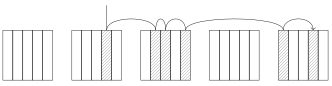
The number of pages to be read is estimated by the following formula:19
The estimated cost of reading a single page falls between seq_page_cost and random_page_cost, depending on the ratio of the fraction of fetched pages to the total number of pages in the table:
As usual, the I/O estimation is increased by the cost of processing each fetched tuple. If an exact bitmap is used, the number of tuples is estimated at the total number of tuples in the table multiplied by the selectivity of filter conditions. But if any bitmap segments are lossy, PostgreSQL has to access the corresponding pages to recheck all their tuples.
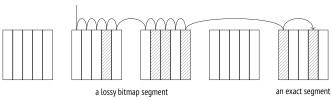
Thus, the estimation takes into account the expected fraction of lossy bitmap segments (which can be calculated based on the total number of selected rows and the bitmap size limit defined by work_mem).20 (v. 11)
The total cost of condition rechecks also increases the estimation (regardless of the bitmap accuracy).
The startup cost estimation of the Bitmap Heap Scan node is based on the total cost of the Bitmap Index Scan node, which is extended by the cost of bitmap processing:
Here the bitmap is exact, and the cost is estimated roughly as follows:21
If the query plan combines several bitmaps, the sum of the costs of separate index scans is increased by a (small) cost of merging them together.22
20.4 Parallel Index Scans
All the index scanning modes—a regular index scan, an index-only scan, and a bitmap scan—have their own flavors for parallel plans. (v. 9.6) (p. 300)
The cost of parallel execution is estimated in the same way as that of sequential one, but (just like in the case of a parallel sequential scan) CPU resources are distributed between all parallel processes, thus reducing the total cost. The I/O component of the cost is not distributed because processes are synchronized to perform page access sequentially.
Now let me show you several examples of parallel plans without breaking down their cost estimation.
A parallel index scan:
While a parallel scan of a B-tree is in progress, the ID of the current index page is kept in the server’s shared memory. The initial value is set by the process that starts the scan: it traverses the tree from the root to the first suitable leaf page and saves its ID. Workers access subsequent index pages as needed, replacing the saved ID. Having fetched a page, the worker iterates through all its suitable entries and reads the corresponding heap tuples. The scanning completes when the worker has read the whole range of values that satisfy the query filter.
A parallel index-only scan:
A parallel index-only scan skips heap access for all-visible pages; it is the only difference it has from a parallel index scan.
A parallel bitmap scan:
A bitmap scan implies that a bitmap is always built sequentially, by a single leader process; for this reason, the name of the Bitmap Index Scan node does not contain the word Parallel. When the bitmap is ready, the Parallel Bitmap Heap Scan node starts a parallel heap scan. Workers access subsequent heap pages and process them concurrently.
20.5 Comparison of Various Access Methods
The following illustration shows how costs of various access methods depend on selectivity of filter conditions:
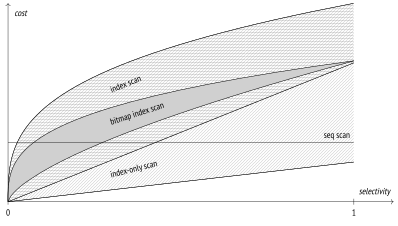
It is a qualitative diagram; the actual figures are of course dependent on the particular table and server configuration.
Sequential scanning does not depend on selectivity, and starting from a certain fraction of selected rows, it is usually more efficient than other methods.
The cost of an index scan is affected by the correlation between the physical order of tuples and the order in which their IDs are returned by the access method. If the correlation is perfect, an index scan can be quite efficient even if the fraction of selected rows is rather high. However, for low correlation (which is much more common) it can quickly become even more expensive than a sequential scan. That said, index scanning is still an absolute leader when it comes to selecting a single row using an index (typically a unique one).
If applicable, index-only scans can show great performance and beat sequential scans even if all the rows are selected. However, their performance is highly dependent on the visibility map, and in the worst-case scenario an index-only scan can degrade to a regular index scan.
The cost of a bitmap scan is affected by the size of available memory, but to a much lesser extent than an index scan cost depends on correlation. If the correlation is low, the bitmap scan turns out to be much cheaper.
Each access method has its own perfect usage scenarios; there is no such method that always outperforms other methods. The planner has to do extensive calculations to estimate the efficiency of each method in each particular case. Clearly, the accuracy of these estimations highly depends on the accuracy of the collected statistics.
backend/access/index/indexam.c, index_getnext_tid function ↩︎
backend/utils/adt/selfuncs.c, btcostestimate function postgresql.org/docs/14/index-cost-estimation.html ↩︎
backend/optimizer/path/costsize.c, index_pages_fetched function ↩︎
backend/optimizer/path/costsize.c, cost_index function ↩︎
backend/access/index/indexam.c, index_getbitmap function ↩︎
backend/access/index/indexam.c, index_getbitmap function ↩︎
backend/access/heap/heapam.c, index_delete_prefetch_buffer function ↩︎
backend/commands/analyze.c, acquire_sample_rows function ↩︎
backend/nodes/tidbitmap.c, tbm_lossify function ↩︎
backend/nodes/tidbitmap.c, tbm_union & tbm_intersect functions ↩︎
backend/optimizer/path/costsize.c, compute_bitmap_pages function ↩︎
backend/optimizer/path/costsize.c, compute_bitmap_pages function ↩︎
backend/optimizer/path/costsize.c, cost_bitmap_heap_scan function ↩︎
backend/optimizer/path/costsize.c, cost_bitmap_and_node & cost_bitmap_or_node functions ↩︎
21 Nested Loop
21.1 Join Types and Methods
Joins are a key feature of the SQL language; they serve as the foundation for its power and flexibility. Sets of rows (either retrieved from tables directly or received as the result of some other operations) are always joined pairwise.
There are several types of joins:
Inner joins. An inner join (specified as INNER JOIN, or simply JOIN) comprises those pairs of rows of two sets that satisfy a particular join condition. The join condition combines some columns of one set of rows with some columns of the other set; all the columns involved constitute the join key.
If the join condition demands that join keys of two sets be equal, such a join is called an equi-join; this is the most common join type.
A Cartesian product (CROSS JOIN) of two sets comprises all the possible pairs of rows of these sets—it is a special case of an inner join with a true condition.
Outer joins. A left outer join (specified as LEFT OUTER JOIN, or simply LEFT JOIN) extends the result of an inner join by those rows of the left set that have no match in the right set (the corresponding right-side columns are filled with NULL values).
The same is also true for a right outer join (RIGHT JOIN), down to the permutation of sets.
A full outer join (specified as FULL JOIN) comprises left and right outer joins, adding both right-side and left-side rows for which no match has been found.
Anti-Joins and Semi-Joins. A semi-join looks a lot like an inner join, but it includes only those rows of the left set that have a match in the right set (a row is included only once even if there are several matches).
An anti-join includes those rows of a set that have no match in the other set.
The SQL language has no explicit semi- and anti-joins, but the same outcome can be achieved using predicates like EXISTS and NOT EXISTS.
All these joins are logical operations. For example, an inner join is often described as a Cartesian product that has been cleared of the rows that do not satisfy the join condition. But at the physical level, an inner join is typically achieved via less expensive means.
PostgreSQL provides several join methods:
a nested loop join
a hash join
a merge join
Join methods are algorithms that implement logical operations of SQL joins. These basic algorithms often have special flavors tailored for particular join types, even though they may support only some of them. For example, a nested loop supports an inner join (represented in the plan by a Nested Loop node) and a left outer join (represented by a Nested Loop Left Join node), but it cannot be used for full joins.
Some flavors of the same algorithms can also be used by other operations, such as aggregation.
Different join methods perform best in different conditions; it is the job of the planner to choose the most cost-effective one.
21.2 Nested Loop Joins
The basic algorithm of the nested loop join functions as follows. The outer loop traverses all the rows of the first set (called the outer set). For each of these rows, the nested loop goes through the rows of the second set (called the inner set) to find the ones that satisfy the join condition. Each found pair is returned immediately as part of the query result.1
The algorithm accesses the inner set as many times as there are rows in the outer set. Therefore, the efficiency of nested loop joins depends on several factors:
cardinality of the outer set of rows
availability of an access method that can efficiently fetch the rows of the inner set
recurrent access to the same rows of the inner set
Cartesian Product
A nested loop join is the most efficient way to find a Cartesian product, regardless of the number of rows in the sets:
outer set
inner set
The Nested Loop node performs a join using the algorithm described above. It always has two child nodes: the one that is displayed higher in the plan corresponds to the outer set of rows, while the lower one represents the inner set.
In this example, the inner set is represented by the Materialize node.2 This node returns the rows received from its child node, having saved them for future use (the rows are accumulated in memory until their total size reaches work_mem; then PostgreSQL starts spilling them into a temporary file on disk). If accessed again, the node reads the accumulated rows without calling the child node. Thus, the executor can avoid scanning the full table again and read only those rows that satisfy the condition. (default: 4MB)
A similar plan can also be built for a query that uses a regular equi-join:
Having recognized the equality of the two values, the planner replaces the join condition tf.ticket_no = t.ticket_no by the tf.ticket_no = constant condition, virtually reducing an equi-join to a Cartesian product.3
Cardinality estimation. The cardinality of a Cartesian product is estimated at the product of cardinalities of the joined data sets: 3 = 1 × 3.
Cost estimation. The startup cost of the join operation combines the startup costs of all child nodes.
The full cost of the join includes the following components:
the cost of fetching all the rows of the outer set
the cost of a single retrieval of all the rows of the inner set (since the cardinality estimation of the outer set equals one)
the cost of processing each row to be returned
Here is a dependency graph for the cost estimation:
× 1
The cost of the join is calculated as follows:
Now let’s get back to the previous example:
The plan now contains the Materialize node; having once accumulated the rows received from its child node, Materialize returns them much faster for all the subsequent calls.
In general, the total cost of a join comprises the following expenses:4
the cost of fetching all the rows of the outer set
the cost of the initial fetch of all the rows of the inner set (during which materialization is performed)
(N − 1)-fold cost of repeat fetches of rows of the inner set (here N is the number of rows in the outer set)
the cost of processing each row to be returned
The dependency graph here is as follows:
× 9
In this example, materialization reduces the cost of repeat data fetches. The cost of the first Materialize call is shown in the plan, but all the subsequent calls are not listed. I will not provide any calculations here,5 but in this particular case the estimation is 0.0125.
Thus, the cost of the join performed in this example is calculated as follows:
Parameterized Joins
Now let’s consider a more common example that does not boil down to a Cartesian product:
Here the Nested Loop node traverses the rows of the outer set (tickets), and for each of these rows it searches for the corresponding rows of the inner set (flights), passing the ticket number (t.ticket_no) to the condition as a parameter. When the inner node (Index Scan) is called, it has to deal with the condition ticket_no = constant.
Cardinality estimation. The planner estimates that the filter condition by a booking number is satisfied by two rows of the outer set (rows=2), and each of these rows matches three rows of the inner set on average (rows=3).
Join selectivity is a fraction of the Cartesian product of the two sets that remains after the join. It is obvious that we must exclude those rows of both sets that contain NULL values in the join key since the equality condition will never be satisfied for them.
The estimated cardinality equals the cardinality of the Cartesian product (that is, the product of cardinalities of the two sets) multiplied by the selectivity.6
Here the estimated cardinality of the first (outer) set is two rows. Since no conditions are applied to the second (inner) set except for the join condition itself, the cardinality of the second set is taken as the cardinality of the ticket_flights table.
Since the joined tables are connected by a foreign key, the selectivity estimation relies on the fact that each row of the child table has exactly one matching row in the parent table. So the selectivity is taken as the inverse of the size of the table referred to by the foreign key.7
Thus, for the case when the ticket_no columns contain no NULL values, the estimation is as follows:
Clearly, tables can be also joined without using foreign keys. Then the selectivity will be taken as the estimated selectivities of the particular join conditions.8
For the equi-join in this example, the generic formula for selectivity estimation that assumes uniform distribution of values looks as follows: , where nd1 and nd2 represent the number of distinct values of the join key in the first and second set, respectively.9 (p. 276)
Statistics on distinct values show that ticket numbers in the tickets table are unique (which is only to be expected, as the ticket_no column is the primary key), and the ticket_flights has about three matching rows for each ticket:
The result would match the estimation for the join with the foreign key:
The planner tries to refine this baseline estimation whenever possible. It cannot use histograms at the moment, but it takes MCV lists into account if such statistics have been collected on the join key for both tables.10 The selectivity of the rows that appear in the list can be estimated more accurately, and only the remaining rows will have to rely on calculations that are based on uniform distribution. (p. 277)
In general, join selectivity estimation is likely to be more accurate if the foreign key is defined. It is especially true for composite join keys, as the selectivity is often largely underestimated in this case.
Using the EXPLAIN ANALYZE command, you can view not only the actual number of rows, but also the number of times the inner loop has been executed:
The outer set contains two rows (actual rows=2); the estimation has been correct. So the Index Scan node was executed twice (loops=2), and each time it selected four rows on average (actual rows=4). Hence the total number of found rows: actual rows=8.
I do not show the execution time of each stage of the plan (TIMING OFF) for the output to fit the limited width of the page; besides, on some platforms an output with timing enabled can significantly slow down query execution. But if we did include it, PostgreSQL would display an average value, just like for the row count. To get the total execution time, you should multiply this value by the number of iterations (loops).
Cost estimation. The cost estimation formula here is the same as in the previous examples.
Let’s recall our query plan:
In this case, the cost of each subsequent scan of the inner set is the same as that of the first scan. So we ultimately get the following figures:
Caching Rows (Memoization)
If the inner set is repeatedly scanned with the same parameter values (thus giving the same results), it may turn out to be beneficial to cache the rows of this set. (v. 14)
Such caching is performed by the Memoize11 node. Being similar to the Materialize node, it is designed to handle parameterized joins and has a much more complex implementation:
The
Materializenode simply materializes all the rows returned by its child node, whileMemoizeensures that the rows returned for different parameter values are kept separately.In the event of an overflow, the
Materializestorage starts spilling rows to disk, whileMemoizekeeps all the rows in memory (there would otherwise be no point in caching).
Here is an example of a query that uses Memoize:
The size of the memory chunk that is used to store cached rows equals work_mem × hash_mem_multiplier. As implied by the second parameter’s name, cached rows are stored in a hash table (with open addressing).12 The hash key (shown as Cache Key in the plan) is the parameter value (or several values if there are more than one parameter). (default: 4MB) (default: 1.0)
All the hash keys are bound into a list; one of its ends is considered cold (since it contains the keys that have not been used for a long time), while the other is hot (it stores recently used keys).
If a call on the Memoize node shows that the passed parameter values correspond to the already cached rows, these rows will be passed on to the parent node (Nested Loop) without checking the child node. The used hash key is then moved to the hot end of the list.
If the cache does not contain the required rows, the Memoize node pulls them from its child node, caches them, and passes them on to the node above. The corresponding hash key also becomes hot.
As new data is being cached, it can fill all the available memory. To free some space, the rows that correspond to cold keys get evicted. This eviction algorithm differs from the one used in the buffer cache but serves the same purpose. (p. 154)
Some parameter values may turn out to have so many matching rows that they do not fit into the allocated memory chunk, even if all the other rows are already evicted. Such parameters are skipped—it makes no sense to cache only some of the rows since the next call will still have to get all the rows from the child node.
Cost and cardinality estimations. These calculations are quite similar to what we have already seen above. We just have to bear in mind that the cost of the Memoize node shown in the plan has nothing to do with its actual cost: it is simply the cost of its child node increased by the cpu_tuple_cost value.13 (default: 0.01)
We have already come across a similar situation for the Materialize node: its cost is only calculated for subsequent scans14 and is not reflected in the plan.
Clearly, it only makes sense to use Memoize if it is cheaper than its child node. The cost of each subsequent Memoize scan depends on the expected cache access profile and the size of the memory chunk that can be used for caching. The calculated value is highly dependent on the accurate estimation of the number of distinct parameter values to be used in the scans of the inner set of rows.15 Based on this number, you can weigh the probabilities of the rows to be cached and to be evicted from the cache. The expected hits reduce the estimated cost, while potential evictions increase it. We will skip the details of these calculations here.
To figure out what is actually going on during query execution, we will use the EXPLAIN ANALYZE command, as usual:
This query selects the flights that follow the same route and are performed by aircraft of a particular type, so all the calls on the Memoize node use the same hash key. The first row has to be fetched from the table (Misses: 1), but all the subsequent rows are found in the cache (Hits: 112). The whole operation takes just 1 kB of memory.
The other two displayed values are zero: they represent the number of evictions and the number of cache overflows when it was impossible to cache all the rows related to a particular set of parameters. Large figures would indicate that the allocated cache is too small, which might be caused by inaccurate estimation of the number of distinct parameter values. Then the use of the Memoize node can turn out to be quite expensive. In the extreme case, you can forbid the planner to use caching by turning off the enable_memoize parameter. (default: on)
Outer Joins
The nested loop join can be used to perform the left outer join:
Here the join operation is represented by the Nested Loop Left Join node. The planner has chosen a non-parameterized join with a filter: it performs identical scans of the inner set of rows (so this set is hidden behind the Materialize node) and returns the rows that satisfy the filter condition (Join Filter).
The cardinality of the outer join is estimated just like the one of the inner join, except that the calculated estimation is compared with the cardinality of the outer set of rows, and the bigger value is taken as the final result.16 In other words, the outer join never reduces the number of rows (but can increase it).
The cost estimation is similar to that of the inner join.
We must also keep in mind that the planner can select different plans for inner and outer joins. Even this simple example will have a different Join Filter if the planner is forced to use a nested loop join:
A slight difference in the total cost is caused by the fact that the outer join must also check ticket numbers to get the correct result if there is no match in the outer set of rows.
Right joins are not supported,17 as the nested loop algorithm treats the inner and outer sets differently. The outer set is scanned in full; as for the inner set, the index access allows reading only those rows that satisfy the join condition, so some of its rows may be skipped altogether.
A full join is not supported for the same reason.
Anti- and Semi-joins
Anti-joins and semi-joins are similar in the sense that for each row of the first (outer) set it is enough to find only one matching row in the second (inner) set.
An anti-join returns the rows of the first set only if they have no match in the second set: as soon as the executor finds the first matching row in the second set, it can exit the current loop: the corresponding row of the first set must be excluded from the result.
Anti-joins can be used to compute the NOT EXISTS predicate.
For example, let’s find aircraft models with undefined cabin configuration. The corresponding plan contains the Nested Loop Anti Join node:
An alternative query without the NOT EXISTS predicate will have the same plan:
A semi-join returns those rows of the first set that have at least one match in the second set (again, there is no need to check the set for other matches—the result is already known).
A semi-join can be used to compute the EXISTS predicate. Let’s find the aircraft models with seats installed in the cabin:
The Nested Loop Semi Join node represents the same-name join method. This plan (just like the anti-join plans above) provides the basic estimation of the number of rows in the seats table (rows=149), although it is enough to retrieve only one of them. The actual query execution stops after fetching the first row, of course:
Cardinality estimation. The selectivity of a semi-join is estimated in the usual manner, except that the cardinality of the inner set is taken as one. For anti-joins, the estimated selectivity is subtracted from one, just like for negation.18
Cost estimation. For anti- and semi-joins, the cost estimation reflects the fact that the scan of the second set stops as soon as the first matching row is found.19
Non-Equi-joins
The nested loop algorithm allows joining sets of rows based on any join condition.
Obviously, if the inner set is a base table with an index created on it, and the join condition uses an operator that belongs to an operator class of this index, the access to the inner set can be quite efficient. But it is always possible to perform the join by calculating a Cartesian product of rows filtered by some condition—which can be absolutely arbitrary in this case. Like in the following query, which selects pairs of airports that are located close to each other: (p. 315)
Parallel Mode
A nested loop join can participate in parallel plan execution.20 (v. 9.6) (p. 300)
It is only the outer set that can be processed in parallel, as it can be scanned by several workers simultaneously. Having fetched an outer row, each worker then has to search for the matching rows in the inner set, which is done sequentially.
The query shown below includes several joins; it searches for passengers that have tickets for a particular flight:
At the upper level, the nested loop join is performed sequentially. The outer set consists of a single row of the flights table fetched by a unique key, so the use of a nested loop is justified even for a large number of inner rows.
The inner set is retrieved using a parallel plan. Each of the workers scans its own share of rows of the ticket_flights table and joins them with tickets using the nested loop algorithm. (p. 301)
backend/optimizer/path/costsize.c, initial_cost_nestloop andfinal_cost_nestloop function ↩︎
backend/optimizer/path/costsize.c, cost_rescan function ↩︎
backend/optimizer/path/costsize.c, calc_joinrel_size_estimate function ↩︎
backend/optimizer/path/costsize.c, get_foreign_key_join_selectivity function ↩︎
backend/optimizer/path/clausesel.c, clauselist_selectivity function ↩︎
backend/utils/adt/selfuncs.c, eqjoinsel function ↩︎
backend/utils/adt/selfuncs.c, eqjoinsel function ↩︎
backend/optimizer/util/pathnode.c, create_memoize_path function ↩︎
backend/optimizer/path/costsize.c, cost_memoize_rescan function ↩︎
backend/utils/adt/selfuncs.c, estimate_num_groups function ↩︎
backend/optimizer/path/costsize.c, calc_joinrel_size_estimate function ↩︎
backend/optimizer/path/joinpath.c, match_unsorted_outer function ↩︎
backend/optimizer/path/costsize.c, calc_joinrel_size_estimate function ↩︎
backend/optimizer/path/costsize.c, final_cost_nestloop function ↩︎
backend/optimizer/path/joinpath.c, consider_parallel_nestloop function ↩︎
22 Hashing
22.1 Hash Joins
One-Pass Hash Joins
A hash join searches for matching rows using a pre-built hash table. Here is an example of a plan with such a join:
At the first stage, the Hash Join node1 calls the Hash node,2 which pulls the whole inner set of rows from its child node and places it into a hash table.
Storing pairs of hash keys and values, the hash table enables fast access to a value by its key; the search time does not depend on the size of the hash table, as hash keys are distributed more or less uniformly between a limited number of buckets. The bucket to which a given key goes is determined by the hash function of the hash key; since the number of buckets is always a power of two, it is enough to take the required number of bits of the computed value.
Just like the buffer cache, this implementation uses a dynamically extendible hash table that resolves hash collisions by chaining.3 (p. 149)
At the first stage of a join operation, the inner set is scanned, and the hash function is computed for each of its rows. The columns that are referenced in the join condition (Hash Cond) serve as the hash key, while the hash table itself stores all the queried fields of the inner set.
A hash join is most efficient in the case when the whole hash table can be accommodated in RAM, as the executor manages to process the data in one batch in this case. The size of the memory chunk allocated for this purpose is limited by the value of work_mem × hash_mem_multiplier. (v. 13) (default: 4MB) (default: 1.0)
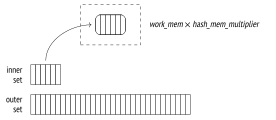
Let’s run EXPLAIN ANALYZE to take a look at statistics on memory usage of a query:
Unlike a nested loop join, which treats inner and outer sets differently, a hash join can swap them around. The smaller set is usually used as the inner one, as it results in a smaller hash table.
In this example, the whole table fits into the allocated cache: it takes about 143 MB (Memory Usage) and contains 4 M = 222 buckets. So the join is performed in one pass (Batches).
But if the query referred to only one column, the hash table would fit 111 MB:
It is yet another reason to avoid referring to superfluous fields in a query (which can happen if you are using an asterisk, to give one example).
The chosen number of buckets should guarantee that each bucket holds only one row on average when the hash table is completely filled with data. Higher density would increase the rate of hash collisions, making the search less efficient, while a less compact hash table would take up too much memory. The estimated number of buckets is increased up to the nearest power of two.4
(If the estimated hash table size exceeds the memory limit based on the average width of a single row, two-pass hashing will be applied.)
A hash join cannot start returning results until the hash table is fully built.
At the second stage (the hash table is already built by this time), the Hash Join node calls on its second child node to get the outer set of rows. For each scanned row, the hash table is searched for a match. It requires calculating the hash key for the columns of the outer set that are included into the join condition.
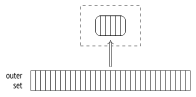
The found matches are returned to the parent node.
Cost estimation. We have already covered cardinality estimation; since it does not depend on the join method, I will now focus on cost estimation. (p. 356)
The cost of the Hash node is represented by the total cost of its child node. It is a dummy number that simply fills the slot in the plan.5 All the actual estimations are included into the cost of the Hash Join node.6
Here is an example:
The startup cost of the join reflects primarily the cost of hash table creation and includes the following components:
the total cost of fetching the inner set, which is required to build the hash table
the cost of calculating the hash function of all the columns included into the join key, for each row of the inner set (estimated at cpu_operator_cost per operation) (default:
0.0025)the cost of insertion of all the inner rows into the hash table (which is estimated at cpu_tuple_cost per inserted row) (default:
0.01)the startup cost of fetching the outer set of rows, which is required to start the join operation
The total cost comprises the startup cost and the cost of the join itself, namely:
the cost of computing the hash function of all the columns included into the join key, for each row of the outer set (cpu_operator_cost)
the cost of join condition rechecks, which are required to address possible hash collisions (estimated at cpu_operator_cost per each checked operator)
- the processing cost for each resulting row (cpu_tuple_cost)
The number of required rechecks is the hardest to estimate. It is calculated by multiplying the number of rows of the outer set by some fraction of the inner set (stored in the hash table). To estimate this fraction, the planner has to take into account that data distribution may be non-uniform. I will spare you the details of these computations;7 in this particular case, this fraction is estimated at 0.150112.
Thus, the cost of our query is estimated as follows:
And here is the dependency graph:
Two-Pass Hash Joins
If the planner’s estimations show that the hash table will not fit the allocated memory, the inner set of rows is split into batches to be processed separately. The number of batches (just like the number of buckets) is always a power of two; the batch to use is determined by the corresponding number of bits of the hash key.8
Any two matching rows belong to the same batch: rows placed into different batches cannot have the same hash code.
All batches hold an equal number of hash keys. If the data is distributed uniformly, batch sizes will also be roughly the same. The planner can control memory consumption by choosing an appropriate number of batches.9
At the first stage, the executor scans the inner set of rows to build the hash table. If the scanned row belongs to the first batch, it is added to the hash table and kept in RAM. Otherwise, it is written into a temporary file (there is a separate file for each batch).10 (default: -1)
The total volume of temporary files that a session can store on disk is limited by the temp_file_limit parameter (temporary tables are not included into this limit). As soon as the session reaches this value, the query is aborted.
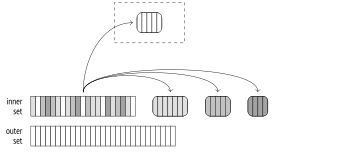
At the second stage, the outer set is scanned. If the row belongs to the first batch, it is matched against the hash table, which contains the first batch of rows of the inner set (there can be no matches in other batches anyway).
If the row belongs to a different batch, it is stored in a temporary file, which is again created separately for each batch. Thus, N batches can use 2(N − 1) files (or fewer if some of the batches turn out to be empty).
Once the second stage is complete, the memory allocated for the hash table is freed. At this point, we already have the result of the join for one of the batches.
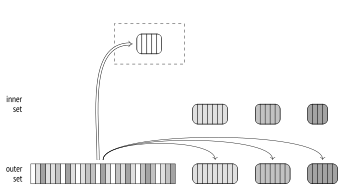
Both stages are repeated for each of the batches saved on disk: the rows of the inner set are transferred from the temporary file to the hash table; then the rows of the outer set related to the same batch are read from another temporary file and matched against this hash table. Once processed, temporary files get deleted.
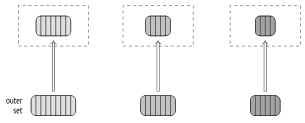
Unlike a similar output for a one-pass join, the output of the EXPLAIN command for a two-pass join contains more than one batch. If run with the BUFFERS option, this command also displays statistics on disk access:
I have already shown this query above with an increased work_mem setting. The default value of 4 MB is too small for the whole hash table to fit RAM; in this example, the data is split into 64 batches, and the hash table uses 64 K = 216 buckets. As the hash table is being built (the Hash node), the data is written into temporary files (temp written); at the join stage (the Hash Join node), temporary files are both read and written (temp read, written).
To collect more statistics on temporary files, you can set the log_temp_files parameter to zero. Then the server log will list all the temporary files and their sizes (as they appeared at the time of deletion). (default: -1)
Dynamic Adjustments
The planned course of events may be disrupted by two issues: inaccurate statistics and non-uniform data distribution.
If the distribution of values in the join key columns is non-uniform, different batches will have different sizes.
If some batch (except for the very first one) turns out to be too large, all its rows will have to be written to disk and then read from disk. It is the outer set that causes most of the trouble, as it is typically bigger. So if there are regular, non-multivariate statistics on MCVs of the outer set (that is, the outer set is represented by a table, and the join is performed by a single column), rows with hash codes corresponding to MCVs are considered to be a part of the first batch.11 This technique (called skew optimization) can reduce the I/O overhead of a two-pass join to some extent. (p. 291)
Because of these two factors, the size of some (or all) batches may exceed the estimation. Then the corresponding hash table will not fit the allocated memory chunk and will surpass the defined limits.
So if the hash table being built turns out too big, the number of batches is increased (doubled) on the fly. Each batch is virtually split into two new ones: about half of the rows (assuming that the distribution is uniform) is left in the hash table, while the other half is saved into a new temporary file.12
Such a split can happen even if a one-pass join has been originally planned. In fact, one- and two-pass joins use the same algorithm implemented by the same code; I single them out here solely for smoother narration.
The number of batches cannot be reduced. If it turns out that the planner has overestimated the data size, batches will not be merged together.
In the case of non-uniform distribution, increasing the number of batches may not help. For example, if the key column contains the same value in all its rows, they will be placed into the same batch since the hash function will be returning the same value over and over again. Unfortunately, the hash table will continue growing in this case, regardless of the imposed restrictions.
In theory, this issue could be addressed by a multi-pass join, which would perform partial scans of the batch, but it is not supported.
To demonstrate a dynamic increase in the number of batches, we first have to perform some manipulations: (p. 274)
As a result, we get a new table called bookings_copy. It is an exact copy of the bookings table, but the planner underestimates the number of rows in it by ten times. A similar situation may occur if the hash table is generated for a set of rows produced by another join operation, so there is no reliable statistics available.
This miscalculation makes the planner think that 8 buckets are enough, but while the join is being performed, this number grows to 32:
Cost estimation. I have already used this example to demonstrate cost estimation for a one-pass join, but now I am going to reduce the size of available memory to the minimum, so the planner will have to use two batches. It increases the cost of the join:
The cost of the second pass is incurred by spilling rows into temporary files and reading them from these files.
The startup cost of a two-pass join is based on that of a one-pass join, which is increased by the estimated cost of writing as many pages as required to store all the necessary fields of all the rows of the inner set.13 Although the first batch is not written to disk when the hash table is being built, the estimation does not take it into account and hence does not depend on the number of batches.
In its turn, the total cost comprises the total cost of a one-pass join and the estimated costs of reading the rows of the inner set previously stored on disk, as well as reading and writing the rows of the outer set.
Both writing and reading are estimated at seq_page_cost per page, as I/O operations are assumed to be sequential.
In this particular case, the number of pages required for the inner set is estimated at 7, while the data of the outer set is expected to fit 2309 pages. Having added these estimations to the one-pass join cost calculated above, we get the same figures as shown in the query plan:
Thus, if there is not enough memory, the join is performed in two passes and becomes less efficient. Therefore, it is important to observe the following points:
The query must be composed in a way that excludes redundant fields from the hash table.
The planner must choose the smaller of the two sets of rows when building the hash table.
Using Hash Joins in Parallel Plans
The hash join algorithm described above can also be used in parallel plans. First, several parallel processes build their own (absolutely identical) hash tables for the inner set, (v. 9.6)
independently of each other; then they start processing the outer set concurrently. The performance gain here is due to each process scanning only its own share of outer rows.
The following plan uses a regular one-pass hash join:
Here each process hashes the bookings table, then retrieves its own share of outer rows via the Parallel Index Only Scan node, and matches these rows against the resulting hash table.
The hash table memory limit is applied to each parallel process separately, so the total size of memory allocated for this purpose will be three times bigger than indicated in the plan (Memory Usage).
Parallel One-Pass Hash Joins
Even though a regular hash join can be quite efficient in parallel plans (especially for small inner sets, for which parallel processing does not make much sense), larger data sets are better handled by a special parallel hash join algorithm. (v. 11)
An important distinction of the parallel version of the algorithm is that the hash table is created in the shared memory, which is allocated dynamically and can be accessed by all parallel processes that contribute to the join operation. Instead of several separate hash tables, a single common one is built, which uses the total amount of memory dedicated to all the participating processes. It increases the chance of completing the join in one pass.
At the first stage (which is represented in the plan by the Parallel Hash node), all the parallel processes build a common hash table, taking advantage of the parallel access to the inner set of rows.14
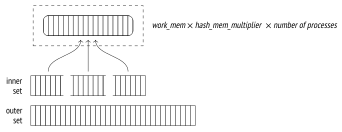
To move on from here, each parallel process must complete its share of first-stage processing.15
At the second stage (the Parallel Hash Join node), the processes are again run in parallel to match their shares of rows of the outer set against the hash table, which is already built by this time.16
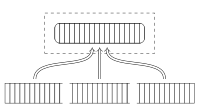
outer set
Here is an example of such a plan:
It is the same query that I showed in the previous section, but the parallel hash join was turned off by the enable_parallel_hash parameter at that time. (default: on)
Although the available memory is down by half as compared to a regular hash join demonstrated before, the operation still completes in one pass because it uses the memory allocated for all the parallel processes (Memory Usage). The hash table gets a bit bigger, but since it is the only one we have now, the total memory usage has decreased. (v. 11)
Parallel Two-Pass Hash Joins
The consolidated memory of all the parallel processes may still be not enough to accommodate the whole hash table. It can become clear either at the planning stage or later, during query execution. The two-pass algorithm applied in this case is quite different from what we have seen so far.
The key distinction of this algorithm is that it creates several smaller hash tables instead of a single big one. Each process gets its own table and processes its own batches independently. (But since separate hash tables are still located in the shared memory, any process can get access to any of these tables.) If planning shows that more than one batch will be required,17 a separate hash table is built for each process right away. If the decision is taken at the execution stage, the hash table is rebuilt.18
Thus, at the first stage processes scan the inner set in parallel, splitting it into batches and writing them into temporary files.19 Since each process reads only its own share of the inner set, none of them builds a full hash table for any of the batches (even for the first one). The full set of rows of any batch is only accumulated in the file written by all the parallel processes in a synchronized manner.20 So unlike the non-parallel and one-pass parallel versions of the algorithm, the parallel two-pass hash join writes all the batches to disk, including the first one.
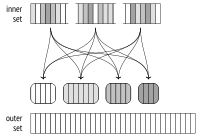
Once all the processes have completed hashing of the inner set, the second stage begins.21
If the non-parallel version of the algorithm were employed, the rows of the outer set that belong to the first batch would be matched against the hash table right away. But in the case of the parallel version, the memory does not contain the hash table yet, so the workers process the batches independently. Therefore, the second stage starts by a parallel scan of the outer set to distribute its rows into batches, and each batch is written into a separate temporary file.22 The scanned rows are not inserted into the hash table (as it happens at the first stage), so the number of batches never rises.
Once all the processes have completed the scan of the outer set, we get 2N temporary files on disk; they contain the batches of the inner and outer sets.
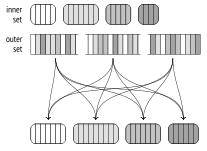
Then each process chooses one of the batches and performs the join: it loads the inner set of rows into a hash table in memory, scans the rows of the outer set, and matches them against the hash table. When the batch join is complete, the process chooses the next batch that has not been processed yet.23
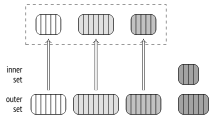
If no more unprocessed batches are left, the process that has completed its own batch starts processing one of the batches that is currently being handled by another process; such concurrent processing is possible because all the hash tables are located in the shared memory.
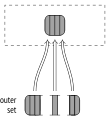
This approach is more efficient than using a single big hash table for all the processes: it is easier to set up parallel processing, and synchronization is cheaper.
Modifications
The hash join algorithm supports any types of joins: apart from the inner join, it can also handle left, right, and full outer joins, as well as semi- and anti-joins. But as I have already mentioned, the join condition is limited to the equality operator.
We have already observed some of these operations when dealing with the nested loop join. Here is an example of the right outer join: (p. 362)
Note that the logical left join specified in the SQL query got transformed into a physical operation of the right join in the execution plan.
At the logical level, bookings is the outer table (constituting the left side of the join operation), while the tickets table is the inner one. Therefore, bookings with no tickets must also be included into the join result.
At the physical level, inner and outer sets are assigned based on the cost of the join rather than their location in the query text. It usually means that the set with a smaller hash table will be used as the inner one. This is exactly what is happening here: the bookings table is used as the inner set, and the left join is changed to the right one.
And vice versa, if the query specifies the right outer join (to display the tickets that are not related to any bookings), the execution plan uses the left join:
To complete the picture, I will provide an example of a query plan with the full outer join:
Parallel hash joins are currently not supported for right and full joins.24
Note that the next example uses the bookings table as the outer set, but the planner would have preferred the right join if it were supported:
22.2 Distinct Values and Grouping
Algorithms that group values for aggregation and remove duplicates are very similar to join algorithms. One of the approaches they can use consists in building a hash table on the required columns. Values are included into the hash table only if it contains no such values yet. As a result, the hash table accumulates all the distinct values.
The node that performs hash aggregation is called HashAggregate.25
Let’s consider some situations that may require this node.
The number of seats in each travel class (GROUP BY):
The list of travel classes (DISTINCT):
Travel classes combined with one more value (UNION):
The Append node combines both sets but does not get rid of any duplicates, which must not appear in the UNION result. They have to be removed separately by the HashAggregate node.
The memory chunk allocated for the hash table is limited by the value of work_mem × hash_mem_multiplier, just like in the case of a hash join. (default: 4MB) (default: 1.0)
If the hash table fits the allocated memory, aggregation uses a single batch:
There are not so many distinct values in the amounts field, so the hash table takes only 61 kB (Memory Usage).
As soon as the hash table fills up the allocated memory, all the further values are spilled into temporary files and grouped into partitions based on several bits of their hash values. The number of partitions is a power of two and is chosen in such a way that each of their hash tables fits the allocated memory. The accuracy of the estimation is of course dependent on the quality of the collected statistics, so the received number is multiplied by 1.5 to further reduce partition sizes and raise the chances of processing each partition in one pass.26 (v. 13)
Once the whole set is scanned, the node returns aggregation results for those values that have made it into the hash table.
Then the hash table is cleared, and each of the partitions saved into temporary files at the previous stage is scanned and processed just like any other set of rows. If the hash table still exceeds the allocated memory, the rows that are subject to overflow will be partitioned again and written to disk for further processing.
To avoid excessive I/O, the two-pass hash join algorithm moves MCVs into the first batch. Aggregation, however, does not require this optimization: those rows that fit the allocated memory will not be split into partitions, and MCVs are likely to occur early enough to get into RAM.
In this example, the number of distinct IDs is relatively high, so the hash table does not fit the allocated memory. It takes five batches to perform the query: one for the initial data set and four for the partitions written to disk.
backend/executor/nodeHash.c, ExecChooseHashTableSize function ↩︎
backend/optimizer/plan/createplan.c, create_hashjoin_plan function ↩︎
backend/optimizer/path/costsize.c, initial_cost_hashjoin & final_cost_hashjoin functions ↩︎
backend/utils/adt/selfuncs.c, estimate_hash_bucket_stats function ↩︎
backend/executor/nodeHash.c, ExecHashGetBucketAndBatch function ↩︎
backend/executor/nodeHash.c, ExecChooseHashTableSize function ↩︎
backend/executor/nodeHash.c, ExecHashTableInsert function ↩︎
backend/executor/nodeHash.c, ExecHashBuildSkewHash function ↩︎
backend/executor/nodeHash.c, ExecHashIncreaseNumBatches function ↩︎
backend/optimizer/path/costsize.c, page_size function ↩︎
backend/executor/nodeHash.c, MultiExecParallelHash function ↩︎
backend/executor/nodeHashjoin.c, ExecParallelHashJoin function ↩︎
backend/executor/nodeHash.c, ExecChooseHashTableSize function ↩︎
backend/executor/nodeHash.c, ExecParallelHashIncreaseNumBatches function ↩︎
backend/executor/nodeHash.c, MultiExecParallelHash function ↩︎
backend/executor/nodeHashjoin.c, ExecParallelHashJoin function ↩︎
backend/executor/nodeHashjoin.c, ExecParallelHashJoinPartitionOuter function ↩︎
backend/executor/nodeHashjoin.c, ExecParallelHashJoinNewBatch function ↩︎
backend/executor/nodeAgg.c, hash_choose_num_partitions function ↩︎
23 Sorting and Merging
23.1 Merge Joins
A merge join processes data sets sorted by the join key and returns the result that is sorted in a similar way. Input sets may come pre-sorted following an index scan; otherwise, the executor has to sort them before the actual merge begins.1
Merging Sorted Sets
Let’s take a look at an example of a merge join; it is represented in the execution plan by the Merge Join node:2
The optimizer prefers this join method because it returns a sorted result, as defined by the ORDER BY clause. When choosing a plan, the optimizer notes the sort order of the data sets and does not perform any sorting unless it is really required. For example, if the data set produced by a merge join already has an appropriate sort order, it can be used in the subsequent merge join as is:
The first tables to be joined are ticket_flights and boarding_passes; both of them have a composite primary key (ticket_no, flight_id), and the result is sorted by these two columns. The produced set of rows is then joined with the tickets table, which is sorted by the ticket_no column.
The join requires only one pass over both data sets and does not take any additional memory. It uses two pointers to the current rows (which are originally the first ones) of the inner and outer sets.
If the keys of the current rows do not match, one of the pointers (that references the row with the smaller key) is going to be advanced to the next row until it finds a match. The joined rows are returned to the upper node, and the pointer of the inner set is advanced by one place. The operation continues until one of the sets is over.
This algorithm copes with duplicates of the inner set, but the outer set can contain them too. To address this issue, the algorithm has to be improved: if the key remains the same after the outer pointer is advanced, the inner pointer gets back to the first matching row. Thus, each row of the outer set will be matched to all the rows of the inner set with the same key.3
For the outer join, the algorithm is further tweaked a bit, but it is still based on the same principle.
Merge join conditions can use only the equality operator, which means that only equi-joins are supported (although support for other condition types is currently being implemented as well).4
Cost estimation. Let’s take a closer look at the previous example:
The startup cost of the join includes at least the startup costs of all the child nodes.
In general, it may be required to scan some fraction of the outer or inner set before the first match is found. It is possible to estimate this fraction by comparing (based on the histogram) the smallest join keys in the two sets.5 But in this particular case, the range of ticket numbers is the same in both tables. (p. 279)
The total cost comprises the cost of fetching the data from the child nodes and the computation cost.
Since the join algorithm stops as soon as one of the sets is over (unless the outer join is performed, of course), the other set may be scanned only partially. To estimate the size of the scanned part, we can compare the maximal key values in the two sets. In this example, both sets will be read in full, so the total cost of the join includes the sum of the total costs of both child nodes.
Moreover, if there are any duplicates, some of the rows of the inner set may be scanned several times. The estimated number of repeat scans equals the difference between the cardinalities of the join result and the inner set.6 In this query, these cardinalities are the same, which means that the sets contain no duplicates.
The algorithm compares join keys of the two sets. The cost of one comparison is estimated at the cpu_operator_cost value, while the estimated number of comparisons can be taken as the sum of rows of both sets (increased by the number of repeat reads caused by duplicates). The processing cost of each row included into the result is estimated at the cpu_tuple_cost value, as usual. (default: 0.0025) (default: 0.01)
Thus, in this example the cost of the join is estimated as follows:7
Parallel Mode
Although the merge join has no parallel flavor, it can still be used in parallel plans.8 (v. 9.6)
The outer set can be scanned by several workers in parallel, but the inner set is always scanned by each worker in full.
Since the parallel hash join is almost always cheaper, I will turn it off for a while: (p. 378)
Here is an example of a parallel plan that uses a merge join:
Full and right outer merge joins are not allowed in parallel plans.
Modifications
The merge join algorithm can be used with any types of joins. The only restriction is that join conditions of full and right outer joins must contain merge-compatible expressions (“outer-column equals inner-column” or “column equals constant”).9 Inner and left outer joins simply filter the join result by irrelevant conditions, but for full and right joins such filtering is inapplicable.
Here is an example of a full join that uses the merge algorithm:
Inner and left merge joins preserve the sort order. Full and right outer joins, however, cannot guarantee it because NULL values can be wedged in between the ordered values of the outer set, which breaks the sort order.10 To restore the required order, the planner introduces the Sort node here. Naturally, it increases the cost of the plan, making the hash join more attractive, so the planner has selected this plan only because hash joins are currently disabled.
But the next example cannot do without a hash join: the nested loop does not allow full joins at all, while merging cannot be used because of an unsupported join condition. So the hash join is used regardless of the enable_hashjoin parameter value:
Let’s restore the ability to use hash joins that we have previously disabled:
23.2 Sorting
If one of the sets (or possibly both of them) is not sorted by the join key, it must be reordered before the join operation begins. This sorting operation is represented in the plan by the Sort node:11
Such sorting can also be applied outside the context of joins if the ORDER BY clause is specified, both in a regular query and within a window function:
Here the WindowAgg node12 computes a window function on the data set that has been pre-sorted by the Sort node.
The planner has several sort methods in its toolbox. The example that I have already shown uses two of them (Sort Method). These details can be displayed by the EXPLAIN ANALYZE command, as usual:
Quicksort
If the data set to be sorted fits the work_mem chunk, the classic quicksort method is applied. This algorithm is described in all textbooks, so I am not going to explain it here. (default: 4MB)
As for the implementation, sorting is performed by a dedicated component13 that chooses the most suitable algorithm depending on the amount of available memory and some other factors.
Cost estimation. Let’s take a look at how a small table is sorted. In this case, sorting is performed in memory using the quicksort algorithm:
The computational complexity of sorting n values is known to be O(n log2 n). A single comparison operation is estimated at the doubled cpu_operator_cost value. Since the whole data set must be scanned and sorted before the result can be retrieved, the startup cost of sorting includes the total cost of the child node and all the expenses incurred by comparison operations. (default: 0.0025)
The total cost of sorting also includes the cost of processing each row to be returned, which is estimated at cpu_operator_cost (and not at the usual cpu_tuple_cost value, as the overhead incurred by the Sort node is insignificant).14
For this example, the costs are calculated as follows:
Top-N Heapsort
If a data set needs to be sorted only partially (as defined by the LIMIT clause), the heapsort method can be applied (it is represented in the plan as top-N heapsort). To be more exact, this algorithm is used if sorting reduces the number of rows at least by half, or if the allocated memory cannot accommodate the whole input set (while the output set fits it).
To find k highest (or lowest) values out of n, the executor adds the first k rows into a data structure called heap. Then the rest of the rows get added one by one, and the smallest (or largest) value is removed from the heap after each iteration. Once all the rows are processed, the heap contains k sought-after values.
The heap term here denotes a well-known data structure and has nothing to do with database tables, which are often referred to by the same name.
Cost estimation. The computational complexity of the algorithm is estimated at O(n log2 k), but each particular operation is more expensive as compared to the quicksort algorithm. Therefore, the formula uses n log2 2k.15
External Sorting
If the scan shows that the data set is too big to be sorted in memory, the sorting node switches over to external merge sorting (labeled as external merge in the plan).
The rows that are already scanned are sorted in memory by the quicksort algorithm and written into a temporary file.
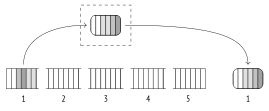
Subsequent rows are then read into the freed memory, and this procedure is repeated until all the data is written into several pre-sorted files.
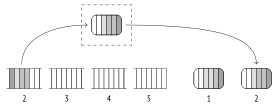
Next, these files are merged into one. This operation is performed by roughly the same algorithm that is used for merge joins; the main difference is that it can process more than two files at a time.
A merge operation does not need too much memory. In fact, it is enough to have room for one row per file. The first rows are read from each file, the row with the lowest value (or the highest one, depending on the sort order) is returned as a partial result, and the freed memory is filled with the next row fetched from the same file.
In practice, rows are read in batches of 32 pages rather than one by one, which reduces the number of I/O operations. The number of files that are merged in a single iteration depends on the available memory, but it is never smaller than six. The upper boundary is also limited (by 500) since efficiency suffers when there are too many files.16
Sorting algorithms have long-established terminology. External sorting was originally performed using magnetic tapes, and PostgreSQL keeps a similar name for the component that controls temporary files.17 Partially sorted data sets are called “runs.”18 The number of runs participating in the merge is referred to as the “merge order.” I did not use these terms, but they are worth knowing if you want to understand PostgreSQL code and comments.
If the sorted temporary files cannot be merged all at once, they have to be processed in several passes, their partial results being written into new temporary files. Each iteration increases the volume of data to be read and written, so the more RAM is available, the faster the external sorting completes.
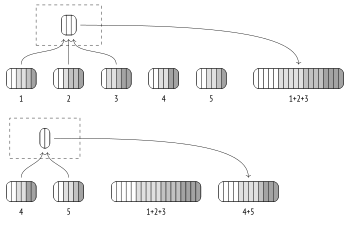
The next iteration merges newly created temporary files.
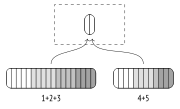
The final merge is typically deferred and performed on the fly when the upper node pulls the data.
Let’s run the EXPLAIN ANALYZE command to see how much disk space has been used by external sorting. The BUFFERS option displays buffer usage statistics for temporary files (temp read and written). The number of written buffers will be (roughly) the same as the number of read ones; converted to kilobytes, this value is shown as Disk in the plan:
To print more details on using temporary files into the server log, you can enable the log_temp_files parameter.
Cost estimation. Let’s take the same plan with external sorting as an example:
Here the regular cost of comparisons (their number is the same as in the case of a quicksort operation in memory) is extended by the I/O cost.19 All the input data has to be first written into temporary files on disk and then read from disk during the merge operation (possibly more than once if all the created files cannot be merged in one iteration).
It is assumed that three quarters of disk operations (both reads and writes) are sequential, while one quarter is random.
The volume of data written to disk depends on the number of rows to be sorted and the number of columns used in the query.20 In this example, the query displays all the columns of the flights table, so the size of the data spilled to disk is almost the same as the size of the whole table if its tuple and page metadata are not taken into account (2309 pages instead of 2624).
Here sorting is completed in one iteration.
Therefore, the sorting cost is estimated in this plan as follows:
Incremental Sorting
If a data set has to be sorted by keys K1 … Km … Kn, and this data set is known to be already sorted by the first m keys, you do not have to re-sort it from scratch. Instead, you can split this set into groups by the same first keys K1 … Km (values in these groups already follow the defined order), and then sort each of these groups separately by the remaining Km+1 … Kn keys. This method is called the incremental sort. (v. 13)
Incremental sorting is less memory-intensive than other sorting algorithms, as it splits the set into several smaller groups; besides, it allows the executor to start returning results after the first group is processed, without waiting for the whole set to be sorted.
In PostgreSQL, the implementation is a bit more subtle:21 while relatively big groups of rows are processed separately, smaller groups are combined together and are sorted in full. It reduces the overhead incurred by invoking the sorting procedure.22
The execution plan represents incremental sorting by the Incremental Sort node:
As the plan shows, the data set is pre-sorted by the total_amount field, as it is the result of an index scan run on this column (Presorted Key). The EXPLAIN ANALYZE command also displays run-time statistics. The Full-sort Groups row is related to small groups that were united to be sorted in full, while the Presorted Groups row displays the data on large groups with partially ordered data, which required incremental sorting by the book_date column only. In both cases, the in-memory quicksort method was applied. The difference in group sizes is due to non-uniform distribution of booking costs.
Incremental sorting can be used to compute window functions too: (v. 14)
Cost estimation. Cost calculations for incremental sorting23 are based on the expected number of groups24 and the estimated sorting cost of an average-sized group (which we have already reviewed).
The startup cost reflects the cost estimation of sorting the first group, which allows the node to start returning sorted rows; the total cost includes the sorting cost of all groups.
We are not going to explore these calculations any further here.
Parallel Mode
Sorting can also be performed concurrently. But although parallel workers do presort their data shares, the Gather node knows nothing about their sort order and can only accumulate them on a first-come, first-serve basis. To preserve the sort order, the executor has to apply the Gather Merge node.25 (v. 10)
The Gather Merge node uses a binary heap26 to adjust the order of rows fetched by several workers. It virtually merges several sorted sets of rows, just like external sorting would do, but is designed for a different use case: Gather Merge typically handles a small fixed number of data sources and fetches rows one by one rather than block by block.
Cost estimation. The startup cost of the Gather Merge node is based on the startup cost of its child node. Just like for the Gather node, this value is increased by the cost of launching parallel processes (estimated at parallel_setup_cost). (p. 303) (default: 1000)
The received value is then further extended by the cost of building a binary heap, which requires sorting n values, where n is the number of parallel workers (that is, n log2 n).
A single comparison operation is estimated at doubled cpu_operator_cost, and total share of such operations is typically negligible since n is quite small. (default: 0.0025)
The total cost includes the expenses incurred by fetching all the data by several processes that perform the parallel part of the plan, and the cost of transferring this data to the leader. A single row transfer is estimated at parallel_tuple_cost increased by 5 %, to compensate for possible waits on getting the next values. (default: 0.1)
The expenses incurred by binary heap updates must also be taken into account in total cost calculations: each input row requires log2 n comparison operations and certain additional actions (they are estimated at cpu_operator_cost).27
Let’s take a look at yet another plan that uses the Gather Merge node. Note that the workers here first perform partial aggregation by hashing, and then the Sort node sorts the received results (it is cheap because few rows are left after aggregation) to be passed further to the leader process, which gathers the full result in the Gather Merge node. As for the final aggregation, it is performed on the sorted list of values: (p. 384)
Here we have three parallel processes (including the leader), and the cost of the Gather Merge node is calculated as follows:
23.3 Distinct Values and Grouping
As we have just seen, grouping values to perform aggregation (and to eliminate duplicates) can be performed not only by hashing, but also by sorting. In a sorted list, groups of duplicate values can be singled out in one pass.
Retrieval of distinct values from a sorted list is represented in the plan by a very simple node called Unique28:
Aggregation is performed in the GroupAggregate node:29
In parallel plans, this node is called Partial GroupAggregate, while the node that completes aggregation is called Finalize GroupAggregate.
Both hashing and sorting strategies can be combined in a single node if grouping is performed by several column sets (specified in the GROUPING SETS, CUBE, or ROLLUP clauses). Without getting into rather complex details of this algorithm, I will simply provide an example that performs grouping by three different columns in conditions of scarce memory: (v. 10)
Here is what happens while this query is being executed. The aggregation node, which is shown in the plan as MixedAggregate, receives the data set sorted by the aircraft_code column.
First, this set is scanned, and the values are grouped by the aircraft_code column (Group Key). As the scan progresses, the rows are reordered by the flight_no column (like it is done by a regular Sort node: either via the quicksort method if the memory is sufficient, or using external sorting on disk); at the same time, the executor places these rows into a hash table that uses departure_airport as its key (like it is done by hash aggregation: either in memory, or using temporary files).
At the second stage, the executor scans the data set that has just been sorted by the flight_no column and groups the values by the same column (Sort Key and the nested Group Key node). If the rows had to be grouped by yet another column, they would be resorted again as required.
Finally, the hash table prepared at the first stage is scanned, and the values are grouped by the departure_airport column (Hash Key).
23.4 Comparison of Join Methods
As we have seen, two data sets can be joined using three different methods, and each of them has its own pros and cons.
The nested loop join does not have any prerequisites and can start returning the first rows of the result set right away. It is the only join method that does not have to fully scan the inner set (as long as index access is available for it). These properties make the nested loop algorithm (combined with indexes) an ideal choice for short OLTP queries, which deal with rather small sets of rows.
The weak point of the nested loop becomes apparent as the data volume grows. For a Cartesian product, this algorithm has quadratic complexity—the cost is proportionate to the product of sizes of the data sets being joined. However, the Cartesian product is not so common in practice; for each row of the outer set, the executor typically accesses a certain number of rows of the inner set using an index, and this average number does not depend on the total size of the data set (for example, an average number of tickets in a booking does not change as the number of bookings and bought tickets grows). Thus, the complexity of the nested loop algorithm often shows linear growth rather than quadratic one, even if with a high linear coefficient.
An important distinction of the nested loop algorithm is its universal applicability: it supports all join conditions, whereas other methods can only deal with equi-joins. It allows running queries with any types of conditions (except for the full join, which cannot be used with the nested loop), but you must keep in mind that a non-equi-join of a large data set is highly likely to be performed slower than desired.
A hash join works best on large data sets. If RAM is sufficient, it requires only one pass over two data sets, so its complexity is linear. Combined with sequential table scans, this algorithm is typically used for OLAP queries, which compute the result based on a large volume of data.
However, if the response time is more important than throughput, a hash join is not the best choice: it will not start returning the resulting rows until the whole hash table is built.
The hash join algorithm is only applicable to equi-joins. Another restriction is that the data type of the join key must support hashing (but almost all of them do).
The nested loop join can sometimes beat the hash join, taking advantage of caching the rows of the inner set in the Memoize node (which is also based on a hash table). While the hash join always scans the inner set in full, the nested loop algorithm does not have to, which may result in some cost reduction. (v. 14)
A merge join can perfectly handle both short OLTP queries and long OLAP ones. It has linear complexity (the sets to be joined have to be scanned only once), does not require much memory, and returns the results without any preprocessing; however, the data sets must already have the required sort order. The most cost-effective way to do it is to fetch the data via an index scan. It is a natural choice if the row count is low; for larger data sets, index scans can still be efficient, but only if the heap access is minimal or does not happen at all.
If no suitable indexes are available, the sets have to be sorted, but this operation is memory-intensive, and its complexity is higher than linear: O(n log2 n). In this case, a hash join is almost always cheaper than a merge join—unless the result has to be sorted.
An added bonus of a merge join is the equivalence of the inner and outer sets. The efficiency of both nested loop and hash joins is highly dependent on whether the planner can assign inner and outer sets correctly.
Merge joins are limited to equi-joins. Besides, the data type must have a B-tree operator class.
The following graph illustrates approximate dependencies between the costs of various join methods and the fraction of rows to be joined.
If the selectivity is high, the nested loop join uses index access for both tables; then the planner switches to the full scan of the outer table, which is reflected by the linear part of the graph.
Here the hash join is using a full scan for both tables. The “step” on the graph corresponds to the moment when the hash table fills the whole memory and the batches start getting spilled to disk.
If an index scan is used, the cost of a merge join shows small linear growth. If the work_mem size is big enough, a hash join is usually more efficient, but a merge join beats it when it comes to temporary files.
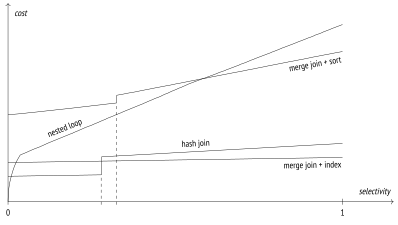
The upper graph of the sort-merge join shows that the costs rise when indexes are unavailable and the data has to be sorted. Just like in the case of a hash join, the “step” on the graph is caused by insufficient memory, as it leads to using temporary files for sorting.
It is merely an example; the ratio between the costs will differ for each particular case.
backend/optimizer/path/joinpath.c, generate_mergejoin_paths function ↩︎
backend/executor/nodeMergejoin.c, ExecMergeJoin function ↩︎
For example, see commitfest.postgresql.org/33/3160 ↩︎
backend/utils/adt/selfuncs.c, mergejoinscansel function ↩︎
backend/optimizer/path/costsize.c, final_cost_mergejoin function ↩︎
backend/optimizer/path/costsize.c, initial_cost_mergejoin & final_cost_mergejoin functions ↩︎
backend/optimizer/path/joinpath.c, consider_parallel_mergejoin function ↩︎
backend/optimizer/path/joinpath.c, select_mergejoin_clauses function ↩︎
backend/optimizer/path/pathkeys.c, build_join_pathkeys function ↩︎
backend/optimizer/path/costsize.c, cost_sort function ↩︎
backend/optimizer/path/costsize.c, cost_sort function ↩︎
backend/utils/sort/tuplesort.c, tuplesort_merge_order function ↩︎
Donald E. Knuth. The Art of Computer Programming. Volume III. Sorting and Searching ↩︎
backend/optimizer/path/costsize.c, cost_sort function ↩︎
backend/optimizer/path/costsize.c, relation_byte_size function ↩︎
backend/optimizer/path/costsize.c, cost_incremental_sort function ↩︎
backend/utils/adt/selfuncs.c, estimate_num_groups function ↩︎
backend/optimizer/path/costsize.c, cost_gather_merge function ↩︎
backend/executor/nodeAgg.c, agg_retrieve_direct function ↩︎
Part V Types of Indexes
24 Hash
24.1 Overview
A hash index1 provides the ability to quickly find a tuple ID (TID) by a particular index key. Roughly speaking, it is simply a hash table stored on disk. The only operation supported by a hash index is search by the equality condition.
When a value is inserted into an index,2 the hash function of the index key is computed. In PostgreSQL, hash functions return 32-bit or 64-bit integers; several lowest bits of these values are used as the number of the corresponding bucket. The TID and the hash code of the key are added into the chosen bucket. The key itself is not stored in the index because it is more convenient to deal with small fixed-length values.
The hash table of an index is expanded dynamically.3 The minimal number of buckets is two. As the number of indexed tuples grows, one of the buckets gets split into two. This operation uses one more bit of the hash code, so the elements are redistributed only between the two buckets resulting from the split; the composition of other buckets of the hash table remains the same.4
The index search operation5 calculates the hash function of the index key and the corresponding bucket number. Of all the bucket contents, the search will return only those TIDs that correspond to the hash code of the key. As bucket elements are ordered by the keys’ hash codes, binary search can return matching TIDs quite efficiently.
Since keys are not stored in the hash table, the index access method may return redundant TIDs because of hash collisions. Therefore, the indexing engine has to recheck all the results fetched by the access method. An index-only scan is not supported for the same reason. (p. 328)
24.2 Page Layout
Unlike a regular hash table, the hash index is stored on disk. Therefore, all the data has to be arranged into pages, preferably in such a way that index operations (search, insertion, deletion) require access to as few pages as possible.
A hash index uses four types of pages:
metapage—page zero that provides the “table of contents” of an index
bucket pages—the main pages of an index, one per bucket
overflow pages—additional pages that are used when the main bucket page cannot accommodate all the elements
bitmap pages—pages containing the bit array used to track overflow pages that have been freed and can be reused
We can peek into index pages using the pageinspect extension. (v. 10)
Let’s begin with an empty table:
I have analyzed the table, so the created index will have the minimal size possible; otherwise, the number of buckets would have been selected based on the assumption that the table contains ten pages.6 (v. 14)
The index contains four pages: the metapage, two bucket pages, and one bitmap page (created at once for future use):

The metapage contains all the control information about the index. We are interested only in a few values at the moment:
The estimated number of rows per bucket is shown in the ffactor field. This value is calculated based on the block size and the fillfactor storage parameter value. By absolutely uniform data distribution and no hash collisions you could use a higher fillfactor value, but in real-life databases it increases the risk of page overflows. (default: 75)
The worst scenario for a hash index is a large skew in data distribution, when a key is repeated multiple times. Since the hash function will be returning the same value, all the data will be placed into the same bucket, and increasing the number of buckets will not help.
Now the index is empty, as shown by the ntuples field. Let’s cause a bucket page overflow by inserting multiple rows with the same value of the index key. An overflow page appears in the index: (v. 10)
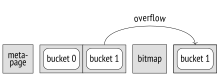
The combined statistics on all the pages shows that bucket 0 is empty, while all the values have been placed into bucket 1: some of them are located in the main page, and those that did not fit it can be found in the overflow page.
It is clear that if the elements of the bucket are spread over several pages, performance will suffer. A hash index shows best results if data distribution is uniform.
Now let’s take a look at how a bucket can be split. It happens when the number of rows in the index exceeds the estimated ffactor value for the available buckets. Here we have two buckets, and the ffactor is 307, so it will happen when the 615th row is inserted into the index:
The maxbucket value has been increased to two: now we have three buckets, numbered from 0 to 2. But even though we have added only one bucket, the number of pages has doubled:
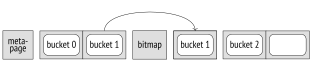
One of the new pages is used by bucket 2, while the other one remains free and will be used by bucket 3 as soon as it appears.
Thus, from the point of view of the operating system, the hash index grows in spurts, although from the logical standpoint the hash table shows gradual growth.
To level out this growth to some extent and avoid allocating too many pages at a time, starting from the tenth increase pages get allocated in four equal batches rather than all at once. (v. 10)
Two more fields of the metapage, which are virtually bit masks, provide the details on bucket addresses:
A bucket number is defined by the hash code bits that correspond to the highmask. But if the received bucket number does not exist (exceeds maxbucket), the lowmask bits are taken.7 In this particular case, we take two lowest bits, which gives us the values from 0 to 3; but if we got 3, we would take only one lowest bit, that is, use bucket 1 instead of bucket 3.
Each time the size is doubled, new bucket pages are allocated as a single continuous chunk, while overflow and bitmap pages get inserted between these fragments as required. The metapage keeps the number of pages inserted into each of the chunks in the spares array, which gives us an opportunity to calculate the number of its main page based on the bucket number using simple arithmetic.8
In this particular case, the first increase was followed by insertion of two pages (a bitmap page and an overflow page), but no additions have happened after the second increase yet:
The metapage also stores an array of pointers to bitmap pages:
spares
meta-bucket 0bucket 0 bucket 1bucket 1 bitmap bucket 1bucket 1 bucket 2bucket 2 page
mmap
The space within index pages is freed when pointers to dead tuples are removed. It happens during page pruning (which is triggered by an attempt to insert an element into a completely filled page)9 or when routine vacuuming is performed.
However, a hash index cannot shrink: once allocated, index pages will not be returned to the operating system. The main pages are permanently assigned to their buckets, even if they contain no elements at all; the cleared overflow pages are tracked in the bitmap and can be reused (possibly by another bucket). The only way to reduce the physical size of an index is to rebuild it using the REINDEX or VACUUM FULL commands. (p. 135)
The query plan has no indication of the index type:
24.3 Operator Class
Prior to PostgreSQL 10, hash indexes were not logged, that is, they were neither protected against failures nor replicated, and consequently, it was not recommended to use them. But even then they had their own value. The thing is that the hashing algorithm is widely used (in particular, to perform hash joins and grouping), and the system must know which hash function can be used for a certain data type. However, this correspondence is not static: it cannot be defined once and for all since PostgreSQL allows adding new data types on the fly. Therefore, it is maintained by the operator class of the hash index and a particular data type. The hash function itself is represented by the support function of the class: (p. 367) (p. 315)
These functions return 32-bit integers. Although they are not documented, they can be used to calculate the hash code for a value of the corresponding type.
For example, the text_ops family uses the hashtext function:
The operator class of the hash index provides only the equal to operator:
24.4 Properties
Let’s take a look at the index-level properties that the hash access method imparts to the system. (p. 322)
Access Method Properties
It is clear that hash indexes cannot be used for row ordering: the hash function mixes the data more or less randomly.
Unique constraints are not supported either. However, hash indexes can enforce exclusion constraints, and since the only supported function is equal to, this exclusion attains the meaning of uniqueness: (p. 325)
Multicolumn indexes and additional INCLUDE columns are not supported either.
Index-Level Properties
The hash index supports both a regular index scan and a bitmap scan.
Table clusterization by the hash index is not supported. It is quite logical, as it is hard to imagine why it may be necessary to physically order heap data based on the hash function value.
Column-Level Properties
Column-level properties are virtually defined by the index access method and always take the same values.
Since the hash function does not preserve the order of values, all the properties related to ordering are inapplicable to the hash index.
The hash index cannot participate in an index-only scan, as it does not store the index key and requires heap access.
The hash index does not support NULL values, since the equal to operation is inapplicable to them.
Search for elements in an array is not implemented either.
postgresql.org/docs/14/hash-index.html backend/access/hash/README ↩︎
backend/access/hash/hashpage.c, _hash_expandtable function ↩︎
backend/access/hash/hashpage.c, _hash_getbucketbuf_from_hashkey function ↩︎
backend/access/table/tableam.c, table_block_relation_estimate_size function ↩︎
backend/access/hash/hashutil.c, _hash_hashkey2bucket function ↩︎
include/access/hash.h, BUCKET_TO_BLKNO macro ↩︎
backend/access/hash/hashinsert.c, _hash_vacuum_one_page function ↩︎
25 B-tree
25.1 Overview
A B-tree (implemented as the btree access method) is a data structure that enables you to quickly find the required element in leaf nodes of the tree by going down from its root.1 For the search path to be unambiguously identified, all tree elements must be ordered. B-trees are designed for ordinal data types, whose values can be compared and sorted.
The following schematic diagram of an index build over airport codes shows inner nodes as horizontal rectangles; leaf nodes are aligned vertically.
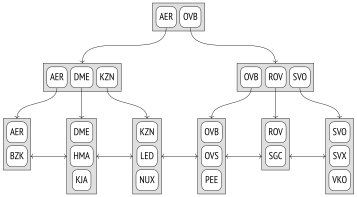
Each tree node contains several elements, which consist of an index key and a pointer. Inner node elements reference nodes of the next level; leaf node elements reference heap tuples (the illustration does not show these references).
B-trees have the following important properties:
They are balanced, which means that all leaf nodes of a tree are located at the same depth. Therefore, they guarantee equal search time for all values.
They have plenty of branches, that is, each node contains many elements, often hundreds of them (the illustration shows three-element nodes solely for clarity). As a result, B-tree depth is always small, even for very large tables.
We cannot say with absolute certainty what the letter B in the name of this structure stands for. Both balanced and bushy fit equally well. Surprisingly, you can often see it interpreted as binary, which is certainly incorrect.
- Data in an index is sorted either in ascending or in descending order, both within each node and across all nodes of the same level. Peer nodes are bound into a bidirectional list, so it is possible to get an ordered set of data by simply scanning the list one way or the other, without having to start at the root each time.
25.2 Search and Insertions
Search by Equality
Let’s take a look at how we can search for a value in a tree by condition “indexed-column = expression”.2 We will try to find the KJA airport (Krasnoyarsk).
The search starts at the root node, and the access method must determine which child node to descend to. It chooses the Ki key, for which Ki ⩽ expression < Ki+1 is satisfied.
The root node contains the keys AER and OVB. The condition AER ⩽ KJA < OVB holds true, so we need to descend into the child node referenced by the element with the AER key.
This procedure is repeated recursively until we get to the leaf node that contains the required tuple ID. In this case, the child node satisfies the condition DME ⩽ KJA < KZN, so we have to descend into the leaf node referenced by the element with the DME key.
As you can notice, the leftmost keys in the inner nodes of the tree are redundant: to choose the child node of the root, it is enough to have condition KJA < OVB satisfied. B-trees do not store such keys, so in the illustrations that follow I will leave the corresponding elements empty.
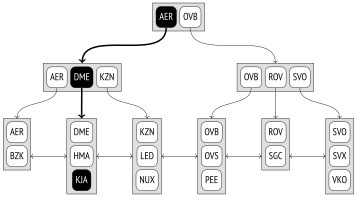
The required element in the leaf node can be quickly found by binary search.
However, the search procedure is not as trivial as it seems. It must be taken into account that the sort order of data in an index can be either ascending, like shown above, or descending. Even a unique index can have several matching values, and all of them must be returned. Moreover, there may be so many duplicates that they do not fit a single node, so the neighboring leaf node will have to be processed too. (p. 429)
Since an index can contain non-unique values, it would be more accurate to call its order non-descending rather than ascending (and non-ascending rather than descending). But I will stick to a simpler term. Besides, the tuple ID is a part of an index key, which lets us consider index entries to be unique even if the values are actually the same.
On top of that, while the search is in progress, other processes may modify the data, pages may get split into two, and the tree structure may change. All the algorithms are designed to minimize contention between these concurrent operations whenever possible and avoid excessive locks, but we are not going to get into these technicalities here. (v. 12)
Search by Inequality
If the search is performed by condition “indexed-column ⩽ expression” (or “indexed-column ⩾ expression”), we must first search the index for the value that satisfies the equality condition and then traverse its leaf nodes in the required direction until the end of the tree is reached.
This diagram illustrates the search for airport codes that are less than or equal to DME (Domodedovo).
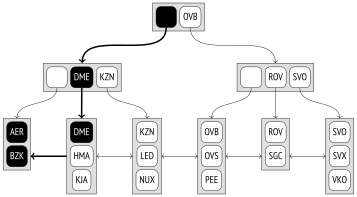
For less than and greater than operators, the procedure is the same, except that the first found value must be excluded.
Search by Range
When searching by range “expression1 ⩽ indexed-column ⩽ expression2”, we must first find expression1 and then traverse the leaf nodes in the right direction until we get to expression2. This diagram illustrates the process of searching for airport codes in the range between LED (Saint Petersburg) and ROV (Rostov-on-Don), inclusive.
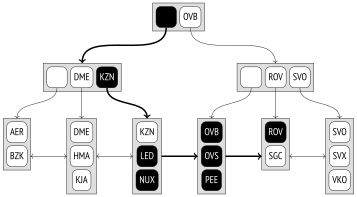
Insertions
The insert position of a new element is unambiguously defined by the order of keys. For example, if you insert the RTW airport code (Saratov) into the table, the new element will appear in the last but one leaf node, between ROV and SGC.
But what if the leaf node does not have enough space for a new element? For example (assuming that a node can accommodate three elements at the most), if we insert the TJM airport code (Tyumen), the last leaf node will be overfilled. In this case, the node is split into two, some of the elements of the old node are moved into the new node, and a pointer to the new child node is added into the parent node. Obviously, the parent can get overfilled too. Then it is also split into two nodes, and so on. If it comes to splitting the root, one more node is created above the resulting nodes to become the new root of the tree. The tree depth is increased by one level in this case.
In this example, the insertion of the TJM airport led to two node splits; the resulting new nodes are highlighted in the diagram below. To make sure that any node can be split, a bidirectional list binds the nodes at all levels, not only those at the lowest level.
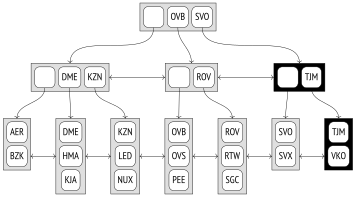
The described procedure of insertions and splits guarantees that the tree remains balanced, and since the number of elements that a node can accommodate is typically quite large, the tree depth rarely increases.
The problem is that once split, nodes can never be merged together, even if they contain very few elements after vacuuming. This limitation pertains not to the B-tree data structure as such, but rather to its PostgreSQL implementation. So if the node turns out to be full when an insertion is attempted, the access method first tries to prune redundant data in order to clear some space and avoid an extra split. (p. 101)
25.3 Page Layout
Each node of a B-tree takes one page. The page’s size defines the node’s capacity.
Because of page splits, the root of the tree can be represented by different pages at different times. But the search algorithm must always start the scan at the root. It finds the ID of the current root page in the zero index page (which is called a metapage). The metapage also contains some other metadata.
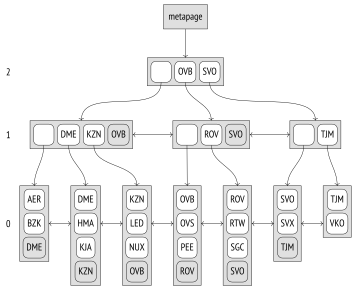
Data layout in index pages is a bit different from what we have seen so far. All the pages, except the rightmost ones at each level, contain an additional “high key,” which is guaranteed to be not smaller than any key in this page. In the above diagram high keys are highlighted.
Let’s use the pageinspect extension to take a look at a page of a real index built upon six-digit booking references. The metapage lists the root page ID and the depth of the tree (level numbering starts from leaf nodes and is zero-based):
The keys stored in index entries are displayed as sequences of bytes, which is not really convenient:
To decipher these values, we will have to write an adhoc function. It will not support all platforms and may not work for some particular scenarios, but it will do for the examples in this chapter:
Now we can take a look at the contents of the root page:
As I have said, the first entry contains no key. The ctid column provides links to child pages.
Suppose we are looking for booking E2D725. In this case, we have to choose entry 19 (since E2CB14 ⩽ E2D725 < EF6FEA) and go down to page 5135.
high key
The first entry in this page contains the high key, which may seem a bit unexpected. Logically, it should have been placed at the end of the page, but from the implementation standpoint it is more convenient to have it at the beginning to avoid moving it each time the page content changes.
Here we choose entry 3 (since E2D71D ⩽ E2D725 < E2E2F4) and go down to page 11919.
It is a leaf page of the index. The first entry is the high key; all the other entries point to heap tuples.
And here is our booking:
This is roughly what happens at the low level when we search for a booking by its code:
Deduplication
Non-unique indexes can contain a lot of duplicate keys that point to different heap tuples. Since non-unique keys appear more than once and hence take much space, duplicates (v. 13)
are collapsed into a single index entry, which contains the key and the list of the corresponding tuple IDs.3 In some cases, this procedure (which is called deduplication) can significantly reduce the index size.
However, unique indexes can also contain duplicates because of MVCC: an index keeps references to all versions of table rows. The mechanism of HOT updates can help you fight index bloating caused by referencing outdated and typically short-lived row versions, but sometimes it may be inapplicable. In this case, deduplication can buy some time required to vacuum redundant heap tuples and avert extra page splits. (p. 92)
To avoid wasting resources on deduplication when it brings no immediate benefits, collapsing is only performed if the leaf page does not have enough space to accommodate one more tuple.4 Then page pruning and deduplication5 can free some space and prevent an undesired page split. However, if duplicates are rare, you can disable the deduplication feature by turning off the deduplicate_items storage parameter.
Some indexes do not support deduplication. The main limitation is that the equality of keys must be checked by simple binary comparison of their inner representation. Not all data types by far can be compared this way. For instance, floating-point numbers (float and double precision) have two different representations for zero. Arbitrary-precision numbers (numeric) can represent the same number in different scales, while the jsonb type can use such numbers. Neither is deduplication possible for text types if you use nondeterministic collations,6 which allow the same symbols to be represented by different byte sequences (standard collations are deterministic).
Besides, deduplication is currently not supported for composite types, ranges, and arrays, as well as for indexes declared with the INCLUDE clause.
To check whether a particular index can use deduplication, you can take a look at the allequalimage field in its metapage:
In this case, deduplication is supported. And indeed, we can see that one of the leaf pages contains both index entries with a single tuple ID (htid) and those with a list of IDs (tids):
Compact Storage of Inner Index Entries
Deduplication enables accommodating more entries in leaf pages of an index. But even though leaf pages make up the bulk of an index, data compaction performed in inner pages to prevent extra splits is just as important, as search efficiency is directly dependent on tree depth. (v. 12)
Inner index entries contain index keys, but their values are only used to determine the subtree to descend into during search. In multicolumn indexes, it is often enough to take the first key attribute (or several first ones). Other attributes can be truncated to save space in the page.
Such suffix truncation happens when a leaf page is being split and the inner page has to accommodate a new pointer.7
In theory, we could even go one step further and keep only the meaningful part of the attribute, for example, the first few symbols of a row that are enough to differentiate between subtrees. But it is not implemented yet: an index entry either contains the whole attribute or excludes this attribute altogether.
For instance, here are several entries of the root page of an index built over the tickets table on the columns containing booking references and passenger names:
We can see that some index entries do not have the second attribute.
Naturally, leaf pages must keep all key attributes and INCLUDE column values, if any. Otherwise, it would be impossible to perform index-only scans. The only exception is high keys; they can be kept partially.
25.4 Operator Class
Comparison Semantics
Apart from hashing values, the system must also know how to order values of various types, including custom ones. It is indispensable for sorting, grouping, merge joins, and some other operations. And just like in the case of hashing, comparison operators for a particular data type are defined by an operator class.8
An operator class allows us to abstract from names (such as >, <, =) and can even provide several ways to order values of the same type.
Here are the mandatory comparison operators that must be defined in any operator class of the btree method (shown for the bool_ops family):
Each of these five comparison operators corresponds to one of the strategies,9 which defines their semantics:
1 less than
2 less than or equal to
3 equal to
4 greater than or equal to
5 greater than
A B-tree operator class also includes several support functions.10 The first one must return 1 if its first argument is greater than the second one, −1 if it is less than the second one, and 0 if the arguments are equal.
Other support functions are optional, but they improve performance of the access method.
To better understand this mechanism, we can define a new data type with a non-default collation. The documentation gives an example for complex numbers,11 but it is written in C. Fortunately, a B-tree operator class can be implemented using interpreted languages too, so I will take advantage of it and make an example that is as simple as possible (even if knowingly inefficient).
Let’s define a new composite type for information units:
Now create a table with a column of the new type and fill it with random values:
By default, values of composite types are sorted in lexicographical order, which is not the same as the natural order in this particular case:
Now let’s get down to creating our operator class. We will start with defining a function that converts the volume into bytes:
Create a support function for the future operator class:
Now it is easy to define comparison operators using this support function. I deliberately use peculiar names to demonstrate that they can be arbitrary:
The other four operators are defined in a similar way.
At this stage, we can already compare capacities:
Once the operator class is created, sorting will also start working as expected:
Our operator class is used by default when a new index is created, and this index returns the results in the correct order:
The MERGES clause specified in the equality operator declaration enables merge joins for this data type. (p. 387)
Multicolumn Indexes and Sorting
Let’s take a closer look at sorting multicolumn indexes.
First and foremost, it is very important to choose the optimal order of columns when declaring an index: data sorting within pages will begin with the first column, then move on to the second one, and so on. Multicolumn indexes can guarantee efficient search only if the provided filter condition spans a continuous sequence of columns starting from the very first one: the first column, the first two columns, the range between the first and the third columns, etc. Other types of conditions can only be used to filter out redundant values that have been fetched based on other criteria.
Here is the order of index entries in the first leaf page of the index that has been created on the tickets table and includes booking references and passenger names:
In this case, an efficient search for tickets is only possible either by the booking reference and the passenger name, or by the booking reference alone.
But if we decide to look for a passenger name, we have to scan all the rows:
Even if the planner chooses to perform an index scan, all index entries will still have to be traversed.12 Unfortunately, the plan will not show that the condition is actually used only for filtering the result.
If the first column does not have too many distinct values v1, v2, …, vn, it could be beneficial to perform several passes over the corresponding subtrees, virtually replacing a single search by condition “col2 = value” with a series of searches by the following conditions:
col1 = v1 AND col2 = value
col1 = v2 AND col2 = value
⋯
col1 = vn AND col2 = value
This type of an index access is called a Skip Scan, but it is not implemented yet.13
And vice versa, if an index is created on passenger names and booking numbers, it will better suit queries by either the passenger name alone or both the passenger name and booking reference:
In addition to the column order, you should also pay attention to the sort order when creating a new index. By default, values are sorted in ascending order (ASC), but you can reverse it (DESC) if required. It does not matter much if an index is built over a single column, as it can be scanned in any direction. But in a multicolumn index the order becomes important.
Our newly created index can be used to retrieve the data sorted by both columns either in ascending or in descending order:
But this index cannot return the data right away if it needs to be sorted in ascending order by one column and in descending order by the other column at the same time. In this case, the index provides partially ordered data that has to be further sorted by the second attribute: (p. 399)
The location of NULL values also affects the ability to use index for sorting. By default, NULL values are considered “greater” than regular values for the purpose of sorting, that is, they are located in the right side of the tree if the sort order is ascending and in the left side if the sort order is descending. The location of NULL values can be changed using the NULLS LAST and NULLS FIRST clauses.
In the next example, the index does not satisfy the ORDER BY clause, so the result has to be sorted:
But if we create an index that follows the desired order, it will be used:
25.5 Properties
Let’s take a look at the interface properties of B-trees. (p. 322)
Access Method Properties
B-trees can order data and ensure its uniqueness. It is the only access method with such properties.
Many access methods support multicolumn indexes, but since values in B-trees are ordered, you have to pay close attention to the order of columns in an index.
Formally, exclusion constraints are supported, but they are limited to equality conditions, which makes them analogous to unique constraints. It is much more preferable to use a full-fledged unique constraint instead.
B-tree indexes can also be extended with additional INCLUDE columns that do not participate in search.
Index-Level Properties
B-tree indexes can be used for clusterization.
Both index scans and bitmap scans are supported. Since leaf pages are bound into a bidirectional list, an index can also be traversed backwards, which results in the reverse sort order:
Column-Level Properties
The ORDERABLE property indicates that the data stored in a B-tree is ordered, while the first four properties (ASC and DESC, NULLS FIRST and NULLS LAST) define the actual order in a particular column. In this example, column values are sorted in ascending order with NULL values listed last.
The SEARCH NULLS property indicates whether NULL values can be searched.
B-trees do not support ordering operators (DISTANCE ORDERABLE), even though it has been attempted to implement them.14
B-trees support searching for multiple elements in an array (the SEARCH ARRAY property) and can return the resulting data without heap access (RETURNABLE).
postgresql.org/docs/14/btree.html backend/access/nbtree/README ↩︎
backend/access/nbtree/nbtsearch.c, _bt_search function ↩︎
postgresql.org/docs/14/btree-implementation.html#BTREE-DEDUPLICATION ↩︎
backend/access/nbtree/nbtinsert.c, _bt_delete_or_dedup_one_page function ↩︎
backend/access/nbtree/nbtdedup.c, _bt_dedup_pass function ↩︎
backend/access/nbtree/nbtinsert.c, _bt_split function ↩︎
backend/access/nbtree/nbtsearch.c, _bt_first function ↩︎
26 GiST
26.1 Overview
GiST (Generalized Search Tree)1 is an access method that is virtually a generalization of a balanced search tree for data types that support relative positioning of values. B-tree applicability is limited to ordinal types that allow comparison operations (but the support provided for such types is extremely efficient). As for GiST, its operator class allows defining arbitrary criteria for data distribution in the tree. A GiST index can accommodate an R-tree for spatial data, an RD-tree for sets, and a signature tree for any data types (including texts and images).
Thanks to extensibility, you can create a new access method in PostgreSQL from scratch by implementing the interface of the indexing engine. However, apart from designing the indexing logic, you have to define the page layout, an efficient locking strategy, and WAL support. It all takes strong programming skills and much implementation efforts. GiST simplifies this task, addressing all the low-level technicalities and providing the basis for the search algorithm. To use the GiST method with a new data type, you just need to add a new operator class that includes a dozen support functions. Unlike the trivial operator class provided for B-trees, such a class contains most of the indexing logic. GiST can be regarded as a framework for building new access methods in this respect.
Speaking in the most general terms, each entry that belongs to a leaf node (a leaf entry) contains a predicate (a logical condition) and a heap tuple ID. The index key must satisfy the predicate; it does not matter whether the key itself is a part of this entry or not.
Each entry in an inner leaf (an inner entry) also contains a predicate and a reference to a child node; all the indexed data of the child subtree must satisfy this predicate. In other words, the predicate of an inner entry is the union of all the predicates of its child entries. This important property of GiST serves the purpose of simple ranking used by B-trees.
GiST tree search relies on the consistency function, which is one of the support functions defined by the operator class.
The consistency function is called on an index entry to determine whether the predicate of this entry is “consistent” with the search condition (“indexed-column operator expression”). For an inner entry, it shows whether we have to descend into the corresponding subtree; for a leaf entry, it checks whether its index key satisfies the condition.
The search starts at the root node,2 which is typical of a tree search. The consistency function determines which child nodes must be traversed and which can be skipped. Then this procedure is repeated for each of the found child nodes; unlike a B-tree, a GiST index may have several such nodes. Leaf node entries selected by the consistency function are returned as results.
The search is always depth-first: the algorithm tries to get to a leaf page as soon as possible. Therefore, it can start returning results right away, which makes a lot of sense if the user needs to get only the first few rows.
To insert a new value into a GiST tree, it is impossible to use the consistency function, since we need to choose exactly one node to descend to.3 This node must have the minimal insert cost; it is determined by the penalty function of the operator class.
Just like in the case of a B-tree, the selected node may turn out to have no free space, which leads to a split.4 This operation needs two more functions. One of them distributes the entries between the old and new nodes; the other forms the union of the two predicates to update the predicate of the parent node.
As new values are being added, the existing predicates expand, and they are typically narrowed down only if the page is split or the whole index is rebuilt. Thus, frequent updates of a GiST index can lead to its performance degradation.
Since all these theoretical discussions may seem too vague, and the exact logic mostly depends on a particular operator class anyway, I will provide several specific examples.
26.2 R-Trees for Points
The first example deals with indexing points (or other geometries) on a plane. A regular B-tree cannot be used for this data type, as there are no comparison operators defined for points. Clearly, we could have implemented such operators on our own, but geometries need index support for totally different operations. I will go over just two of them: search for objects contained within a particular area and nearest neighbor search.
An R-tree draws rectangles on a plane; taken together, they must cover all the indexed points. An index entry stores the bounding box, and the predicate can be defined as follows: the point lies within this bounding box.
The root of an R-tree contains several large rectangles (that may also overlap). Child nodes hold smaller rectangles that fit their parent nodes; together, they cover all the underlying points.
Leaf nodes should contain the indexed points themselves, but GiST requires that all entries have the same data type; therefore, leaf entries are also represented by rectangles, which are simply reduced to points.
To better visualize this structure, let’s take a look at three levels of an R-tree built over airport coordinates. For this example, I have extended the airports table of the demo database up to five thousand rows.5 I have also reduced the fillfactor value to make the tree deeper; the default value would have given us a single-level tree. (default: 90)
At the upper level, all the points are included into several (partially overlapping) bounding boxes:
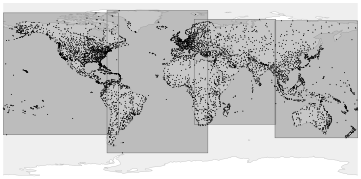
At the next level, big rectangles are split into smaller ones:
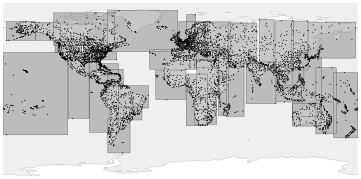
Finally, at the inner level of the tree each bounding box contains as many points as a single page can accommodate:
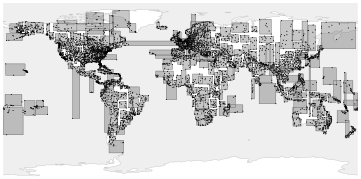
This index uses the point_ops operator class, which is the only one available for points.
Rectangles and any other geometries can be indexed in the same manner, but instead of the object itself the index has to store its bounding box.
Page Layout
You can study GiST pages using the pageinspect extension. (v. 14)
Unlike B-tree indexes, GiST has no metapage, and the zero page is always the root of the tree. If the root page gets split, the old root is moved into a separate page, and the new root takes its place.
Here is the contents of the root page:
These four rows correspond to the four rectangles of the upper level shown in the first picture. Unfortunately, the keys are displayed here as points (which makes sense for leaf pages), not as rectangles (which would be more logical for inner pages). But we can always get raw data and interpret it on our own.
To extract more detailed information, you can use the gevel extension,6 which is not included into the standard PostgreSQL distribution.
Operator Class
The following query returns the list of support functions that implement the logic of search and insert operations for trees:7
I have already listed the mandatory functions above:
1 consistency function used to traverse the tree during search
2 union function that merges rectangles
5 penalty function used to choose the subtree to descend to when inserting an entry
6 picksplit function that distributes entries between new pages after a page split
7 same function that checks two keys for equality
The point_ops operator class includes the following operators:
Operator names do not usually tell us much about operator semantics, so this query also displays the names of the underlying functions and their descriptions. One way or another, all the operators deal with relative positioning of geometries (left of, right of, above, below, contains, is contained) and the distance between them.
As compared to B-trees, GiST offers more strategies. Some of the strategy numbers are common to several types of indexes,8 while others are calculated by formulas (for example, 28, 48, and 68 virtually represent the same strategy: is contained for rectangles, polygons, and circles). Besides, GiST supports some obsolete operator names (<<| and |>>).
Operator classes may implement only some of the available strategies. For example, the contains strategy is not supported by the operator class for points, but it is available in classes defined for geometries with measurable area (box_ops, poly_ops, and circle_ops).
Search for Contained Elements
A typical query that can be sped up by an index returns all points of the specified area.
For example, let’s find all the airports located within one degree from the centre of Moscow:
We can take a closer look at this operator using a trivial example shown in the figure below:
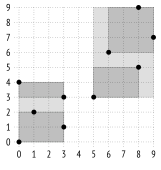
If bounding boxes are selected this way, the index structure will be as follows:
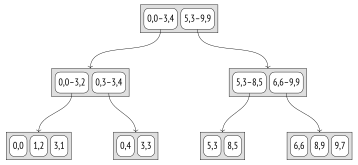
The contains operator <@ determines whether a particular point is located within the specified rectangle. The consistency function for this operator9 returns “yes” if the rectangle of the index entry has any common points with this rectangle. It means that for leaf node entries, which store rectangles reduced to points, this function determines whether the point is contained within the specified rectangle.
For example, let’s find the inner points of rectangle (1,2)–(4,7), which is hatched in the figure below:
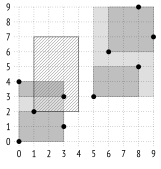
The search starts at the root node. The bounding box overlaps with (0,0)–(3,4), but does not overlap with (5,3)–(9,9). It means that we do not have to descend into the second subtree.
At the next level, the bounding box overlaps with (0,3)–(3,4) and touches (0,0)–(3,2), so we have to check both subtrees.
Once we get to leaf nodes, we just have to go through all the points that they contain and return those that satisfy the consistency function.
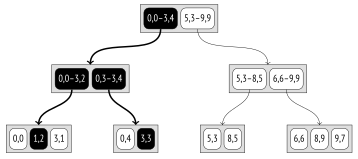
A B-tree search always selects exactly one child node. A GiST search, however, may have to scan several subtrees, especially if their bounding boxes overlap.
Nearest Neighbor Search
Most of the operators supported by indexes (such as = or <@ shown in the previous example) are typically called search operators, as they define search conditions in queries.
Such operators are predicates, that is, they return a logical value.
But there is also a group of ordering operators, which return the distance between arguments. Such operators are used in the ORDER BY clause and are typically supported by indexes that have the DISTANCE ORDERABLE property, which enables you to quickly find the specified number of nearest neighbors. This type of search is known as k-NN, or k-nearest neighbor search. (p. 327)
For example, we can find 10 airports closest to Kostroma:
Since an index scan returns the results one by one and can be stopped any time, several first values can be found very quickly.
It would be very hard to achieve efficient search without index support. We would have to find all the points that appear in a particular area and then gradually expand this area until the requested number of results is returned. It would require several index scans, not to mention the problem of choosing the size of the original area and its increments.
You can see the operator type in the system catalog (“s” stands for search, “o” denotes ordering operators):
To support such queries, an operator class must define an additional support function: it is the distance function, which is called on the index entry to calculate the distance from the value stored in this entry to some other value.
For a leaf element representing an indexed value, this function must return the distance to this value. In the case of points,10 it is a regular Euclidean distance, which equals .
For an inner element, the function must return the minimal of all the possible distances from its child leaf elements. Since it is quite costly to scan all the child entries, the function can optimistically underestimate the distance (sacrificing efficiency), but it must never return a bigger value—it would compromise search correctness.
Therefore, for an inner element represented by a bounding box, the distance to the point is understood in the regular mathematical sense: it is either the minimal distance between the point and the rectangle or zero if the point is inside the rectangle.11 This value can be easily calculated without traversing all the child points of the rectangle, and it is guaranteed to be not greater than the distance to any of these points.
Let’s consider the algorithm of searching for three nearest neighbors of point (6,8):
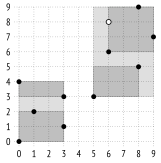
The search starts at the root node, which holds two bounding boxes. The distance from the specified point to rectangle (0,0)–(3,4) is taken as the distance to the rectangle’s corner (3,4), which equals 5.0. The distance to (5,3)–(9,9) is 0.0. (I am going to round all the values here to the first decimal place; such accuracy will be enough for this example.)
Child nodes get traversed in the order of distance increase. Thus, we first descend into the right child node, which contains two rectangles: (5,3)–(8,5) and (6,6)–(9,9). The distance to the first one is 3.0; the distance to the second one is 0.0.
Once again, we choose the right subtree and get into the leaf node containing three points: (6,6) at the distance of 2.0, (8,9) at the distance of 2.2, and (9,7) at the distance of 3.2.
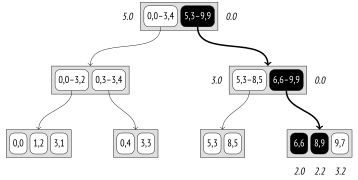
Thus, we have received the first two points: (6,6) and (8,9). But the distance to the third point of this node is greater than the distance to rectangle (5,3)–(8,5).
So now we have to descend into the left child node, which contains two points. The distance to point (8,5) is 3.6, while the distance to (5,3) is 5.1. It turns out that point (9,7) in the previous child node is closer to point (6,8) than any of the nodes of the left subtree, so we can return it as the third result.
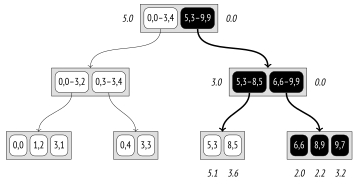
This example illustrates the requirements that must be satisfied by the distance function for inner entries. Because of the reduced distance (3.0 instead of 3.6) to rectangle (5,3)–(8,5), an extra node had to be scanned, so search efficiency has declined; however, the algorithm itself remained correct.
Insertion
When a new key is getting inserted into an R-tree, the node to be used for this key is determined by the penalty function: the size of the bounding box must be increased as little as possible.12
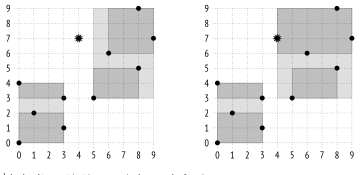
For example, point (4,7) will be added to rectangle (5,3)–(9,9) because its area will increase by only 6 units, while rectangle (0,0)–(3,4) would have to be increased by 12 units. At the next (leaf) level, the point will be added to rectangle (6,6)–(9,9), following the same logic.
Assuming that a page holds three elements at the most, it has to be split in two, and the elements have to be distributed between the new pages. In this example, the result seems obvious, but in the general case the data distribution task is not so trivial. First and foremost, the picksplit function attempts to minimize overlaps between bounding boxes, aiming at getting smaller rectangles and uniform distribution of points between pages.13
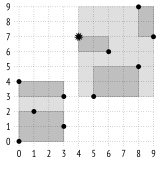
Exclusion Constraints
GiST indexes can also be used in exclusion constraints.
An exclusion constraint guarantees that the specified fields of any two heap tuples do not match each other in the sense of some operator. The following conditions must be satisfied:
The exclusion constraint must be supported by the indexing method (the
CAN EXCLUDEproperty).The operator must belong to the operator class of this indexing method.
The operator must be commutative: the condition “a operator b = b operator a” must hold true.
For the hash and btree access methods considered above, the only suitable operator is equal to. It virtually turns an exclusion constraint into a unique one, which is not particularly useful. (p. 419)
The gist method has two more applicable strategies:
overlapping: the
&&operatoradjacency: the
-|-operator (defined for intervals)
To try it out, let’s create a constraint that forbids placing airports too close to each other. This condition can be formulated as follows: circles of a particular radius with centers lying at the airports’ coordinates must not overlap:
When an exclusion constraint is defined, an index to enforce it is added automatically. Here it is a GiST index built over an expression.
Let’s take a look at a more complex example. Suppose we need to allow close proximity of airports, but only if they belong to the same city. A possible solution is to define a new integrity constraint that can be formulated as follows: it is forbidden to have pairs of rows with intersections (&&) of circles if their centers lie at the airports’ coordinates and the corresponding cities have different names (!=).
An attempt to create such a constraint results in an error because there is no operator class for the text data type:
However, GiST does provide strategies like strictly left of, strictly right of, and same, which can also be applied to regular ordinal data types, such as numbers or text strings. The btree_gist extension is specifically intended to implement GiST support for operations that are typically used with B-trees:
The constraint is created. Now we cannot add Zhukovsky airport belonging to a town with the same name because Moscow airports are too close:
But we can do it if we specify Moscow as this airport’s city:
It is important to remember that even though GiST supports greater than, less than, and equal to operations, B-trees are much more efficient in this respect, especially when accessing a range of values. So it makes sense to use the trick with the btree_gist extension shown above only if the GiST index is really needed for other legitimate reasons.
Properties
Access method properties. Here are the properties of the gist method:
Unique constraints and sorting are not supported.
A GiST index can be created with additional INCLUDE columns. (v. 12)
As we know, we can build an index over several columns, as well as use it in integrity constraints.
Index-level properties. These properties are defined at the index level:
A GiST index can be used for clusterization.
As for data retrieval methods, both regular (row-by-row) index scans and bitmap scans are supported. However, backward scanning of GiST indexes is not allowed.
Column-level properties. Most of the column properties are defined at the access method level, and they remain the same:
All sort-related properties are disabled.
NULL values are allowed, but GiST is not really efficient at handling them. It is assumed that a NULL value does not increase the bounding box; such values get inserted into random subtrees, so they have to be searched for in the whole tree.
However, a couple of column-level properties do depend on the particular operator class:
Index-only scans are allowed, since leaf nodes keep full index keys.
As we have seen above, this operator class provides the distance operator for nearest neighbor search. The distance to a NULL value is considered to be NULL; such values are returned last (similar to the NULLS LAST clause in B-trees).
However, there is no distance operator for range types (which represent segments, that is, linear geometries rather than areal ones), so this property is different for an index built for such types:
26.3 RD-Trees for Full-Text Search
About Full-Text Search
The objective of full-text search14 is to select those documents from the provided set that match the search query.
To be searched, the document is cast to the tsvector type, which contains lexemes and their positions in the document. Lexemes are words converted into a format that is suitable for search. By default, all words are normalized to lowercase, and their endings are cut off:
The so-called stop words (like “the” or “from”) are filtered out: they are assumed to occur too often for the search to return any meaningful results for them. Naturally, all these transformations are configurable.
A search query is represented by another type: tsquery. Any query includes one or more lexemes bound by logical connectives: & (AND), | (OR), ! (NOT). You can also use parentheses to define operator precedence.
The only operator used for full-text search is the match operator @@:
This operator determines whether the document satisfies the query. Here is an example:
It is by no means an exhaustive description of full-text search, but this information should be sufficient for understanding indexing fundamentals. (p. 493)
Indexing tsvector Data
To work fast, full-text search has to be supported by an index.15 Since it is not documents themselves but tsvector values that get indexed, you have two options here: either build an index on an expression and perform a type cast, or add a separate column of the tsvector type and index this column. The benefit of the first approach is that it does not waste any space on storing tsvector values, which are actually not needed as such. But it is slower than the second option, as the indexing engine has to recheck all the heap tuples returned by the access method. It means that the tsvector value has to be calculated again for each rechecked row, and as we soon will see, GiST rechecks all rows. (p. 493)
Let’s construct a simple example. We are going to create a two-column table: the first column will store the document, while the second one will hold the tsvector value. We can use a trigger to update the second column,16 but it is more convenient to simply declare 17 this column as generated: (v. 12)
In the examples above, I used the to_tsvector function with a single argument, having set the default_text_search_config parameter to define the full-text search configuration. The volatility category of this function flavor is STABLE, since it is implicitly dependent on the parameter value. But here I apply another flavor that defines the configuration explicitly; this flavor is IMMUTABLE and can be used in generation expressions.
Let’s insert several rows: (default: english)
As such, an R-tree is of no good for indexing documents, since the concept of bounding boxes makes no sense for them. Therefore, its RD-tree (Russian Doll) modification is used. Instead of a bounding box, such a tree uses a bounding set, that is, a set that contains all the elements of its child sets. For full-text search, such a set contains lexemes of the document, but in the general case a bounding set can be arbitrary.
There are several ways to represent bounding sets in index entries. The simplest one is to enumerate all the elements of the set.
Here is how it might look like:
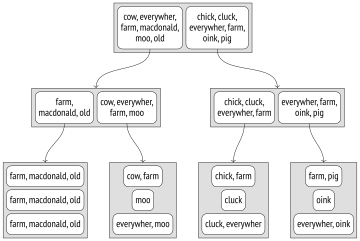
To find the documents that satisfy the DOC_TSV @@ TO_TSQUERY(’COW’) condition, we need to descend into the nodes whose child entries are known to contain the “cow” lexeme.
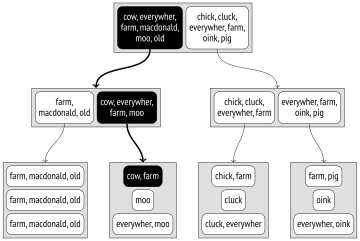
The problems of such representation are obvious. The number of lexemes in a document can be enormous, while the page size is limited. Even if each particular document does not have too many distinct lexemes when taken separately, their united sets at upper levels of the tree may still turn out too big.
Full-text search uses another solution, namely a more compact signature tree. It should be well familiar to anyone who had to deal with the Bloom filter. (p. 536)
Each lexeme can be represented by its signature: a bit string of a particular length in which only one of the bits is set to 1. The bit that should be set is determined by the hash function of the lexeme.
A document’s signature is the result of a bitwise OR operation on signatures of all the lexemes in this document.
Suppose we have assigned the following signatures to our lexemes:
| Lexeme | Signature |
|---|---|
| chick | 1000000 |
| cluck | 0001000 |
| cow | 0000010 |
| everywher | 0010000 |
| farm | 0000100 |
| macdonald | 0100000 |
| moo | 0000100 |
| oink | 0000010 |
| old | 0000001 |
| pig | 0010000 |
Then the documents’ signatures will be as follows:
| Document | Signature |
|---|---|
| Old MacDonald had a farm | 0100101 |
| And on his farm he had some cows | 0000110 |
| Here a moo, there a moo | 0000100 |
| Everywhere a moo moo | 0010100 |
| And on his farm he had some chicks | 1000100 |
| Here a cluck, there a cluck | 0001000 |
| Everywhere a cluck cluck | 0011000 |
| And on his farm he had some pigs | 0010100 |
| Here an oink, there an oink | 0000010 |
| Everywhere an oink oink | 0010010 |
The advantages of this approach are obvious: index entries have the same size, which is quite small, so the index turns out quite compact. But there are certain disadvantages too. To begin with, it is impossible to perform an index-only scan because the index does not store index keys anymore, and each returned TID has to be rechecked by the table. The accuracy also suffers: the index may return many false positives, which have to be filtered out during a recheck.
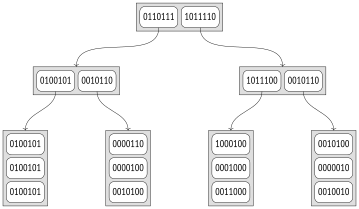
Let’s take another look at the DOC_TSV @@ TO_TSQUERY(’COWS’) condition. The signature of a query is calculated in the same way as that of a document; in this particular case it equals 0000010. The consistency function18 must find all the child nodes that have the same bits set in their signatures:
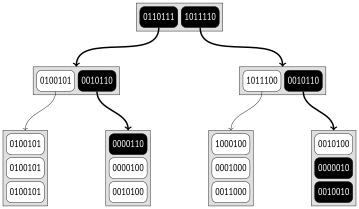
As compared with the previous example, more nodes have to be scanned here because of false-positive hits. Since the signature’s capacity is limited, some of the lexemes in a large set are bound to have the same signatures. In this example, such lexemes are “cow” and “oink.” It means that a signature can match different documents; here the signature of the query corresponds to three of them.
False positives reduce index efficiency but do not affect its correctness in any way: since false negatives are guaranteed to be ruled out, the required value cannot be missed.
Clearly, the signature size is actually bigger. By default, it takes 124 bytes (992 bits), so the probability of collisions is much lower than in this example. If required, you can further increase the signature size up to about 2000 bytes using the operator class parameter: (v. 13)
Besides, if values are small enough (a bit smaller than of the page, which takes about 500 bytes for a standard page),19 it is tsvector values themselves rather than their signatures that the tsvector_ops operator class keeps in leaf pages of an index.
To see how indexing works on real data, we can take the pgsql-hackers mailing list archive.20 It contains 356,125 emails together with their send dates, subjects, author names, and body texts.
Let’s add a column of the tsvector type and build an index. Here I combine three values (subject, author, and body text) into a single vector to show that documents can be generated dynamically and do not have to be stored in a single column.
As the column was being filled, a certain number of largest words were filtered out because of their size. But once the index is ready, it can be used in search queries:
Together with 898 rows that satisfy the condition, the access method also returned 7859 rows to be later filtered out by a recheck. If we increase the signature capacity, the accuracy (and, consequently, the index efficiency) will be improved, but the index size will grow:
Properties
I have already shown the access method properties, and most of them are the same for all operator classes. But the following two column-level properties are worth mentioning: (p. 459)
Index-only scans are now impossible, as the original value cannot be restored from its signature. It is perfectly fine in this particular case: the tsvector value is only used for search, while we need to retrieve the document itself.
The ordering operator for the tsvector_ops class is not defined either.
26.4 Other Data Types
I have considered only two most prominent examples. They show that even though the GiST method is based on a balanced tree, it can be used for various data types thanks to different support function implementations in different operator classes. When we speak about a GiST index, we must always specify the operator class, since it is crucial for index properties.
Here are several more data types currently supported by the GiST access method.
Geometric data types. Apart from points, GiST can index other geometric objects: rectangles, circles, polygons. All these objects are represented by their bounding boxes for this purpose.
The cube extension adds the same-name data type that represents multidimensional cubes. They are indexed using R-trees with bounding boxes of the corresponding dimension.
Range types. PostgreSQL provides several built-in numeric and temporal range types, such as int4range and tstzrange.21 Custom range types can be defined using the CREATE TYPE AS RANGE command.
Any range types, both standard and custom, are supported by GiST via the range_ops operator class.22 For indexing, a one-dimensional R-tree is applied: bounding boxes are transformed to bounding segments in this case.
Multirange types are supported as well; they rely on the multirange_ops class. A bounding range comprises all the ranges that are part of a multirange value. (v. 14)
The seg extension provides the same-name data type for intervals with bounds defined with particular accuracy. It is not considered to be a range type, but it virtually is, so it is indexed in exactly the same manner.
Ordinal types. Let’s recall the btree_gist extension once again: it provides operator classes for the GiST method to support various ordinal data types, which are typically indexed by a B-tree. Such operator classes can be used to build a multicolumn index when the data type in one of the columns is not supported by B-trees.
Network address types. The inet data type has built-in GiST support, which is implemented via the inet_ops23 operator class.
Integer arrays. The intarray extension expands the functionality of integer arrays to add GiST support for them. There are two classes of operators. For small arrays, you can use gist__int_ops, which implements the RD-tree with full representation of keys in index entries. Large arrays will benefit from a more compact but less precise signature RD-tree based on the gist__bigint_ops operator class.
Extra underscores in the names of operator classes belong to the names of arrays of basic types. For instance, alongside the more common int4[] notation, an integer array can be denoted as _int4. There are no _int and _bigint types though.
Ltree. The ltree extension adds the same-name data type for tree-like structures with labels. GiST support is provided via signature RD-trees that use the gist_ltree_ops operator class for ltree values and the gist__ltree_ops operator class for arrays of the ltree type.
Key–value storage. The hstore extension provides the hstore data type for storing key– value pairs. The gist_hstore_ops operator class implements index support based on a signature RD-tree.
Trigrams. The pg_trgm extension adds the gist_trgm_ops class, which implements index support for comparing text strings and wildcard search. (p. 507)
postgresql.org/docs/14/gist.html backend/access/gist/README ↩︎
backend/access/gist/gistget.c, gistgettuple function ↩︎
backend/access/gist/gistutil.c, gistchoose function ↩︎
backend/access/gist/gistsplit.c, gistSplitByKey function ↩︎
You can download the corresponding file at edu.postgrespro.ru/internals-14/extra_airports.copy (I have used the data available at the openflights.org website). ↩︎
backend/access/gist/gistproc.c, gist_point_consistent function ↩︎
backend/utils/adt/geo_ops.c, point_distance function ↩︎
backend/utils/adt/geo_ops.c, box_closest_point function ↩︎
backend/access/gist/gistproc.c, gist_box_penalty function ↩︎
backend/access/gist/gistproc.c, gist_box_picksplit function ↩︎
postgresql.org/docs/14/textsearch-features.html#TEXTSEARCH-UPDATE-TRIGGERS ↩︎
backend/utils/adt/tsgistidx.c, gtsvector_consistent function ↩︎
backend/utils/adt/tsgistidx.c, gtsvector_compress function ↩︎
27 SP-GiST
27.1 Overview
The first letters in the SP-GiST name stand for Space Partitioning. The space here is understood as an arbitrary set of values on which the search is performed; it is not necessarily the space in the conventional sense of the word (such as a two-dimensional plane). The GiST part of the name hints at certain similarity between GiST and SP-GiST methods: both of them are generalized search trees and serve as frameworks for indexing various data types.
The idea behind the SP-GiST method1 is to split the search space into several non-overlapping regions, which are in turn can be recursively split into sub-regions. Such partitioning produces non-balanced trees (which differ from B-trees and GiST trees) and can be used to implement such well-known structures as quadtrees, k-D trees, and radix trees (tries).
Non-balanced trees typically have few branches and, consequently, large depth. For example, a quadtree node has four child nodes at the most, while a node of a k-D tree can have only two. It does not pose any problems if the tree is kept in memory; but when stored on disk, tree nodes have to be packed into pages as densely as possible to minimize I/O, and this task is not so trivial. B-tree and GiST indexes do not have to take care of it because each of their tree nodes takes the whole page.
An inner node of an SP-GiST tree contains a value that satisfies the condition that holds true for all its child nodes. Such a value is often called a prefix; it plays the same role as the predicate in GiST indexes. Pointers to SP-GiST child nodes may have labels.
Leaf node elements contain an indexed value (or its part) and the corresponding TID.
Just like GiST, SP-GiST implements only the main algorithms, taking care of such low-level details as concurrent access, locks, and logging. New data types and algorithms of space partitioning can be added via the operator class interface. The operator class provides most of the logic and defines many aspects of indexing functionality.
In SP-GiST, the search is depth-first, starting at the root node.2 The nodes that are worth descending into are chosen by the consistency function, similar to the one used in GiST. For an inner node of the tree, this function returns a set of child nodes whose values do not contradict the search predicate. The consistency function does not descend into these nodes: it merely assesses the corresponding labels and prefixes. For leaf nodes, it determines whether the indexed value of this node matches the search predicate.
In a non-balanced tree, search time can vary depending on the branch depth.
There are two support functions that participate in insertion of values into an SP-GiST index. As the tree is being traversed from the root node, the choose function takes one of the following decisions: send the new value into an existing child node, create a new child node for this value, or split the current node (if the value does not match this node’s prefix). If the chosen leaf page does not have enough space, the picksplit function determines which nodes should be moved to a new page.
Now I will provide some examples to illustrate these algorithms.
27.2 Quadtrees for Points
Quadtrees are used for indexing points on a two-dimensional plane. The plane is recursively split into four regions (quadrants) with respect to the selected point. This point is called a centroid; it serves as the node prefix, that is, the condition that defines the location of child values.
The root node splits the plane into four quadrants.
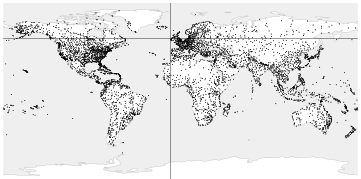
Then each of them is further split into its own quadrants.
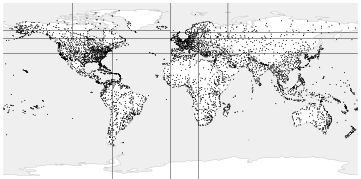
This procedure goes on until the desired number of partitions is reached.
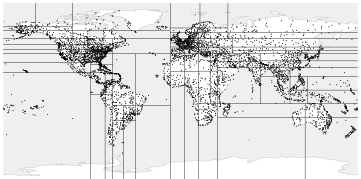
This example uses an index built on an extended airports table. The illustrations show that branch depth depends on point density in the corresponding quadrants. For visual clarity, I set a small value of the fillfactor storage parameter, which makes the tree deeper: (p. 446) (default: 80)
The default operator class for points is quad_point_ops.
Operator Class
I have already mentioned SP-GiST support functions:3 the consistency function for search and the picksplit function for insertions.
Now let’s take a look at the list of support functions of the quad_point_ops operator class.4 All of them are mandatory.
These functions perform the following tasks:
- The
configfunction reports basic information about the operator class to the access method.
- The
choosefunction select the node for insertions.
- The
picksplitfunction distributes nodes between pages after a page split.
The
inner_consistentfunction checks whether the value of the inner node satisfies the search predicate.The
leaf_consistentfunction determines whether the value stored in the leaf node satisfies the search predicate.
There are also several optional functions.
5 The quad_point_ops operator class supports the same strategies as GiST: (p. 449)
For example, you can use the above operator >^ to find the airports located to the North of Dikson:
Let’s take a closer look at the structure and inner workings of a quadtree. We will use the same simple example with several points that we discussed in the chapter related to GiST. (p. 451)
Here is how the plane can be partitioned in this case:
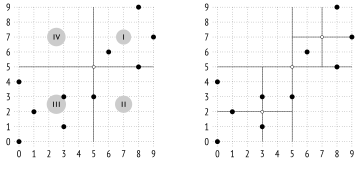
The left illustration shows quadrant numbering at one of the tree levels; in the illustrations that follow, I will place child nodes from left to right in the same order for the sake of clarity. Points that lie on the boundaries are included into the quadrant with the smaller number. The right illustration shows the final partitioning.
You can see a possible structure of this index below. Each inner node references four child nodes at the most, and each of these pointers is labeled with the quadrant number:
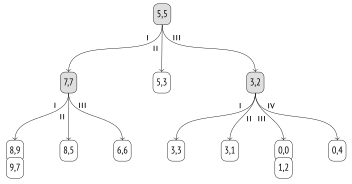
Page Layout
Unlike B-tree and GiST indexes, SP-GiST has no one-to-one correspondence between tree nodes and pages. Since inner nodes usually do not have too many children, several nodes have to be packed into a single page. Different types of nodes are stored in different pages: inner nodes are stored in inner pages, while leaf nodes go to leaf pages.
Index entries stored in inner pages hold the value used as a prefix, as well as a set of pointers to child nodes; each pointer may be accompanied by a label.
Leaf page entries consist of a value and a TID.
All leaf nodes related to a particular inner node are stored together in a single page and are bound into a list. If the page cannot accommodate another node, this list can be moved to a different page,6 or the page can be split; one way or the other, a list never stretches over several pages.
To save space, the algorithm tries to add new nodes into the same pages until these pages are completely filled. The numbers of the last pages used are cached by backends and are periodically saved in the zero page, which is called a metapage. The metapage contains no reference to the root node, which we would have seen in a B-tree; the root of an SP-GiST index is always located in the first page.
Let’s get back to our example. The illustration below shows how tree nodes can be distributed between pages. The quad_point_ops operator class does not actually use labels. Since a node can have four child nodes at the most, the index keeps a fixed-size array of four pointers, some of which may be empty.
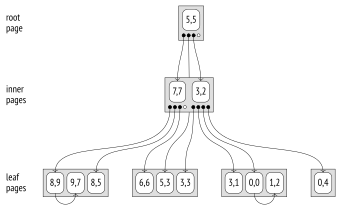
Search
Let’s use the same example to take a look at the algorithm of searching for points located above point (3,7).
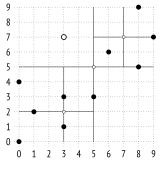
The search starts at the root. The inner consistency function9 determines the child nodes to be descended into. Point (3,7) is compared with the root node’s centroid (5,5) to choose the quadrants that may contain the sought-after points; in this example, these are quadrants I and IV.
Once inside the node with centroid (7,7), we again have to choose the child nodes to descend into. They belong to quadrants I and IV, but since quadrant IV is empty, we only need to check one leaf node. The leaf consistency function10 compares the points of this node with point (3,7) specified in the query. The above condition is satisfied only for (8,9).
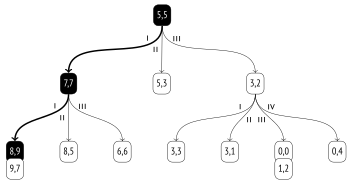
Now we just have to go back one level and check the node that corresponds to quadrant IV of the root node. It is empty, so the search is complete.
Insertion
When a value gets inserted into an SP-GiST tree,11 each action that follows is determined by the choice function.12 In this particular case, it simply directs the point to one of the existing nodes that corresponds to its quadrant.
For example, let’s add value (7,1):
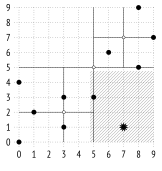
The value belongs to quadrant II and will be added to the corresponding tree node:
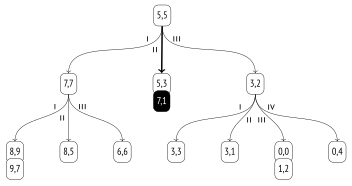
If the list of leaf nodes in the selected quadrant becomes too big after insertion (it must fit a single page), the page is split. The picksplit function13 determines the new centroid by calculating the average value of all points’ coordinates, thus distributing the child nodes between new quadrants more or less uniformly.
The following picture illustrates the page overflow caused by point (2,1) insertion:
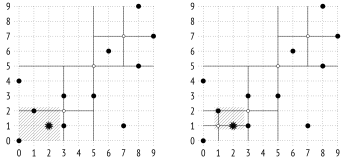
A new inner node with centroid (1,1) is added into the tree, while points (0,0), (1,2), and (2,1) get redistributed between the new quadrants:
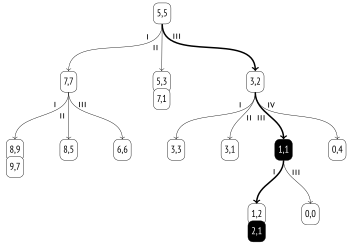
Properties
Access method properties. The spgist method reports the following properties:
No support is provided for sorting and uniqueness properties. Multicolumn indexes are not supported either.
Exclusion constraints are supported, just like in GiST.
An SP-GiST index can be created with additional INCLUDE columns. (v. 14)
Index-level properties. Unlike GiST, SP-GiST indexes do not support clusterization:
Both ways of getting TIDs (either one by one or as a bitmap) are supported. Backward scanning is unavailable, as it does not make any sense for SP-GiST.
Column-level properties. For the most part, column-level properties are the same:
Sorting is not supported, so all the related properties do not make any sense and are disabled.
I have not said anything about NULL values so far, but as we can see in the index properties, they are supported. Unlike GiST, SP-GiST indexes do not store NULL values in the main tree. Instead, a separate tree is created; its root is located in the second index page. Thus, the first three pages always have the same meaning: the metapage, the root of the main tree, and the root of the tree for NULL values.
Some column-level properties may depend on the particular operator class:
Like in all the other examples in this chapter, this index can be used for index-only scans.
But in general, an operator class does not necessarily store full values in leaf pages, as it can recheck them by the table instead. It allows using SP-GiST indexes in PostGIS for potentially large geometry values, to give one example. (v. 11)
Nearest neighbor search is supported; we have seen the ordering operator <-> in the operator class. (v. 12)
27.3 K-Dimensional Trees for Points
Points on a plane can also be indexed using another approach to partitioning: we can split the plane into two sub-regions instead of four. Such partitioning is implemented by the kd_point_ops14 operator class:
Note that indexed values, prefixes, and labels may have different data types. For this operator class, values are represented as points, prefixes are real numbers, while labels are not provided (as in quad_point_ops).
Let’s select some coordinate on the Y-axis (it defines the latitude in the example with airports). This coordinate splits the plane into two sub-regions, the upper and the lower one:
For each of these sub-regions, select coordinates on the X-axis (longitude) that split them into two sub-regions, left and right:
We will continue splitting each of the resulting sub-regions, taking turns between horizontal and vertical partitioning, until the points in each part fit a single index page:
All inner leaf nodes of the tree built this way will have only two child nodes. The method can be easily generalized for space with arbitrary dimensions, so such trees are often referred to as k-dimensional (k-D trees).
27.4 Radix Trees for Strings
The text_ops operator class for SP-GiST implements a radix tree for strings.15 Here the prefix of an inner node is really a prefix, which is common to all the strings in the child nodes.
Pointers to child nodes are marked by the first byte of the values that follow the prefix.
For clarity, I use a single character to denote a prefix, but it is true only for 8-byte encodings. In general, the operator class processes a string as a sequence of bytes. Besides, a prefix can take several other values with special semantics, so there are actually two bytes allocated per prefix.
Child nodes store parts of values that follow the prefix and the label. Leaf nodes keep only suffixes.
To reconstruct the full value of an index key in a leaf page, we can concatenate all prefixes and labels, starting from the root node.
Here is an example of a radix tree built over several names:
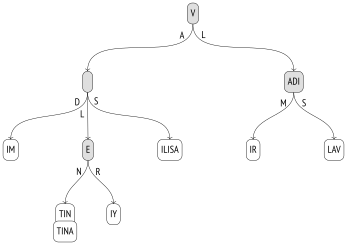
Operator Class
The text_ops operator class supports comparison operators typically used with ordinal data types, including text strings:
Regular operators process characters, while operators with tildes deal with bytes. They do not take collation into account (just like the text_pattern_ops operator class for B-tree), so they can be used to speed up search by the LIKE condition: (p. 317)
If you use regular operators >= and < together with a collation other than “C,” the index becomes virtually useless, as it deals with bytes rather than characters.
For such cases of prefix search, the operator class provides the ^@ operator, which is more suitable: (v. 11)
A radix tree representation can sometimes turn out to be much more compact than that of a B-tree, as it does not keep full values: it reconstructs them as required while the tree is being traversed.
Search
Let’s run the following query on the names table:
First, the inner consistency function16 is called on the root to determine the child nodes to descend into. This function concatenates prefix V and labels A and L. The received value VA goes into the query condition; string literals are truncated there, so that their length does not exceed the length of the value being checked: VA ~>=~ 'VA'AND VA ~<~ 'VL'. The condition is satisfied, so the child node with label A needs to be checked. The VL value is checked in the same way. It is also a match, so the node with label L must be checked too.
Now let’s take the node that corresponds to value VA. Its prefix is empty, so for the three child nodes the inner consistency function reconstructs values VAD, VAL, and VAS by concatenating VA received at the previous step and the label. The condition VAD ~>=~ 'VAL' AND VAD ~<~ 'VER' is not true, but the other two values are suitable.
As the tree is being traversed this way, the algorithm filters out non-matching branches and gets to leaf nodes. The leaf consistency function17 checks whether the value reconstructed during the tree traversal satisfies the query condition. Matching values are returned as the result of an index scan.
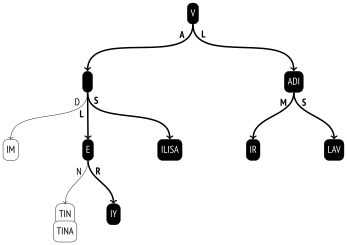
Note that although the query uses greater than and less than operators, which are common to B-trees, range search by SP-GiST is much less efficient. In a B-tree, it is enough to descend into a single boundary value of the range and then scan the list of leaf pages.
Insertion
The choice function of operator classes for points can always direct a new value into one of the existing sub-regions (a quadrant or one of the halves). But it is not true for radix trees: a new value may not match any of the existing prefixes, and the inner node has to be split in this case.
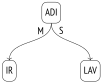
Let’s add the name VLADA to an already built tree.
The choice function18 manages to descend from the root to the next node (V + L), but the remaining part of the value ADA does not match the ADI prefix. The node has to be split in two: one of the resulting nodes will contain the common part of the prefix (AD), while the rest of the prefix will be moved one level down:
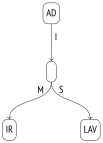
Then the choice function is called again on the same node. The prefix now corresponds to the value, but there is no child node with a suitable label (A), so the function decides to create such a node. The final result is shown in the illustration below; the nodes that have been added or modified during the insertion are highlighted.
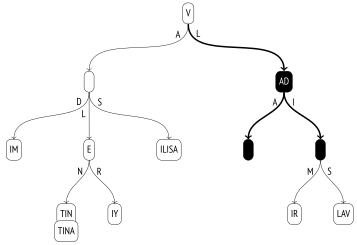
Properties
I have already described the access method and index-level properties above; they are common to all the classes. Most of the column-level properties also remain the same.
Even though indexed values are not explicitly stored in the tree, index-only scans are supported, since values are reconstructed as the tree is being traversed from the root to leaf nodes.
As for the distance operator, it is not defined for strings, so nearest neighbor search is not provided by this operator class.
It does not mean that the concept of distance cannot be implemented for strings. For example, the pg_trgm extension adds a distance operator based on trigrams: the fewer common trigrams are found in two strings, the farther they are assumed to be located from each other. Then there is the Levenshtein distance, which is defined as the minimal number of single-character edits required to convert one string into another. A function that calculates such a distance is provided in the fuzzystrmatch extension. But none of the extensions provides an operator class with SP-GiST support.
27.5 Other Data Types
SP-GiST operator classes are not limited to indexing points and text strings that we have discussed above.
Geometric types. The box_ops19 operator class implements a quadtree for rectangles. Rectangles are represented by points in a four-dimensional space, so the area is split into sixteen partitions.
The poly_ops class can be used to index polygons. It is a fuzzy operator class: it actually uses bounding boxes instead of polygons, just like box_ops, and then rechecks the result by the table. (v. 11)
Whether to choose GiST or SP-GiST largely depends on the nature of data to be indexed. For example, PostGIS documentation recommends SP-GiST for objects with large overlaps (also known as “spaghetti data”).20
Range types. The quadtree for ranges offers the range_ops operator class.21 An interval is defined by a two-dimensional point: the X-axis represents the lower boundary, while the Y-axis represents the upper boundary.
Network address types. For the inet data type, the inet_ops22 operator class implements a radix tree.
postgresql.org/docs/14/spgist.html backend/access/spgist/README ↩︎
backend/access/spgist/spgscan.c, spgWalk function ↩︎
backend/access/spgist/spgdoinsert.c, moveLeafs function ↩︎
backend/access/spgist/spgquadtreeproc.c, spg_quad_inner_consistent function ↩︎
backend/access/spgist/spgquadtreeproc.c, spg_quad_leaf_consistent function ↩︎
backend/access/spgist/spgdoinsert.c, spgdoinsert function ↩︎
backend/access/spgist/spgquadtreeproc.c, spg_quad_choose function ↩︎
backend/access/spgist/spgquadtreeproc.c, spg_quad_picksplit function ↩︎
backend/access/spgist/spgtextproc.c, spg_text_inner_consistent function ↩︎
backend/access/spgist/spgtextproc.c, spg_text_leaf_consistent function ↩︎
backend/access/spgist/spgtextproc.c, spg_text_choose function ↩︎
postgis.net/docs/using_postgis_dbmanagement.html#spgist_indexes ↩︎
28 GIN
28.1 Overview
According to its authors, GIN stands for a potent and undaunted spirit, not for an alcoholic beverage.1 But there is also a formal interpretation: this acronym is expanded as Generalized Inverted Index.
The GIN access method is designed for data types representing non-atomic values made up of separate elements (for example, documents consist of lexemes in the context of full-text search). Unlike GiST, which indexes values as a whole, GIN indexes only their elements; each element is mapped to all the values that contain it.
We can compare this method to a book’s index, which comprises all the important terms and lists all the pages where these terms are mentioned. To be convenient to use, it must be compiled in alphabetical order, otherwise it would be impossible to navigate through quickly. In a similar way, GIN relies on the fact that all elements of compound values can be sorted; its main data structure is B-tree. (p. 421)
The implementation of the GIN tree of elements is less complex than that of a regular B-tree: it has been designed to contain rather small sets of elements repeated multiple times.
This assumption leads to two important conclusions:
- An element must be stored in an index only once.
Each element is mapped to a list of TIDs, which is called a posting list. If this list is rather short, it is stored together with the element; longer lists are moved into a separate posting tree, which is actually a B-tree. Just like element trees, posting lists are sorted; it does not matter much from the user’s perspective but helps to speed up data access and reduce index size.
- There is no point in removing elements from a tree.
Even if the list of TIDs for a particular element is empty, the same element is likely to appear again as part of some other value.
Thus, an index is a tree of elements whose leaf entries are bound to either flat lists or trees of TIDs.
Just like GiST and SP-GiST access methods, GIN can be used to index a whole variety of data types via a simplified interface of operator classes. Operators of such classes usually check whether the indexed composite value matches a particular set of elements (just like the @@ operator checks whether a document satisfies a full-text search query).
To index a particular data type, the GIN method must be able to split composite values into elements, sort these elements, and check whether the found value satisfies the query. These operations are implemented by support functions of the operator class.
28.2 Index for Full-Text Search
GIN is mainly applied to speed up full-text search, so I will go on with the example used to illustrate GiST indexing. As you can guess, compound values in this case are documents, while elements of these values are lexemes. (p. 463)
Let’s build a GIN index on the “Old MacDonald” table: (p. 463)
A possible structure of this index is shown below. Unlike in the previous illustrations, here I provide actual TID values (shown with a grey background), as they are important for understanding the algorithms. These values suggest that heap tuples have the following IDs:
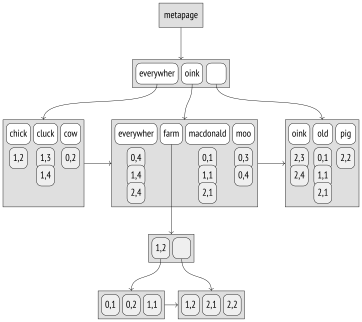
Note some differences from a regular B-tree index here. The leftmost keys in inner B-tree nodes are empty, as they are actually redundant; in a GIN index, they are not stored at all. For this reason, references to child nodes are shifted too. The high key is used in both indexes, but in GIN it takes its legitimate rightmost position. Same-level nodes in a B-tree are bound into a bidirectional list; GIN uses a unidirectional list, since the tree is always traversed in only one direction. (p. 426)
In this theoretical example, all posting lists fit regular pages, except the one for the “farm” lexeme. This lexeme occurred in as many as six documents, so its IDs were moved into a separate posting tree.
Page Layout
GIN page layout is very similar to that of a B-tree. We can peek into an index using the pageinspect extension. Let’s create a GIN index on the table that stores emails of the pgsql-hackers mailing list: (p. 468)
The zero page (the metapage) contains the basic statistics, such as the number of elements and pages of other types:
GIN uses the special space of index pages; for example, this space stores the bits that define the page type: (p. 63)
The page with the meta attribute is of course the metapage. Pages with the data attribute belong to posting lists, while pages without this attribute are related to element trees. Leaf pages have the leaf attribute.
In the next example, another pageinspect function returns the information on TIDs that are stored in trees’ leaf pages. Each entry of such a tree is virtually a small list of TIDs rather than a single TID:
Posting lists are ordered, which allows them to be compressed (hence the same-name attribute). Instead of a six-byte TID, they store its difference with the previous value, which is represented by a variable number of bytes:2 the smaller this difference, the less space the data takes.
Operator Class
Here is the list of support functions for GIN operator classes:3
The first support function compares two elements (two lexemes in this case). If the lexemes were represented by a regular SQL type supported by B-tree, GIN would automatically use comparison operators defined in the B-tree operator class.
The fifth (optional) function is used in partial search to check whether an index element partially matches the search key. In this particular case, partial search consists in searching lexemes by a prefix. For example, the query “c:*” corresponds to all lexemes starting with letter “c.”
The second function extracts lexemes from the document, while the third one extracts lexemes from the search query. The use of different functions is justified because, at the very least, the document and the query are represented by different data types, namely tsvector and tsquery. Besides, the function for the search query determines how the search will be performed. If the query requires the document to contain a particular lexeme, the search will be limited to the documents that contain at least one lexeme specified in the query. If there is no such condition (for example, if you need documents that do not contain a particular lexeme), all the documents have to be scanned—which is of course much more expensive. (v. 13)
If the query contains any other search keys, the index is first scanned by these keys, and then these intermediate results are rechecked. Thus, there is no need to scan the index in full.
The fourth and sixth functions are consistency functions, which determine whether the found document satisfies the search query. As input, the fourth function gets the exact information on which lexemes specified in the query appear in the document. The sixth function operates in the context of uncertainty and can be called when it is not yet clear whether some of the lexemes are present in the document or not. An operator class does not have to implement both functions: it is enough to provide only one of them, but search efficiency may suffer in this case.
The tsvector_ops operator class supports only one operator that matches the document against the search query: @@,4 which is also included into the GiST operator class.
Search
Let’s take a look at the search algorithm for the “everywhere | oink” query, where two lexemes are connected by the OR operator. First, a support function5 extracts lexemes “everywher” and “oink” (search keys) from the search string of the tsquery type.
Since the query demands particular lexemes to be present, TIDs of the documents that contain at least one key specified in the query are bound into a list. For this purpose, the TIDs that correspond to each search key are searched in the tree of lexemes and are added into a common list. All the TIDs stored in an index are ordered, which allows merging several sorted streams of TIDs into one.6 (p. 387)
Note that at this point it does not matter yet whether the keys were combined by AND, OR, or any other operator: the search engine deals with the list of keys and knows nothing about the search query semantics.
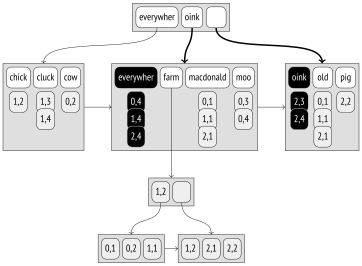
Each found TID that corresponds to a document is checked by the consistency function.7 It is this function that interprets the search query and leaves only those TIDs that satisfy the query (or at least may satisfy it and have to be rechecked by the table).
In this particular case, the consistency function leaves all the TIDs:
| TID | “everywher” | “oink” | Consistency function |
|---|---|---|---|
| (0,4) | ✓ | – | ✓ |
| (1,4) | ✓ | – | ✓ |
| (2,3) | – | ✓ | ✓ |
| (2,4) | ✓ | ✓ | ✓ |
Instead of a regular lexeme, search queries can contain a prefix. It is useful if an application user can enter the first letters of a word into the search field, expecting to get the results right away. For example, the “pig:*” query will match all the documents that contain lexemes starting with “pig”: here we get “pigs,” and we would also get “pigeons” if old MacDonald had bred them on his farm.
Such partial search matches indexed lexemes against the search key using a special support function;8 in addition to prefix matching, this function can also implement other logic for partial search.
Frequent and Rare Lexemes
If searched lexemes occur in a document multiple times, the created list of TIDs will turn out long, which is of course inefficient. Fortunately, it can often be avoided if the query also contains some rare lexemes.
Let’s consider the “farm & cluck” query. The “cluck” lexeme occurs two times, while the “farm” lexeme appears six times. Instead of treating both lexemes equally and building the full list of TIDs by them, the rare “cluck” lexeme is considered mandatory, while the more frequent “farm” lexeme is treated as optional, as it is clear that (taking the query semantics into account) a document with the “farm” lexeme can satisfy the query only if it contains the “cluck” lexeme too.
Thus, an index scan determines the first document that contains “cluck”; its TID is (1,3). Then we have to find out whether this document also contains the “farm” lexeme, but all the documents whose TIDs are smaller than (1,3) can be skipped. Since frequent lexemes are likely to correspond to many TIDs, chances are high that they are stored in a separate tree, so some pages can be skipped as well. In this particular case, the search in the tree of “farm” lexemes starts with (1,3).
This procedure is repeated for the subsequent values of the mandatory lexeme.
Clearly, this optimization can also be applied to more complex search scenarios that involve more than two lexemes. The algorithm sorts the lexemes in the order of their frequency, adds them one by one to the list of mandatory lexemes, and stops when the remaining lexemes are no longer able to guarantee that the document satisfies the query.9
For example, let’s consider the query “farm & ( cluck | chick )”. The least frequent lexeme is “chick”; it is added to the list of mandatory lexemes right away. To check whether other lexemes can be considered optional, the consistency function takes false for the mandatory lexeme and true for all the other lexemes. It returns true AND (true OR false) = true, which means that the remaining lexemes are “self-sufficient,” and at least one of them must become mandatory.
The next least frequent lexeme (“cluck”) is added into the list, and now the consistency function returns true AND (false OR false) = false. Thus, “chick” and “cluck” lexemes become mandatory, while “farm” remains optional.
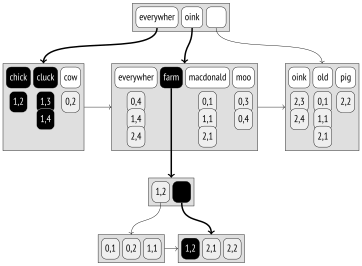
The length of the posting list is three, as the mandatory lexemes have occurred three times:
| TID | “chick” | “cluck” | “farm” | Consistency function |
|---|---|---|---|---|
| (1,2) | ✓ | – | ✓ | ✓ |
| (1,3) | – | ✓ | – | – |
| (1,4) | – | ✓ | – | – |
Thus, if lexeme frequencies are known, it is possible to merge trees of lexemes in the most efficient way, starting from rare lexemes and skipping those page ranges of frequent lexemes that are sure to be redundant. It reduces the number of times the consistency function has to be called. (p. 283)
To make sure that this optimization really works, let’s query the pgsql-hackers archive. We will need to specify two lexemes, a common and a rare one: (p. 468)
It turns out that a document that contains them both does exist:
This query is performed almost just as fast as the search for a single word “tattoo”:
But if we were looking for a single word “wrote,” the search would take much longer:
Insertions
A GIN index cannot contain duplicates;10 if an element to be added is already present in the index, its TID is simply added to the posting list or tree of an already existing element.
A posting list is a part of an index entry that cannot take too much space in a page, so if the allotted space is exceeded, the list is transformed into a tree.11
When a new element (or a new TID) is being added into a tree, a page overflow can occur; in this case, the page is split into two, and the elements are redistributed between them.12
But each document typically contains many lexemes that have to be indexed. So even if we create or modify just one document, the index tree still undergoes a lot of modifications. That is why GIN updates are rather slow.
The illustration below shows the state of the tree after the row “Everywhere clucks, moos, and oinks” with TID (4,1) was inserted into the table. The posting lists of lexemes “cluck,” “moo,” and “oink” were extended; the list of the “everywher” lexeme exceeded the maximal size and was split off as a separate tree.
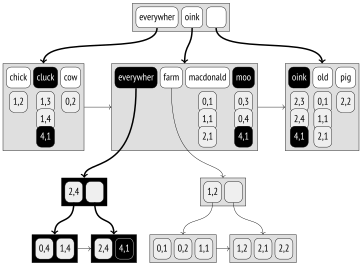
However, if an index gets updated to incorporate changes related to several documents at once, the total amount of work is likely to be reduced as compared to consecutive changes, as these documents may contain some common lexemes.
This optimization is controlled by the fastupdate storage parameter. Deferred index updates are accumulated in an unordered pending list, which is physically stored in separate list pages outside the element tree. When this list becomes big enough, all its contents is transferred into the index in one go, and the list is cleared.13 The maximal size of the list is defined either by the gin_pending_list_limit parameter or by the same-name index storage parameter. (default: on) (p. 233) (default: 4MB)
By default, such deferred updates are enabled, but you should keep in mind that they slow down search: apart from the tree itself, the whole unordered list of lexemes has to be scanned. Besides, insertion time becomes less predictable, as any change can lead to an overflow that incurs an expensive merge procedure. The latter is partially smoothed by the fact that the merge can be also performed asynchronously during index vacuuming.
When a new index is created,14 the elements also get added in batches rather than one by one, which would be too slow. Instead of being saved into an unordered list on disk, all the changes are accumulated in a maintenance_work_mem memory chunk and get transferred into an index once this chunk has no more free space. The more memory is allocated for this operation, the faster the index is built. (default: 64MB)
The examples provided in this chapter prove GIN superiority over GiST signature trees when it comes to search precision. For this reason, it is GIN that is typically used for full-text search. However, the problem of slow GIN updates may tip the scale in favor of GiST if the data is being actively updated. (p. 463)
Limiting Result Set Size
The GIN access method always returns the result as a bitmap; it is impossible to get TIDs one by one. In other words, the BITMAP SCAN property is supported, but the INDEX SCAN property is not. (p. 326)
The reason for this limitation is the unordered list of deferred updates. In the case of an index access, this list is scanned to build a bitmap, and then this bitmap is updated with the data of the tree. If the unordered list gets merged with the tree (as the result of an index update or during vacuuming) while search is in progress, the same value can be returned twice, which is unacceptable. But in the case of a bitmap it does not pose any problems: the same bit will simply be set twice.
Consequently, using the LIMIT clause with a GIN index is not quite efficient, as the bitmap still has to be built in full, which contributes a fair share to the total cost:
Therefore, the GIN method offers a special feature that limits the number of results returned by an index scan. This limit is imposed by the gin_fuzzy_search_limit parameter, which is turned off by default. If this parameter is enabled, the index access method will randomly skip some values to get roughly the specified number of rows (hence the name “fuzzy”):15 (default: 0)
Note that there are no LIMIT clauses in these queries. It is the only legitimate way to get different data when using an index scan and a heap scan. The planner knows nothing about such behavior of GIN indexes and does not take this parameter value into account when estimating the cost.
Properties
All the properties of the gin access method are the same at all levels; they do not depend on a particular operator class.
Access Method Properties
GIN supports neither sorting nor unique constraints.
Multicolumn indexes are supported, but it is worth mentioning that the order of their columns is irrelevant. Unlike a regular B-tree, a multicolumn GIN index does not store composite keys; instead, it extends separate elements with the corresponding column number.
Exclusion constraints cannot be supported because the INDEX SCAN property is unavailable.
GIN does not support additional INCLUDE columns. Such columns simply do not make much sense here, as it is hardly possible to use a GIN index as covering: it contains only separate elements of an index value, while the value itself is stored in the table.
Index-Level Properties
Fetching results one by one is not supported: the index access always returns a bitmap.
For the same reason, it makes no sense to reorder tables by a GIN index: the bitmap always corresponds to the physical layout of data in a table, whichever it is.
Backward scanning is not supported: this feature is useful for regular index scans, not for bitmap scans.
Column-Level Properties
None of the column-level properties are available: neither sorting (for obvious reasons) nor using the index as covering (since the document itself is not stored in the index). NULL support is not available either (it does not make sense for elements of non-atomic types).
GIN Limitations and RUM Index
Potent as it is, GIN still cannot address all the challenges of full-text search. Although the tsvector type does indicate positions of lexemes, this information does not make it into an index. Therefore, GIN cannot be used to speed up phrase search, which takes lexeme proximity into account. Moreover, search engines usually return results by relevance (whatever this term might mean), and since GIN does not support ordering operators, the only solution here would be computing the ranking function for each resulting row, which is of course very slow.
These drawbacks have been addressed by the RUM access method (whose name makes us doubt developers’sincerity when it comes to the true meaning of GIN). This access method is provided as an extension; you can either download the corresponding package from the PGDG repository16 or get the source code itself.17
RUM is based on GIN, but they have two major differences. First, RUM does not provide deferred updates, so it supports regular index scans in addition to bitmap scans and implements ordering operators. Second, RUM index keys can be extended with additional information. This feature resembles INCLUDE columns to some extent, but here additional information is bound to a particular key. In the context of full-text search, RUM operator class maps lexeme occurrences to their positions in the document, which speeds up phrase search and result ranking.
The downsides of this approach are slow updates and larger index sizes. Besides, since the rum access method is provided as an extension, it relies on the generic WAL mechanism,18 which is slower than the built-in logging and generates bigger volumes of WAL.
28.3 Trigrams
The pg_trgm19 extension can assess word similarity by comparing the number of coinciding three-letter sequences (trigrams). Word similarity can be used alongside full-text search to return some results even if the words to search for have been entered with typos.
The gin_trgm_ops operator class implements text string indexing. To single out elements of text values, it extracts various three-letter substrings rather than words or lexemes (only letters and digits are taken into account; other characters are ignored). Within an index, trigrams are represented as integers. Note that for non-Latin characters, which take from two to four bytes in the UTF-8 encoding, such representation does not allow decoding the original symbols.
This class supports operators for both precise and fuzzy comparison of strings and words.
LIKE and ILIKE
regular expressions
To perform fuzzy comparison, we can define the distance between strings as a ratio of common trigrams to the total number of trigrams in the query string. But as I have already shown, GIN does not support ordering operators, so all operators in the class must be Boolean. Therefore, for %, %>, and %>> operators that implement strategies of fuzzy comparison, the consistency function returns true if the computed distance does not exceed the defined threshold.
For = and LIKE operators, the consistency function demands that the value contains all the trigrams of the query string. Matching a document against a regular expression requires a much more complex check.
In any case, trigram search is always fuzzy, and the results have to be rechecked.
28.4 Indexing Arrays
The array data type is also supported by GIN. Built over array elements, a GIN index can be used to quickly determine whether an array overlaps with or is contained in another array:
As an example, let’s take the routes view of the demo database that shows the information on flights. The days_of_week column is an array of days of the week on which flights are performed. To build an index, we first have to materialize the view:
Let’s use the created index to select the flights that depart on Tuesdays, Thursdays, and Sundays. I turn off sequential scanning; otherwise, the planner would not use the index for such a small table:
It turns out that there are eleven such flights:
The built index contains only seven elements: integer numbers from 1 to 7 that represent days of the week.
The query execution is quite similar to what I have shown before for the full-text search. In this particular case, the search query is represented by a regular array rather than by a special data type; it is assumed that the indexed array must contain all the specified elements. An important distinction here is that the equality condition also requires the indexed array to contain no other elements. The consistency function20 knows about this requirement thanks to the strategy number, but it cannot verify that there are no unwanted elements, so it requests the indexing engine to recheck the results by the table:
It may be useful to extend the GIN index with additional columns. For example, to enable search for the flights that depart on Tuesdays, Thursdays, and Sundays from Moscow, the index lacks the departure_city column. But there are no operator classes implemented for regular scalar data types:
Such situations can be addressed by the btree_gin extension. It adds GIN operator classes that simulate regular B-tree processing by representing a scalar value as a composite value with a single element. (p. 459)
The remark made about btree_gist holds true for btree_gin as well: a B-tree is much more efficient when it comes to comparison operations, so it makes sense to use the btree_gin extension only when a GIN index is really needed. For instance, a search by less than or less than or equal to conditions can be performed by a backward scan in a B-tree, but not in GIN.
28.5 Indexing JSON
One more non-atomic data type with built-in GIN support is jsonb.21 It offers a whole range of operators for JSON, and some of them can perform faster using GIN.
There are two operator classes that extract different sets of elements from a JSON document:
jsonb_ops Operator Class
The jsonb_ops operator class is the default one. All the keys, values, and array elements of the original JSON document are converted into index entries.22 It speeds up queries that check for inclusion of JSON values (@>), existence of keys (?, ?|, and ?&), or JSON path matches (@? and @@):
Let’s convert several rows of the routes view into the JSON format:
Let’s consider a query with condition route @> '{"days_of_week": [6]}', which selects JSON documents containing the specified path (that is, the flights performed on Saturdays).
The support function23 extracts the search keys from the JSON value of the search query: “days_of_week” and “6”. These keys are searched in the element tree, and the documents that contain at least one of them are checked by the consistency function.24 For the contains strategy, this function demands that all the search keys are available, but the results still have to be rechecked by the table: from the point of view of an index, the specified path can also correspond to documents like {"days_of_week": [2],"foo": [6]}.
The created index can be illustrated as follows:
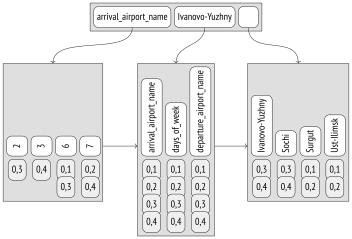
jsonb_path_ops Operator Class
The second class called jsonb_path_ops contains fewer operators:
If this class is used, the index will contain paths from the root of the document to all the values and all the array elements rather than isolated JSON fragments.25 It makes the search much more precise and efficient, but there is no speedup for operations with arguments represented by separate keys instead of paths.
As a path can be quite lengthy, it is not paths themselves but their hashes that actually get indexed.
Let’s create an index for the same table using this operator class:
The created index can be represented by the following tree:
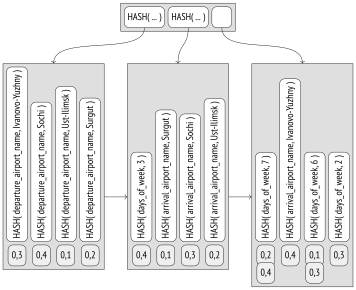
When executing a query with the same condition route @> '{"days_of_week": [6]}', the support function26 extracts the whole path “days_of_week, 6” rather than its separate components. The TIDs of the two matching documents will be found in the element tree right away.
Clearly, these entries will be checked by the consistency function27 and then rechecked by the indexing engine (to rule out hash collisions, for example). But the search through the tree is much more efficient, so it makes sense to always choose the jsonb_path_ops class if the index support provided by its operators is sufficient for queries.
28.6 Indexing Other Data Types
GIN support via extensions is also provided for the following data types:
Arrays of integers. The intarray extension adds the gin__int_ops operator class for integer arrays. It is very similar to the standard array_ops operator class, but it supports the match operator @@, which matches a document against a search query.
Key–value storage. The hstore extension implements a storage for key–value pairs and provides the gin_hstore_ops operator class. Both keys and values get indexed.
JSON query language. An external jsquery extension provides its own query language and GIN index support for JSON.
After the SQL:2016 standard was adopted and the SQL/JSON query language was implemented in PostgreSQL, the standard built-in capabilities seem to be a better choice. (v. 12)
postgresql.org/docs/14/gin.html backend/access/gin/README ↩︎
postgresql.org/docs/14/gin-extensibility.html backend/utils/adt/tsginidx.c ↩︎
backend/utils/adt/tsvector_op.c, ts_match_vq function ↩︎
backend/utils/adt/tsginidx.c, gin_extract_tsquery function ↩︎
backend/access/gin/ginget.c, keyGetItem function ↩︎
backend/utils/adt/tsginidx.c, gin_tsquery_triconsistent function ↩︎
backend/utils/adt/tsginidx.c, gin_cmp_prefix function ↩︎
backend/access/gin/ginget.c, startScanKey function ↩︎
backend/access/gin/gininsert.c, ginEntryInsert function ↩︎
backend/access/gin/gininsert.c, addItemPointersToLeafTuple function ↩︎
backend/access/gin/ginbtree.c, ginInsertValue function ↩︎
backend/access/gin/ginfast.c, ginInsertCleanup function ↩︎
backend/access/gin/gininsert.c, ginbuild function ↩︎
backend/access/gin/ginget.c, dropItem macro ↩︎
backend/access/gin/ginarrayproc.c, ginarrayconsistent function ↩︎
backend/utils/adt/jsonb_gin.c, gin_extract_jsonb function ↩︎
backend/utils/adt/jsonb_gin.c, gin_extract_jsonb_query function ↩︎
backend/utils/adt/jsonb_gin.c, gin_consistent_jsonb function ↩︎
backend/utils/adt/jsonb_gin.c, gin_extract_jsonb_path function ↩︎
backend/utils/adt/jsonb_gin.c, gin_extract_jsonb_query_path function ↩︎
backend/utils/adt/jsonb_gin.c, gin_consistent_jsonb_path function ↩︎
29 BRIN
29.1 Overview
Unlike other indexes that are optimized to quickly find the required rows, BRIN1 is designed to filter out unnecessary rows. This access method was created primarily for large tables of several terabytes and up, so a smaller index size takes priority over search accuracy.
To speed up search, the whole table is split into ranges, hence the name: Block Range Index. Each range comprises several pages. The index does not store TIDs, keeping only a summary on the data of each range. For ordinal data types, it is the minimal and the maximal values in the simplest case, but different operator classes may collect different information on values in a range.
The number of pages in a range is defined at the time of the index creation based on the value of the pages_per_range storage parameter. (default: 128)
If a query condition references an indexed column, all the ranges that are guaranteed to have no matches can be skipped. The pages of all the other ranges are returned by the index as a lossy bitmap; all the rows of these pages have to be rechecked. (p. 342)
Thus, BRIN works well for columns with localized values (that is, for columns in which values stored close to each other have similar summary information properties). For ordinal data types, it means that values must be stored in ascending or descending order, that is, have high correlation between their physical location and the logical order defined by the greater than and less than operations. For other types of summary information, “similar properties” may vary. (p. 284)
It will not be wrong to think of BRIN as an accelerator of sequential heap scans rather than an index in the conventional sense of the word. It can be regarded as an alternative to partitioning, with each range representing a virtual partition.
29.2 Example
Our demo database contains no tables that are large enough for BRIN, but we can imagine that analytical reports demand that we have a denormalized table containing summary information on all the departed and arrived flights of a particular airport, down to the occupied seats. The data for each airport is updated daily, as soon as it is midnight in the corresponding timezone. The added data is neither updated nor deleted.
The table looks as follows:
Data loading can be emulated using nested loops:2 the outer loop will correspond to days (the demo database stores annual data), while the inner loop will be based on timezones. As a result, the loaded data will be more or less ordered at least by time and airports, even though it is not explicitly sorted within the loop.
I will load an existing copy of the database that takes roughly 4 GB and contains about 30 million rows:3
We can hardly call it a large table, but this data volume will be enough to demonstrate how BRIN works. I will create an index in advance:
It takes very little space with the default settings.
A B-tree index is a thousand times bigger, even if data deduplication is enabled. True, its efficiency is also much higher, but an additional volume can turn out to be unaffordable luxury for really large tables. (v. 13)
29.3 Page Layout
The zero page of a BRIN index is called the metapage; it keeps information on the index structure.
At a certain offset from the metadata, there are pages with summary information. Each index entry in such a page contains a summary of a particular block range.
The space between the metapage and the summary information is taken by the range map, which is sometimes also referred to as a reverse map (hence the common revmap abbreviation). It is effectively an array of pointers to the corresponding index rows; the index number in this array corresponds to the range number.
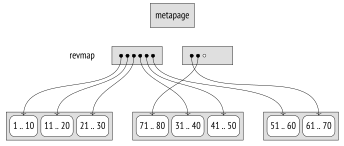
As the table is expanding, the size of the range map also grows. If the map does not fit the allotted pages, it overtakes the next page, and all the index entries previously located in this page are transferred to other pages. Since a page can accommodate many pointers, such transfers are quite rare.
BRIN index pages can be displayed by the pageinspect extension, as usual. The metadata includes the size of the range and the number of pages reserved for the range map:
Here the range map takes four pages, from the first to the fourth one. We can take a look at the pointers to index entries containing summarized data:
If the range is not summarized yet, the pointer in the range map is NULL.
And here are the summaries for several ranges:
29.4 Search
If a query condition is supported by the BRIN index,4 the executor scans the range map and the summary information for each range. If the data in a range may match the search key, all the pages that belong to this range are added to the bitmap. Since BRIN does not keep IDs of separate tuples, the bitmap is always lossy.
Matching the data against the search key is performed by the consistency function, which interprets range summary information. Non-summarized ranges are always added to the bitmap.
The received bitmap is used to scan the table in the usual manner. It is important to mention that heap page reads happen sequentially, block range by block range, and prefetching is employed. (p. 340)
29.5 Summary Information Updates
Value Insertion
As a new tuple is added into a heap page, the summary information in the corresponding index range gets updated.5 The range number is calculated based on the page number using simple arithmetic operations, and the summary information is then located by the range map.
To determine whether the current summary information has to be expanded, the addition function is employed. If an expansion is required and the page has enough free space, it is done in-place (without adding a new index entry).
Suppose we have added a tuple with value 42 to page 13. The range number is calculated by integer division of page number by the size of the range. Assuming that the range size equals four pages, we get range number 3; since range numbering is zero-based, we take the fourth pointer in the range map. The minimal value in this range is 31, the maximal one is 40. The added value falls outside these limits, so the maximal value is increased:
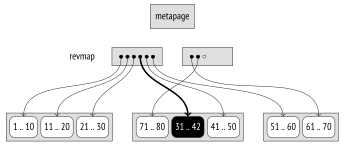
If an in-place update is impossible, a new entry is added, and the range map is modified.
Range Summarization
Everything said above applies to scenarios when a new tuple appears in an already summarized range. When an index is being built, all the existing ranges are summarized, but as the table grows, new pages may fall outside these ranges.
If an index is created with the autosummarize storage parameter enabled, the new range will be summarized at once. But in data warehouses, where rows are usually added in large batches rather than one by one, this mode can seriously slow down insertion. (default: off)
By default, new ranges are not summarized right away. It does not affect index correctness because ranges with no summary information are always scanned. Summarization is performed asynchronously, either during table vacuuming or when initiated manually by calling the brin_summarize_new_values function (or the brin_summarize_range function that processes a single range). (p. 112)
Range summarization6 does not lock the table for updates. At the beginning of this process, a placeholder entry is inserted into the index for this range. If the data in the range is changed while this range is being scanned, the placeholder will be updated with the summary information on these changes. Then the union function will unite this data with the summary information on the corresponding range.
In theory, summary information could sometimes shrink after some rows are deleted. But while GiST indexes can redistribute data after a page split, summary information of BRIN indexes never shrinks and can only get wider. Shrinking is usually not required here because a data storage is typically used only for appending new data. You can manually delete summary information by calling the brin_desummarize_range function for this range to be summarized again, but there is no clue as to which ranges might benefit from it. (p. 445)
Thus, BRIN is primarily targeted at tables of very large size, which either have minimal updates that add new rows mostly to the end of the file, or are not updated at all. It is mainly used in data warehouses for building analytical reports.
29.6 Minmax Classes
For data types that allow comparing values, summary information includes at least the maximal and minimal values. The corresponding operator classes contain the word minmax in their names:7
Here are the support functions of these operator classes:
The first function returns the operator class metadata, and all the other functions have already been described: they insert new values, check consistency, and perform union operations.
The minmax class includes the same comparison operators that we have seen for B-trees: (p. 432)
Choosing Columns to be Indexed
Which columns does it make sense to index using this operator class? As mentioned earlier, such indexes work well if the physical location of rows correlates with the logical order of values.
Let’s check it for the above example.
The data is ordered by time (both scheduled and actual time; there is little difference, if any): new entries are added in chronological order, and as the data is neither updated nor deleted, all the rows get into the main fork of the table sequentially, one after another. (p. 25)
Columns fare_conditions, flight_type, and airport_utc_offset have relatively high correlation, but they store too few distinct values.
The correlation in other columns is too low for their indexing with the minmax operator class to be of any interest.
Range Size and Search Efficiency
An appropriate range size can be determined based on the number of pages used to store particular values.
Let’s take a look at the scheduled_time column and get the information on all the flights performed in 24 hours. We first have to find out how many table pages are taken by the data related to this time interval.
To get this number, we can use the fact that a TID consists of a page number and an offset. Unfortunately, there is no built-in function to break down a TID into these two components, so we will have to write our own clumsy function to perform type casting via a text representation:
Now we can see how days are distributed through the table:
As we can notice, the data distribution is not quite uniform. With a standard range size of 128 pages, each day will take from 9 to 12 ranges. While fetching the data for a particular day, the index scan will return both the rows that are really needed and some rows related to other days that got into the same ranges. The bigger the range size, the more extra boundary values will be read; we can change their number by reducing or increasing the range size.
Let’s try out a query for some particular day (I have already created an index with the default settings). For simplicity, I will forbid parallel execution:
We can define an efficiency factor of a BRIN index for a particular query as a ratio between the number of pages skipped in an index scan and the total number of pages in the table. If the efficiency factor is zero, the index access degrades to sequential scanning (without taking overhead costs into account). The higher the efficiency factor, the fewer pages have to be read. But as some pages contain the data to be returned and cannot be skipped, the efficiency factor is always smaller than one. (p. 348)
In this particular case, the efficiency factor is ≈ 0.997, where 528,417 is the number of pages in the table.
However, we cannot draw any meaningful conclusions based on a single value. Even if we had uniform data and ideal correlation, the efficiency would still vary because, at the very least, range boundaries will not match page boundaries. We can get the full picture only if we treat the efficiency factor as a random value and analyze its distribution.
For our example, we can select all the different days of the year, check the execution plan for each value, and calculate statistics based on this selection. We can easily automate this process because the EXPLAIN command can return the results in the JSON format, which is convenient to parse. I will not provide all the code here, but the following snippet contains all the important details:
The results can be visually displayed as a box plot, also known as a “box-and-whiskers.” The whiskers here denote the first and fourth quartiles (that is, the right whisker gets 25 % of the largest values, while the left one gets 25 % of the smallest values). The box itself holds the remaining 50 % of values and has the median value marked. What is more important, this compact representation enables us to visually compare different results. The following illustration shows the efficiency factor distribution for the default range size and for two other sizes that are four times larger and smaller.
As we could have expected, the search accuracy and efficiency are high even for rather large ranges.
The dashed line here marks the average value of the maximal efficiency factor possible for this query, assuming that one day takes roughly of the table.
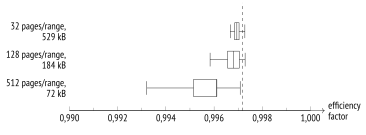
Note that the rise in efficiency comes at the expense of the index size increase. BRIN is quite flexible in letting you find the balance between the two.
Properties
BRIN properties are hardwired and do not depend on operator classes.
Access Method Properties
Obviously, neither sorting nor uniqueness properties are supported. Since a BRIN index always returns a bitmap, exclusion constraints are not supported either. Neither do additional INCLUDE columns make any sense, as even indexing keys are not stored in BRIN indexes.
However, we can create a multicolumn BRIN index. In this case, summary information for each column is collected and stored in a separate index entry, but they still have a common range mapping. Such an index is useful if the same range size is applicable to all the indexed columns.
Alternatively, we can create separate BRIN indexes for several columns and take advantage of the fact that bitmaps can be merged together. For example: (p. 343)
Index-Level Properties
Obviously, bitmap scanning is the only supported access type.
Lack of clusterization may seem puzzling. Since BRIN is sensitive to the physical order of rows, it is quite logical to assume that it should support reordering, which would maximize its efficiency. But clusterization of large tables is anyway a luxury, taking into account all the processing and extra disk space required to rebuild a table. Besides, as the example of the flights_bi table shows, some ordering in data storages can occur naturally.
Column-Level Properties
The only available column-level property is NULL support. To track NULL values in a range, summary information provides a separate attribute:
29.7 Minmax-Multi Classes
The established correlation can be easily disrupted by data updates. The reason is not an actual modification of a particular value but rather the MVCC design itself: an old version of a row may be deleted in one page, while its new version may be inserted into any location that is currently free, so the original row order cannot be preserved. (v. 14) (p. 66)
To minimize this effect to some extent, we can reduce the value of the fillfactor storage parameter to leave more space in the page for future updates. But is it really worth increasing the size of an already huge table? Besides, deletions will anyway free some space in existing pages, thus preparing traps for new tuples that would otherwise get to the end of the file.
Such a situation can be easily emulated. Let’s delete 0.1 % of randomly chosen rows and vacuum the table to clean up some space for new tuples:
Now let’s add some data for a new day in one of the timezones. I will simply copy the data of the previous day:
The performed deletion was enough to free some space in all or almost all the ranges. Getting into pages located somewhere in the middle of the file, new tuples have automatically expanded the ranges. For example, the summary information related to the first range used to cover less than a day, but now it comprises the whole year:
The smaller the date specified in the query, the more ranges have to be scanned. The graph shows the magnitude of the disaster:

To address this issue, we have to make the summary information a bit more sophisticated: instead of a single continuous range, we have to store several smaller ones that cover all the values when taken together. Then one of the ranges can cover the main set of data, while the rest will handle occasional outliers.
Such functionality is provided by minmax-multi operator classes:8
As compared to minmax operator classes, minmax-multi classes have one more support function that computes the distance between values; it is used to determine the range length, which the operator class strives to reduce:
The operators of such classes are absolutely the same as those of the minmax classes.
Minmax-multi classes can take the values_per_range parameter, which defines the maximal allowed number of summarized values per range. A summarized value is represented by two numbers (an interval),while a separate point requires just one. If there are not enough values, some of the intervals are reduced.9 (default: 32)
Let’s build a minmax-multi index instead of the existing one. We will limit the number of allowed values per range to 16:
The graph shows that the new index brings the efficiency back to the original level. Quite expectedly, it leads to an increase in the index size:
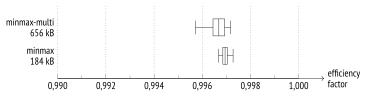
29.8 Inclusion Classes
The difference between minmax and inclusion operator classes is roughly the same as the difference between B-trees and GiST indexes: the latter are designed for data types that do not support comparison operations, although mutual alignment of values still makes sense for them. Summary information for a particular range provided by inclusion operator classes is represented by the bounding box of the values in this range.
Here are these operator classes; they are not numerous:
The list of support functions is extended by one more mandatory function that merges two values, and by a bunch of optional ones:
When dealing with values that can be compared, we relied on their correlation; but for other data types, no such statistic is collected,10 so it is hard to predict the efficiency of an inclusion-based BRIN index.
What is worse, correlation greatly affects cost estimation of an index scan. If such statistic is unavailable, it is taken as zero.11 Thus, the planner has no way to tell between exact and fuzzy inclusion indexes, so it typically avoids using them altogether. (v. 3.1.1)
PostGIS collects statistics on correlation of spatial data.
In this particular case, we can presume that it makes sense to build an index over airport coordinates, as longitude must correlate with the timezone.
Unlike GiST predicates, BRIN summary information has the same type as the indexed data; therefore, it is not so easy to build an index for points. But we can create an expression index by converting points into dummy rectangles:
An index built over timezones with the same range size takes approximately the same volume (3288 kB).
The operators included into this class are similar to GiST operators. For example, a BRIN index can be used to speed up search for points in a certain area:
But as mentioned earlier, the planner refuses to use an index scan unless we turn off sequential scanning:
29.9 Bloom Classes
Operator classes based on the Bloom filter enable BRIN usage for any data types that support the equal to operation and have a hash function defined. They can also be applied to regular ordinal types if values are localized in separate ranges but their physical location has no correlation with the logical order. (v. 14)
The names of such operator classes contain the word bloom:12
The classic Bloom filter is a data structure that enables you to quickly check whether an element belongs to a set. This filter is very compact, but it allows false positives: a set may be assumed to contain more elements than it actually does. But what is more important, false negatives are ruled out: the filter cannot decide that an element is not present in the set if it is actually there.
The filter is an array of m bits (also called a signature), which is originally filled with zeros. We select k different hash functions to map any element of the set to k bits of the signature. When an element is added to the set, each of the bits in the signature is set to one. Consequently, if all the bits that correspond to an element are set to one, the element may be present in the set; if there is at least one zero bit, the element is guaranteed to be absent.
In the case of BRIN indexes, the filter processes a set of values of an indexed column that belong to a particular range; the summary information for this range is represented by the built Bloom filter.
The bloom extension13 provides its own index access method based on the Bloom filter. It builds a filter for each table row and deals with a set of column values of each row. Such an index is designed for indexing several columns at a time and can be used in adhoc queries, when the columns to be referenced in filter conditions are not known in advance. A BRIN index can also be built on several columns, but its summary information will contain several independent Bloom filters for each of these columns.
The accuracy of the Bloom filter depends on the signature length. In theoretical terms, the optimal number of signature bits can be estimated at m = , where n is the number of elements in the set and p is the probability of false positives.
These two settings can be adjusted using the corresponding operator class parameters:
n_distinct_per_range defines the number of elements in a set; in this case, it is the number of distinct values in one range of an indexed column. This parameter value is interpreted just like statistics on distinct values: negative values indicate the fraction of rows in the range, not their absolute number. (default:
-0.1) (p. 276)false_positive_rate defines the probability of false positives. (default:
0.01)
A near-zero value means that an index scan will almost certainly skip the ranges that have no searched values. But it does not guarantee exact search, as the scanned ranges will also contain extra rows that do not match the query. Such behavior is due to range width and physical data location rather than to the actual filter properties.
The list of support functions is extended by a hash function:
Since the Bloom filter is based on hashing, only the equality operator is supported:
Let’s take the flight_no column that stores flight numbers; it has near-zero correlation, so it is useless for a regular range operator class. We will keep the default false-positive setting; as for the number of distinct values in a range, it can be easily calculated. For example, for an eight-page range we will get the following value:
For smaller ranges, this number will be even lower (but in any case, the operator class does not allow values smaller than 16).
We just have to create an index and check the execution plan:
The graph shows that for some flight numbers (represented by separate points that do not belong to any whiskers) the index does not work very well, but its overall efficiency is quite high:
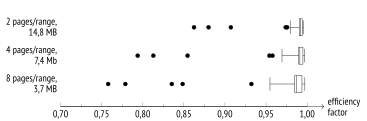
postgresql.org/docs/14/brin.html backend/access/brin/README ↩︎
backend/access/brin/brin.c, bringetbitmap function ↩︎
backend/access/brin/brin.c, brininsert function ↩︎
backend/access/brin/brin.c, summarize_range function ↩︎
backend/access/brin/brin_minmax_multi.c, reduce_expanded_ranges function ↩︎
backend/commands/analyze.c, compute_scalar_stats function ↩︎
backend/utils/adt/selfuncs.c, brincostestimate function ↩︎
Conclusion
Well, now our journey is coming to an end. I hope that you have found the book useful— or at least interesting—and have learned something new from it (I myself did learn a lot while I was writing it).
Most of the covered information is likely to remain up-to-date for quite a long time, but some details will inevitably change very fast. I believe that the biggest value of this book is not a set of particular facts but rather the approach to exploring the system that I show. Neither this book nor the documentation should be taken for granted. Contemplate, experiment, verify all the facts yourself: PostgreSQL provides all the tools that you need for it, and I tried to show how to use them. It is usually almost as easy as asking a question on a forum or googling the answer, but is definitely much more reliable and useful.
For the same reason, I wanted to encourage you to look into the code. Do not get intimidated by its complexity: simply try it out. Open source is a great advantage, so take this opportunity.
I will be happy to get your feedback; you can send your comments and suggestions to edu@postgrespro.ru. I am going to update the book regularly, so it can really help me improve its future editions. The latest online version of the book is available for free at postgrespro.com/community/books/internals.
Good luck!
Index
A
Access method
Alignment 65
Anomaly
Append385autoprewarm worker163autosummarize 523
autovacuum 110
autovacuum worker110autovacuum_analyze_scale_factor 113
autovacuum_analyze_threshold 113
autovacuum_freeze_min_age 132
autovacuum_freeze_table_age 132
autovacuum_multixact_freeze_max_age 215
autovacuum_vacuum_insert_scale_factor 112
autovacuum_vacuum_insert_threshold 112
autovacuum_work_mem 111
autovacuum_freeze_max_age 131
B
Backend 34
Background writing 176
- setup 179
bgwriter_delay 179
bgwriter_lru_multiplier 179
Binding 267
Bison 254
Bitmap 341
- NULL values 64
BitmapAnd343Block see page
bloom 537
Box plot 527
BRIN 517
btree_gin 511
C
- join 356
checkpoint_warning 179
client_encoding 507
Cluster 20
Cmin and cmax 86
Combo-identifier 86
commit_delay 183
commit_siblings 183
cpu_index_tuple_cost 333
cube 470
D
Database 20
data_checksums 188
debug_print_parse 255
debug_print_plan 257
debug_print_rewritten 256
deduplicate_items 430
default_table_access_method 294
default_text_search_config 464
default_transaction_isolation 60
Durability 40
E
F
false_positive_rate 537
fdatasync 186
fillfactor 92–93, 98–99, 125, 127, 135, 236, 413, 446, 474, 531
Finalize Aggregate304Finalize GroupAggregate404Flex 254
force_parallel_mode 309
Fork 24
- manual 132
Full page image 174
Full-text search 462
fuzzystrmatch 490
G
geqo 261
geqo_threshold 261
Getting the result 270
GIN 492
gin_fuzzy_search_limit 504
gin_pending_list_limit 503
GroupAggregate403
H
Header
Hint bits see information bits
Histogram 279
I
idle_in_transaction_session_timeout 141
ignore_checksum_failure 188
Incremental Sort400Index Only Scan337Instance 20
Integrity constraints 39
Isolation 40
J
Join
jsquery 516
K
- k-D tree 483
L
M
maintenance_io_concurrency 341
Map
max_locks_per_transaction 201
max_parallel_processes 161
max_parallel_workers 305
max_pred_locks_per_page 238
max_pred_locks_per_relation 239
max_wal_senders 192
Merge Join387min_parallel_index_scan_size 108
min_parallel_table_scan_size 305
min_wal_size 178
MixedAggregate404Multitransactions 213
- wraparound 215
N
O
P
pageinspect 62, 65, 68, 74, 125, 167, 211, 412, 447, 478, 494, 520
pages_per_range 517
Parallel Bitmap Heap Scan348Parallel execution 300, 305, 347, 366, 377, 390, 401, 404
- limitations 308
Parallel Hash379Parallel Hash Join379Parallel Index Only Scan378parallel_workers 305
Parsing 254
Partial Aggregate303Partial GroupAggregate404pg_checksums 187
pg_controldata 173
PGDATA 20
pg_dump 90
pg_prewarm 161
pg_prewarm.autoprewarm 161
pg_prewarm.autoprewarm_interval 161
pg_rewind 165
pgstattuple 136
pg_test_fsync 186
pg_wait_sampling 245
pg_wait_sampling.profile_period 246
Plan 257
- generic and custom 268
plan_cache_mode 269
Pointers to tuples 63
Portal 264
postgres33Preparing a statement 266
Process 33
Protocol 35
Q
- Quadtree 473
R
RD-tree 464
Read Committed42–46, 49–50, 52–53, 61, 80, 87–88, 91, 104, 219Recovery 173
Relation 24
Repeatable Read43–45, 52–56, 58, 60–61, 80, 88, 91, 133, 219, 236Rewriting see transformation
Row version see tuple
RTE 254
R-Tree 445
Rule system 256
RUM 506
S
Savepoint 76
Scan
Schema 22
search_path 22
seg 471
- join 356
Serializable43–44, 58, 60–61, 80, 88, 91, 219, 235–236, 239, 308Server 20
shared_buffers 158
slowfs 246
Special space 63
SP-GiST 472
Split
statement_timeout 225
Support functions 320
T
Publication and Credits
The elephant on the cover is a fragment of an illustration from Edward Topsell’s The History of Four-footed Beasts and Serpents, published in London in 1658
PostgreSQL 14 Internals by Egor Rogov
Translated from Russian by Liudmila Mantrova
© Postgres Professional, 2022–2023
ISBN 978-5-6045970-4-0
This book in PDF is available at postgrespro.com/community/books/internals