28 GIN
PostgreSQL 14 · Translated from Russian by Liudmila Mantrova · Chinese translation by Xiong Cancan
28.1 Overview
According to its authors, GIN stands for a potent and undaunted spirit, not for an alcoholic beverage.1 But there is also a formal interpretation: this acronym is expanded as Generalized Inverted Index.
The GIN access method is designed for data types representing non-atomic values made up of separate elements (for example, documents consist of lexemes in the context of full-text search). Unlike GiST, which indexes values as a whole, GIN indexes only their elements; each element is mapped to all the values that contain it.
We can compare this method to a book’s index, which comprises all the important terms and lists all the pages where these terms are mentioned. To be convenient to use, it must be compiled in alphabetical order, otherwise it would be impossible to navigate through quickly. In a similar way, GIN relies on the fact that all elements of compound values can be sorted; its main data structure is B-tree. (p. 421)
The implementation of the GIN tree of elements is less complex than that of a regular B-tree: it has been designed to contain rather small sets of elements repeated multiple times.
This assumption leads to two important conclusions:
- An element must be stored in an index only once.
Each element is mapped to a list of TIDs, which is called a posting list. If this list is rather short, it is stored together with the element; longer lists are moved into a separate posting tree, which is actually a B-tree. Just like element trees, posting lists are sorted; it does not matter much from the user’s perspective but helps to speed up data access and reduce index size.
- There is no point in removing elements from a tree.
Even if the list of TIDs for a particular element is empty, the same element is likely to appear again as part of some other value.
Thus, an index is a tree of elements whose leaf entries are bound to either flat lists or trees of TIDs.
Just like GiST and SP-GiST access methods, GIN can be used to index a whole variety of data types via a simplified interface of operator classes. Operators of such classes usually check whether the indexed composite value matches a particular set of elements (just like the @@ operator checks whether a document satisfies a full-text search query).
To index a particular data type, the GIN method must be able to split composite values into elements, sort these elements, and check whether the found value satisfies the query. These operations are implemented by support functions of the operator class.
28.2 Index for Full-Text Search
GIN is mainly applied to speed up full-text search, so I will go on with the example used to illustrate GiST indexing. As you can guess, compound values in this case are documents, while elements of these values are lexemes. (p. 463)
Let’s build a GIN index on the “Old MacDonald” table: (p. 463)
A possible structure of this index is shown below. Unlike in the previous illustrations, here I provide actual TID values (shown with a grey background), as they are important for understanding the algorithms. These values suggest that heap tuples have the following IDs:
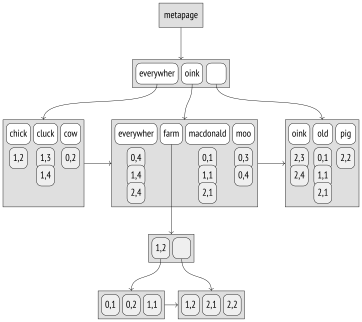
Note some differences from a regular B-tree index here. The leftmost keys in inner B-tree nodes are empty, as they are actually redundant; in a GIN index, they are not stored at all. For this reason, references to child nodes are shifted too. The high key is used in both indexes, but in GIN it takes its legitimate rightmost position. Same-level nodes in a B-tree are bound into a bidirectional list; GIN uses a unidirectional list, since the tree is always traversed in only one direction. (p. 426)
In this theoretical example, all posting lists fit regular pages, except the one for the “farm” lexeme. This lexeme occurred in as many as six documents, so its IDs were moved into a separate posting tree.
Page Layout
GIN page layout is very similar to that of a B-tree. We can peek into an index using the pageinspect extension. Let’s create a GIN index on the table that stores emails of the pgsql-hackers mailing list: (p. 468)
The zero page (the metapage) contains the basic statistics, such as the number of elements and pages of other types:
GIN uses the special space of index pages; for example, this space stores the bits that define the page type: (p. 63)
The page with the meta attribute is of course the metapage. Pages with the data attribute belong to posting lists, while pages without this attribute are related to element trees. Leaf pages have the leaf attribute.
In the next example, another pageinspect function returns the information on TIDs that are stored in trees’ leaf pages. Each entry of such a tree is virtually a small list of TIDs rather than a single TID:
Posting lists are ordered, which allows them to be compressed (hence the same-name attribute). Instead of a six-byte TID, they store its difference with the previous value, which is represented by a variable number of bytes:2 the smaller this difference, the less space the data takes.
Operator Class
Here is the list of support functions for GIN operator classes:3
The first support function compares two elements (two lexemes in this case). If the lexemes were represented by a regular SQL type supported by B-tree, GIN would automatically use comparison operators defined in the B-tree operator class.
The fifth (optional) function is used in partial search to check whether an index element partially matches the search key. In this particular case, partial search consists in searching lexemes by a prefix. For example, the query “c:*” corresponds to all lexemes starting with letter “c.”
The second function extracts lexemes from the document, while the third one extracts lexemes from the search query. The use of different functions is justified because, at the very least, the document and the query are represented by different data types, namely tsvector and tsquery. Besides, the function for the search query determines how the search will be performed. If the query requires the document to contain a particular lexeme, the search will be limited to the documents that contain at least one lexeme specified in the query. If there is no such condition (for example, if you need documents that do not contain a particular lexeme), all the documents have to be scanned—which is of course much more expensive. (v. 13)
If the query contains any other search keys, the index is first scanned by these keys, and then these intermediate results are rechecked. Thus, there is no need to scan the index in full.
The fourth and sixth functions are consistency functions, which determine whether the found document satisfies the search query. As input, the fourth function gets the exact information on which lexemes specified in the query appear in the document. The sixth function operates in the context of uncertainty and can be called when it is not yet clear whether some of the lexemes are present in the document or not. An operator class does not have to implement both functions: it is enough to provide only one of them, but search efficiency may suffer in this case.
The tsvector_ops operator class supports only one operator that matches the document against the search query: @@,4 which is also included into the GiST operator class.
Search
Let’s take a look at the search algorithm for the “everywhere | oink” query, where two lexemes are connected by the OR operator. First, a support function5 extracts lexemes “everywher” and “oink” (search keys) from the search string of the tsquery type.
Since the query demands particular lexemes to be present, TIDs of the documents that contain at least one key specified in the query are bound into a list. For this purpose, the TIDs that correspond to each search key are searched in the tree of lexemes and are added into a common list. All the TIDs stored in an index are ordered, which allows merging several sorted streams of TIDs into one.6 (p. 387)
Note that at this point it does not matter yet whether the keys were combined by AND, OR, or any other operator: the search engine deals with the list of keys and knows nothing about the search query semantics.
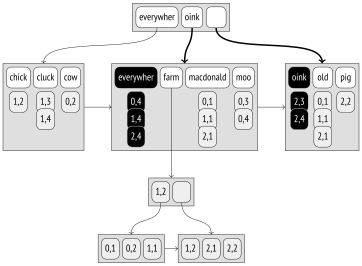
Each found TID that corresponds to a document is checked by the consistency function.7 It is this function that interprets the search query and leaves only those TIDs that satisfy the query (or at least may satisfy it and have to be rechecked by the table).
In this particular case, the consistency function leaves all the TIDs:
| TID | “everywher” | “oink” | Consistency function |
|---|---|---|---|
| (0,4) | ✓ | – | ✓ |
| (1,4) | ✓ | – | ✓ |
| (2,3) | – | ✓ | ✓ |
| (2,4) | ✓ | ✓ | ✓ |
Instead of a regular lexeme, search queries can contain a prefix. It is useful if an application user can enter the first letters of a word into the search field, expecting to get the results right away. For example, the “pig:*” query will match all the documents that contain lexemes starting with “pig”: here we get “pigs,” and we would also get “pigeons” if old MacDonald had bred them on his farm.
Such partial search matches indexed lexemes against the search key using a special support function;8 in addition to prefix matching, this function can also implement other logic for partial search.
Frequent and Rare Lexemes
If searched lexemes occur in a document multiple times, the created list of TIDs will turn out long, which is of course inefficient. Fortunately, it can often be avoided if the query also contains some rare lexemes.
Let’s consider the “farm & cluck” query. The “cluck” lexeme occurs two times, while the “farm” lexeme appears six times. Instead of treating both lexemes equally and building the full list of TIDs by them, the rare “cluck” lexeme is considered mandatory, while the more frequent “farm” lexeme is treated as optional, as it is clear that (taking the query semantics into account) a document with the “farm” lexeme can satisfy the query only if it contains the “cluck” lexeme too.
Thus, an index scan determines the first document that contains “cluck”; its TID is (1,3). Then we have to find out whether this document also contains the “farm” lexeme, but all the documents whose TIDs are smaller than (1,3) can be skipped. Since frequent lexemes are likely to correspond to many TIDs, chances are high that they are stored in a separate tree, so some pages can be skipped as well. In this particular case, the search in the tree of “farm” lexemes starts with (1,3).
This procedure is repeated for the subsequent values of the mandatory lexeme.
Clearly, this optimization can also be applied to more complex search scenarios that involve more than two lexemes. The algorithm sorts the lexemes in the order of their frequency, adds them one by one to the list of mandatory lexemes, and stops when the remaining lexemes are no longer able to guarantee that the document satisfies the query.9
For example, let’s consider the query “farm & ( cluck | chick )”. The least frequent lexeme is “chick”; it is added to the list of mandatory lexemes right away. To check whether other lexemes can be considered optional, the consistency function takes false for the mandatory lexeme and true for all the other lexemes. It returns true AND (true OR false) = true, which means that the remaining lexemes are “self-sufficient,” and at least one of them must become mandatory.
The next least frequent lexeme (“cluck”) is added into the list, and now the consistency function returns true AND (false OR false) = false. Thus, “chick” and “cluck” lexemes become mandatory, while “farm” remains optional.
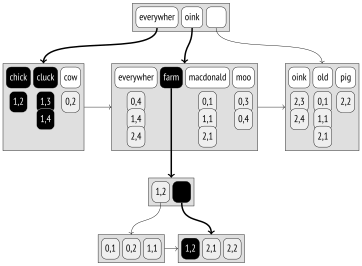
The length of the posting list is three, as the mandatory lexemes have occurred three times:
| TID | “chick” | “cluck” | “farm” | Consistency function |
|---|---|---|---|---|
| (1,2) | ✓ | – | ✓ | ✓ |
| (1,3) | – | ✓ | – | – |
| (1,4) | – | ✓ | – | – |
Thus, if lexeme frequencies are known, it is possible to merge trees of lexemes in the most efficient way, starting from rare lexemes and skipping those page ranges of frequent lexemes that are sure to be redundant. It reduces the number of times the consistency function has to be called. (p. 283)
To make sure that this optimization really works, let’s query the pgsql-hackers archive. We will need to specify two lexemes, a common and a rare one: (p. 468)
It turns out that a document that contains them both does exist:
This query is performed almost just as fast as the search for a single word “tattoo”:
But if we were looking for a single word “wrote,” the search would take much longer:
Insertions
A GIN index cannot contain duplicates;10 if an element to be added is already present in the index, its TID is simply added to the posting list or tree of an already existing element.
A posting list is a part of an index entry that cannot take too much space in a page, so if the allotted space is exceeded, the list is transformed into a tree.11
When a new element (or a new TID) is being added into a tree, a page overflow can occur; in this case, the page is split into two, and the elements are redistributed between them.12
But each document typically contains many lexemes that have to be indexed. So even if we create or modify just one document, the index tree still undergoes a lot of modifications. That is why GIN updates are rather slow.
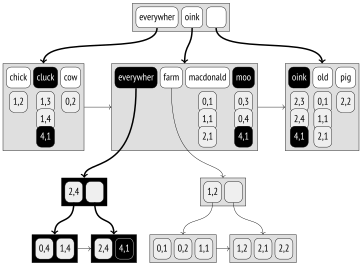
The illustration below shows the state of the tree after the row “Everywhere clucks, moos, and oinks” with TID (4,1) was inserted into the table. The posting lists of lexemes “cluck,” “moo,” and “oink” were extended; the list of the “everywher” lexeme exceeded the maximal size and was split off as a separate tree.
However, if an index gets updated to incorporate changes related to several documents at once, the total amount of work is likely to be reduced as compared to consecutive changes, as these documents may contain some common lexemes.
This optimization is controlled by the fastupdate storage parameter. Deferred index updates are accumulated in an unordered pending list, which is physically stored in separate list pages outside the element tree. When this list becomes big enough, all its contents is transferred into the index in one go, and the list is cleared.13 The maximal size of the list is defined either by the gin_pending_list_limit parameter or by the same-name index storage parameter. (default: on) (p. 233) (default: 4MB)
By default, such deferred updates are enabled, but you should keep in mind that they slow down search: apart from the tree itself, the whole unordered list of lexemes has to be scanned. Besides, insertion time becomes less predictable, as any change can lead to an overflow that incurs an expensive merge procedure. The latter is partially smoothed by the fact that the merge can be also performed asynchronously during index vacuuming.
When a new index is created,14 the elements also get added in batches rather than one by one, which would be too slow. Instead of being saved into an unordered list on disk, all the changes are accumulated in a maintenance_work_mem memory chunk and get transferred into an index once this chunk has no more free space. The more memory is allocated for this operation, the faster the index is built. (default: 64MB)
The examples provided in this chapter prove GIN superiority over GiST signature trees when it comes to search precision. For this reason, it is GIN that is typically used for full-text search. However, the problem of slow GIN updates may tip the scale in favor of GiST if the data is being actively updated. (p. 463)
Limiting Result Set Size
The GIN access method always returns the result as a bitmap; it is impossible to get TIDs one by one. In other words, the BITMAP SCAN property is supported, but the INDEX SCAN property is not. (p. 326)
The reason for this limitation is the unordered list of deferred updates. In the case of an index access, this list is scanned to build a bitmap, and then this bitmap is updated with the data of the tree. If the unordered list gets merged with the tree (as the result of an index update or during vacuuming) while search is in progress, the same value can be returned twice, which is unacceptable. But in the case of a bitmap it does not pose any problems: the same bit will simply be set twice.
Consequently, using the LIMIT clause with a GIN index is not quite efficient, as the bitmap still has to be built in full, which contributes a fair share to the total cost:
Therefore, the GIN method offers a special feature that limits the number of results returned by an index scan. This limit is imposed by the gin_fuzzy_search_limit parameter, which is turned off by default. If this parameter is enabled, the index access method will randomly skip some values to get roughly the specified number of rows (hence the name “fuzzy”):15 (default: 0)
Note that there are no LIMIT clauses in these queries. It is the only legitimate way to get different data when using an index scan and a heap scan. The planner knows nothing about such behavior of GIN indexes and does not take this parameter value into account when estimating the cost.
Properties
All the properties of the gin access method are the same at all levels; they do not depend on a particular operator class.
Access Method Properties
GIN supports neither sorting nor unique constraints.
Multicolumn indexes are supported, but it is worth mentioning that the order of their columns is irrelevant. Unlike a regular B-tree, a multicolumn GIN index does not store composite keys; instead, it extends separate elements with the corresponding column number.
Exclusion constraints cannot be supported because the INDEX SCAN property is unavailable.
GIN does not support additional INCLUDE columns. Such columns simply do not make much sense here, as it is hardly possible to use a GIN index as covering: it contains only separate elements of an index value, while the value itself is stored in the table.
Index-Level Properties
Fetching results one by one is not supported: the index access always returns a bitmap.
For the same reason, it makes no sense to reorder tables by a GIN index: the bitmap always corresponds to the physical layout of data in a table, whichever it is.
Backward scanning is not supported: this feature is useful for regular index scans, not for bitmap scans.
Column-Level Properties
None of the column-level properties are available: neither sorting (for obvious reasons) nor using the index as covering (since the document itself is not stored in the index). NULL support is not available either (it does not make sense for elements of non-atomic types).
GIN Limitations and RUM Index
Potent as it is, GIN still cannot address all the challenges of full-text search. Although the tsvector type does indicate positions of lexemes, this information does not make it into an index. Therefore, GIN cannot be used to speed up phrase search, which takes lexeme proximity into account. Moreover, search engines usually return results by relevance (whatever this term might mean), and since GIN does not support ordering operators, the only solution here would be computing the ranking function for each resulting row, which is of course very slow.
These drawbacks have been addressed by the RUM access method (whose name makes us doubt developers’sincerity when it comes to the true meaning of GIN). This access method is provided as an extension; you can either download the corresponding package from the PGDG repository16 or get the source code itself.17
RUM is based on GIN, but they have two major differences. First, RUM does not provide deferred updates, so it supports regular index scans in addition to bitmap scans and implements ordering operators. Second, RUM index keys can be extended with additional information. This feature resembles INCLUDE columns to some extent, but here additional information is bound to a particular key. In the context of full-text search, RUM operator class maps lexeme occurrences to their positions in the document, which speeds up phrase search and result ranking.
The downsides of this approach are slow updates and larger index sizes. Besides, since the rum access method is provided as an extension, it relies on the generic WAL mechanism,18 which is slower than the built-in logging and generates bigger volumes of WAL.
28.3 Trigrams
The pg_trgm19 extension can assess word similarity by comparing the number of coinciding three-letter sequences (trigrams). Word similarity can be used alongside full-text search to return some results even if the words to search for have been entered with typos.
The gin_trgm_ops operator class implements text string indexing. To single out elements of text values, it extracts various three-letter substrings rather than words or lexemes (only letters and digits are taken into account; other characters are ignored). Within an index, trigrams are represented as integers. Note that for non-Latin characters, which take from two to four bytes in the UTF-8 encoding, such representation does not allow decoding the original symbols.
This class supports operators for both precise and fuzzy comparison of strings and words.
LIKE and ILIKE
regular expressions
To perform fuzzy comparison, we can define the distance between strings as a ratio of common trigrams to the total number of trigrams in the query string. But as I have already shown, GIN does not support ordering operators, so all operators in the class must be Boolean. Therefore, for %, %>, and %>> operators that implement strategies of fuzzy comparison, the consistency function returns true if the computed distance does not exceed the defined threshold.
For = and LIKE operators, the consistency function demands that the value contains all the trigrams of the query string. Matching a document against a regular expression requires a much more complex check.
In any case, trigram search is always fuzzy, and the results have to be rechecked.
28.4 Indexing Arrays
The array data type is also supported by GIN. Built over array elements, a GIN index can be used to quickly determine whether an array overlaps with or is contained in another array:
As an example, let’s take the routes view of the demo database that shows the information on flights. The days_of_week column is an array of days of the week on which flights are performed. To build an index, we first have to materialize the view:
Let’s use the created index to select the flights that depart on Tuesdays, Thursdays, and Sundays. I turn off sequential scanning; otherwise, the planner would not use the index for such a small table:
It turns out that there are eleven such flights:
The built index contains only seven elements: integer numbers from 1 to 7 that represent days of the week.
The query execution is quite similar to what I have shown before for the full-text search. In this particular case, the search query is represented by a regular array rather than by a special data type; it is assumed that the indexed array must contain all the specified elements. An important distinction here is that the equality condition also requires the indexed array to contain no other elements. The consistency function20 knows about this requirement thanks to the strategy number, but it cannot verify that there are no unwanted elements, so it requests the indexing engine to recheck the results by the table:
It may be useful to extend the GIN index with additional columns. For example, to enable search for the flights that depart on Tuesdays, Thursdays, and Sundays from Moscow, the index lacks the departure_city column. But there are no operator classes implemented for regular scalar data types:
Such situations can be addressed by the btree_gin extension. It adds GIN operator classes that simulate regular B-tree processing by representing a scalar value as a composite value with a single element. (p. 459)
The remark made about btree_gist holds true for btree_gin as well: a B-tree is much more efficient when it comes to comparison operations, so it makes sense to use the btree_gin extension only when a GIN index is really needed. For instance, a search by less than or less than or equal to conditions can be performed by a backward scan in a B-tree, but not in GIN.
28.5 Indexing JSON
One more non-atomic data type with built-in GIN support is jsonb.21 It offers a whole range of operators for JSON, and some of them can perform faster using GIN.
There are two operator classes that extract different sets of elements from a JSON document:
jsonb_ops Operator Class
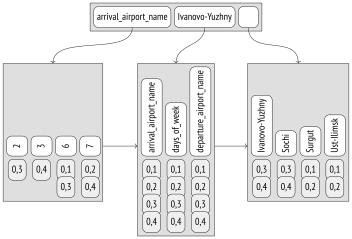
The jsonb_ops operator class is the default one. All the keys, values, and array elements of the original JSON document are converted into index entries.22 It speeds up queries that check for inclusion of JSON values (@>), existence of keys (?, ?|, and ?&), or JSON path matches (@? and @@):
Let’s convert several rows of the routes view into the JSON format:
Let’s consider a query with condition route @> '{"days_of_week": [6]}', which selects JSON documents containing the specified path (that is, the flights performed on Saturdays).
The support function23 extracts the search keys from the JSON value of the search query: “days_of_week” and “6”. These keys are searched in the element tree, and the documents that contain at least one of them are checked by the consistency function.24 For the contains strategy, this function demands that all the search keys are available, but the results still have to be rechecked by the table: from the point of view of an index, the specified path can also correspond to documents like {"days_of_week": [2],"foo": [6]}.
The created index can be illustrated as follows:
jsonb_path_ops Operator Class
The second class called jsonb_path_ops contains fewer operators:
If this class is used, the index will contain paths from the root of the document to all the values and all the array elements rather than isolated JSON fragments.25 It makes the search much more precise and efficient, but there is no speedup for operations with arguments represented by separate keys instead of paths.
As a path can be quite lengthy, it is not paths themselves but their hashes that actually get indexed.
Let’s create an index for the same table using this operator class:
The created index can be represented by the following tree:
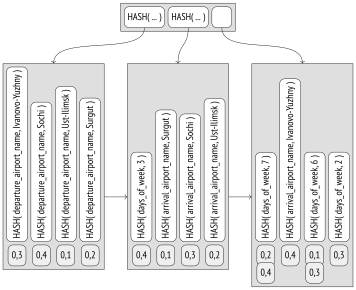
When executing a query with the same condition route @> '{"days_of_week": [6]}', the support function26 extracts the whole path “days_of_week, 6” rather than its separate components. The TIDs of the two matching documents will be found in the element tree right away.
Clearly, these entries will be checked by the consistency function27 and then rechecked by the indexing engine (to rule out hash collisions, for example). But the search through the tree is much more efficient, so it makes sense to always choose the jsonb_path_ops class if the index support provided by its operators is sufficient for queries.
28.6 Indexing Other Data Types
GIN support via extensions is also provided for the following data types:
Arrays of integers. The intarray extension adds the gin__int_ops operator class for integer arrays. It is very similar to the standard array_ops operator class, but it supports the match operator @@, which matches a document against a search query.
Key–value storage. The hstore extension implements a storage for key–value pairs and provides the gin_hstore_ops operator class. Both keys and values get indexed.
JSON query language. An external jsquery extension provides its own query language and GIN index support for JSON.
After the SQL:2016 standard was adopted and the SQL/JSON query language was implemented in PostgreSQL, the standard built-in capabilities seem to be a better choice. (v. 12)
postgresql.org/docs/14/gin.html backend/access/gin/README ↩︎
postgresql.org/docs/14/gin-extensibility.html backend/utils/adt/tsginidx.c ↩︎
backend/utils/adt/tsvector_op.c, ts_match_vq function ↩︎
backend/utils/adt/tsginidx.c, gin_extract_tsquery function ↩︎
backend/access/gin/ginget.c, keyGetItem function ↩︎
backend/utils/adt/tsginidx.c, gin_tsquery_triconsistent function ↩︎
backend/utils/adt/tsginidx.c, gin_cmp_prefix function ↩︎
backend/access/gin/ginget.c, startScanKey function ↩︎
backend/access/gin/gininsert.c, ginEntryInsert function ↩︎
backend/access/gin/gininsert.c, addItemPointersToLeafTuple function ↩︎
backend/access/gin/ginbtree.c, ginInsertValue function ↩︎
backend/access/gin/ginfast.c, ginInsertCleanup function ↩︎
backend/access/gin/gininsert.c, ginbuild function ↩︎
backend/access/gin/ginget.c, dropItem macro ↩︎
backend/access/gin/ginarrayproc.c, ginarrayconsistent function ↩︎
backend/utils/adt/jsonb_gin.c, gin_extract_jsonb function ↩︎
backend/utils/adt/jsonb_gin.c, gin_extract_jsonb_query function ↩︎
backend/utils/adt/jsonb_gin.c, gin_consistent_jsonb function ↩︎
backend/utils/adt/jsonb_gin.c, gin_extract_jsonb_path function ↩︎
backend/utils/adt/jsonb_gin.c, gin_extract_jsonb_query_path function ↩︎
backend/utils/adt/jsonb_gin.c, gin_consistent_jsonb_path function ↩︎