# SP-GiST
LLMS index: [llms.txt](/en/llms.txt)
---
## 27.1 Overview {#internal-section-27-1}
The first letters in the SP-GiST name stand for Space Partitioning. The space here is understood as an arbitrary set of values on which the search is performed; it is not necessarily the space in the conventional sense of the word (such as a two-dimensional plane). The GiST part of the name hints at certain similarity between GiST and SP-GiST methods: both of them are generalized search trees and serve as frameworks for indexing various data types.
The idea behind the SP-GiST method[^internal-472-1] is to split the search space into several non-overlapping regions, which are in turn can be recursively split into sub-regions. Such partitioning produces *non-balanced* trees (which differ from B-trees and GiST trees) and can be used to implement such well-known structures as quadtrees, *k*-D trees, and radix trees (tries).
Non-balanced trees typically have few branches and, consequently, large depth. For example, a quadtree node has four child nodes at the most, while a node of a *k*-D tree can have only two. It does not pose any problems if the tree is kept in memory; but when stored on disk, tree nodes have to be packed into pages as densely as possible to minimize I/O, and this task is not so trivial. B-tree and GiST indexes do not have to take care of it because each of their tree nodes takes the whole page.
An inner node of an SP-GiST tree contains a value that satisfies the condition that holds true for all its child nodes. Such a value is often called a *prefix*; it plays the same role as the *predicate* in GiST indexes. Pointers to SP-GiST child nodes may have *labels*.
Leaf node elements contain an indexed value (or its part) and the corresponding TID.
Just like GiST, SP-GiST implements only the main algorithms, taking care of such low-level details as concurrent access, locks, and logging. New data types and algorithms of space partitioning can be added via the operator class interface. The operator class provides most of the logic and defines many aspects of indexing functionality.
In SP-GiST, the search is depth-first, starting at the root node.[^internal-473-1] The nodes that are worth descending into are chosen by the *consistency function*, similar to the one used in GiST. For an inner node of the tree, this function returns a set of child nodes whose values do not contradict the search predicate. The consistency function does not descend into these nodes: it merely assesses the corresponding labels and prefixes. For leaf nodes, it determines whether the indexed value of this node matches the search predicate.
In a non-balanced tree, search time can vary depending on the branch depth.
There are two support functions that participate in insertion of values into an SP-GiST index. As the tree is being traversed from the root node, the *choose function* takes one of the following decisions: send the new value into an existing child node, create a new child node for this value, or split the current node (if the value does not match this node’s prefix). If the chosen leaf page does not have enough space, the *picksplit function* determines which nodes should be moved to a new page.
Now I will provide some examples to illustrate these algorithms.
## 27.2 Quadtrees for Points {#internal-section-27-2}
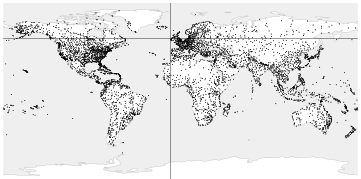
*Quadtrees* are used for indexing points on a two-dimensional plane. The plane is recursively split into four regions (quadrants) with respect to the selected point. This point is called a *centroid*; it serves as the node prefix, that is, the condition that defines the location of child values.
The root node splits the plane into four quadrants.
{#internal-fig-27-1 num="27.1" caption="27.2 Quadtrees for Points" .book-original-figure width=722 height=358}
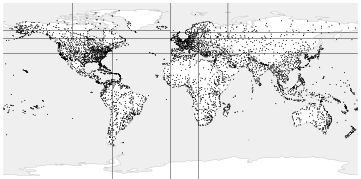
Then each of them is further split into its own quadrants.
{#internal-fig-27-2 num="27.2" caption="27.2 Quadtrees for Points" .book-original-figure width=722 height=358}
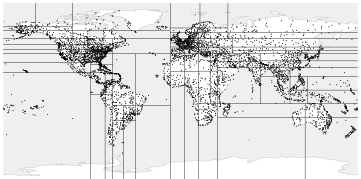
This procedure goes on until the desired number of partitions is reached.
{#internal-fig-27-3 num="27.3" caption="27.2 Quadtrees for Points" .book-original-figure width=722 height=358}
This example uses an index built on an extended airports table. The illustrations show that branch depth depends on point density in the corresponding quadrants. For visual clarity, I set a small value of the *fillfactor* storage parameter, which makes the tree deeper: (*p.* [446](/en/26-gist/#internal-page-446)) (*default:* `80`)
```psql
=> CREATE INDEX airports_quad_idx ON airports_big
USING spgist(coordinates) WITH (fillfactor = 10);
```
The default operator class for points is `quad_point_ops`.
### Operator Class {#internal-section-star-213}
I have already mentioned SP-GiST support functions:[^internal-475-1] the consistency function for search and the `picksplit` function for insertions.
Now let’s take a look at the list of support functions of the `quad_point_ops` operator class.[^internal-475-2] All of them are mandatory.
```psql
=> SELECT amprocnum, amproc::regproc
FROM pg_am am
JOIN pg_opclass opc ON opcmethod = am.oid
JOIN pg_amproc amop ON amprocfamily = opcfamily
WHERE amname = 'spgist'
AND opcname = 'quad_point_ops'
ORDER BY amprocnum;
amprocnum | amproc
-----------+---------------------------
1 | spg_quad_config
2 | spg_quad_choose
3 | spg_quad_picksplit
4 | spg_quad_inner_consistent
5 | spg_quad_leaf_consistent
(5 rows)
```
These functions perform the following tasks:
1. The `config` function reports basic information about the operator class to the access method.
2. The `choose` function select the node for insertions.
3. The `picksplit` function distributes nodes between pages after a page split.
4. The `inner_consistent` function checks whether the value of the *inner* node satisfies the search predicate.
5. The `leaf_consistent` function determines whether the value stored in the *leaf* node satisfies the search predicate.
There are also several optional functions.
[^internal-475-3] The `quad_point_ops` operator class supports the same strategies as GiST: (*p.* [449](/en/26-gist/#internal-page-449))
```psql
=> SELECT amopopr::regoperator, oprcode::regproc, amopstrategy
FROM pg_am am
JOIN pg_opclass opc ON opcmethod = am.oid
JOIN pg_amop amop ON amopfamily = opcfamily
JOIN pg_operator opr ON opr.oid = amopopr
WHERE amname = 'spgist'
AND opcname = 'quad_point_ops'
ORDER BY amopstrategy;
amopopr | oprcode | amopstrategy
------------------+----------------+--------------
<<(point,point) | point_left | 1
>>(point,point) | point_right | 5
~=(point,point) | point_eq | 6
<@(point,box) | on_pb | 8
<<|(point,point) | point_below | 10
|>>(point,point) | point_above | 11
<->(point,point) | point_distance | 15
<^(point,point) | point_below | 29
>^(point,point) | point_above | 30
(9 rows)
```
For example, you can use the *above* operator `>^` to find the airports located to the North of Dikson:
```psql
=> SELECT airport_code, airport_name->>'en'
FROM airports_big
WHERE coordinates >^ '(80.3817,73.5167)'::point;
airport_code | ?column?
--------------+----------------------------
THU | Thule Air Base
YEU | Eureka Airport
YLT | Alert Airport
YRB | Resolute Bay Airport
LYR | Svalbard Airport, Longyear
NAQ | Qaanaaq Airport
YGZ | Grise Fiord Airport
DKS | Dikson Airport
(8 rows)
=> EXPLAIN (costs off) SELECT airport_code
FROM airports_big
WHERE coordinates >^ '(80.3817,73.5167)'::point;
QUERY PLAN
---------------------------------------------------------------
Bitmap Heap Scan on airports_big
Recheck Cond: (coordinates >^ '(80.3817,73.5167)'::point)
-> Bitmap Index Scan on airports_quad_idx
Index Cond: (coordinates >^ '(80.3817,73.5167)'::point)
(4 rows)
```
Let’s take a closer look at the structure and inner workings of a quadtree. We will use the same simple example with several points that we discussed in the chapter related to GiST. (*p.* [451](/en/26-gist/#internal-page-451))
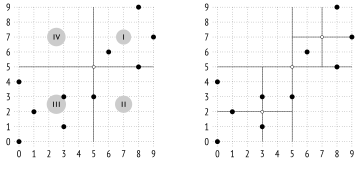
Here is how the plane can be partitioned in this case:
{#internal-fig-27-4 num="27.4" caption="Operator Class" .book-original-figure width=720 height=342}
The left illustration shows quadrant numbering at one of the tree levels; in the illustrations that follow, I will place child nodes from left to right in the same order for the sake of clarity. Points that lie on the boundaries are included into the quadrant with the smaller number. The right illustration shows the final partitioning.
You can see a possible structure of this index below. Each inner node references four child nodes at the most, and each of these pointers is labeled with the quadrant number:
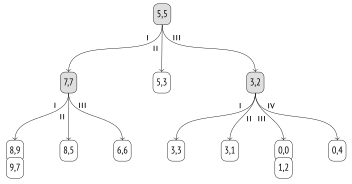
{#internal-fig-27-5 num="27.5" caption="Operator Class" .book-original-figure width=704 height=368}
### Page Layout {#internal-section-star-214}
Unlike B-tree and GiST indexes, SP-GiST has no one-to-one correspondence between tree nodes and pages. Since inner nodes usually do not have too many children, several nodes have to be packed into a single page. Different types of nodes are stored in different pages: inner nodes are stored in *inner pages*, while leaf nodes go to *leaf pages*.
Index entries stored in inner pages hold the value used as a prefix, as well as a set of pointers to child nodes; each pointer may be accompanied by a label.
Leaf page entries consist of a value and a TID.
All leaf nodes related to a particular inner node are stored together in a single page and are bound into a list. If the page cannot accommodate another node, this list can be moved to a different page,[^internal-478-1] or the page can be split; one way or the other, a list never stretches over several pages.
To save space, the algorithm tries to add new nodes into the same pages until these pages are completely filled. The numbers of the last pages used are cached by backends and are periodically saved in the zero page, which is called a *metapage*. The metapage contains no reference to the root node, which we would have seen in a B-tree; the root of an SP-GiST index is always located in the first page.
> [!NOTE]
> Unfortunately, the pageinspect extension does not provide any functions for exploring SP-GiST, but we can use an external extension called gevel.[^internal-478-2] It was attempted to integrate its functionality into pageinspect, but with no success.[^internal-478-3]
Let’s get back to our example. The illustration below shows how tree nodes can be distributed between pages. The `quad_point_ops` operator class does not actually use labels. Since a node can have four child nodes at the most, the index keeps a fixed-size array of four pointers, some of which may be empty.
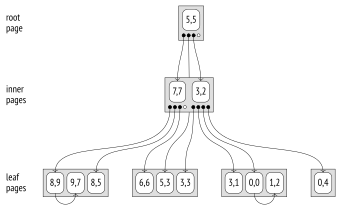
{#internal-fig-27-6 num="27.6" caption="Page Layout" .book-original-figure width=682 height=430}
### Search {#internal-section-star-215}
Let’s use the same example to take a look at the algorithm of searching for points located above point `(3,7)`.
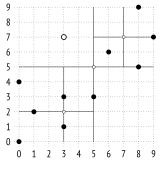
{#internal-fig-27-7 num="27.7" caption="Search" .book-original-figure width=324 height=340}
The search starts at the root. The inner consistency function[^internal-479-1] determines the child nodes to be descended into. Point `(3,7)` is compared with the root node’s centroid `(5,5)` to choose the quadrants that may contain the sought-after points; in this example, these are quadrants I and IV.
Once inside the node with centroid `(7,7)`, we again have to choose the child nodes to descend into. They belong to quadrants I and IV, but since quadrant IV is empty, we only need to check one leaf node. The leaf consistency function[^internal-479-2] compares the points of this node with point `(3,7)` specified in the query. The *above* condition is satisfied only for `(8,9)`.
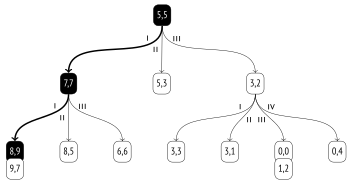
{#internal-fig-27-8 num="27.8" caption="Search" .book-original-figure width=704 height=370}
Now we just have to go back one level and check the node that corresponds to quadrant IV of the root node. It is empty, so the search is complete.
### Insertion {#internal-section-star-216}
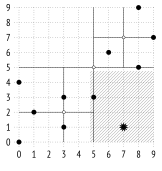
When a value gets inserted into an SP-GiST tree,[^internal-480-1] each action that follows is determined by the choice function.[^internal-480-2] In this particular case, it simply directs the point to one of the existing nodes that corresponds to its quadrant.
For example, let’s add value `(7,1)`:
{#internal-fig-27-9 num="27.9" caption="Insertion" .book-original-figure width=324 height=342}
The value belongs to quadrant II and will be added to the corresponding tree node:
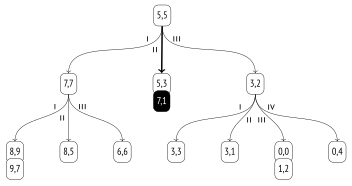
{#internal-fig-27-10 num="27.10" caption="Insertion" .book-original-figure width=704 height=372}
If the list of leaf nodes in the selected quadrant becomes too big after insertion (it must fit a single page), the page is split. The `picksplit` function[^internal-481-1] determines the new centroid by calculating the average value of all points’ coordinates, thus distributing the child nodes between new quadrants more or less uniformly.
The following picture illustrates the page overflow caused by point `(2,1)` insertion:
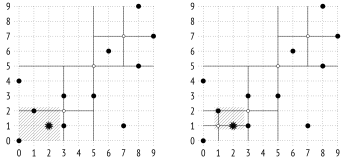
{#internal-fig-27-11 num="27.11" caption="Insertion" .book-original-figure width=692 height=324}
A new inner node with centroid `(1,1)` is added into the tree, while points `(0,0)`, `(1,2)`, and `(2,1)` get redistributed between the new quadrants:
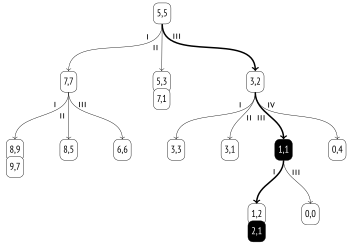
{#internal-fig-27-12 num="27.12" caption="Insertion" .book-original-figure width=704 height=494}
### Properties {#internal-section-star-217}
**Access method properties.** The `spgist` method reports the following properties:
```psql
=> SELECT a.amname, p.name, pg_indexam_has_property(a.oid, p.name)
FROM pg_am a, unnest(array[
'can_order', 'can_unique', 'can_multi_col',
'can_exclude', 'can_include'
]) p(name)
WHERE a.amname = 'spgist';
amname | name | pg_indexam_has_property
--------+---------------+-------------------------
spgist | can_order | f
spgist | can_unique | f
spgist | can_multi_col | f
spgist | can_exclude | t
spgist | can_include | t
(5 rows)
```
No support is provided for sorting and uniqueness properties. Multicolumn indexes are not supported either.
Exclusion constraints are supported, just like in GiST.
An SP-GiST index can be created with additional `INCLUDE` columns. (v. 14)
**Index-level properties.** Unlike GiST, SP-GiST indexes do not support clusterization:
```psql
=> SELECT p.name, pg_index_has_property('airports_quad_idx', p.name)
FROM unnest(array[
'clusterable', 'index_scan', 'bitmap_scan', 'backward_scan'
]) p(name);
name | pg_index_has_property
---------------+-----------------------
clusterable | f
index_scan | t
bitmap_scan | t
backward_scan | f
(4 rows)
```
Both ways of getting TIDs (either one by one or as a bitmap) are supported. Backward scanning is unavailable, as it does not make any sense for SP-GiST.
**Column-level properties.** For the most part, column-level properties are the same:
```psql
=> SELECT p.name,
pg_index_column_has_property('airports_quad_idx', 1, p.name)
FROM unnest(array[
'orderable', 'search_array', 'search_nulls'
]) p(name);
name | pg_index_column_has_property
--------------+------------------------------
orderable | f
search_array | f
search_nulls | t
(3 rows)
```
Sorting is not supported, so all the related properties do not make any sense and are disabled.
I have not said anything about NULL values so far, but as we can see in the index properties, they are supported. Unlike GiST, SP-GiST indexes do not store NULL values in the main tree. Instead, a separate tree is created; its root is located in the second index page. Thus, the first three pages always have the same meaning: the metapage, the root of the main tree, and the root of the tree for NULL values.
Some column-level properties may depend on the particular operator class:
```psql
=> SELECT p.name,
pg_index_column_has_property('airports_quad_idx', 1, p.name)
FROM unnest(array[
'returnable', 'distance_orderable'
]) p(name);
name | pg_index_column_has_property
--------------------+------------------------------
returnable | t
distance_orderable | t
(2 rows)
```
Like in all the other examples in this chapter, this index can be used for index-only scans.
But in general, an operator class does not necessarily store full values in leaf pages, as it can recheck them by the table instead. It allows using SP-GiST indexes in PostGIS for potentially large `geometry` values, to give one example. (v. 11)
Nearest neighbor search is supported; we have seen the ordering operator `<->` in the operator class. (v. 12)
## 27.3 K-Dimensional Trees for Points {#internal-section-27-3}
Points on a plane can also be indexed using another approach to partitioning: we can split the plane into two sub-regions instead of four. Such partitioning is implemented by the `kd_point_ops`[^internal-483-1] operator class:
```psql
=> CREATE INDEX airports_kd_idx ON airports_big
USING spgist(coordinates kd_point_ops);
```
Note that indexed values, prefixes, and labels may have different data types. For this operator class, values are represented as points, prefixes are real numbers, while labels are not provided (as in `quad_point_ops`).
Let’s select some coordinate on the Y-axis (it defines the latitude in the example with airports). This coordinate splits the plane into two sub-regions, the upper and the lower one:
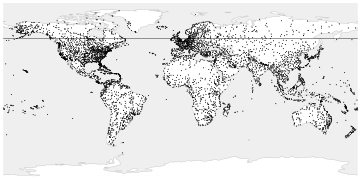
{#internal-fig-27-13 num="27.13" caption="27.3 K-Dimensional Trees for Points" .book-original-figure width=722 height=358}
For each of these sub-regions, select coordinates on the X-axis (longitude) that split them into two sub-regions, left and right:
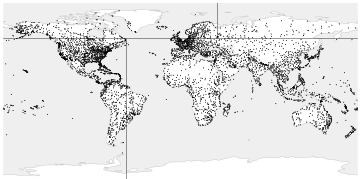
{#internal-fig-27-14 num="27.14" caption="27.3 K-Dimensional Trees for Points" .book-original-figure width=722 height=358}
We will continue splitting each of the resulting sub-regions, taking turns between horizontal and vertical partitioning, until the points in each part fit a single index page:
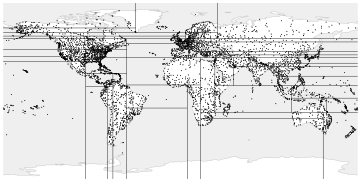
{#internal-fig-27-15 num="27.15" caption="27.3 K-Dimensional Trees for Points" .book-original-figure width=722 height=358}
All inner leaf nodes of the tree built this way will have only two child nodes. The method can be easily generalized for space with arbitrary dimensions, so such trees are often referred to as *k-dimensional* (*k*-D trees).
## 27.4 Radix Trees for Strings {#internal-section-27-4}
The `text_ops` operator class for SP-GiST implements a radix tree for strings.[^internal-485-1] Here the *prefix* of an inner node is really a prefix, which is common to all the strings in the child nodes.
Pointers to child nodes are marked by the first byte of the values that follow the prefix.
> [!NOTE]
> For clarity, I use a single character to denote a prefix, but it is true only for 8-byte encodings. In general, the operator class processes a string as a sequence of bytes. Besides, a prefix can take several other values with special semantics, so there are actually two bytes allocated per prefix.
Child nodes store parts of values that follow the prefix and the label. Leaf nodes keep only suffixes.
To reconstruct the full value of an index key in a leaf page, we can concatenate all prefixes and labels, starting from the root node.
Here is an example of a radix tree built over several names:
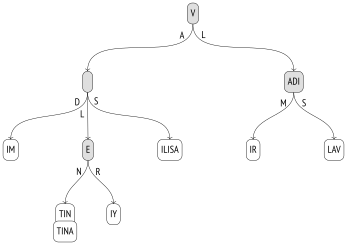
{#internal-fig-27-16 num="27.16" caption="27.4 Radix Trees for Strings" .book-original-figure width=694 height=490}
### Operator Class {#internal-section-star-221}
The `text_ops` operator class supports comparison operators typically used with ordinal data types, including text strings:
```psql
=> SELECT oprname, oprcode::regproc, amopstrategy
FROM pg_am am
JOIN pg_opclass opc ON opcmethod = am.oid
JOIN pg_amop amop ON amopfamily = opcfamily
JOIN pg_operator opr ON opr.oid = amopopr
WHERE amname = 'spgist'
AND opcname = 'text_ops'
ORDER BY amopstrategy;
oprname | oprcode | amopstrategy
---------+-----------------+--------------
~<~ | text_pattern_lt | 1
~<=~ | text_pattern_le | 2
= | texteq | 3
~>=~ | text_pattern_ge | 4
~>~ | text_pattern_gt | 5
< | text_lt | 11
<= | text_le | 12
>= | text_ge | 14
> | text_gt | 15
^@ | starts_with | 28
(10 rows)
```
Regular operators process characters, while operators with tildes deal with bytes. They do not take collation into account (just like the `text_pattern_ops` operator class for B-tree), so they can be used to speed up search by the `LIKE` condition: (*p.* [317](/en/19-index-access-methods/#internal-page-317))
```psql
=> CREATE INDEX tickets_spgist_idx ON tickets
USING spgist(passenger_name);
=> EXPLAIN (costs off) SELECT *
FROM tickets
WHERE passenger_name LIKE 'IVAN%';
QUERY PLAN
-----------------------------------------------------------
Bitmap Heap Scan on tickets
Filter: (passenger_name ~~ 'IVAN%'::text)
-> Bitmap Index Scan on tickets_spgist_idx
Index Cond: ((passenger_name ~>=~ 'IVAN'::text) AND
(passenger_name ~<~ 'IVAO'::text))
(5 rows)
```
> [!NOTE]
> If you use regular operators >= and < together with a collation other than “C,” the index becomes virtually useless, as it deals with bytes rather than characters.
For such cases of *prefix search*, the operator class provides the `^@` operator, which is more suitable: (v. 11)
```psql
=> EXPLAIN (costs off) SELECT *
FROM tickets
WHERE passenger_name ^@ 'IVAN';
QUERY PLAN
----------------------------------------------------
Bitmap Heap Scan on tickets
Recheck Cond: (passenger_name ^@ 'IVAN'::text)
-> Bitmap Index Scan on tickets_spgist_idx
Index Cond: (passenger_name ^@ 'IVAN'::text)
(4 rows)
```
A radix tree representation can sometimes turn out to be much more compact than that of a B-tree, as it does not keep full values: it reconstructs them as required while the tree is being traversed.
### Search {#internal-section-star-222}
Let’s run the following query on the `names` table:
```sql
SELECT * FROM names
WHERE name ~>=~ 'VALERIY'
AND name ~<~ 'VLADISLAV';
```
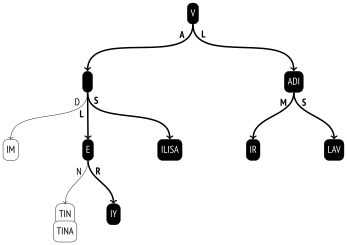
First, the inner consistency function[^internal-488-1] is called on the root to determine the child nodes to descend into. This function concatenates prefix `V` and labels `A` and `L`. The received value `VA` goes into the query condition; string literals are truncated there, so that their length does not exceed the length of the value being checked: `VA ~>=~ 'VA'AND VA ~<~ 'VL'`. The condition is satisfied, so the child node with label `A` needs to be checked. The `VL` value is checked in the same way. It is also a match, so the node with label `L` must be checked too.
Now let’s take the node that corresponds to value `VA`. Its prefix is empty, so for the three child nodes the inner consistency function reconstructs values `VAD`, `VAL`, and `VAS` by concatenating `VA` received at the previous step and the label. The condition `VAD ~>=~ 'VAL' AND VAD ~<~ 'VER'` is not true, but the other two values are suitable.
As the tree is being traversed this way, the algorithm filters out non-matching branches and gets to leaf nodes. The leaf consistency function[^internal-488-2] checks whether the value reconstructed during the tree traversal satisfies the query condition. Matching values are returned as the result of an index scan.
{#internal-fig-27-17 num="27.17" caption="Search" .book-original-figure width=694 height=490}
Note that although the query uses *greater than* and *less than* operators, which are common to B-trees, range search by SP-GiST is much less efficient. In a B-tree, it is enough to descend into a single boundary value of the range and then scan the list of leaf pages.
### Insertion {#internal-section-star-223}
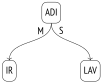
The choice function of operator classes for points can always direct a new value into one of the existing sub-regions (a quadrant or one of the halves). But it is not true for radix trees: a new value may not match any of the existing prefixes, and the inner node has to be split in this case.
{#internal-fig-27-18 num="27.18" caption="Insertion" .book-original-figure width=206 height=168}
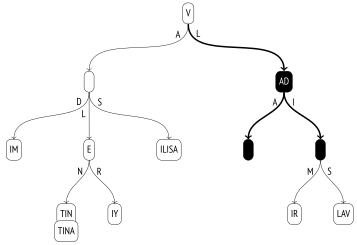
Let’s add the name `VLADA` to an already built tree.
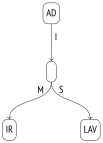
The choice function[^internal-489-1] manages to descend from the root to the next node (`V` + `L`), but the remaining part of the value `ADA` does not match the `ADI` prefix. The node has to be split in two: one of the resulting nodes will contain the common part of the prefix (`AD`), while the rest of the prefix will be moved one level down:
{#internal-fig-27-19 num="27.19" caption="Insertion" .book-original-figure width=206 height=286}
Then the choice function is called again on the same node. The prefix now corresponds to the value, but there is no child node with a suitable label (`A`), so the function decides to create such a node. The final result is shown in the illustration below; the nodes that have been added or modified during the insertion are highlighted.
{#internal-fig-27-20 num="27.20" caption="Insertion" .book-original-figure width=714 height=490}
### Properties {#internal-section-star-225}
I have already described the access method and index-level properties above; they are common to all the classes. Most of the column-level properties also remain the same.
```psql
=> SELECT p.name,
pg_index_column_has_property('tickets_spgist_idx', 1, p.name)
FROM unnest(array[
'returnable', 'distance_orderable'
]) p(name);
name | pg_index_column_has_property
--------------------+------------------------------
returnable | t
distance_orderable | f
(2 rows)
```
Even though indexed values are not explicitly stored in the tree, index-only scans are supported, since values are reconstructed as the tree is being traversed from the root to leaf nodes.
As for the distance operator, it is not defined for strings, so nearest neighbor search is not provided by this operator class.
> [!NOTE]
> It does not mean that the concept of distance cannot be implemented for strings. For example, the pg\_trgm extension adds a distance operator based on trigrams: the fewer common trigrams are found in two strings, the farther they are assumed to be located from each other. Then there is the Levenshtein distance, which is defined as the minimal number of single-character edits required to convert one string into another. A function that calculates such a distance is provided in the fuzzystrmatch extension. But none of the extensions provides an operator class with SP-GiST support.
## 27.5 Other Data Types {#internal-section-27-5}
SP-GiST operator classes are not limited to indexing points and text strings that we have discussed above.
**Geometric types.** The `box_ops`[^internal-490-1] operator class implements a quadtree for rectangles. Rectangles are represented by points in a four-dimensional space, so the area is split into sixteen partitions.
The `poly_ops` class can be used to index polygons. It is a fuzzy operator class: it actually uses bounding boxes instead of polygons, just like `box_ops`, and then rechecks the result by the table. (v. 11)
Whether to choose GiST or SP-GiST largely depends on the nature of data to be indexed. For example, PostGIS documentation recommends SP-GiST for objects with large overlaps (also known as “spaghetti data”).[^internal-491-1]
**Range types.** The quadtree for ranges offers the `range_ops` operator class.[^internal-491-2] An interval is defined by a two-dimensional point: the X-axis represents the lower boundary, while the Y-axis represents the upper boundary.
**Network address types.** For the `inet` data type, the `inet_ops`[^internal-491-3] operator class implements a radix tree.
[^internal-472-1]: [postgresql.org/docs/14/spgist.html]() [backend/access/spgist/README]()
[^internal-473-1]: [backend/access/spgist/spgscan.c](), spgWalk function
[^internal-475-1]: [postgresql.org/docs/14/spgist-extensibility.html]()
[^internal-475-2]: [backend/access/spgist/spgquadtreeproc.c]()
[^internal-475-3]: [include/access/stratnum.h]()
[^internal-478-1]: [backend/access/spgist/spgdoinsert.c](), moveLeafs function
[^internal-478-2]: [sigaev.ru/git/gitweb.cgi?p=gevel.git]()
[^internal-478-3]: [commitfest.postgresql.org/15/1207]()
[^internal-479-1]: [backend/access/spgist/spgquadtreeproc.c](), spg\_quad\_inner\_consistent function
[^internal-479-2]: [backend/access/spgist/spgquadtreeproc.c](), spg\_quad\_leaf\_consistent function
[^internal-480-1]: [backend/access/spgist/spgdoinsert.c](), spgdoinsert function
[^internal-480-2]: [backend/access/spgist/spgquadtreeproc.c](), spg\_quad\_choose function
[^internal-481-1]: [backend/access/spgist/spgquadtreeproc.c](), spg\_quad\_picksplit function
[^internal-483-1]: [backend/access/spgist/spgkdtreeproc.c]()
[^internal-485-1]: [backend/access/spgist/spgtextproc.c]()
[^internal-488-1]: [backend/access/spgist/spgtextproc.c](), spg\_text\_inner\_consistent function
[^internal-488-2]: [backend/access/spgist/spgtextproc.c](), spg\_text\_leaf\_consistent function
[^internal-489-1]: [backend/access/spgist/spgtextproc.c](), spg\_text\_choose function
[^internal-490-1]: [backend/utils/adt/geo\_spgist.c]()
[^internal-491-1]: [postgis.net/docs/using\_postgis\_dbmanagement.html#spgist\_indexes]()
[^internal-491-2]: [backend/utils/adt/rangetypes\_spgist.c]()
[^internal-491-3]: [backend/utils/adt/network\_spgist.c]()