# GiST
LLMS index: [llms.txt](/en/llms.txt)
---
## 26.1 Overview {#internal-section-26-1}
GiST (Generalized Search Tree)[^internal-444-1] is an access method that is virtually a generalization of a balanced search tree for data types that support relative positioning of values. B-tree applicability is limited to ordinal types that allow comparison operations (but the support provided for such types is extremely efficient). As for GiST, its operator class allows defining arbitrary criteria for data distribution in the tree. A GiST index can accommodate an R-tree for spatial data, an RD-tree for sets, and a signature tree for any data types (including texts and images).
Thanks to extensibility, you can create a new access method in PostgreSQL from scratch by implementing the interface of the indexing engine. However, apart from designing the indexing logic, you have to define the page layout, an efficient locking strategy, and WAL support. It all takes strong programming skills and much implementation efforts. GiST simplifies this task, addressing all the low-level technicalities and providing the basis for the search algorithm. To use the GiST method with a new data type, you just need to add a new operator class that includes a dozen support functions. Unlike the trivial operator class provided for B-trees, such a class contains most of the indexing logic. GiST can be regarded as a framework for building new access methods in this respect.
Speaking in the most general terms, each entry that belongs to a leaf node (a leaf entry) contains a *predicate* (a logical condition) and a heap tuple ID. The index key must satisfy the predicate; it does not matter whether the key itself is a part of this entry or not.
Each entry in an inner leaf (an inner entry) also contains a predicate and a reference to a child node; all the indexed data of the child subtree must satisfy this predicate. In other words, the predicate of an inner entry is the union of all the predicates of its child entries. This important property of GiST serves the purpose of simple ranking used by B-trees.
GiST tree search relies on the *consistency function*, which is one of the support functions defined by the operator class.
The consistency function is called on an index entry to determine whether the predicate of this entry is “consistent” with the search condition (“*indexed-column operator expression*”). For an inner entry, it shows whether we have to descend into the corresponding subtree; for a leaf entry, it checks whether its index key satisfies the condition.
The search starts at the root node,[^internal-445-1] which is typical of a tree search. The consistency function determines which child nodes must be traversed and which can be skipped. Then this procedure is repeated for each of the found child nodes; unlike a B-tree, a GiST index may have several such nodes. Leaf node entries selected by the consistency function are returned as results.
The search is always depth-first: the algorithm tries to get to a leaf page as soon as possible. Therefore, it can start returning results right away, which makes a lot of sense if the user needs to get only the first few rows.
To insert a new value into a GiST tree, it is impossible to use the consistency function, since we need to choose exactly one node to descend to.[^internal-445-2] This node must have the minimal insert cost; it is determined by the *penalty function* of the operator class.
Just like in the case of a B-tree, the selected node may turn out to have no free space, which leads to a split.[^internal-445-3] This operation needs two more functions. One of them distributes the entries between the old and new nodes; the other forms the union of the two predicates to update the predicate of the parent node.
As new values are being added, the existing predicates expand, and they are typically narrowed down only if the page is split or the whole index is rebuilt. Thus, frequent updates of a GiST index can lead to its performance degradation.
Since all these theoretical discussions may seem too vague, and the exact logic mostly depends on a particular operator class anyway, I will provide several specific examples.
## 26.2 R-Trees for Points {#internal-section-26-2}
The first example deals with indexing points (or other geometries) on a plane. A regular B-tree cannot be used for this data type, as there are no comparison operators defined for points. Clearly, we could have implemented such operators on our own, but geometries need index support for totally different operations. I will go over just two of them: search for objects contained within a particular area and nearest neighbor search.
An R-tree draws rectangles on a plane; taken together, they must cover all the indexed points. An index entry stores the bounding box, and the predicate can be defined as follows: *the point lies within this bounding box*.
The root of an R-tree contains several large rectangles (that may also overlap). Child nodes hold smaller rectangles that fit their parent nodes; together, they cover all the underlying points.
Leaf nodes should contain the indexed points themselves, but GiST requires that all entries have the same data type; therefore, leaf entries are also represented by rectangles, which are simply reduced to points.
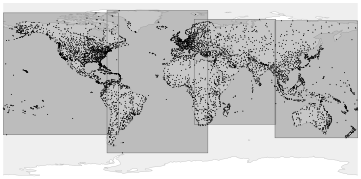
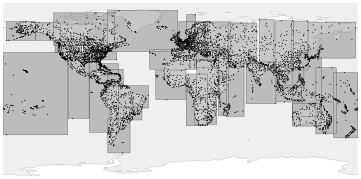
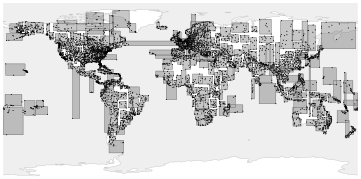
To better visualize this structure, let’s take a look at three levels of an R-tree built over airport coordinates. For this example, I have extended the `airports` table of the demo database up to five thousand rows.[^internal-446-1] I have also reduced the *fillfactor* value to make the tree deeper; the default value would have given us a single-level tree. (*default:* `90`)
```psql
=> CREATE TABLE airports_big AS
SELECT * FROM airports_data;
=> COPY airports_big FROM
'/home/student/internals/airports/extra_airports.copy';
=> CREATE INDEX airports_gist_idx ON airports_big
USING gist(coordinates) WITH (fillfactor=10);
```
At the upper level, all the points are included into several (partially overlapping) bounding boxes:
{#internal-fig-26-1 num="26.1" caption="26.2 R-Trees for Points" .book-original-figure width=722 height=358}
At the next level, big rectangles are split into smaller ones:
{#internal-fig-26-2 num="26.2" caption="26.2 R-Trees for Points" .book-original-figure width=722 height=358}
Finally, at the inner level of the tree each bounding box contains as many points as a single page can accommodate:
{#internal-fig-26-3 num="26.3" caption="26.2 R-Trees for Points" .book-original-figure width=722 height=358}
This index uses the `point_ops` operator class, which is the only one available for points.
Rectangles and any other geometries can be indexed in the same manner, but instead of the object itself the index has to store its bounding box.
### Page Layout {#internal-section-star-200}
You can study GiST pages using the `pageinspect` extension. (v. 14)
Unlike B-tree indexes, GiST has no metapage, and the zero page is always the root of the tree. If the root page gets split, the old root is moved into a separate page, and the new root takes its place.
Here is the contents of the root page:
```psql
=> SELECT ctid, keys
FROM gist_page_items(
get_raw_page('airports_gist_idx', 0), 'airports_gist_idx'
);
ctid | keys
-------------+---------------------------------------------------------
(207,65535) | (coordinates)=((50.84510040283203,78.246101379395))
(400,65535) | (coordinates)=((179.951004028,73.51780700683594))
(206,65535) | (coordinates)=((-1.5908199548721313,40.63980103))
(466,65535) | (coordinates)=((-1.0334999561309814,82.51779937740001))
(4 rows)
```
These four rows correspond to the four rectangles of the upper level shown in the first picture. Unfortunately, the keys are displayed here as points (which makes sense for leaf pages), not as rectangles (which would be more logical for inner pages). But we can always get raw data and interpret it on our own.
> [!NOTE]
> To extract more detailed information, you can use the gevel extension,[^internal-448-1] which is not included into the standard PostgreSQL distribution.
### Operator Class {#internal-section-star-201}
The following query returns the list of support functions that implement the logic of search and insert operations for trees:[^internal-448-2]
```psql
=> SELECT amprocnum, amproc::regproc
FROM pg_am am
JOIN pg_opclass opc ON opcmethod = am.oid
JOIN pg_amproc amop ON amprocfamily = opcfamily
WHERE amname = 'gist'
AND opcname = 'point_ops'
ORDER BY amprocnum;
amprocnum | amproc
-----------+------------------------
1 | gist_point_consistent
2 | gist_box_union
3 | gist_point_compress
5 | gist_box_penalty
6 | gist_box_picksplit
7 | gist_box_same
8 | gist_point_distance
9 | gist_point_fetch
11 | gist_point_sortsupport
(9 rows)
```
I have already listed the mandatory functions above:
1 consistency function used to traverse the tree during search
2 `union` function that merges rectangles
5 `penalty` function used to choose the subtree to descend to when inserting an entry
6 `picksplit` function that distributes entries between new pages after a page split
7 `same` function that checks two keys for equality
The `point_ops` operator class includes the following operators:
```psql
=> SELECT amopopr::regoperator, amopstrategy AS st, oprcode::regproc,
left(obj_description(opr.oid, 'pg_operator'), 19) description
FROM pg_am am
JOIN pg_opclass opc ON opcmethod = am.oid
JOIN pg_amop amop ON amopfamily = opcfamily
JOIN pg_operator opr ON opr.oid = amopopr
WHERE amname = 'gist'
AND opcname = 'point_ops'
ORDER BY amopstrategy;
amopopr | st | oprcode | description
-------------------+----+---------------------+---------------------
<<(point,point) | 1 | point_left | is left of
>>(point,point) | 5 | point_right | is right of
~=(point,point) | 6 | point_eq | same as
<<|(point,point) | 10 | point_below | is below
|>>(point,point) | 11 | point_above | is above
<->(point,point) | 15 | point_distance | distance between
<@(point,box) | 28 | on_pb | point inside box
<^(point,point) | 29 | point_below | deprecated, use <<|
>^(point,point) | 30 | point_above | deprecated, use |>>
<@(point,polygon) | 48 | pt_contained_poly | is contained by
<@(point,circle) | 68 | pt_contained_circle | is contained by
(11 rows)
```
Operator names do not usually tell us much about operator semantics, so this query also displays the names of the underlying functions and their descriptions. One way or another, all the operators deal with relative positioning of geometries (*left of*, *right of*, *above*, *below*, *contains*, *is contained*) and the distance between them.
As compared to B-trees, GiST offers more strategies. Some of the strategy numbers are common to several types of indexes,[^internal-450-1] while others are calculated by formulas (for example, 28, 48, and 68 virtually represent the same strategy: *is contained* for rectangles, polygons, and circles). Besides, GiST supports some obsolete operator names (`<<|` and `|>>`).
Operator classes may implement only some of the available strategies. For example, the *contains* strategy is not supported by the operator class for points, but it is available in classes defined for geometries with measurable area (`box_ops`, `poly_ops`, and `circle_ops`).
### Search for Contained Elements {#internal-section-star-202}
A typical query that can be sped up by an index returns all points of the specified area.
For example, let’s find all the airports located within one degree from the centre of Moscow:
```psql
=> SELECT airport_code, airport_name->>'en'
FROM airports_big
WHERE coordinates <@ '<(37.622513,55.753220),1.0>'::circle;
airport_code | ?column?
--------------+------------------------------------
SVO | Sheremetyevo International Airport
VKO | Vnukovo International Airport
DME | Domodedovo International Airport
BKA | Bykovo Airport
ZIA | Zhukovsky International Airport
CKL | Chkalovskiy Air Base
OSF | Ostafyevo International Airport
(7 rows)
=> EXPLAIN (costs off) SELECT airport_code
FROM airports_big
WHERE coordinates <@ '<(37.622513,55.753220),1.0>'::circle;
QUERY PLAN
---------------------------------------------------------------------
Bitmap Heap Scan on airports_big
Recheck Cond: (coordinates <@ '<(37.622513,55.75322),1>'::circle)
-> Bitmap Index Scan on airports_gist_idx
Index Cond: (coordinates <@ '<(37.622513,55.75322),1>'::ci...
(4 rows)
```
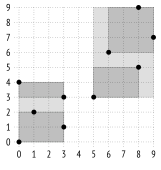
We can take a closer look at this operator using a trivial example shown in the figure below:
{#internal-fig-26-4 num="26.4" caption="Search for Contained Elements" .book-original-figure width=322 height=340}
If bounding boxes are selected this way, the index structure will be as follows:
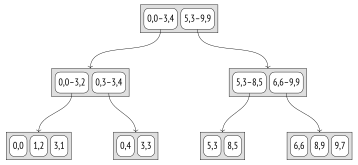
{#internal-fig-26-5 num="26.5" caption="Search for Contained Elements" .book-original-figure width=716 height=330}
The *contains* operator `<@` determines whether a particular point is located within the specified rectangle. The consistency function for this operator[^internal-451-1] returns “yes” if the rectangle of the index entry has any common points with this rectangle. It means that for leaf node entries, which store rectangles reduced to points, this function determines whether the point is contained within the specified rectangle.
For example, let’s find the inner points of rectangle `(1,2)–(4,7)`, which is hatched in the figure below:
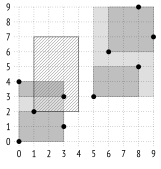
{#internal-fig-26-6 num="26.6" caption="Search for Contained Elements" .book-original-figure width=322 height=338}
The search starts at the root node. The bounding box overlaps with `(0,0)–(3,4)`, but does not overlap with `(5,3)–(9,9)`. It means that we do not have to descend into the second subtree.
At the next level, the bounding box overlaps with `(0,3)–(3,4)` and touches `(0,0)–(3,2)`, so we have to check both subtrees.
Once we get to leaf nodes, we just have to go through all the points that they contain and return those that satisfy the consistency function.
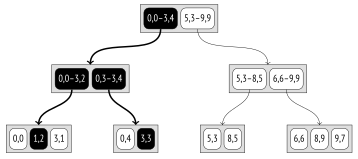
{#internal-fig-26-7 num="26.7" caption="Search for Contained Elements" .book-original-figure width=716 height=318}
A B-tree search always selects exactly one child node. A GiST search, however, may have to scan several subtrees, especially if their bounding boxes overlap.
### Nearest Neighbor Search {#internal-section-star-203}
Most of the operators supported by indexes (such as `=` or `<@` shown in the previous example) are typically called *search* operators, as they define search conditions in queries.
Such operators are predicates, that is, they return a logical value.
But there is also a group of *ordering* operators, which return the distance between arguments. Such operators are used in the `ORDER BY` clause and are typically supported by indexes that have the `DISTANCE ORDERABLE` property, which enables you to quickly find the specified number of nearest neighbors. This type of search is known as *k*-NN, or *k*-nearest neighbor search. (*p.* [327](/en/19-index-access-methods/#internal-page-327))
For example, we can find 10 airports closest to Kostroma:
```psql
=> SELECT airport_code, airport_name->>'en'
FROM airports_big
ORDER BY coordinates <-> '(40.926780,57.767943)'::point
LIMIT 10;
airport_code | ?column?
--------------+------------------------------------------------
KMW | Kostroma Sokerkino Airport
IAR | Tunoshna Airport
IWA | Ivanovo South Airport
VGD | Vologda Airport
RYB | Staroselye Airport
GOJ | Nizhny Novgorod Strigino International Airport
CEE | Cherepovets Airport
CKL | Chkalovskiy Air Base
ZIA | Zhukovsky International Airport
BKA | Bykovo Airport
(10 rows)
```
```psql
=> EXPLAIN (costs off) SELECT airport_code
FROM airports_big
ORDER BY coordinates <-> '(40.926780,57.767943)'::point
LIMIT 5;
QUERY PLAN
-----------------------------------------------------------------
Limit
-> Index Scan using airports_gist_idx on airports_big
Order By: (coordinates <-> '(40.92678,57.767943)'::point)
(3 rows)
```
Since an index scan returns the results one by one and can be stopped any time, several first values can be found very quickly.
> [!NOTE]
> It would be very hard to achieve efficient search without index support. We would have to find all the points that appear in a particular area and then gradually expand this area until the requested number of results is returned. It would require several index scans, not to mention the problem of choosing the size of the original area and its increments.
You can see the operator type in the system catalog (“s” stands for search, “o” denotes ordering operators):
```psql
=> SELECT amopopr::regoperator, amoppurpose, amopstrategy
FROM pg_am am
JOIN pg_opclass opc ON opcmethod = am.oid
JOIN pg_amop amop ON amopfamily = opcfamily
WHERE amname = 'gist'
AND opcname = 'point_ops'
ORDER BY amopstrategy;
amopopr | amoppurpose | amopstrategy
-------------------+-------------+--------------
<<(point,point) | s | 1
>>(point,point) | s | 5
~=(point,point) | s | 6
<<|(point,point) | s | 10
|>>(point,point) | s | 11
<->(point,point) | o | 15
<@(point,box) | s | 28
<^(point,point) | s | 29
>^(point,point) | s | 30
<@(point,polygon) | s | 48
<@(point,circle) | s | 68
(11 rows)
```
To support such queries, an operator class must define an additional support function: it is the *distance function*, which is called on the index entry to calculate the distance from the value stored in this entry to some other value.
For a leaf element representing an indexed value, this function must return the distance to this value. In the case of points,[^internal-454-1] it is a regular Euclidean distance, which equals \(\sqrt{(x_2-x_1)^2+(y_2-y_1)^2}\).
For an inner element, the function must return the *minimal* of all the possible distances from its child leaf elements. Since it is quite costly to scan all the child entries, the function can optimistically underestimate the distance (sacrificing efficiency), but it must never return a bigger value—it would compromise search correctness.
Therefore, for an inner element represented by a bounding box, the distance to the point is understood in the regular mathematical sense: it is either the minimal distance between the point and the rectangle or zero if the point is inside the rectangle.[^internal-454-2] This value can be easily calculated without traversing all the child points of the rectangle, and it is guaranteed to be not greater than the distance to any of these points.
Let’s consider the algorithm of searching for three nearest neighbors of point `(6,8)`:
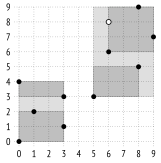
{#internal-fig-26-8 num="26.8" caption="Nearest Neighbor Search" .book-original-figure width=322 height=326}
The search starts at the root node, which holds two bounding boxes. The distance from the specified point to rectangle `(0,0)–(3,4)` is taken as the distance to the rectangle’s corner `(3,4)`, which equals 5.0. The distance to `(5,3)–(9,9)` is 0.0. (I am going to round all the values here to the first decimal place; such accuracy will be enough for this example.)
Child nodes get traversed in the order of distance increase. Thus, we first descend into the right child node, which contains two rectangles: `(5,3)–(8,5)` and `(6,6)–(9,9)`. The distance to the first one is 3.0; the distance to the second one is 0.0.
Once again, we choose the right subtree and get into the leaf node containing three points: `(6,6)` at the distance of 2.0, `(8,9)` at the distance of 2.2, and `(9,7)` at the distance of 3.2.
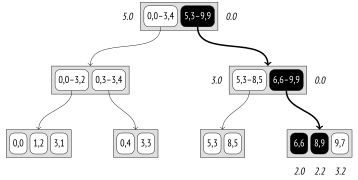
{#internal-fig-26-9 num="26.9" caption="Nearest Neighbor Search" .book-original-figure width=716 height=360}
Thus, we have received the first two points: `(6,6)` and `(8,9)`. But the distance to the third point of this node is greater than the distance to rectangle `(5,3)–(8,5)`.
So now we have to descend into the left child node, which contains two points. The distance to point `(8,5)` is 3.6, while the distance to `(5,3)` is 5.1. It turns out that point `(9,7)` in the previous child node is closer to point `(6,8)` than any of the nodes of the left subtree, so we can return it as the third result.
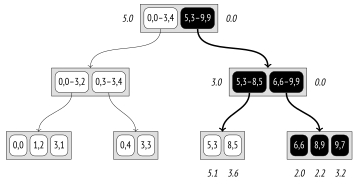
{#internal-fig-26-10 num="26.10" caption="Nearest Neighbor Search" .book-original-figure width=716 height=372}
This example illustrates the requirements that must be satisfied by the distance function for inner entries. Because of the reduced distance (3.0 instead of 3.6) to rectangle `(5,3)–(8,5)`, an extra node had to be scanned, so search efficiency has declined; however, the algorithm itself remained correct.
### Insertion {#internal-section-star-204}
When a new key is getting inserted into an R-tree, the node to be used for this key is determined by the penalty function: the size of the bounding box must be increased as little as possible.[^internal-456-1]
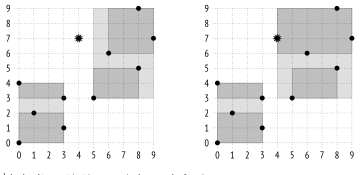
{#internal-fig-26-11 num="26.11" caption="Insertion" .book-original-figure width=720 height=350}
For example, point `(4,7)` will be added to rectangle `(5,3)–(9,9)` because its area will increase by only 6 units, while rectangle `(0,0)–(3,4)` would have to be increased by 12 units. At the next (leaf) level, the point will be added to rectangle `(6,6)–(9,9)`, following the same logic.
Assuming that a page holds three elements at the most, it has to be split in two, and the elements have to be distributed between the new pages. In this example, the result seems obvious, but in the general case the data distribution task is not so trivial. First and foremost, the `picksplit` function attempts to minimize overlaps between bounding boxes, aiming at getting smaller rectangles and uniform distribution of points between pages.[^internal-457-1]
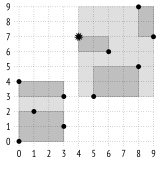
{#internal-fig-26-12 num="26.12" caption="Insertion" .book-original-figure width=324 height=340}
### Exclusion Constraints {#internal-section-star-205}
GiST indexes can also be used in exclusion constraints.
An exclusion constraint guarantees that the specified fields of any two heap tuples do not match each other in the sense of some *operator*. The following conditions must be satisfied:
- The exclusion constraint must be supported by the indexing method (the `CAN EXCLUDE` property).
- The operator must belong to the operator class of this indexing method.
- The operator must be commutative: the condition “*a operator b* = *b operator a*” must hold true.
For the `hash` and `btree` access methods considered above, the only suitable operator is *equal* *to*. It virtually turns an exclusion constraint into a unique one, which is not particularly useful. (*p.* [419](/en/24-hash/#internal-page-419))
The `gist` method has two more applicable strategies:
- overlapping: the `&&` operator
- adjacency: the `-|-` operator (defined for intervals)
To try it out, let’s create a constraint that forbids placing airports too close to each other. This condition can be formulated as follows: circles of a particular radius with centers lying at the airports’ coordinates must not overlap:
```psql
=> ALTER TABLE airports_data ADD EXCLUDE
USING gist (circle(coordinates,0.2) WITH &&);
=> INSERT INTO airports_data(
airport_code, airport_name, city, coordinates, timezone
) VALUES (
'ZIA', '{}', '{"en": "Moscow"}', point(38.1517, 55.5533),
'Europe/Moscow'
);
ERROR: conflicting key value violates exclusion constraint
"airports_data_circle_excl"
DETAIL: Key (circle(coordinates, 0.2::double
precision))=(<(38.1517,55.5533),0.2>) conflicts with existing key
(circle(coordinates, 0.2::double
precision))=(<(37.90629959106445,55.40879821777344),0.2>).
```
When an exclusion constraint is defined, an index to enforce it is added automatically. Here it is a GiST index built over an expression.
Let’s take a look at a more complex example. Suppose we need to allow close proximity of airports, but only if they belong to the same city. A possible solution is to define a new integrity constraint that can be formulated as follows: it is forbidden to have pairs of rows with *intersections* (`&&`) of circles if their centers lie at the airports’ coordinates and the corresponding cities have *different* names (`!=`).
An attempt to create such a constraint results in an error because there is no operator class for the text data type:
```psql
=> ALTER TABLE airports_data
DROP CONSTRAINT airports_data_circle_excl; -- delete old data
=> ALTER TABLE airports_data ADD EXCLUDE USING gist (
circle(coordinates,0.2) WITH &&,
(city->>'en') WITH !=
);
ERROR: data type text has no default operator class for access
method "gist"
HINT: You must specify an operator class for the index or define a
default operator class for the data type.
```
However, GiST does provide strategies like *strictly left of*, *strictly right of*, and *same*, which can also be applied to regular ordinal data types, such as numbers or text strings. The `btree_gist` extension is specifically intended to implement GiST support for operations that are typically used with B-trees:
```psql
=> CREATE EXTENSION btree_gist;
=> ALTER TABLE airports_data ADD EXCLUDE USING gist (
circle(coordinates,0.2) WITH &&,
(city->>'en') WITH !=
);
ALTER TABLE
```
The constraint is created. Now we cannot add Zhukovsky airport belonging to a town with the same name because Moscow airports are too close:
```psql
=> INSERT INTO airports_data(
airport_code, airport_name, city, coordinates, timezone
) VALUES (
'ZIA', '{}', '{"en": "Zhukovsky"}', point(38.1517, 55.5533),
'Europe/Moscow'
);
ERROR: conflicting key value violates exclusion constraint
"airports_data_circle_expr_excl"
DETAIL: Key (circle(coordinates, 0.2::double precision), (city ->>
'en'::text))=(<(38.1517,55.5533),0.2>, Zhukovsky) conflicts with
existing key (circle(coordinates, 0.2::double precision), (city ->>
'en'::text))=(<(37.90629959106445,55.40879821777344),0.2>, Moscow).
```
But we can do it if we specify Moscow as this airport’s city:
```psql
=> INSERT INTO airports_data(
airport_code, airport_name, city, coordinates, timezone
) VALUES (
'ZIA', '{}', '{"en": "Moscow"}', point(38.1517, 55.5533),
'Europe/Moscow'
);
INSERT 0 1
```
It is important to remember that even though GiST supports *greater than*, *less than*, and *equal to* operations, B-trees are much more efficient in this respect, especially when accessing a range of values. So it makes sense to use the trick with the `btree_gist` extension shown above only if the GiST index is really needed for other legitimate reasons.
### Properties {#internal-section-star-206}
**Access method properties.** Here are the properties of the `gist` method:
```psql
=> SELECT a.amname, p.name, pg_indexam_has_property(a.oid, p.name)
FROM pg_am a, unnest(array[
'can_order', 'can_unique', 'can_multi_col',
'can_exclude', 'can_include'
]) p(name)
WHERE a.amname = 'gist';
amname | name | pg_indexam_has_property
--------+---------------+-------------------------
gist | can_order | f
gist | can_unique | f
gist | can_multi_col | t
gist | can_exclude | t
gist | can_include | t
(5 rows)
```
Unique constraints and sorting are not supported.
A GiST index can be created with additional `INCLUDE` columns. (v. 12)
As we know, we can build an index over several columns, as well as use it in integrity constraints.
**Index-level properties.** These properties are defined at the index level:
```psql
=> SELECT p.name, pg_index_has_property('airports_gist_idx', p.name)
FROM unnest(array[
'clusterable', 'index_scan', 'bitmap_scan', 'backward_scan'
]) p(name);
name | pg_index_has_property
---------------+-----------------------
clusterable | t
index_scan | t
bitmap_scan | t
backward_scan | f
(4 rows)
```
A GiST index can be used for clusterization.
As for data retrieval methods, both regular (row-by-row) index scans and bitmap scans are supported. However, backward scanning of GiST indexes is not allowed.
**Column-level properties.** Most of the column properties are defined at the access method level, and they remain the same:
```psql
=> SELECT p.name,
pg_index_column_has_property('airports_gist_idx', 1, p.name)
FROM unnest(array[
'orderable', 'search_array', 'search_nulls'
]) p(name);
name | pg_index_column_has_property
--------------+------------------------------
orderable | f
search_array | f
search_nulls | t
(3 rows)
```
All sort-related properties are disabled.
NULL values are allowed, but GiST is not really efficient at handling them. It is assumed that a NULL value does not increase the bounding box; such values get inserted into random subtrees, so they have to be searched for in the whole tree.
However, a couple of column-level properties do depend on the particular operator class:
```psql
=> SELECT p.name,
pg_index_column_has_property('airports_gist_idx', 1, p.name)
FROM unnest(array[
'returnable', 'distance_orderable'
]) p(name);
name | pg_index_column_has_property
--------------------+------------------------------
returnable | t
distance_orderable | t
(2 rows)
```
Index-only scans are allowed, since leaf nodes keep full index keys.
As we have seen above, this operator class provides the distance operator for nearest neighbor search. The distance to a NULL value is considered to be NULL; such values are returned last (similar to the `NULLS LAST` clause in B-trees).
However, there is no distance operator for range types (which represent segments, that is, linear geometries rather than areal ones), so this property is different for an index built for such types:
```psql
=> CREATE TABLE reservations(during tsrange);
=> CREATE INDEX ON reservations USING gist(during);
=> SELECT p.name,
pg_index_column_has_property('reservations_during_idx', 1, p.name)
FROM unnest(array[
'returnable', 'distance_orderable'
]) p(name);
name | pg_index_column_has_property
--------------------+------------------------------
returnable | t
distance_orderable | f
(2 rows)
```
## 26.3 RD-Trees for Full-Text Search {#internal-section-26-3}
### About Full-Text Search {#internal-section-star-210}
The objective of full-text search[^internal-462-1] is to select those *documents* from the provided set that match the *search query*.
To be searched, the document is cast to the `tsvector` type, which contains *lexemes* and their positions in the document. Lexemes are words converted into a format that is suitable for search. By default, all words are normalized to lowercase, and their endings are cut off:
```psql
=> SET default_text_search_config = english;
=> SELECT to_tsvector(
'No one can tell me, nobody knows, ' ||
'Where the wind comes from, where the wind goes.'
);
to_tsvector
----------------------------------------------------------------------
'come':11 'goe':16 'know':7 'nobodi':6 'one':2 'tell':4 'wind':10,15
(1 row)
```
The so-called stop words (like “the” or “from”) are filtered out: they are assumed to occur too often for the search to return any meaningful results for them. Naturally, all these transformations are configurable.
A search query is represented by another type: `tsquery`. Any query includes one or more lexemes bound by logical connectives: `&` (AND), `|` (OR), `!` (NOT). You can also use parentheses to define operator precedence.
```psql
=> SELECT to_tsquery('wind & (comes | goes)');
to_tsquery
-----------------------------
'wind' & ( 'come' | 'goe' )
(1 row)
```
The only operator used for full-text search is the *match operator* `@@`:
```psql
=> SELECT amopopr::regoperator, oprcode::regproc, amopstrategy
FROM pg_am am
JOIN pg_opclass opc ON opcmethod = am.oid
JOIN pg_amop amop ON amopfamily = opcfamily
JOIN pg_operator opr ON opr.oid = amopopr
WHERE amname = 'gist'
AND opcname = 'tsvector_ops'
ORDER BY amopstrategy;
amopopr | oprcode | amopstrategy
----------------------+-------------+--------------
@@(tsvector,tsquery) | ts_match_vq | 1
(1 row)
```
This operator determines whether the document satisfies the query. Here is an example:
```psql
=> SELECT to_tsvector('Where the wind comes from, where the wind goes')
@@ to_tsquery('wind & coming');
?column?
----------
t
(1 row)
```
It is by no means an exhaustive description of full-text search, but this information should be sufficient for understanding indexing fundamentals. (*p.* [493](/en/28-gin/#internal-page-493))
### Indexing tsvector Data {#internal-section-star-211}
To work fast, full-text search has to be supported by an index.[^internal-463-1] Since it is not documents themselves but `tsvector` values that get indexed, you have two options here: either build an index on an expression and perform a type cast, or add a separate column of the `tsvector` type and index this column. The benefit of the first approach is that it does not waste any space on storing `tsvector` values, which are actually not needed as such. But it is slower than the second option, as the indexing engine has to recheck all the heap tuples returned by the access method. It means that the `tsvector` value has to be calculated again for each rechecked row, and as we soon will see, GiST rechecks all rows. (*p.* [493](/en/28-gin/#internal-page-493))
Let’s construct a simple example. We are going to create a two-column table: the first column will store the document, while the second one will hold the `tsvector` value. We can use a trigger to update the second column,[^internal-463-2] but it is more convenient to simply declare [^internal-463-3] this column as generated: (v. 12)
```psql
=> CREATE TABLE ts(
doc text,
doc_tsv tsvector GENERATED ALWAYS AS (
to_tsvector('pg_catalog.english', doc)
) STORED
);
=> CREATE INDEX ts_gist_idx ON ts
USING gist(doc_tsv);
```
> [!NOTE]
> In the examples above, I used the to\_tsvector function with a single argument, having set the *default\_text\_search\_config* parameter to define the full-text search *configuration*. The volatility category of this function flavor is STABLE, since it is implicitly dependent on the parameter value. But here I apply another flavor that defines the configuration explicitly; this flavor is IMMUTABLE and can be used in generation expressions.
Let’s insert several rows: (*default:* `english`)
```psql
=> INSERT INTO ts(doc) VALUES
('Old MacDonald had a farm'), ('And on his farm he had some cows'),
('Here a moo, there a moo'), ('Everywhere a moo moo'),
('Old MacDonald had a farm'), ('And on his farm he had some chicks'),
('Here a cluck, there a cluck'), ('Everywhere a cluck cluck'),
('Old MacDonald had a farm'), ('And on his farm he had some pigs'),
('Here an oink, there an oink'), ('Everywhere an oink oink')
RETURNING doc_tsv;
doc_tsv
--------------------------------
'farm':5 'macdonald':2 'old':1
'cow':8 'farm':4
'moo':3,6
'everywher':1 'moo':3,4
'farm':5 'macdonald':2 'old':1
'chick':8 'farm':4
'cluck':3,6
'cluck':3,4 'everywher':1
'farm':5 'macdonald':2 'old':1
'farm':4 'pig':8
'oink':3,6
'everywher':1 'oink':3,4
(12 rows)
INSERT 0 12
```
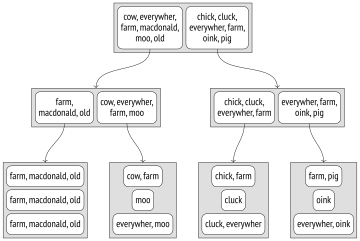
As such, an R-tree is of no good for indexing documents, since the concept of bounding boxes makes no sense for them. Therefore, its RD-tree (Russian Doll) modification is used. Instead of a bounding box, such a tree uses a *bounding set*, that is, a set that contains all the elements of its child sets. For full-text search, such a set contains lexemes of the document, but in the general case a bounding set can be arbitrary.
There are several ways to represent bounding sets in index entries. The simplest one is to enumerate all the elements of the set.
Here is how it might look like:
{#internal-fig-26-13 num="26.13" caption="Indexing tsvector Data" .book-original-figure width=720 height=483}
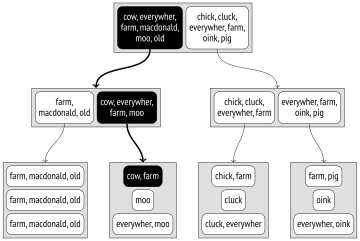
To find the documents that satisfy the `DOC_TSV @@ TO_TSQUERY(’COW’)` condition, we need to descend into the nodes whose child entries are known to contain the “cow” lexeme.
{#internal-fig-26-14 num="26.14" caption="Indexing tsvector Data" .book-original-figure width=720 height=483}
The problems of such representation are obvious. The number of lexemes in a document can be enormous, while the page size is limited. Even if each particular document does not have too many distinct lexemes when taken separately, their united sets at upper levels of the tree may still turn out too big.
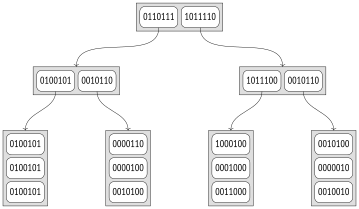
Full-text search uses another solution, namely a more compact *signature tree*. It should be well familiar to anyone who had to deal with the Bloom filter. (*p.* [536](/en/29-brin/#internal-page-536))
Each lexeme can be represented by its *signature*: a bit string of a particular length in which only one of the bits is set to 1. The bit that should be set is determined by the hash function of the lexeme.
A document’s signature is the result of a bitwise `OR` operation on signatures of all the lexemes in this document.
Suppose we have assigned the following signatures to our lexemes:
| Lexeme | Signature |
| --- | --- |
| chick | `1000000` |
| cluck | `0001000` |
| cow | `0000010` |
| everywher | `0010000` |
| **farm** | `0000100` |
| **macdonald** | `0100000` |
| moo | `0000100` |
| oink | `0000010` |
| **old** | `0000001` |
| pig | `0010000` |
{#internal-table-26-1 num="26.1" caption="Lexeme signatures"}
Then the documents’ signatures will be as follows:
| Document | Signature |
| --- | --- |
| **Old MacDonald** had a **farm** | `0100101` |
| And on his farm he had some cows | `0000110` |
| Here a moo, there a moo | `0000100` |
| Everywhere a moo moo | `0010100` |
| And on his farm he had some chicks | `1000100` |
| Here a cluck, there a cluck | `0001000` |
| Everywhere a cluck cluck | `0011000` |
| And on his farm he had some pigs | `0010100` |
| Here an oink, there an oink | `0000010` |
| Everywhere an oink oink | `0010010` |
{#internal-table-26-2 num="26.2" caption="Document signatures"}
The advantages of this approach are obvious: index entries have the same size, which is quite small, so the index turns out quite compact. But there are certain disadvantages too. To begin with, it is impossible to perform an index-only scan because the index does not store index keys anymore, and each returned TID has to be rechecked by the table. The accuracy also suffers: the index may return many false positives, which have to be filtered out during a recheck.
{#internal-fig-26-15 num="26.15" caption="Indexing tsvector Data" .book-original-figure width=718 height=418}
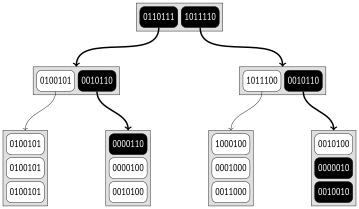
Let’s take another look at the `DOC_TSV @@ TO_TSQUERY(’COWS’)` condition. The signature of a query is calculated in the same way as that of a document; in this particular case it equals `0000010`. The consistency function[^internal-467-1] must find all the child nodes that have the same bits set in their signatures:
{#internal-fig-26-16 num="26.16" caption="Indexing tsvector Data" .book-original-figure width=718 height=418}
As compared with the previous example, more nodes have to be scanned here because of false-positive hits. Since the signature’s capacity is limited, some of the lexemes in a large set are bound to have the same signatures. In this example, such lexemes are “cow” and “oink.” It means that a signature can match different documents; here the signature of the query corresponds to three of them.
False positives reduce index efficiency but do not affect its correctness in any way: since false negatives are guaranteed to be ruled out, the required value cannot be missed.
Clearly, the signature size is actually bigger. By default, it takes 124 bytes (992 bits), so the probability of collisions is much lower than in this example. If required, you can further increase the signature size up to about 2000 bytes using the *operator class parameter*: (v. 13)
```sql
CREATE INDEX ... USING gist(column tsvector_ops(siglen = 1024));
```
Besides, if values are small enough (a bit smaller than \(\frac{1}{16}\) of the page, which takes about 500 bytes for a standard page),[^internal-468-1] it is `tsvector` values themselves rather than their signatures that the `tsvector_ops` operator class keeps in leaf pages of an index.
To see how indexing works on real data, we can take the pgsql-hackers mailing list archive.[^internal-468-2] It contains 356,125 emails together with their send dates, subjects, author names, and body texts.
Let’s add a column of the `tsvector` type and build an index. Here I combine three values (subject, author, and body text) into a single vector to show that documents can be generated dynamically and do not have to be stored in a single column.
```psql
=> ALTER TABLE mail_messages ADD COLUMN tsv tsvector
GENERATED ALWAYS AS ( to_tsvector(
'pg_catalog.english', subject||' '||author||' '||body_plain
) ) STORED;
NOTICE: word is too long to be indexed
DETAIL: Words longer than 2047 characters are ignored.
...
NOTICE: word is too long to be indexed
DETAIL: Words longer than 2047 characters are ignored.
ALTER TABLE
```
```psql
=> CREATE INDEX mail_gist_idx ON mail_messages USING gist(tsv);
=> SELECT pg_size_pretty(pg_relation_size('mail_gist_idx'));
pg_size_pretty
----------------
127 MB
(1 row)
```
As the column was being filled, a certain number of largest words were filtered out because of their size. But once the index is ready, it can be used in search queries:
```psql
=> EXPLAIN (analyze, costs off, timing off, summary off)
SELECT *
FROM mail_messages
WHERE tsv @@ to_tsquery('magic & value');
QUERY PLAN
----------------------------------------------------------
Index Scan using mail_gist_idx on mail_messages
(actual rows=898 loops=1)
Index Cond: (tsv @@ to_tsquery('magic & value'::text))
Rows Removed by Index Recheck: 7859
(4 rows)
```
Together with 898 rows that satisfy the condition, the access method also returned 7859 rows to be later filtered out by a recheck. If we increase the signature capacity, the accuracy (and, consequently, the index efficiency) will be improved, but the index size will grow:
```psql
=> DROP INDEX mail_messages_tsv_idx;
=> CREATE INDEX ON mail_messages
USING gist(tsv tsvector_ops(siglen=248));
=> SELECT pg_size_pretty(pg_relation_size('mail_messages_tsv_idx'));
pg_size_pretty
----------------
139 MB
(1 row)
=> EXPLAIN (analyze, costs off, timing off, summary off)
SELECT *
FROM mail_messages
WHERE tsv @@ to_tsquery('magic & value');
QUERY PLAN
----------------------------------------------------------
Index Scan using mail_messages_tsv_idx on mail_messages
(actual rows=898 loops=1)
Index Cond: (tsv @@ to_tsquery('magic & value'::text))
Rows Removed by Index Recheck: 2060
(4 rows)
```
### Properties {#internal-section-star-212}
I have already shown the access method properties, and most of them are the same for all operator classes. But the following two column-level properties are worth mentioning: (*p.* [459](/en/26-gist/#internal-page-459))
```psql
=> SELECT p.name,
pg_index_column_has_property('mail_messages_tsv_idx', 1, p.name)
FROM unnest(array[
'returnable', 'distance_orderable'
]) p(name);
name | pg_index_column_has_property
--------------------+------------------------------
returnable | f
distance_orderable | f
(2 rows)
```
Index-only scans are now impossible, as the original value cannot be restored from its signature. It is perfectly fine in this particular case: the `tsvector` value is only used for search, while we need to retrieve the document itself.
The ordering operator for the `tsvector_ops` class is not defined either.
## 26.4 Other Data Types {#internal-section-26-4}
I have considered only two most prominent examples. They show that even though the GiST method is based on a balanced tree, it can be used for various data types thanks to different support function implementations in different operator classes. When we speak about a GiST index, we must always specify the operator class, since it is crucial for index properties.
Here are several more data types currently supported by the GiST access method.
**Geometric data types.** Apart from points, GiST can index other geometric objects: rectangles, circles, polygons. All these objects are represented by their bounding boxes for this purpose.
The `cube` extension adds the same-name data type that represents multidimensional cubes. They are indexed using R-trees with bounding boxes of the corresponding dimension.
**Range types.** PostgreSQL provides several built-in numeric and temporal range types, such as `int4range` and `tstzrange`.[^internal-470-1] Custom range types can be defined using the `CREATE TYPE AS RANGE` command.
Any range types, both standard and custom, are supported by GiST via the `range_ops` operator class.[^internal-470-2] For indexing, a one-dimensional R-tree is applied: bounding boxes are transformed to bounding segments in this case.
Multirange types are supported as well; they rely on the `multirange_ops` class. A bounding range comprises all the ranges that are part of a multirange value. (v. 14)
The `seg` extension provides the same-name data type for intervals with bounds defined with particular accuracy. It is not considered to be a range type, but it virtually is, so it is indexed in exactly the same manner.
**Ordinal types.** Let’s recall the `btree_gist` extension once again: it provides operator classes for the GiST method to support various ordinal data types, which are typically indexed by a B-tree. Such operator classes can be used to build a multicolumn index when the data type in one of the columns is not supported by B-trees.
**Network address types.** The `inet` data type has built-in GiST support, which is implemented via the `inet_ops`[^internal-471-1] operator class.
**Integer arrays.** The `intarray` extension expands the functionality of integer arrays to add GiST support for them. There are two classes of operators. For small arrays, you can use `gist__int_ops`, which implements the RD-tree with full representation of keys in index entries. Large arrays will benefit from a more compact but less precise signature RD-tree based on the `gist__bigint_ops` operator class.
> [!NOTE]
> Extra underscores in the names of operator classes belong to the names of arrays of basic types. For instance, alongside the more common int4\[\] notation, an integer array can be denoted as \_int4. There are no \_int and \_bigint types though.
**Ltree.** The `ltree` extension adds the same-name data type for tree-like structures with labels. GiST support is provided via signature RD-trees that use the `gist_ltree_ops` operator class for `ltree` values and the `gist__ltree_ops` operator class for arrays of the `ltree` type.
**Key–value storage.** The `hstore` extension provides the `hstore` data type for storing key– value pairs. The `gist_hstore_ops` operator class implements index support based on a signature RD-tree.
**Trigrams.** The `pg_trgm` extension adds the `gist_trgm_ops` class, which implements index support for comparing text strings and wildcard search. (*p.* [507](/en/28-gin/#internal-page-507))
[^internal-444-1]: [postgresql.org/docs/14/gist.html]() [backend/access/gist/README]()
[^internal-445-1]: [backend/access/gist/gistget.c](), gistgettuple function
[^internal-445-2]: [backend/access/gist/gistutil.c](), gistchoose function
[^internal-445-3]: [backend/access/gist/gistsplit.c](), gistSplitByKey function
[^internal-446-1]: You can download the corresponding file at [edu.postgrespro.ru/internals-14/extra\_airports.copy]() (I have used the data available at the [openflights.org]() website).
[^internal-448-1]: [sigaev.ru/git/gitweb.cgi?p=gevel.git]()
[^internal-448-2]: [postgresql.org/docs/14/gist-extensibility.html]()
[^internal-450-1]: [include/access/stratnum.h]()
[^internal-451-1]: [backend/access/gist/gistproc.c](), gist\_point\_consistent function
[^internal-454-1]: [backend/utils/adt/geo\_ops.c](), point\_distance function
[^internal-454-2]: [backend/utils/adt/geo\_ops.c](), box\_closest\_point function
[^internal-456-1]: [backend/access/gist/gistproc.c](), gist\_box\_penalty function
[^internal-457-1]: [backend/access/gist/gistproc.c](), gist\_box\_picksplit function
[^internal-462-1]: [postgresql.org/docs/14/textsearch.html]()
[^internal-463-1]: [postgresql.org/docs/14/textsearch-indexes.html]()
[^internal-463-2]: [postgresql.org/docs/14/textsearch-features.html#TEXTSEARCH-UPDATE-TRIGGERS]()
[^internal-463-3]: [postgresql.org/docs/14/ddl-generated-columns.html]()
[^internal-467-1]: [backend/utils/adt/tsgistidx.c](), gtsvector\_consistent function
[^internal-468-1]: [backend/utils/adt/tsgistidx.c](), gtsvector\_compress function
[^internal-468-2]: [edu.postgrespro.ru/mail\_messages.sql.gz]()
[^internal-470-1]: [postgresql.org/docs/14/rangetypes.html]()
[^internal-470-2]: [backend/utils/adt/rangetypes\_gist.c]()
[^internal-471-1]: [backend/utils/adt/network\_gist.c]()