25 B-tree
PostgreSQL 14 · Translated from Russian by Liudmila Mantrova · Chinese translation by Xiong Cancan
25.1 Overview
A B-tree (implemented as the btree access method) is a data structure that enables you to quickly find the required element in leaf nodes of the tree by going down from its root.1 For the search path to be unambiguously identified, all tree elements must be ordered. B-trees are designed for ordinal data types, whose values can be compared and sorted.
The following schematic diagram of an index build over airport codes shows inner nodes as horizontal rectangles; leaf nodes are aligned vertically.
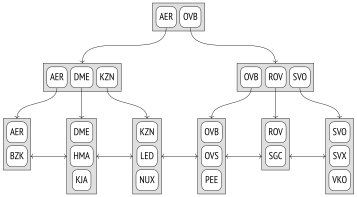
Each tree node contains several elements, which consist of an index key and a pointer. Inner node elements reference nodes of the next level; leaf node elements reference heap tuples (the illustration does not show these references).
B-trees have the following important properties:
They are balanced, which means that all leaf nodes of a tree are located at the same depth. Therefore, they guarantee equal search time for all values.
They have plenty of branches, that is, each node contains many elements, often hundreds of them (the illustration shows three-element nodes solely for clarity). As a result, B-tree depth is always small, even for very large tables.
We cannot say with absolute certainty what the letter B in the name of this structure stands for. Both balanced and bushy fit equally well. Surprisingly, you can often see it interpreted as binary, which is certainly incorrect.
- Data in an index is sorted either in ascending or in descending order, both within each node and across all nodes of the same level. Peer nodes are bound into a bidirectional list, so it is possible to get an ordered set of data by simply scanning the list one way or the other, without having to start at the root each time.
25.2 Search and Insertions
Search by Equality
Let’s take a look at how we can search for a value in a tree by condition “indexed-column = expression”.2 We will try to find the KJA airport (Krasnoyarsk).
The search starts at the root node, and the access method must determine which child node to descend to. It chooses the Ki key, for which Ki ⩽ expression < Ki+1 is satisfied.
The root node contains the keys AER and OVB. The condition AER ⩽ KJA < OVB holds true, so we need to descend into the child node referenced by the element with the AER key.
This procedure is repeated recursively until we get to the leaf node that contains the required tuple ID. In this case, the child node satisfies the condition DME ⩽ KJA < KZN, so we have to descend into the leaf node referenced by the element with the DME key.
As you can notice, the leftmost keys in the inner nodes of the tree are redundant: to choose the child node of the root, it is enough to have condition KJA < OVB satisfied. B-trees do not store such keys, so in the illustrations that follow I will leave the corresponding elements empty.
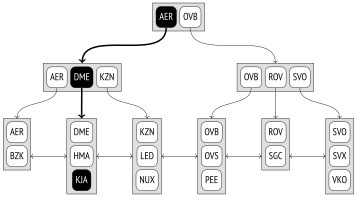
The required element in the leaf node can be quickly found by binary search.
However, the search procedure is not as trivial as it seems. It must be taken into account that the sort order of data in an index can be either ascending, like shown above, or descending. Even a unique index can have several matching values, and all of them must be returned. Moreover, there may be so many duplicates that they do not fit a single node, so the neighboring leaf node will have to be processed too. (p. 429)
Since an index can contain non-unique values, it would be more accurate to call its order non-descending rather than ascending (and non-ascending rather than descending). But I will stick to a simpler term. Besides, the tuple ID is a part of an index key, which lets us consider index entries to be unique even if the values are actually the same.
On top of that, while the search is in progress, other processes may modify the data, pages may get split into two, and the tree structure may change. All the algorithms are designed to minimize contention between these concurrent operations whenever possible and avoid excessive locks, but we are not going to get into these technicalities here. (v. 12)
Search by Inequality
If the search is performed by condition “indexed-column ⩽ expression” (or “indexed-column ⩾ expression”), we must first search the index for the value that satisfies the equality condition and then traverse its leaf nodes in the required direction until the end of the tree is reached.
This diagram illustrates the search for airport codes that are less than or equal to DME (Domodedovo).
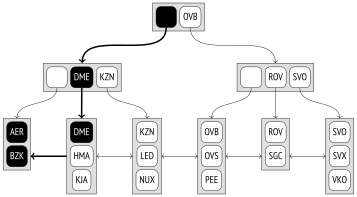
For less than and greater than operators, the procedure is the same, except that the first found value must be excluded.
Search by Range
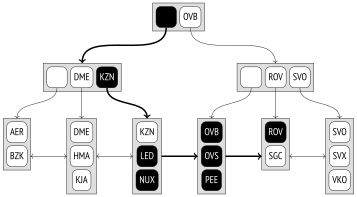
When searching by range “expression1 ⩽ indexed-column ⩽ expression2”, we must first find expression1 and then traverse the leaf nodes in the right direction until we get to expression2. This diagram illustrates the process of searching for airport codes in the range between LED (Saint Petersburg) and ROV (Rostov-on-Don), inclusive.
Insertions
The insert position of a new element is unambiguously defined by the order of keys. For example, if you insert the RTW airport code (Saratov) into the table, the new element will appear in the last but one leaf node, between ROV and SGC.
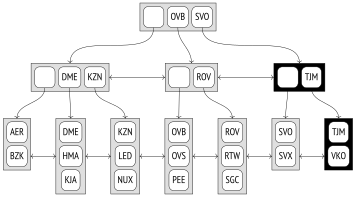
But what if the leaf node does not have enough space for a new element? For example (assuming that a node can accommodate three elements at the most), if we insert the TJM airport code (Tyumen), the last leaf node will be overfilled. In this case, the node is split into two, some of the elements of the old node are moved into the new node, and a pointer to the new child node is added into the parent node. Obviously, the parent can get overfilled too. Then it is also split into two nodes, and so on. If it comes to splitting the root, one more node is created above the resulting nodes to become the new root of the tree. The tree depth is increased by one level in this case.
In this example, the insertion of the TJM airport led to two node splits; the resulting new nodes are highlighted in the diagram below. To make sure that any node can be split, a bidirectional list binds the nodes at all levels, not only those at the lowest level.
The described procedure of insertions and splits guarantees that the tree remains balanced, and since the number of elements that a node can accommodate is typically quite large, the tree depth rarely increases.
The problem is that once split, nodes can never be merged together, even if they contain very few elements after vacuuming. This limitation pertains not to the B-tree data structure as such, but rather to its PostgreSQL implementation. So if the node turns out to be full when an insertion is attempted, the access method first tries to prune redundant data in order to clear some space and avoid an extra split. (p. 101)
25.3 Page Layout
Each node of a B-tree takes one page. The page’s size defines the node’s capacity.
Because of page splits, the root of the tree can be represented by different pages at different times. But the search algorithm must always start the scan at the root. It finds the ID of the current root page in the zero index page (which is called a metapage). The metapage also contains some other metadata.
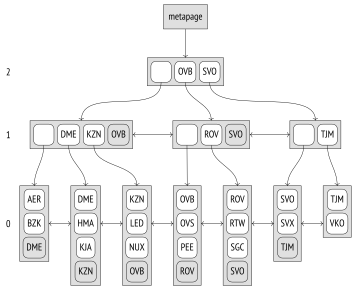
Data layout in index pages is a bit different from what we have seen so far. All the pages, except the rightmost ones at each level, contain an additional “high key,” which is guaranteed to be not smaller than any key in this page. In the above diagram high keys are highlighted.
Let’s use the pageinspect extension to take a look at a page of a real index built upon six-digit booking references. The metapage lists the root page ID and the depth of the tree (level numbering starts from leaf nodes and is zero-based):
The keys stored in index entries are displayed as sequences of bytes, which is not really convenient:
To decipher these values, we will have to write an adhoc function. It will not support all platforms and may not work for some particular scenarios, but it will do for the examples in this chapter:
Now we can take a look at the contents of the root page:
As I have said, the first entry contains no key. The ctid column provides links to child pages.
Suppose we are looking for booking E2D725. In this case, we have to choose entry 19 (since E2CB14 ⩽ E2D725 < EF6FEA) and go down to page 5135.
high key
The first entry in this page contains the high key, which may seem a bit unexpected. Logically, it should have been placed at the end of the page, but from the implementation standpoint it is more convenient to have it at the beginning to avoid moving it each time the page content changes.
Here we choose entry 3 (since E2D71D ⩽ E2D725 < E2E2F4) and go down to page 11919.
It is a leaf page of the index. The first entry is the high key; all the other entries point to heap tuples.
And here is our booking:
This is roughly what happens at the low level when we search for a booking by its code:
Deduplication
Non-unique indexes can contain a lot of duplicate keys that point to different heap tuples. Since non-unique keys appear more than once and hence take much space, duplicates (v. 13)
are collapsed into a single index entry, which contains the key and the list of the corresponding tuple IDs.3 In some cases, this procedure (which is called deduplication) can significantly reduce the index size.
However, unique indexes can also contain duplicates because of MVCC: an index keeps references to all versions of table rows. The mechanism of HOT updates can help you fight index bloating caused by referencing outdated and typically short-lived row versions, but sometimes it may be inapplicable. In this case, deduplication can buy some time required to vacuum redundant heap tuples and avert extra page splits. (p. 92)
To avoid wasting resources on deduplication when it brings no immediate benefits, collapsing is only performed if the leaf page does not have enough space to accommodate one more tuple.4 Then page pruning and deduplication5 can free some space and prevent an undesired page split. However, if duplicates are rare, you can disable the deduplication feature by turning off the deduplicate_items storage parameter.
Some indexes do not support deduplication. The main limitation is that the equality of keys must be checked by simple binary comparison of their inner representation. Not all data types by far can be compared this way. For instance, floating-point numbers (float and double precision) have two different representations for zero. Arbitrary-precision numbers (numeric) can represent the same number in different scales, while the jsonb type can use such numbers. Neither is deduplication possible for text types if you use nondeterministic collations,6 which allow the same symbols to be represented by different byte sequences (standard collations are deterministic).
Besides, deduplication is currently not supported for composite types, ranges, and arrays, as well as for indexes declared with the INCLUDE clause.
To check whether a particular index can use deduplication, you can take a look at the allequalimage field in its metapage:
In this case, deduplication is supported. And indeed, we can see that one of the leaf pages contains both index entries with a single tuple ID (htid) and those with a list of IDs (tids):
Compact Storage of Inner Index Entries
Deduplication enables accommodating more entries in leaf pages of an index. But even though leaf pages make up the bulk of an index, data compaction performed in inner pages to prevent extra splits is just as important, as search efficiency is directly dependent on tree depth. (v. 12)
Inner index entries contain index keys, but their values are only used to determine the subtree to descend into during search. In multicolumn indexes, it is often enough to take the first key attribute (or several first ones). Other attributes can be truncated to save space in the page.
Such suffix truncation happens when a leaf page is being split and the inner page has to accommodate a new pointer.7
In theory, we could even go one step further and keep only the meaningful part of the attribute, for example, the first few symbols of a row that are enough to differentiate between subtrees. But it is not implemented yet: an index entry either contains the whole attribute or excludes this attribute altogether.
For instance, here are several entries of the root page of an index built over the tickets table on the columns containing booking references and passenger names:
We can see that some index entries do not have the second attribute.
Naturally, leaf pages must keep all key attributes and INCLUDE column values, if any. Otherwise, it would be impossible to perform index-only scans. The only exception is high keys; they can be kept partially.
25.4 Operator Class
Comparison Semantics
Apart from hashing values, the system must also know how to order values of various types, including custom ones. It is indispensable for sorting, grouping, merge joins, and some other operations. And just like in the case of hashing, comparison operators for a particular data type are defined by an operator class.8
An operator class allows us to abstract from names (such as >, <, =) and can even provide several ways to order values of the same type.
Here are the mandatory comparison operators that must be defined in any operator class of the btree method (shown for the bool_ops family):
Each of these five comparison operators corresponds to one of the strategies,9 which defines their semantics:
1 less than
2 less than or equal to
3 equal to
4 greater than or equal to
5 greater than
A B-tree operator class also includes several support functions.10 The first one must return 1 if its first argument is greater than the second one, −1 if it is less than the second one, and 0 if the arguments are equal.
Other support functions are optional, but they improve performance of the access method.
To better understand this mechanism, we can define a new data type with a non-default collation. The documentation gives an example for complex numbers,11 but it is written in C. Fortunately, a B-tree operator class can be implemented using interpreted languages too, so I will take advantage of it and make an example that is as simple as possible (even if knowingly inefficient).
Let’s define a new composite type for information units:
Now create a table with a column of the new type and fill it with random values:
By default, values of composite types are sorted in lexicographical order, which is not the same as the natural order in this particular case:
Now let’s get down to creating our operator class. We will start with defining a function that converts the volume into bytes:
Create a support function for the future operator class:
Now it is easy to define comparison operators using this support function. I deliberately use peculiar names to demonstrate that they can be arbitrary:
The other four operators are defined in a similar way.
At this stage, we can already compare capacities:
Once the operator class is created, sorting will also start working as expected:
Our operator class is used by default when a new index is created, and this index returns the results in the correct order:
The MERGES clause specified in the equality operator declaration enables merge joins for this data type. (p. 387)
Multicolumn Indexes and Sorting
Let’s take a closer look at sorting multicolumn indexes.
First and foremost, it is very important to choose the optimal order of columns when declaring an index: data sorting within pages will begin with the first column, then move on to the second one, and so on. Multicolumn indexes can guarantee efficient search only if the provided filter condition spans a continuous sequence of columns starting from the very first one: the first column, the first two columns, the range between the first and the third columns, etc. Other types of conditions can only be used to filter out redundant values that have been fetched based on other criteria.
Here is the order of index entries in the first leaf page of the index that has been created on the tickets table and includes booking references and passenger names:
In this case, an efficient search for tickets is only possible either by the booking reference and the passenger name, or by the booking reference alone.
But if we decide to look for a passenger name, we have to scan all the rows:
Even if the planner chooses to perform an index scan, all index entries will still have to be traversed.12 Unfortunately, the plan will not show that the condition is actually used only for filtering the result.
If the first column does not have too many distinct values v1, v2, …, vn, it could be beneficial to perform several passes over the corresponding subtrees, virtually replacing a single search by condition “col2 = value” with a series of searches by the following conditions:
col1 = v1 AND col2 = value
col1 = v2 AND col2 = value
⋯
col1 = vn AND col2 = value
This type of an index access is called a Skip Scan, but it is not implemented yet.13
And vice versa, if an index is created on passenger names and booking numbers, it will better suit queries by either the passenger name alone or both the passenger name and booking reference:
In addition to the column order, you should also pay attention to the sort order when creating a new index. By default, values are sorted in ascending order (ASC), but you can reverse it (DESC) if required. It does not matter much if an index is built over a single column, as it can be scanned in any direction. But in a multicolumn index the order becomes important.
Our newly created index can be used to retrieve the data sorted by both columns either in ascending or in descending order:
But this index cannot return the data right away if it needs to be sorted in ascending order by one column and in descending order by the other column at the same time. In this case, the index provides partially ordered data that has to be further sorted by the second attribute: (p. 399)
The location of NULL values also affects the ability to use index for sorting. By default, NULL values are considered “greater” than regular values for the purpose of sorting, that is, they are located in the right side of the tree if the sort order is ascending and in the left side if the sort order is descending. The location of NULL values can be changed using the NULLS LAST and NULLS FIRST clauses.
In the next example, the index does not satisfy the ORDER BY clause, so the result has to be sorted:
But if we create an index that follows the desired order, it will be used:
25.5 Properties
Let’s take a look at the interface properties of B-trees. (p. 322)
Access Method Properties
B-trees can order data and ensure its uniqueness. It is the only access method with such properties.
Many access methods support multicolumn indexes, but since values in B-trees are ordered, you have to pay close attention to the order of columns in an index.
Formally, exclusion constraints are supported, but they are limited to equality conditions, which makes them analogous to unique constraints. It is much more preferable to use a full-fledged unique constraint instead.
B-tree indexes can also be extended with additional INCLUDE columns that do not participate in search.
Index-Level Properties
B-tree indexes can be used for clusterization.
Both index scans and bitmap scans are supported. Since leaf pages are bound into a bidirectional list, an index can also be traversed backwards, which results in the reverse sort order:
Column-Level Properties
The ORDERABLE property indicates that the data stored in a B-tree is ordered, while the first four properties (ASC and DESC, NULLS FIRST and NULLS LAST) define the actual order in a particular column. In this example, column values are sorted in ascending order with NULL values listed last.
The SEARCH NULLS property indicates whether NULL values can be searched.
B-trees do not support ordering operators (DISTANCE ORDERABLE), even though it has been attempted to implement them.14
B-trees support searching for multiple elements in an array (the SEARCH ARRAY property) and can return the resulting data without heap access (RETURNABLE).
postgresql.org/docs/14/btree.html backend/access/nbtree/README ↩︎
backend/access/nbtree/nbtsearch.c, _bt_search function ↩︎
postgresql.org/docs/14/btree-implementation.html#BTREE-DEDUPLICATION ↩︎
backend/access/nbtree/nbtinsert.c, _bt_delete_or_dedup_one_page function ↩︎
backend/access/nbtree/nbtdedup.c, _bt_dedup_pass function ↩︎
backend/access/nbtree/nbtinsert.c, _bt_split function ↩︎
backend/access/nbtree/nbtsearch.c, _bt_first function ↩︎