22 Hashing
PostgreSQL 14 · Translated from Russian by Liudmila Mantrova · Chinese translation by Xiong Cancan
22.1 Hash Joins
One-Pass Hash Joins
A hash join searches for matching rows using a pre-built hash table. Here is an example of a plan with such a join:
At the first stage, the Hash Join node1 calls the Hash node,2 which pulls the whole inner set of rows from its child node and places it into a hash table.
Storing pairs of hash keys and values, the hash table enables fast access to a value by its key; the search time does not depend on the size of the hash table, as hash keys are distributed more or less uniformly between a limited number of buckets. The bucket to which a given key goes is determined by the hash function of the hash key; since the number of buckets is always a power of two, it is enough to take the required number of bits of the computed value.
Just like the buffer cache, this implementation uses a dynamically extendible hash table that resolves hash collisions by chaining.3 (p. 149)
At the first stage of a join operation, the inner set is scanned, and the hash function is computed for each of its rows. The columns that are referenced in the join condition (Hash Cond) serve as the hash key, while the hash table itself stores all the queried fields of the inner set.
A hash join is most efficient in the case when the whole hash table can be accommodated in RAM, as the executor manages to process the data in one batch in this case. The size of the memory chunk allocated for this purpose is limited by the value of work_mem × hash_mem_multiplier. (v. 13) (default: 4MB) (default: 1.0)
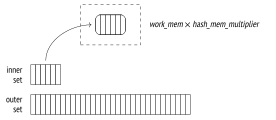
Let’s run EXPLAIN ANALYZE to take a look at statistics on memory usage of a query:
Unlike a nested loop join, which treats inner and outer sets differently, a hash join can swap them around. The smaller set is usually used as the inner one, as it results in a smaller hash table.
In this example, the whole table fits into the allocated cache: it takes about 143 MB (Memory Usage) and contains 4 M = 222 buckets. So the join is performed in one pass (Batches).
But if the query referred to only one column, the hash table would fit 111 MB:
It is yet another reason to avoid referring to superfluous fields in a query (which can happen if you are using an asterisk, to give one example).
The chosen number of buckets should guarantee that each bucket holds only one row on average when the hash table is completely filled with data. Higher density would increase the rate of hash collisions, making the search less efficient, while a less compact hash table would take up too much memory. The estimated number of buckets is increased up to the nearest power of two.4
(If the estimated hash table size exceeds the memory limit based on the average width of a single row, two-pass hashing will be applied.)
A hash join cannot start returning results until the hash table is fully built.
At the second stage (the hash table is already built by this time), the Hash Join node calls on its second child node to get the outer set of rows. For each scanned row, the hash table is searched for a match. It requires calculating the hash key for the columns of the outer set that are included into the join condition.
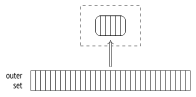
The found matches are returned to the parent node.
Cost estimation. We have already covered cardinality estimation; since it does not depend on the join method, I will now focus on cost estimation. (p. 356)
The cost of the Hash node is represented by the total cost of its child node. It is a dummy number that simply fills the slot in the plan.5 All the actual estimations are included into the cost of the Hash Join node.6
Here is an example:
The startup cost of the join reflects primarily the cost of hash table creation and includes the following components:
the total cost of fetching the inner set, which is required to build the hash table
the cost of calculating the hash function of all the columns included into the join key, for each row of the inner set (estimated at cpu_operator_cost per operation) (default:
0.0025)the cost of insertion of all the inner rows into the hash table (which is estimated at cpu_tuple_cost per inserted row) (default:
0.01)the startup cost of fetching the outer set of rows, which is required to start the join operation
The total cost comprises the startup cost and the cost of the join itself, namely:
the cost of computing the hash function of all the columns included into the join key, for each row of the outer set (cpu_operator_cost)
the cost of join condition rechecks, which are required to address possible hash collisions (estimated at cpu_operator_cost per each checked operator)
- the processing cost for each resulting row (cpu_tuple_cost)
The number of required rechecks is the hardest to estimate. It is calculated by multiplying the number of rows of the outer set by some fraction of the inner set (stored in the hash table). To estimate this fraction, the planner has to take into account that data distribution may be non-uniform. I will spare you the details of these computations;7 in this particular case, this fraction is estimated at 0.150112.
Thus, the cost of our query is estimated as follows:
And here is the dependency graph:
Two-Pass Hash Joins
If the planner’s estimations show that the hash table will not fit the allocated memory, the inner set of rows is split into batches to be processed separately. The number of batches (just like the number of buckets) is always a power of two; the batch to use is determined by the corresponding number of bits of the hash key.8
Any two matching rows belong to the same batch: rows placed into different batches cannot have the same hash code.
All batches hold an equal number of hash keys. If the data is distributed uniformly, batch sizes will also be roughly the same. The planner can control memory consumption by choosing an appropriate number of batches.9
At the first stage, the executor scans the inner set of rows to build the hash table. If the scanned row belongs to the first batch, it is added to the hash table and kept in RAM. Otherwise, it is written into a temporary file (there is a separate file for each batch).10 (default: -1)
The total volume of temporary files that a session can store on disk is limited by the temp_file_limit parameter (temporary tables are not included into this limit). As soon as the session reaches this value, the query is aborted.
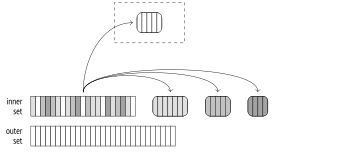
At the second stage, the outer set is scanned. If the row belongs to the first batch, it is matched against the hash table, which contains the first batch of rows of the inner set (there can be no matches in other batches anyway).
If the row belongs to a different batch, it is stored in a temporary file, which is again created separately for each batch. Thus, N batches can use 2(N − 1) files (or fewer if some of the batches turn out to be empty).
Once the second stage is complete, the memory allocated for the hash table is freed. At this point, we already have the result of the join for one of the batches.
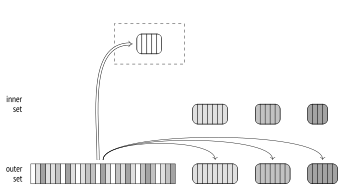
Both stages are repeated for each of the batches saved on disk: the rows of the inner set are transferred from the temporary file to the hash table; then the rows of the outer set related to the same batch are read from another temporary file and matched against this hash table. Once processed, temporary files get deleted.
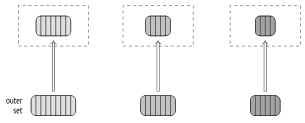
Unlike a similar output for a one-pass join, the output of the EXPLAIN command for a two-pass join contains more than one batch. If run with the BUFFERS option, this command also displays statistics on disk access:
I have already shown this query above with an increased work_mem setting. The default value of 4 MB is too small for the whole hash table to fit RAM; in this example, the data is split into 64 batches, and the hash table uses 64 K = 216 buckets. As the hash table is being built (the Hash node), the data is written into temporary files (temp written); at the join stage (the Hash Join node), temporary files are both read and written (temp read, written).
To collect more statistics on temporary files, you can set the log_temp_files parameter to zero. Then the server log will list all the temporary files and their sizes (as they appeared at the time of deletion). (default: -1)
Dynamic Adjustments
The planned course of events may be disrupted by two issues: inaccurate statistics and non-uniform data distribution.
If the distribution of values in the join key columns is non-uniform, different batches will have different sizes.
If some batch (except for the very first one) turns out to be too large, all its rows will have to be written to disk and then read from disk. It is the outer set that causes most of the trouble, as it is typically bigger. So if there are regular, non-multivariate statistics on MCVs of the outer set (that is, the outer set is represented by a table, and the join is performed by a single column), rows with hash codes corresponding to MCVs are considered to be a part of the first batch.11 This technique (called skew optimization) can reduce the I/O overhead of a two-pass join to some extent. (p. 291)
Because of these two factors, the size of some (or all) batches may exceed the estimation. Then the corresponding hash table will not fit the allocated memory chunk and will surpass the defined limits.
So if the hash table being built turns out too big, the number of batches is increased (doubled) on the fly. Each batch is virtually split into two new ones: about half of the rows (assuming that the distribution is uniform) is left in the hash table, while the other half is saved into a new temporary file.12
Such a split can happen even if a one-pass join has been originally planned. In fact, one- and two-pass joins use the same algorithm implemented by the same code; I single them out here solely for smoother narration.
The number of batches cannot be reduced. If it turns out that the planner has overestimated the data size, batches will not be merged together.
In the case of non-uniform distribution, increasing the number of batches may not help. For example, if the key column contains the same value in all its rows, they will be placed into the same batch since the hash function will be returning the same value over and over again. Unfortunately, the hash table will continue growing in this case, regardless of the imposed restrictions.
In theory, this issue could be addressed by a multi-pass join, which would perform partial scans of the batch, but it is not supported.
To demonstrate a dynamic increase in the number of batches, we first have to perform some manipulations: (p. 274)
As a result, we get a new table called bookings_copy. It is an exact copy of the bookings table, but the planner underestimates the number of rows in it by ten times. A similar situation may occur if the hash table is generated for a set of rows produced by another join operation, so there is no reliable statistics available.
This miscalculation makes the planner think that 8 buckets are enough, but while the join is being performed, this number grows to 32:
Cost estimation. I have already used this example to demonstrate cost estimation for a one-pass join, but now I am going to reduce the size of available memory to the minimum, so the planner will have to use two batches. It increases the cost of the join:
The cost of the second pass is incurred by spilling rows into temporary files and reading them from these files.
The startup cost of a two-pass join is based on that of a one-pass join, which is increased by the estimated cost of writing as many pages as required to store all the necessary fields of all the rows of the inner set.13 Although the first batch is not written to disk when the hash table is being built, the estimation does not take it into account and hence does not depend on the number of batches.
In its turn, the total cost comprises the total cost of a one-pass join and the estimated costs of reading the rows of the inner set previously stored on disk, as well as reading and writing the rows of the outer set.
Both writing and reading are estimated at seq_page_cost per page, as I/O operations are assumed to be sequential.
In this particular case, the number of pages required for the inner set is estimated at 7, while the data of the outer set is expected to fit 2309 pages. Having added these estimations to the one-pass join cost calculated above, we get the same figures as shown in the query plan:
Thus, if there is not enough memory, the join is performed in two passes and becomes less efficient. Therefore, it is important to observe the following points:
The query must be composed in a way that excludes redundant fields from the hash table.
The planner must choose the smaller of the two sets of rows when building the hash table.
Using Hash Joins in Parallel Plans
The hash join algorithm described above can also be used in parallel plans. First, several parallel processes build their own (absolutely identical) hash tables for the inner set, (v. 9.6)
independently of each other; then they start processing the outer set concurrently. The performance gain here is due to each process scanning only its own share of outer rows.
The following plan uses a regular one-pass hash join:
Here each process hashes the bookings table, then retrieves its own share of outer rows via the Parallel Index Only Scan node, and matches these rows against the resulting hash table.
The hash table memory limit is applied to each parallel process separately, so the total size of memory allocated for this purpose will be three times bigger than indicated in the plan (Memory Usage).
Parallel One-Pass Hash Joins
Even though a regular hash join can be quite efficient in parallel plans (especially for small inner sets, for which parallel processing does not make much sense), larger data sets are better handled by a special parallel hash join algorithm. (v. 11)
An important distinction of the parallel version of the algorithm is that the hash table is created in the shared memory, which is allocated dynamically and can be accessed by all parallel processes that contribute to the join operation. Instead of several separate hash tables, a single common one is built, which uses the total amount of memory dedicated to all the participating processes. It increases the chance of completing the join in one pass.
At the first stage (which is represented in the plan by the Parallel Hash node), all the parallel processes build a common hash table, taking advantage of the parallel access to the inner set of rows.14
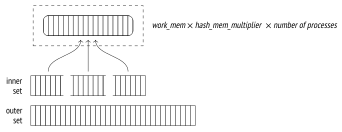
To move on from here, each parallel process must complete its share of first-stage processing.15
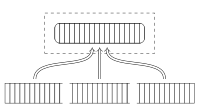
At the second stage (the Parallel Hash Join node), the processes are again run in parallel to match their shares of rows of the outer set against the hash table, which is already built by this time.16
outer set
Here is an example of such a plan:
It is the same query that I showed in the previous section, but the parallel hash join was turned off by the enable_parallel_hash parameter at that time. (default: on)
Although the available memory is down by half as compared to a regular hash join demonstrated before, the operation still completes in one pass because it uses the memory allocated for all the parallel processes (Memory Usage). The hash table gets a bit bigger, but since it is the only one we have now, the total memory usage has decreased. (v. 11)
Parallel Two-Pass Hash Joins
The consolidated memory of all the parallel processes may still be not enough to accommodate the whole hash table. It can become clear either at the planning stage or later, during query execution. The two-pass algorithm applied in this case is quite different from what we have seen so far.
The key distinction of this algorithm is that it creates several smaller hash tables instead of a single big one. Each process gets its own table and processes its own batches independently. (But since separate hash tables are still located in the shared memory, any process can get access to any of these tables.) If planning shows that more than one batch will be required,17 a separate hash table is built for each process right away. If the decision is taken at the execution stage, the hash table is rebuilt.18
Thus, at the first stage processes scan the inner set in parallel, splitting it into batches and writing them into temporary files.19 Since each process reads only its own share of the inner set, none of them builds a full hash table for any of the batches (even for the first one). The full set of rows of any batch is only accumulated in the file written by all the parallel processes in a synchronized manner.20 So unlike the non-parallel and one-pass parallel versions of the algorithm, the parallel two-pass hash join writes all the batches to disk, including the first one.
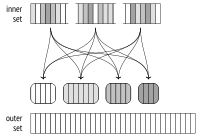
Once all the processes have completed hashing of the inner set, the second stage begins.21
If the non-parallel version of the algorithm were employed, the rows of the outer set that belong to the first batch would be matched against the hash table right away. But in the case of the parallel version, the memory does not contain the hash table yet, so the workers process the batches independently. Therefore, the second stage starts by a parallel scan of the outer set to distribute its rows into batches, and each batch is written into a separate temporary file.22 The scanned rows are not inserted into the hash table (as it happens at the first stage), so the number of batches never rises.
Once all the processes have completed the scan of the outer set, we get 2N temporary files on disk; they contain the batches of the inner and outer sets.
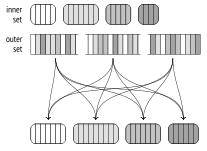
Then each process chooses one of the batches and performs the join: it loads the inner set of rows into a hash table in memory, scans the rows of the outer set, and matches them against the hash table. When the batch join is complete, the process chooses the next batch that has not been processed yet.23
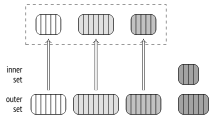
If no more unprocessed batches are left, the process that has completed its own batch starts processing one of the batches that is currently being handled by another process; such concurrent processing is possible because all the hash tables are located in the shared memory.
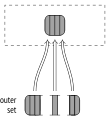
This approach is more efficient than using a single big hash table for all the processes: it is easier to set up parallel processing, and synchronization is cheaper.
Modifications
The hash join algorithm supports any types of joins: apart from the inner join, it can also handle left, right, and full outer joins, as well as semi- and anti-joins. But as I have already mentioned, the join condition is limited to the equality operator.
We have already observed some of these operations when dealing with the nested loop join. Here is an example of the right outer join: (p. 362)
Note that the logical left join specified in the SQL query got transformed into a physical operation of the right join in the execution plan.
At the logical level, bookings is the outer table (constituting the left side of the join operation), while the tickets table is the inner one. Therefore, bookings with no tickets must also be included into the join result.
At the physical level, inner and outer sets are assigned based on the cost of the join rather than their location in the query text. It usually means that the set with a smaller hash table will be used as the inner one. This is exactly what is happening here: the bookings table is used as the inner set, and the left join is changed to the right one.
And vice versa, if the query specifies the right outer join (to display the tickets that are not related to any bookings), the execution plan uses the left join:
To complete the picture, I will provide an example of a query plan with the full outer join:
Parallel hash joins are currently not supported for right and full joins.24
Note that the next example uses the bookings table as the outer set, but the planner would have preferred the right join if it were supported:
22.2 Distinct Values and Grouping
Algorithms that group values for aggregation and remove duplicates are very similar to join algorithms. One of the approaches they can use consists in building a hash table on the required columns. Values are included into the hash table only if it contains no such values yet. As a result, the hash table accumulates all the distinct values.
The node that performs hash aggregation is called HashAggregate.25
Let’s consider some situations that may require this node.
The number of seats in each travel class (GROUP BY):
The list of travel classes (DISTINCT):
Travel classes combined with one more value (UNION):
The Append node combines both sets but does not get rid of any duplicates, which must not appear in the UNION result. They have to be removed separately by the HashAggregate node.
The memory chunk allocated for the hash table is limited by the value of work_mem × hash_mem_multiplier, just like in the case of a hash join. (default: 4MB) (default: 1.0)
If the hash table fits the allocated memory, aggregation uses a single batch:
There are not so many distinct values in the amounts field, so the hash table takes only 61 kB (Memory Usage).
As soon as the hash table fills up the allocated memory, all the further values are spilled into temporary files and grouped into partitions based on several bits of their hash values. The number of partitions is a power of two and is chosen in such a way that each of their hash tables fits the allocated memory. The accuracy of the estimation is of course dependent on the quality of the collected statistics, so the received number is multiplied by 1.5 to further reduce partition sizes and raise the chances of processing each partition in one pass.26 (v. 13)
Once the whole set is scanned, the node returns aggregation results for those values that have made it into the hash table.
Then the hash table is cleared, and each of the partitions saved into temporary files at the previous stage is scanned and processed just like any other set of rows. If the hash table still exceeds the allocated memory, the rows that are subject to overflow will be partitioned again and written to disk for further processing.
To avoid excessive I/O, the two-pass hash join algorithm moves MCVs into the first batch. Aggregation, however, does not require this optimization: those rows that fit the allocated memory will not be split into partitions, and MCVs are likely to occur early enough to get into RAM.
In this example, the number of distinct IDs is relatively high, so the hash table does not fit the allocated memory. It takes five batches to perform the query: one for the initial data set and four for the partitions written to disk.
backend/executor/nodeHash.c, ExecChooseHashTableSize function ↩︎
backend/optimizer/plan/createplan.c, create_hashjoin_plan function ↩︎
backend/optimizer/path/costsize.c, initial_cost_hashjoin & final_cost_hashjoin functions ↩︎
backend/utils/adt/selfuncs.c, estimate_hash_bucket_stats function ↩︎
backend/executor/nodeHash.c, ExecHashGetBucketAndBatch function ↩︎
backend/executor/nodeHash.c, ExecChooseHashTableSize function ↩︎
backend/executor/nodeHash.c, ExecHashTableInsert function ↩︎
backend/executor/nodeHash.c, ExecHashBuildSkewHash function ↩︎
backend/executor/nodeHash.c, ExecHashIncreaseNumBatches function ↩︎
backend/optimizer/path/costsize.c, page_size function ↩︎
backend/executor/nodeHash.c, MultiExecParallelHash function ↩︎
backend/executor/nodeHashjoin.c, ExecParallelHashJoin function ↩︎
backend/executor/nodeHash.c, ExecChooseHashTableSize function ↩︎
backend/executor/nodeHash.c, ExecParallelHashIncreaseNumBatches function ↩︎
backend/executor/nodeHash.c, MultiExecParallelHash function ↩︎
backend/executor/nodeHashjoin.c, ExecParallelHashJoin function ↩︎
backend/executor/nodeHashjoin.c, ExecParallelHashJoinPartitionOuter function ↩︎
backend/executor/nodeHashjoin.c, ExecParallelHashJoinNewBatch function ↩︎
backend/executor/nodeAgg.c, hash_choose_num_partitions function ↩︎