18 Table Access Methods
PostgreSQL 14 · Translated from Russian by Liudmila Mantrova · Chinese translation by Xiong Cancan
18.1 Pluggable Storage Engines
The data layout used by PostgreSQL is neither the only possible nor the best one for all load types. Following the idea of extensibility, PostgreSQL allows you to create and plug in various table access methods (pluggable storage engines), but there is only one available out of the box at the moment: (v. 12)
You can specify the engine to use when creating a table (CREATE TABLE ... USING); otherwise, the default engine listed in the default_table_access_method parameter will be applied. (default: heap)
For the PostgreSQL core to work with various engines in the same way, table access methods must implement a special interface.1 The function specified in the amhandler column returns the interface structure2 that contains all the information required by the core.
The following core components can be used by all table access methods:
transaction manager, including ACID and snapshot isolation support
buffer manager
I/O subsystem
TOAST
optimizer and executor
index support
These components always remain at the disposal of the engine, even if it does not use them all.
In their turn, engines define:
tuple format and data structure
table scan implementation and cost estimation
implementation of insert, delete, update, and lock operations
visibility rules
vacuum and analysis procedures
Historically, PostgreSQL used a single built-in data storage without any proper programming interface, so now it is very hard to come up with a good design that takes all the specifics of the standard engine into account and does not interfere with other methods.
For example, it is still unclear how to deal with the WAL. New access methods may need to log their own operations that the core is unaware of. The existing generic WAL mechanism3 is usually a bad choice, as it incurs too much overhead. You can add yet another interface for handling new types of WAL entries, but then crash recovery will depend on external code, which is highly undesirable. The only plausible solution so far is patching the core for each particular engine.
For this reason, I did not strive to provide any strict distinction between table access methods and the core. Many features described in the previous parts of the book formally belong to the heap access method rather than to the core itself. This method is likely to always remain the ultimate standard engine for PostgreSQL, while other methods will fill separate niches to address challenges of specific load types.
Of all the new engines that are currently being developed, I would like to mention the following:
Zheap is aimed at fighting table bloating.4 It implements in-place row updates and moves historic MVCC-related data into a separate undo storage. Such an engine will be useful for loads that involve frequent data updates.
Zheap architecture will seem familiar to Oracle users, although it does have some nuances (for example, the interface of index access methods does not allow creating indexes with their own versioning). (p. 313)
Zedstore implements columnar storage,5 which is likely to be most efficient with OLAP queries.
The stored data is structured as a B-tree of tuple IDs; each column is stored in its own B-tree associated with the main one. In the future, it might be possible to store several columns in one B-tree, thus getting a hybrid storage.
18.2 Sequential Scans
The storage engine defines the physical layout of table data and provides an access method to it. The only supported method is a sequential scan, which reads the file (or files) of the table’s main fork in full. In each read page, the visibility of each tuple is checked; those tuples that do not satisfy the query are filtered out. (p. 80)
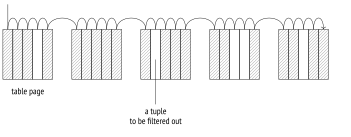
A scanning process goes through the buffer cache; to ensure that large tables do not oust useful data, a small-sized buffer ring is employed. Other processes scanning the same table join this buffer ring, thus avoiding extra disk reads; such scans are called synchronized. Thus, scanning does not always have to begin at the start of the file. (p. 156)
Sequential scanning is the most efficient way to read the whole table or the best part of it. In other words, sequential scans bring the most value when the selectivity is low. (If the selectivity is high, meaning that the query has to select only a few rows, it is preferable to use an index.) (p. 313)
Cost Estimation
In the query execution plan, a sequential scan is represented by the Seq Scan node:
The estimated number of rows is provided as part of the basic statistics:
When estimating the cost, the optimizer takes the following two components into account: disk I/O and CPU resources.6
I/O cost is calculated by multiplying the number of pages in a table and the cost of reading a single page assuming that pages are being read sequentially. When the buffer manager requests a page, the operating system actually reads more data from disk, so several subsequent pages are highly likely to be found in the operating system cache. For this reason, the cost of reading a single page using sequential scanning (which the planner estimates at seq_page_cost) is lower than the random access cost (defined by the random_page_cost value). (default: 1) (default: 4)
The default settings work well for HDDs; if you are using SSDs, it makes sense to significantly reduce the random_page_cost value (the seq_page_cost parameter is usually left as is, serving as a reference value). Since the optimal ratio between these parameters depends on the hardware, they are usually set at the tablespace level (ALTER TABLESPACE ... SET).
These calculations clearly show the consequences of table bloating caused by untimely vacuuming: the larger the main fork of the table, the more pages have to be scanned, regardless of the number of live tuples they contain. (p. 135)
CPU resource estimation comprises the costs of processing each tuple (which the planner estimates at cpu_tuple_cost): (default: 0.01)
The sum of these two estimates represents the total cost of the plan. The startup cost is zero because sequential scans have no prerequisites.
If the scanned table needs to be filtered, the applied filter conditions appear in the plan under the Filter section of the Seq Scan node. The estimated row count depends on the selectivity of these conditions, while the cost estimation includes the related computation expenses. (p. 271)
The EXPLAIN ANALYZE command displays both the actual number of returned rows and the number of rows that have been filtered out:
Let’s take a look at a more complex execution plan that uses aggregation:
The plan consists of two nodes: the upper node (Aggregate), which computes the count function, pulls the data from the lower node (Seq Scan), which scans the table.
The startup cost of the Aggregate node includes the aggregation itself: it is impossible to return the first row (which is the only one in this case) without getting all the rows from the lower node. The aggregation cost is estimated based on the execution cost of a conditional operation (estimated at cpu_operator_cost) for each input row:7 (default: 0.0025)
The received estimate is added to the total cost of the Seq Scan node.
The total cost of the Aggregate node also includes the cost of processing a row to be returned, which is estimated at cpu_tuple_cost: (default: 0.01)
Thus, cost estimation dependencies can be pictured as follows:
18.3 Parallel Plans
PostgreSQL supports parallel query execution.8 The leading process that performs the query spawns (via postmaster) several worker processes that execute the same parallel part of the plan simultaneously. The results are passed to the leader, which puts them together in the Gather9 node. When not accepting the data, the leader may also participate in the execution of the parallel part of the plan. (v. 9.6)
If required, you can forbid the leader’s contributions to the parallel plan execution by turning off the parallel_leader_participation parameter. (v. 11) (default: on)
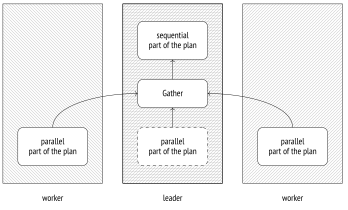
Naturally, starting these processes and sending data between them is not free, so not all queries by far should be parallelized.
Besides, not all parts of the plan can be processed concurrently, even if parallel execution is allowed. Some of the operations are performed by the leader alone, in the sequential mode.
PostgreSQL does not support the other approach to parallel plan execution, which consists in performing data processing by several workers that virtually form an assembly line (roughly speaking, each plan node is performed by a separate process); this mechanism was deemed inefficient by PostgreSQL developers.
18.4 Parallel Sequential Scans
One of the nodes designed for parallel processing is the Parallel Seq Scan node, which performs a parallel sequential scan.
The name sounds a bit controversial (is the scan sequential or parallel after all?), but nevertheless, it reflects the essence of the operation. If we take a look at the file access, table pages are read sequentially, following the order in which they would have been read by a simple sequential scan. However, this operation is performed by several concurrent processes. To avoid scanning the same page twice, the executor synchronizes these processes via shared memory.
A subtle aspect here is that the operating system does not get the big picture typical of sequential scanning; instead, it sees several processes that perform random reads. Therefore, data prefetching that usually speeds up sequential scans becomes virtually useless. To minimize this unpleasant effect, PostgreSQL assigns each process not just one but several consecutive pages to read.10 (v. 14)
As such, parallel scanning does not make much sense because the usual read costs are further increased by the overhead incurred by data transfer from process to process. However, if workers perform any post-processing on the fetched rows (such as aggregation), the total execution time may turn out to be much shorter.
Cost Estimation
Let’s take a look at a simple query that performs aggregation on a large table. The execution plan is parallelized:
All the nodes below Gather belong to the parallel part of the plan. They are executed by each of the workers (two of them are planned here) and possibly by the leader process (unless this functionality is turned off by the parallel_leader_participation parameter). The Gather node itself and all the nodes above it make the sequential part of the plan and are executed by the leader process alone.
Let’s take a look at this query plan once again:
The Parallel Seq Scan node represents a parallel heap scan. The rows field shows the estimated average number of rows to be processed by a single process. All in all, the execution must be performed by three processes (one leader and two workers), but the leader process will handle fewer rows: its share gets smaller as the number of workers grows.11 In this particular case, the factor is 2.4.
The Parallel Seq Scan cost is calculated similar to that of a sequential scan. The received value is smaller, as each process handles fewer rows; the I/O part is included in full since the whole table still has to be read, page by page:
Next, the Partial Aggregate node performs aggregation of the fetched data; in this particular case, it counts the number of rows.
The aggregation cost is estimated in the usual manner and is added to the cost estimation of the table scan:
The next node (Gather) is executed by the leader process. This node is responsible for launching workers and gathering the data they return.
For the purpose of planning, the cost estimation of starting processes (regardless of their number) is defined by the parallel_setup_cost parameter, while the cost of each row transfer between the processes is estimated at parallel_tuple_cost. (default: 1000) (default: 0.1)
In this example, the startup cost (spent on starting the processes) prevails; this value is added to the startup cost of the Partial Aggregate node. The total cost also includes the cost of transferring two rows; this value is added to the total cost of the Partial Aggregate node:12
Last but not least, the Finalize Aggregate node aggregates all the partial results received by the Gather node from the parallel processes.
The final aggregation is estimated just like any other. Its startup cost is based on the cost of aggregating three rows; this value is added to the total cost of Gather (since all the rows are needed to compute the result). The total cost of Finalize Aggregate also includes the cost of returning one row.
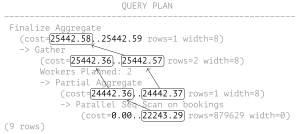
Dependencies between cost estimations are determined by whether the node has to accumulate the data before passing the result to its parent node. Aggregation cannot return the result until it gets all the input rows, so its startup cost is based on the total cost of the lower node. The Gather node, on the contrary, starts sending rows upstream as soon as they are fetched. Therefore, the startup cost of this operation depends on the startup cost of the lower node, while its total cost is based on the lower node’s total cost.
Here is the dependency graph:
18.5 Parallel Execution Limitations
Number of Background Workers
The number of processes is controlled by a hierarchy of three parameters. The maximal number of background workers running concurrently is defined by the max_worker_processes value. (default: 8)
However, parallel query execution is not the only operation that needs background workers. For example, they also participate in logical replication and can be used by extensions. The number of processes allocated specifically for parallel plan execution is limited to the max_parallel_workers value. (default: 8)
Out of this number, up to max_parallel_workers_per_gather processes can serve one leader. (default: 2)
The choice of these parameter values depends on the following factors:
Hardware capabilities: the system must have free cores dedicated to parallel execution.
Table sizes: the database must contain large tables.
A typical load: there must be queries that potentially benefit from parallel execution.
These criteria are typically met by OLAP systems rather than OLTP ones.
The planner will not consider parallel execution at all if the estimated volume of heap data to be read does not exceed the min_parallel_table_scan_size value. (default: 8MB)
Unless the parallel_workers storage parameter is set to explicitly specify the number of processes for a particular table, this value will be calculated by the following formula:
It means that each time a table grows three times, PostgreSQL assigns one more parallel worker for its processing. The default settings give us these figures:
| Table, MB | Number of processes |
|---|---|
| 8 | 1 |
| 24 | 2 |
| 72 | 3 |
| 216 | 4 |
| 648 | 5 |
| 1944 | 6 |
In any case, the number of parallel workers cannot exceed the limit defined by the max_parallel_workers_per_gather parameter.
If we query a small table of 19 MB, only one worker will be planned and launched:
A query on a table of 105 MB gets only two processes because it hits the limit of max_parallel_workers_per_gather workers: (default: 2)
If we remove this limit, we will get the estimated three processes:
If the number of slots that are free during query execution turns out to be smaller than the planned value, only the available number of workers will be launched.
Let’s limit the total number of parallel processes to five and run two queries simultaneously:
Although three processes were expected in both cases, one of the queries managed to get only two slots.
Let’s restore the default settings:
Non-Parallelizable Queries
Not all queries can be parallelized.13 In particular, parallel plans cannot be used for the following query types:
- Queries that modify or lock data (
UPDATE,DELETE,SELECT FOR UPDATE, and the like).
This restriction does not apply to subqueries within the following commands:
– CREATE TABLE AS, SELECT INTO, CREATE MATERIALIZED VIEW (v. 11)
– REFRESH MATERIALIZED VIEW (v. 14)
However, row insertion is still performed sequentially in all these cases.
Queries that can be paused. It applies to queries run within cursors, including
FORloops in PL/pgSQL.Queries that call
PARALLEL UNSAFEfunctions. By default, these are all user-defined functions and a few standard ones. You can get the full list of unsafe functions by querying the system catalog:
- Queries within functions if these functions are called from a parallelized query (to avoid recursive growth of the number of workers).
Some of these limitations may be removed in the future versions of PostgreSQL. For example, the ability to parallelize queries at the Serializable isolation level is already there. (v. 12)
Parallel insertion of rows using such commands as INSERT and COPY is currently under development.14
A query may remain unparallelized for several reasons:
This type of a query does not support parallelization at all.
Parallel plan usage is forbidden by the server configuration (for example, because of the imposed table size limit).
- A parallel plan is more expensive than a sequential one.
To check whether a query can be parallelized at all, you can temporarily switch on the force_parallel_mode parameter. Then the planner will build parallel plans whenever possible: (default: off)
Parallel Restricted Queries
The bigger is the parallel part of the plan, the more performance gains can be potentially achieved. However, certain operations are executed strictly sequentially by the leader process alone,15 even though they do not interfere with parallelization as such. In other words, they cannot appear in the plan tree below the Gather node.
Non-expandable subqueries. The most obvious example of a non-expandable subquery16 is scanning a CTE result (represented in the plan by the CTE Scan node):
If a CTE is not materialized, the plan does not contain the CTE Scan node, so this limitation does not apply. (v. 12)
Note, however, that a CTE itself can be computed in the parallel mode if it turns out to be less expensive:
Another example of a non-expandable subquery is shown under by the SubPlan node in the plan below:
The first two rows represent the plan of the main query: the flights table is scanned sequentially, and each of its rows is checked against the provided filter. The filter condition includes a subquery; the plan of this subquery starts on the third row. So the SubPlan node is executed several times, once for each row fetched by sequential scanning in this case.
The upper Seq Scan node of this plan cannot participate in parallel execution because it relies on the data returned by the SubPlan node.
Last but not least, here is one more non-expandable subquery represented by the InitPlan node:
Unlike the SubPlan node, InitPlan is evaluated only once (in this particular example, once per each execution of the SubPlan 2 node).
The parent node of InitPlan cannot participate in parallel execution (but those nodes that receive the result of the InitPlan evaluation can, like in this example).
Temporary tables. Temporary tables do not support parallel scanning, as they can be accessed exclusively by the process that has created them. Their pages are processed in the local buffer cache. Making the local cache accessible to several processes would require a locking mechanism like in the shared cache, which would make its other benefits less prominent. (p. 163) (p. 240)
Parallel restricted functions. Functions defined as PARALLEL RESTRICTED are allowed only in the sequential part of the plan. You can get the list of such functions from the system catalog by running the following query:
Only label your functions as PARALLEL RESTRICTED (to say nothing of PARALLEL SAFE) if you are fully aware of all the implications and have carefully studied all the imposed restrictions.17
backend/optimizer/path/costsize.c, cost_seqscan function ↩︎
backend/optimizer/path/costsize.c, cost_agg function ↩︎
postgresql.org/docs/14/parallel-query.html backend/access/transam/README.parallel ↩︎
backend/access/heap/heapam.c, table_block_parallelscan_startblock_init & table_block_parallelscan_nextpage functions ↩︎
backend/optimizer/path/costsize.c, get_parallel_divisor function ↩︎
backend/optimizer/path/costsize.c, cost_gather function ↩︎
postgresql.org/docs/14/when-can-parallel-query-be-used.html ↩︎
commitfest.postgresql.org/32/2844 commitfest.postgresql.org/32/2841 commitfest.postgresql.org/32/2610 ↩︎
postgresql.org/docs/14/parallel-safety.html#PARALLEL-LABELING ↩︎