# Statistics
LLMS index: [llms.txt](/en/llms.txt)
---
## 17.1 Basic Statistics {#internal-section-17-1}
Basic relation-level statistics[^internal-271-1] are stored in the `pg_class` table of the system catalog and include the following data:
- number of tuples in a relation (`reltuples`)
- relation size, in pages (`relpages`)
- number of pages tagged in the visibility map (`relallvisible`) (*p.* [27](/en/01-introduction/#internal-page-27))
Here are these values for the `flights` table:
```psql
=> SELECT reltuples, relpages, relallvisible
FROM pg_class WHERE relname = 'flights';
reltuples | relpages | relallvisible
-----------+----------+---------------
214867 | 2624 | 2624
(1 row)
```
If the query does not impose any filter conditions, the `reltuples` value serves as the cardinality estimation:
```psql
=> EXPLAIN SELECT * FROM flights;
QUERY PLAN
----------------------------------------------------------------
Seq Scan on flights (cost=0.00..4772.67 rows=214867 width=63)
(1 row)
```
Statistics are collected during table analysis, both manual and automatic.[^internal-271-2] Furthermore, since basic statistics are of paramount importance, this data is calculated during some (*p.* [109](/en/06-vacuum-and-autovacuum/#internal-page-109))
other operations as well (`VACUUM FULL` and `CLUSTER`,[^internal-272-1] `CREATE INDEX` and `REINDEX`[^internal-272-2]) and is refined during vacuuming.[^internal-272-3]
For analysis purposes, 300×*default\_statistics\_target* random rows are sampled. The sample size required to build statistics of a particular accuracy has low dependency on the volume of analyzed data, so the size of the table is not taken into account.[^internal-272-4] (*default:* `100`)
Sampled rows are picked from the same number (300 × *default\_statistics\_target*) of random pages.[^internal-272-5] Obviously, if the table itself is smaller, fewer pages may be read, and fewer rows will be selected for analysis.
In large tables, statistics collection does not include all the rows, so estimations can diverge from actual values. It is perfectly normal: if the data is changing, statistics cannot be accurate all the time anyway. Accuracy of up to an order of magnitude is usually enough to choose an adequate plan.
Let’s create a copy of the `flights` table with autovacuum disabled, so that we can control the autoanalysis start time:
```psql
=> CREATE TABLE flights_copy(LIKE flights)
WITH (autovacuum_enabled = false);
```
There is no statistics for the new table yet:
```psql
=> SELECT reltuples, relpages, relallvisible
FROM pg_class WHERE relname = 'flights_copy';
reltuples | relpages | relallvisible
-----------+----------+---------------
-1 | 0 | 0
(1 row)
```
The value `reltuples` = −1 is used to differentiate between a table that has not been analyzed yet and a really empty table without any rows. (v. 14)
It is highly likely that some rows will get inserted into the table right after its creation. So being unaware of the current state of things, the planner assumes that the table contains 10 pages:
```psql
=> EXPLAIN SELECT * FROM flights_copy;
QUERY PLAN
-----------------------------------------------------------------
Seq Scan on flights_copy (cost=0.00..14.10 rows=410 width=170)
(1 row)
```
The number of rows is estimated based on the size of a single row, which is shown in the plan as `width`. Row width is typically an average value calculated during analysis, but since no statistics have been collected yet, here it is just an approximation based on the column data types.[^internal-273-1]
Now let’s copy the data from the `flights` table and perform the analysis:
```psql
=> INSERT INTO flights_copy SELECT * FROM flights;
INSERT 0 214867
=> ANALYZE flights_copy;
```
The collected statistics reflects the actual number of rows (the table size is small enough for the analyzer to gather statistics on all the data):
```psql
=> SELECT reltuples, relpages, relallvisible
FROM pg_class WHERE relname = 'flights_copy';
reltuples | relpages | relallvisible
-----------+----------+---------------
214867 | 2624 | 0
(1 row)
```
The `relallvisible` value is used to estimate the cost of an index-only scan. This value is updated by `VACUUM`: (*p.* [337](/en/20-index-scans/#internal-page-337))
```psql
=> VACUUM flights_copy;
=> SELECT relallvisible FROM pg_class WHERE relname = 'flights_copy';
relallvisible
---------------
2624
(1 row)
```
Now let’s double the number of rows without updating statistics and check the cardinality estimation in the query plan:
```psql
=> INSERT INTO flights_copy SELECT * FROM flights;
=> SELECT count(*) FROM flights_copy;
count
--------
429734
(1 row)
=> EXPLAIN SELECT * FROM flights_copy;
QUERY PLAN
---------------------------------------------------------------------
Seq Scan on flights_copy (cost=0.00..9545.34 rows=429734 width=63)
(1 row)
```
Despite the outdated `pg_class` data, the estimation turns out to be accurate:
```psql
=> SELECT reltuples, relpages
FROM pg_class WHERE relname = 'flights_copy';
reltuples | relpages
-----------+----------
214867 | 2624
(1 row)
```
The thing is that if the planner sees a gap between `relpages` and the actual file size, it can scale the `reltuples` value to improve estimation accuracy.[^internal-274-1] Since the file size has doubled as compared to `relpages`, the planner adjusts the estimated number of rows, assuming that data density remains the same:
```psql
=> SELECT reltuples *
(pg_relation_size('flights_copy') / 8192) / relpages AS tuples
FROM pg_class WHERE relname = 'flights_copy';
tuples
--------
429734
(1 row)
```
Naturally, such an adjustment may not always work (for example, if we delete some rows, the estimation will remain the same), but in some cases it allows the planner to hold on until significant changes trigger the next analysis run.
## 17.2 NULL Values {#internal-section-17-2}
Frowned upon by theoreticians,[^internal-274-2] NULL values still play an important role in relational databases: they provide a convenient way to reflect the fact that a value is either unknown or does not exist.
However, a special value demands special treatment. Apart from theoretical inconsistencies, there are also multiple practical challenges that have to be taken into account. Regular Boolean logic is replaced by the three-valued one, so `NOT IN` behaves *unexpectedly*.
It is unclear whether NULL values should be treated as greater than or less than regular values (hence the `NULLS FIRST` and `NULLS LAST` clauses for sorting). It is not quite obvious whether NULL values must be taken into account by aggregate functions. Strictly speaking, NULL values are not values at all, so the planner requires additional information to process them.
Apart from the simplest basic statistics collected at the relation level, the analyzer also gathers statistics for each column of the relation. This data is stored in the `pg_statistic` table of the system catalog,[^internal-275-1] but you can also access it via the `pg_stats` view, which provides this information in a more convenient format.
The *fraction of NULL values* belongs to column-level statistics; calculated during the analysis, it is shown as the `null_frac` attribute.
For example, when searching for the flights that have not departed yet, we can rely on their departure times being undefined:
```psql
=> EXPLAIN SELECT * FROM flights WHERE actual_departure IS NULL;
QUERY PLAN
---------------------------------------------------------------
Seq Scan on flights (cost=0.00..4772.67 rows=16702 width=63)
Filter: (actual_departure IS NULL)
(2 rows)
```
To estimate the result, the planner multiplies the total number of rows by the fraction of NULL values:
```psql
=> SELECT round(reltuples * s.null_frac) AS rows
FROM pg_class
JOIN pg_stats s ON s.tablename = relname
WHERE s.tablename = 'flights'
AND s.attname = 'actual_departure';
rows
-------
16702
(1 row)
```
And here is the actual row count:
```psql
=> SELECT count(*) FROM flights WHERE actual_departure IS NULL;
count
-------
16348
(1 row)
```
## 17.3 Distinct Values {#internal-section-17-3}
The `n_distinct` field of the `pg_stats` view shows the number of distinct values in a column.
If `n_distinct` is negative, its absolute value denotes the fraction of distinct values in a column rather than their actual count. For example, −1 indicates that all column values are unique, while −3 means that each value appears in three rows on average. The analyzer uses fractions if the estimated number of distinct values exceeds 10 % of the total row count; in this case, further data updates are unlikely to change this ratio.[^internal-276-1]
If uniform data distribution is expected, the number of distinct values is used instead. For example, when estimating the cardinality of the “*column* = *expression*” condition, the planner assumes that the *expression* can take any column value with equal probability if its exact value is unknown at the planning stage:[^internal-276-2]
```psql
=> EXPLAIN SELECT *
FROM flights
WHERE departure_airport = (
SELECT airport_code
FROM airports
WHERE city = 'Saint Petersburg'
);
QUERY PLAN
---------------------------------------------------------------------
Seq Scan on flights (cost=30.56..5340.40 rows=2066 width=63)
Filter: (departure_airport = $0)
InitPlan 1 (returns $0)
-> Seq Scan on airports_data ml (cost=0.00..30.56 rows=1 wi...
Filter: ((city ->> lang()) = 'Saint Petersburg'::text)
(5 rows)
```
Here the `InitPlan` node is executed only once, and the calculated value is used in the main plan.
```psql
=> SELECT round(reltuples / s.n_distinct) AS rows
FROM pg_class
JOIN pg_stats s ON s.tablename = relname
WHERE s.tablename = 'flights'
AND s.attname = 'departure_airport';
rows
------
2066
(1 row)
```
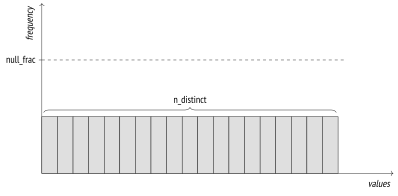
{#internal-fig-17-1 num="17.1" caption="17.3 Distinct Values" .book-original-figure width=796 height=392}
If the estimated number of distinct values is incorrect (because a limited number of rows have been analyzed), it can be overridden at the column level:
```sql
ALTER TABLE ...
ALTER COLUMN ...
SET (n_distinct = ...);
```
If all data always had uniform distribution, this information (coupled with minimal and maximal values) would be sufficient. However, for non-uniform distribution (which is much more common in practice), such estimation is inaccurate:
```psql
=> SELECT min(cnt), round(avg(cnt)) avg, max(cnt)
FROM (
SELECT departure_airport, count(*) cnt
FROM flights
GROUP BY departure_airport
) t;
min | avg | max
-----+------+-------
113 | 2066 | 20875
(1 row)
```
## 17.4 Most Common Values {#internal-section-17-4}
If data distribution is non-uniform, the estimation is fine-tuned based on statistics on most common values (MCV) and their frequencies. The `pg_stats` view displays these arrays in the `most_common_vals` and `most_common_freqs` fields, respectively.
![17.4 Most Common Values: frequency; \[ most\_common\_vals \]; \[ most\_common\_freqs \]; null\_frac; values](/images/internal/p278-02.svg)
{#internal-fig-17-2 num="17.2" caption="17.4 Most Common Values" .book-original-figure width=796 height=452}
Here is an example of such statistics on various types of aircraft:
```psql
=> SELECT most_common_vals AS mcv,
left(most_common_freqs::text,60) || '...' AS mcf
FROM pg_stats
WHERE tablename = 'flights' AND attname = 'aircraft_code' \gx
-[ RECORD 1 ]--------------------------------------------------------
mcv | {CN1,CR2,SU9,321,733,763,319,773}
mcf | {0.27886668,0.27266666,0.26176667,0.057166666,0.037666667,0....
```
To estimate the selectivity of the “*column* = *value*”condition, it is enough to find this value in the `most_common_vals` array and take its frequency from the `most_common_freqs` array element with the same index:[^internal-278-1]
```psql
=> EXPLAIN SELECT * FROM flights WHERE aircraft_code = '733';
QUERY PLAN
--------------------------------------------------------------
Seq Scan on flights (cost=0.00..5309.84 rows=8093 width=63)
Filter: (aircraft_code = '733'::bpchar)
(2 rows)
```
```psql
=> SELECT round(reltuples * s.most_common_freqs[
array_position((s.most_common_vals::text::text[]),'733')
])
FROM pg_class
JOIN pg_stats s ON s.tablename = relname
WHERE s.tablename = 'flights'
AND s.attname = 'aircraft_code';
round
-------
8093
(1 row)
```
It is obvious that such estimation will be close to the actual value:
```psql
=> SELECT count(*) FROM flights WHERE aircraft_code = '733';
count
-------
8263
(1 row)
```
The MCV list is also used to estimate selectivity of inequality conditions. For example, a condition like “*column* < *value*” requires the analyzer to search through `most_common_vals` for all the values that are smaller than the target one and sum up the corresponding frequencies listed in `most_common_freqs`.[^internal-279-1]
MCV statistics work best when distinct values are not too many. The maximum size of arrays is defined by the *default\_statistics\_target* parameter, which also limits the number of rows to be randomly sampled for the purpose of analysis. (*default:* `100`)
In some cases, it makes sense to increase the default parameter value, thus expanding the MCV list and improving the accuracy of estimations. You can do it at the column level:
```sql
ALTER TABLE ...
ALTER COLUMN ...
SET STATISTICS ...;
```
The sample size will also grow, but only for the specified table.
Since the MCV array stores actual values, it may take quite a lot of space. To keep the `pg_statistic` size under control and avoid loading the planner with useless work, values that are larger than 1 kB are excluded from analysis and statistics. But since such large values are likely to be unique, they would probably not make it into `most_common_vals` anyway.
## 17.5 Histogram {#internal-section-17-5}
If distinct values are too many to be stored in an array, PostgreSQL employs a histogram. In this case, values are distributed between several *buckets* of the histogram. The number of buckets is also limited by the *default\_statistics\_target* parameter.
![17.5 Histogram: frequency; \[ mcv \]; \[ mcf \]; null\_frac; values; \[ histogram\_bounds \]](/images/internal/p280-03.svg)
{#internal-fig-17-3 num="17.3" caption="17.5 Histogram" .book-original-figure width=796 height=460}
The bucket width is selected in such a way that each bucket gets approximately the same number of values (this property is reflected in the diagram by the equality of areas of big hatched rectangles). The values included into MCV lists are not taken into account. As a result, the cumulative frequency of values in each bucket equals \(\frac{1}{\text{number of buckets}}\).
The histogram is stored in the `histogram_bounds` field of the `pg_stats` view as an array of buckets’ boundary values:
```psql
=> SELECT left(histogram_bounds::text,60) || '...' AS hist_bounds
FROM pg_stats s
WHERE s.tablename = 'boarding_passes'
AND s.attname = 'seat_no';
hist_bounds
-----------------------------------------------------------------
{10B,10E,10F,10F,11H,12B,13B,14B,14H,15G,16B,17B,17H,19B,19B...
(1 row)
```
Combined with the MCV list, the histogram is used for operations like estimating the selectivity of *greater than* and *less than* conditions.[^internal-280-1]
For example, let’s take a look at the number of boarding passes issued for back rows:
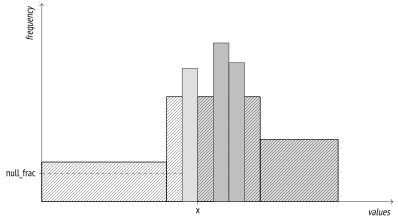
{#internal-fig-17-4 num="17.4" caption="17.5 Histogram" .book-original-figure width=796 height=442}
```psql
=> EXPLAIN SELECT *
FROM boarding_passes
WHERE seat_no > '30B';
QUERY PLAN
---------------------------------------------------------------------
Seq Scan on boarding_passes (cost=0.00..157350.10 rows=2983242 ...
Filter: ((seat_no)::text > '30B'::text)
(2 rows)
```
I have intentionally selected the seat number that lies right on the boundary between two histogram buckets.
The selectivity of this condition will be estimated at \(\frac{N}{\text{number of buckets}}\), where *N* is the number of buckets holding the values that satisfy the condition (that is, the ones located to the right of the specified value). It must also be taken into account that MCVs are not included into the histogram.
Incidentally, NULL values do not appear in the histogram either, but the `seat_no` column contains no such values anyway:
```psql
=> SELECT s.null_frac FROM pg_stats s
WHERE s.tablename = 'boarding_passes'
AND s.attname = 'seat_no';
null_frac
-----------
0
(1 row)
```
First, let’s find the fraction of MCVs that satisfy the condition:
```psql
=> SELECT sum(s.most_common_freqs[
array_position((s.most_common_vals::text::text[]),v)
])
FROM pg_stats s, unnest(s.most_common_vals::text::text[]) v
WHERE s.tablename = 'boarding_passes' AND s.attname = 'seat_no'
AND v > '30B';
sum
------------
0.21226665
(1 row)
```
The overall MCV share (ignored by the histogram) is:
```psql
=> SELECT sum(s.most_common_freqs[
array_position((s.most_common_vals::text::text[]),v)
])
FROM pg_stats s, unnest(s.most_common_vals::text::text[]) v
WHERE s.tablename = 'boarding_passes' AND s.attname = 'seat_no';
sum
------------
0.67816657
(1 row)
```
Since the values that conform to the specified condition take exactly 𝑁 buckets (out of 100 buckets possible), we get the following estimation:
```psql
=> SELECT round( reltuples * (
0.21226665 -- MCV share
+ (1 - 0.67816657 - 0) * (51 / 100.0) -- histogram share
))
FROM pg_class
WHERE relname = 'boarding_passes';
round
---------
2983242
(1 row)
```
In the generic case of non-boundary values, the planner applies linear interpolation to take into account the fraction of the bucket that contains the target value.
Here is the actual number of back seats:
```psql
=> SELECT count(*) FROM boarding_passes WHERE seat_no > '30B';
count
---------
2993735
(1 row)
```
As you increase the *default\_statistics\_target* value, estimation accuracy may improve, but as our example shows, the histogram combined with the MCV list usually gives good results even if the column contains many unique values:
```psql
=> SELECT n_distinct FROM pg_stats
WHERE tablename = 'boarding_passes' AND attname = 'seat_no';
n_distinct
------------
461
(1 row)
```
It makes sense to improve estimation accuracy only if it leads to better planning. Increasing the *default\_statistics\_target* value without giving it much thought may slow down planning and analysis without bringing any benefits in return. That said, reducing this parameter value (down to zero) can lead to a bad plan choice, even though it does speed up planning and analysis. Such savings are usually unjustified.
## 17.6 Statistics for Non-Scalar Data Types {#internal-section-17-6}
For non-scalar data types, PostgreSQL can gather statistics not only on the distribution of values, but also on the distribution of elements used to construct these values. It improves planning accuracy when you query columns that do not conform to the first normal form.
- The `most_common_elems` and `most_common_elem_freqs` arrays show the list of the *most common elements* and the frequency of their usage.
These statistics are collected and used to estimate selectivity of operations on arrays[^internal-283-1] and `tsvector`[^internal-283-2] data types.
- The `elem_count_histogram` array shows the histogram of the *number of distinct elements* in a value.
This data is collected and used for estimating selectivity of operations on arrays only.
- For range types, PostgreSQL builds distribution histograms for range length and lower and upper boundaries of the range. These histograms are used for estimating selectivity of various operations on these types,[^internal-284-1] but the `pg_stats` view does not display them.
Similar statistics are also collected for multirange data types.[^internal-284-2] (v. 14)
## 17.7 Average Field Width {#internal-section-17-7}
The `avg_width` field of the `pg_stats` view shows the average size of values stored in a column. Naturally, for types like `integer` or `char(3)` this size is always the same, but for data types of variable length, such as `text`, it can vary a lot from column to column:
```psql
=> SELECT attname, avg_width FROM pg_stats
WHERE (tablename, attname) IN ( VALUES
('tickets', 'passenger_name'), ('ticket_flights','fare_conditions')
);
attname | avg_width
-----------------+-----------
fare_conditions | 8
passenger_name | 16
(2 rows)
```
This statistic is used to estimate the amount of memory required for operations like sorting or hashing.
## 17.8 Correlation {#internal-section-17-8}
The `correlation` field of the `pg_stats` view shows the correlation between the physical order of data and the logical order defined by comparison operations. If values are stored strictly in ascending order, their correlation will be close to 1; if they are arranged in descending order, their correlation will be close to −1. The more chaotic is data distribution on disk, the closer is the correlation to zero.
```psql
=> SELECT attname, correlation
FROM pg_stats WHERE tablename = 'airports_data'
ORDER BY abs(correlation) DESC;
attname | correlation
--------------+-------------
coordinates |
airport_code | -0.21120238
city | -0.1970127
airport_name | -0.18223621
timezone | 0.17961165
(5 rows)
```
Note that this statistic is not gathered for the `coordinates` column: *less than* and *greater* *than* operators are not defined for the `point` type.
Correlation is used for cost estimation of index scans. (*p.* [331](/en/20-index-scans/#internal-page-331))
## 17.9 Expression Statistics {#internal-section-17-9}
Column-level statistics can be used only if either the left or the right part of the comparison operation refers to the column itself and does not contain any expressions. For example, the planner cannot predict how computing a function of a column will affect statistics, so for conditions like “*function-call* = *constant*” the selectivity is always estimated at 0.5 %:[^internal-285-1]
```psql
=> EXPLAIN SELECT * FROM flights
WHERE extract(
month FROM scheduled_departure AT TIME ZONE 'Europe/Moscow'
) = 1;
QUERY PLAN
---------------------------------------------------------------------
Seq Scan on flights (cost=0.00..6384.17 rows=1074 width=63)
Filter: (EXTRACT(month FROM (scheduled_departure AT TIME ZONE ...
(2 rows)
=> SELECT round(reltuples * 0.005)
FROM pg_class WHERE relname = 'flights';
round
-------
1074
(1 row)
```
The planner knows nothing about semantics of functions, even of standard ones. Our general knowledge suggests that the flights performed in January will make roughly \(\frac{1}{12}\) of the total number of flights, which exceeds the projected value by one order of magnitude.
To improve the estimation, we have to collect expression statistics rather than rely on the column-level one. There are two ways to do it.
### Extended Expression Statistics {#internal-section-star-124}
The first option is to use *extended expression statistics*.[^internal-286-1] Such statistics are not collected by default; you have to manually create the corresponding database object by running the `CREATE STATISTICS` command: (v. 14)
```psql
=> CREATE STATISTICS flights_expr ON (extract(
month FROM scheduled_departure AT TIME ZONE 'Europe/Moscow'
))
FROM flights;
```
Once the data is gathered, the estimation accuracy improves:
```psql
=> ANALYZE flights;
=> EXPLAIN SELECT * FROM flights
WHERE extract(
month FROM scheduled_departure AT TIME ZONE 'Europe/Moscow'
) = 1;
QUERY PLAN
---------------------------------------------------------------------
Seq Scan on flights (cost=0.00..6384.17 rows=16667 width=63)
Filter: (EXTRACT(month FROM (scheduled_departure AT TIME ZONE ...
(2 rows)
```
For the collected statistics to be applied, the query must specify the expression in exactly the same form that was used by the `CREATE STATISTICS` command.
The size limit for extended statistics can be adjusted separately, by running the `ALTER STATISTICS` command. For example: (v. 13)
```psql
=> ALTER STATISTICS flights_expr SET STATISTICS 42;
```
All the metadata related to extended statistics is stored in the `pg_statistic_ext` table of the system catalog, while the collected data itself resides in a separate table called `pg_statistic_ext_data`. This separation is used to implement access control for sensitive information. (v. 12)
Extended expression statistics available to a particular user can be displayed in a more convenient format in a separate view:
```psql
=> SELECT left(expr,50) || '...' AS expr,
null_frac, avg_width, n_distinct,
most_common_vals AS mcv,
left(most_common_freqs::text,50) || '...' AS mcf,
correlation
FROM pg_stats_ext_exprs
WHERE statistics_name = 'flights_expr' \gx
-[ RECORD 1 ]------------------------------------------------------
expr | EXTRACT(month FROM (scheduled_departure AT TIME ZO...
null_frac | 0
avg_width | 8
n_distinct | 12
mcv | {8,9,12,3,1,5,6,7,11,10,4,2}
mcf | {0.12053333,0.11326667,0.0802,0.07976667,0.0775666...
correlation | 0.08355749
```
### Statistics for Expression Indexes {#internal-section-star-125}
Another way to improve cardinality estimation is to use special statistics collected for expression indexes; these statistics are gathered automatically when such an index is created, just like it is done for a table. If the index is really needed, this approach turns out to be very convenient. (*p.* [319](/en/19-index-access-methods/#internal-page-319))
```psql
=> DROP STATISTICS flights_expr;
```
```psql
=> CREATE INDEX ON flights(extract(
month FROM scheduled_departure AT TIME ZONE 'Europe/Moscow'
));
```
```psql
=> ANALYZE flights;
```
```psql
=> EXPLAIN SELECT * FROM flights
WHERE extract(
month FROM scheduled_departure AT TIME ZONE 'Europe/Moscow'
) = 1;
QUERY PLAN
---------------------------------------------------------------------
Bitmap Heap Scan on flights (cost=324.86..3247.92 rows=17089 wi...
Recheck Cond: (EXTRACT(month FROM (scheduled_departure AT TIME...
-> Bitmap Index Scan on flights_extract_idx (cost=0.00..320.5...
Index Cond: (EXTRACT(month FROM (scheduled_departure AT TI...
(4 rows)
```
Statistics on expression indexes are stored in the same way as statistics on tables. For example, you can get the number of distinct values by specifying the index name as `tablename` when querying `pg_stats`:
```psql
=> SELECT n_distinct FROM pg_stats
WHERE tablename = 'flights_extract_idx';
n_distinct
------------
12
(1 row)
```
You can adjust the accuracy of index-related statistics using the `ALTER INDEX` command. If you do not know the column name that corresponds to the indexed expression, you have to first find it out. (v. 11)
For example:
```psql
=> SELECT attname FROM pg_attribute
WHERE attrelid = 'flights_extract_idx'::regclass;
attname
---------
extract
(1 row)
=> ALTER INDEX flights_extract_idx
ALTER COLUMN extract SET STATISTICS 42;
```
## 17.10 Multivariate Statistics {#internal-section-17-10}
It is also possible to collect *multivariate statistics*, which span several table columns. As a prerequisite, you have to manually create the corresponding extended statistics using the `CREATE STATISTICS` command.
PostgreSQL implements three types of multivariate statistics.
### Functional Dependencies Between Columns {#internal-section-star-126}
If values in one column depend (fully or partially) on values in another column and the filter conditions include both these columns, cardinality will be underestimated. (v. 10)
Let’s consider a query with two filter conditions:
```psql
=> SELECT count(*) FROM flights
WHERE flight_no = 'PG0007' AND departure_airport = 'VKO';
count
-------
396
(1 row)
```
The value is hugely underestimated:
```psql
=> EXPLAIN SELECT * FROM flights
WHERE flight_no = 'PG0007' AND departure_airport = 'VKO';
QUERY PLAN
---------------------------------------------------------------------
Bitmap Heap Scan on flights (cost=10.49..816.84 rows=15 width=63)
Recheck Cond: (flight_no = 'PG0007'::bpchar)
Filter: (departure_airport = 'VKO'::bpchar)
-> Bitmap Index Scan on flights_flight_no_scheduled_departure_key
(cost=0.00..10.49 rows=276 width=0)
Index Cond: (flight_no = 'PG0007'::bpchar)
(6 rows)
```
It is a well-known *problem of correlated predicates*. The planner assumes that predicates do not depend on each other, so the overall selectivity is estimated at the product of selectivities of filter conditions combined by logical AND. The plan above clearly illustrates this issue: the value estimated by the `Bitmap Index Scan` node for the condition on the `flight_no` column is significantly reduced once the `Bitmap Heap Scan` node filters the results by the condition on the `departure_airport` column. (*p.* [263](/en/16-query-execution-stages/#internal-page-263))
However, we do understand that airports are unambiguously defined by flight numbers: the second condition is virtually redundant (unless there is a mistake in the airport name, of course). In such cases, we can improve the estimation by applying extended statistics on functional dependencies.
Let’s create an extended statistic on the functional dependency between the two columns:
```psql
=> CREATE STATISTICS flights_dep(dependencies)
ON flight_no, departure_airport FROM flights;
```
The next analysis run gathers this statistic, and the estimation improves:
```psql
=> ANALYZE flights;
=> EXPLAIN SELECT * FROM flights
WHERE flight_no = 'PG0007'
AND departure_airport = 'VKO';
QUERY PLAN
---------------------------------------------------------------------
Bitmap Heap Scan on flights (cost=10.57..819.51 rows=277 width=63)
Recheck Cond: (flight_no = 'PG0007'::bpchar)
Filter: (departure_airport = 'VKO'::bpchar)
-> Bitmap Index Scan on flights_flight_no_scheduled_departure_key
(cost=0.00..10.50 rows=277 width=0)
Index Cond: (flight_no = 'PG0007'::bpchar)
(6 rows)
```
The collected statistics is stored in the system catalog and can be accessed like this:
```psql
=> SELECT dependencies
FROM pg_stats_ext
WHERE statistics_name = 'flights_dep';
dependencies
------------------------------------------
{"2 => 5": 1.000000, "5 => 2": 0.010200}
(1 row)
```
Here 2 and 5 are column numbers stored in the `pg_attribute` table, whereas the corresponding values define the degree of functional dependency: from 0 (no dependency) to 1 (values in the second columns fully depend on values in the first column).
### Multivariate Number of Distinct Values {#internal-section-star-127}
Statistics on the number of unique combinations of values stored in different columns improves cardinality estimation of a `GROUP BY` operation performed on several columns. (v. 10)
For example, here the estimated number of possible pairs of departure and arrival airports is the square of the total number of airports; however, the actual value is much smaller, as not all the pairs are connected by direct flights:
```psql
=> SELECT count(*)
FROM (
SELECT DISTINCT departure_airport, arrival_airport FROM flights
) t;
count
-------
618
(1 row)
=> EXPLAIN SELECT DISTINCT departure_airport, arrival_airport
FROM flights;
QUERY PLAN
--------------------------------------------------------------------
HashAggregate (cost=5847.01..5955.16 rows=10816 width=8)
Group Key: departure_airport, arrival_airport
-> Seq Scan on flights (cost=0.00..4772.67 rows=214867 width=8)
(3 rows)
```
Let’s define and collect an extended statistic on distinct values:
```psql
=> CREATE STATISTICS flights_nd(ndistinct)
ON departure_airport, arrival_airport FROM flights;
=> ANALYZE flights;
```
The cardinality estimation has improved:
```psql
=> EXPLAIN SELECT DISTINCT departure_airport, arrival_airport
FROM flights;
QUERY PLAN
--------------------------------------------------------------------
HashAggregate (cost=5847.01..5853.19 rows=618 width=8)
Group Key: departure_airport, arrival_airport
-> Seq Scan on flights (cost=0.00..4772.67 rows=214867 width=8)
(3 rows)
```
You can view the collected statistic in the system catalog:
```psql
=> SELECT n_distinct
FROM pg_stats_ext
WHERE statistics_name = 'flights_nd';
n_distinct
---------------
{"5, 6": 618}
(1 row)
```
### Multivariate MCV Lists {#internal-section-star-128}
If the distribution of values is non-uniform, it may be not enough to rely on the functional dependency alone, as the estimation accuracy will highly depend on a particular pair of values. For example, the planner underestimates the number of flights performed by Boeing 737 from Sheremetyevo airport: (v. 12)
```psql
=> SELECT count(*)
FROM flights
WHERE departure_airport = 'SVO' AND aircraft_code = '733';
count
-------
2037
(1 row)
=> EXPLAIN SELECT *
FROM flights
WHERE departure_airport = 'SVO' AND aircraft_code = '733';
QUERY PLAN
---------------------------------------------------------------------
Seq Scan on flights (cost=0.00..5847.00 rows=736 width=63)
Filter: ((departure_airport = 'SVO'::bpchar) AND (aircraft_cod...
(2 rows)
```
In this case, you can improve the estimation by collecting statistics on multivariate MCV lists:[^internal-292-1]
```psql
=> CREATE STATISTICS flights_mcv(mcv)
ON departure_airport, aircraft_code FROM flights;
=> ANALYZE flights;
```
The new cardinality estimation is much more accurate:
```psql
=> EXPLAIN SELECT *
FROM flights
WHERE departure_airport = 'SVO' AND aircraft_code = '733';
QUERY PLAN
---------------------------------------------------------------------
Seq Scan on flights (cost=0.00..5847.00 rows=1927 width=63)
Filter: ((departure_airport = 'SVO'::bpchar) AND (aircraft_cod...
(2 rows)
```
To get this estimation, the planner relies on the frequency values stored in the system catalog:
```psql
=> SELECT values, frequency
FROM pg_statistic_ext stx
JOIN pg_statistic_ext_data stxd ON stx.oid = stxd.stxoid,
pg_mcv_list_items(stxdmcv) m
WHERE stxname = 'flights_mcv'
AND values = '{SVO,773}';
values | frequency
-----------+----------------------
{SVO,773} | 0.005266666666666667
(1 row)
```
Just like a regular MCV list, a multivariate list holds *default\_statistics\_target* values (if this parameter is also set at the column level, the largest of its values is used). (*default:* `100`)
If required, you can also change the size of the list, like it is done for extended expression statistics: (v. 13)
```sql
ALTER STATISTICS ... SET STATISTICS ...;
```
In all these examples, I have used only two columns, but you can collect multivariate statistics on a larger number of columns too.
To combine statistics of several types in one object, you can provide a comma-separated list of these types in its definition. If no type is specified, PostgreSQL will collect statistics of all the possible types for the specified columns.
Apart from the actual column names, multivariate statistics can also use arbitrary expressions, just like expression statistics. (v. 14)
[^internal-271-1]: [postgresql.org/docs/14/planner-stats.html]()
[^internal-271-2]: [backend/commands/analyze.c](), do\_analyze\_rel function
[^internal-272-1]: [backend/commands/cluster.c](), copy\_table\_data function
[^internal-272-2]: [backend/catalog/heap.c](), index\_update\_stats function
[^internal-272-3]: [backend/access/heap/vacuumlazy.c](), heap\_vacuum\_rel function
[^internal-272-4]: [backend/commands/analyze.c](), std\_typanalyze function
[^internal-272-5]: [backend/commands/analyze.c](), acquire\_sample\_rows function [backend/utils/misc/sampling.c]()
[^internal-273-1]: [backend/access/table/tableam.c](), table\_block\_relation\_estimate\_size function
[^internal-274-1]: [backend/access/table/tableam.c](), table\_block\_relation\_estimate\_size function
[^internal-274-2]: [sigmodrecord.org/publications/sigmodRecord/0809/p20.date.pdf]()
[^internal-275-1]: [include/catalog/pg\_statistic.h]()
[^internal-276-1]: [backend/commands/analyze.c](), compute\_distinct\_stats function
[^internal-276-2]: [backend/utils/adt/selfuncs.c](), var\_eq\_non\_const function
[^internal-278-1]: [backend/utils/adt/selfuncs.c](), var\_eq\_const function
[^internal-279-1]: [backend/utils/adt/selfuncs.c](), scalarineqsel function
[^internal-280-1]: [backend/utils/adt/selfuncs.c](), ineq\_histogram\_selectivity function
[^internal-283-1]: [postgresql.org/docs/14/arrays.html]() [backend/utils/adt/array\_typanalyze.c]() [backend/utils/adt/array\_selfuncs.c]()
[^internal-283-2]: [postgresql.org/docs/14/datatype-textsearch.html]() [backend/tsearch/ts\_typanalyze.c]() [backend/tsearch/ts\_selfuncs.c]()
[^internal-284-1]: [postgresql.org/docs/14/rangetypes.html]() [backend/utils/adt/rangetypes\_typanalyze.c]() [backend/utils/adt/rangetypes\_selfuncs.c]()
[^internal-284-2]: [backend/utils/adt/multirangetypes\_selfuncs.c]()
[^internal-285-1]: [backend/utils/adt/selfuncs.c](), eqsel function
[^internal-286-1]: [postgresql.org/docs/14/planner-stats#PLANNER-STATS-EXTENDED.html]() [backend/statistics/README]()
[^internal-292-1]: [backend/statistics/README.mcv]() [backend/statistics/mcv.c]()