16 Query Execution Stages
PostgreSQL 14 · Translated from Russian by Liudmila Mantrova · Chinese translation by Xiong Cancan
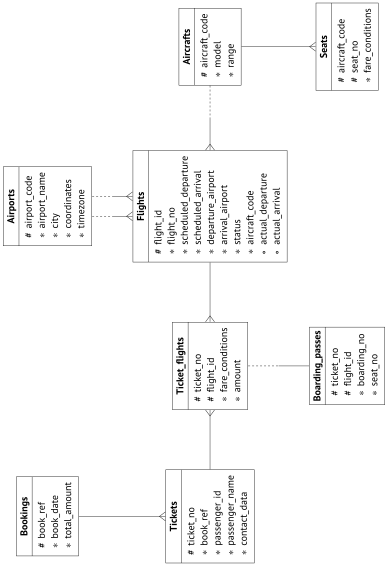
16.1 Demo Database
The examples in the previous parts of the book were based on simple tables with only a handful of rows. This and subsequent parts deal with query execution, which is more demanding in this respect: we need related tables that have a much larger number of rows. Instead of inventing a new data set for each example, I took an existing demo database that illustrates passenger air traffic in Russia.1 It has several versions; we will use the bigger one created on August 15, 2017. To install this version, you have to extract the file containing the database copy from the archive2 and run this file in psql.
When developing this demo database, we tried to make its schema simple enough to be understood without extra explanations; at the same time, we wanted it to be complex enough to allow writing meaningful queries. The database is filled with true-to-life data, which makes the examples more comprehensive and should be interesting to work with.
Here I will cover the main database objects only briefly; if you would like to review the whole schema, you can take a look at its full description referenced in the footnote.
The main entity is a booking (mapped to the bookings table). One booking can include several passengers, each with a separate electronic ticket (tickets). A passenger does not constitute a separate entity; for the purpose of our experiments, we will assume that all passengers are unique.
Each ticket includes one or more flight segments (mapped to the ticket_flights table). A single ticket can have several flight segments in two cases: either it is a round-trip ticket, or it is issued for connecting flights. Although there is no corresponding constraint in the schema, all tickets in a booking are assumed to have the same flight segments.
Each flight (flights) goes from one airport (airports) to another. Flights with the same flight number have the same points of departure and destination but different departure dates.
The routes view is based on the flights table; it displays the information on routes that does not depend on particular flight dates.
At check-in, each passenger is issued a boarding pass (boarding_passes) with a seat number. A passenger can check in for a flight only if this flight is included into the ticket. Flight-seat combinations must be unique, so it is impossible to issue two boarding passes for the same seat.
The number of seats (seats) in an aircraft and their distribution between different travel classes depend on the particular model of the aircraft (aircrafts) that performs the flight. It is assumed that each aircraft model can have only one cabin configuration.
Some tables have surrogate primary keys, while others use natural ones (some of them being composite). It is done solely for demonstration purposes and is by no means an example to follow.
The demo database can be thought of as a dump of a real system: it contains a snapshot of data taken at a particular time in the past. To display this time, you can call the bookings.now() function. Use this function in demo queries that would demand the now() function in real life.
The names of airports, cities, and aircraft models are stored in the airports_data and aircrafts_data tables; they are provided in two languages, English and Russian. To construct examples for this chapter, I will typically query the airports and aircrafts views shown in the entity-relationship diagram; these views choose the output language based on the bookings.lang parameter value. The names of some base tables can still appear in query plans though. (default: en)
16.2 Simple Query Protocol
A simple version of the client-server protocol3 enables SQL query execution: it sends the text of a query to the server and gets the full execution result in response, no matter how many rows it contains.4 A query sent to the server passes several stages: it is parsed, transformed, planned, and then executed.
Parsing
First of all, PostgreSQL has to parse5 the query text to understand what needs to be executed.
Lexical and syntactic analysis. The lexer splits the query text into a set of lexemes6 (such as keywords, string literals, and numeric literals), while the parser validates this set against the SQL language grammar.7 PostgreSQL relies on standard parsing tools, namely Flex and Bison utilities.
The parsed query is reflected in the backend’s memory as an abstract syntax tree.
For example, let’s take a look at the following query:
The lexer singles out five keywords, five identifiers, a string literal, and three single-letter lexemes (a comma, an equals sign, and a semicolon). The parser uses these lexemes to build the parse tree, which is shown in the illustration below in a very simplified form. The captions next to the tree nodes specify the corresponding parts of the query:
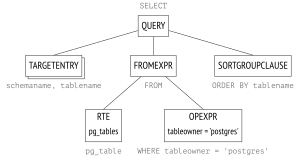
A rather obscure RTE abbreviation stands for Range Table Entry. PostgreSQL source code uses the term range table to refer to tables, subqueries, join results—in other words, to any sets of rows that can be processed by SQL operators.8
Semantic analysis. The purpose of semantic analysis9 is to find out whether the database contains any tables or other objects that this query refers to by name, and whether the user has permission to access these objects. All the information required for semantic analysis is stored in the system catalog. (p. 21)
Having received the parse tree, the semantic analyzer performs its further restructuring, which includes adding references to specific database objects, data types, and other information.
If you enable the debug_print_parse parameter, you can view the full parse tree in the server log, but it has little practical sense.
Transformation
At the next stage, the query can be transformed (rewritten).10
PostgreSQL core uses transformations for several purposes. One of them is to replace the name of the view in the parse tree with the subtree corresponding to the base query of this view.
Another case of using transformations is row-level security implementation.11
The SEARCH and CYCLE clauses of recursive queries also get transformed during this stage.12 (v. 14)
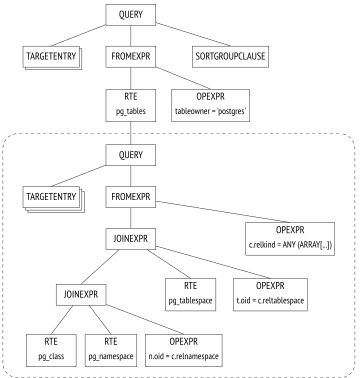
In the example above, pg_tables is a view; if we placed its definition into the query text, it would look as follows:
However, the server does not process the text representation of the query; all manipulations are performed on the parse tree. The illustration shows a reduced version of the transformed tree (you can view its full version in the server log if you enable the debug_print_rewritten parameter).
The parse tree reflects the syntactic structure of the query, but it says nothing about the order in which the operations should be performed.
PostgreSQL also supports custom transformations, which the user can implement via the rewrite rule system.13
The rule system support was proclaimed as one of the main objectives of Postgres development;14 it was still an academic project when the rules were first implemented, but since then they have
been redesigned multiple times. The rule system is a very powerful mechanism, but it is rather hard to comprehend and debug. It was even proposed to remove the rules from PostgreSQL altogether, but the idea did not find unanimous support. In most cases, it is safer and easier to use triggers instead of rules.
Planning
SQL is a declarative language: queries specify what data to fetch, but not how to fetch it.
Any query has several execution paths. Each operation shown in the parse tree can be completed in a number of ways: for example, the result can be retrieved by reading the whole table (and filtering out redundancies), or by finding the required rows via an index scan. Data sets are always joined in pairs, so there is a huge number of options that differ in the order of joins. Besides, there are various join algorithms: for example, the executor can scan the rows of the first data set and search for the matching rows in the other set, or both data sets can be first sorted and then merged together. For each algorithm, we can find a use case where it performs better than others.
The execution times of optimal and non-optimal plans can differ by orders of magnitude, so the planner15 that optimizes the parsed query is one of the most complex components of the system.
Plan tree. The execution plan is also represented as a tree, but its nodes deal with physical operations on data rather than logical ones.
If you would like to explore full plan trees, you can dump them into the server log by enabling the debug_print_plan parameter. But in practice it is usually enough to view the text representation of the plan displayed by the EXPLAIN command.16
The following illustration highlights the main nodes of the tree. It is exactly these nodes that are shown in the output of the EXPLAIN command provided below.
For now, let’s pay attention to the following two points:
The tree contains only two queried tables out of three: the planner saw that one of the tables is not required for retrieving the result and removed it from the plan tree.
For each node of the tree, the planner provides the estimated
costand the number ofrowsexpected to be processed.
Seq Scan nodes shown in the query plan correspond to reading the table, while the Nested Loop node represents the join operation. (p. 296) (p. 351)
![Planning: PLANNEDSTMT; SORT; TARGETENTRYNESTLOOP; SEQSCANSEQSCANOPEXPR; TARGETENTRY; pg\_classpg\_namespacen.oid = c.relnamespace; OPEXPR; relkind = ANY (‘r,p’::“char”\[\]) AND pg\_get\_userbyid(relowner) = ‘postgres’::name](/images/internal/p258-04.svg)
Plan search. PostgreSQL uses a cost-based optimizer;17 it goes over potential plans and estimates the resources required for their execution (such as I/O operations or CPU cycles). Normalized to a numeric value, this estimation is called the cost of the plan. Of all the considered plans, the one with the lowest cost is selected.
The problem is that the number of potentially available plans grows exponentially with the number of joined tables, so it is impossible to consider them all—even for relatively simple queries. The search is typically narrowed down using the dynamic programming algorithm combined with some heuristics. It allows the planner to find a mathematically accurate solution for queries with a larger number of tables within acceptable time.
An accurate solution does not guarantee that the selected plan is really the optimal one, as the planner uses simplified mathematical models and may lack reliable input data.
Managing the order of joins. A query can be structured in a way that limits the search scope to some extent (at a risk of missing the optimal plan).
Common table expressions and the main query can be optimized separately; to guarantee such behavior, you can specify the
MATERIALIZEDclause.18 (v. 12)Subqueries run within non-SQL functions are always optimized separately. (SQL functions can sometimes be inlined into the main query.19)
If you set the join_collapse_limit parameter and use explicit
JOINclauses in the query, the order of some joins will be defined by the syntax structure of the query; the from_collapse_limit parameter has the same effect on subqueries.20
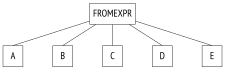
The latter point may have to be explained. Let’s take a look at the query that does not specify any explicit joins for tables listed in the FROM clause:
Here the planner will have to consider all the possible pairs of joins. The query is represented by the following part of the parse tree (shown schematically):
In the next example, joins have a certain structure defined by the JOIN clause:
The parse tree reflects this structure:
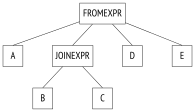
The planner typically flattens the join tree, so that it looks like the one in the first example. The algorithm recursively traverses the tree and replaces each JOINEXPR node with a flat list of its elements.21
However, such collapsing is performed only if the resulting flat list has no more than join_collapse_limit elements. In this particular case, the JOINEXPR node would not be collapsed if the join_collapse_limit value were less than five. (default: 8)
For the planner, it means the following:
Table
Bmust be joined with tableC(or vice versa,Cmust be joined withB; the order of joins within a pair is not restricted).Tables
A,D,Eand the result of joiningBandCcan be joined in any order.
If the join_collapse_limit parameter is set to one, the order defined by explicit JOIN clauses is preserved.
As for FULL OUTER JOIN operands, they are never collapsed, regardless of the value of the join_collapse_limit parameter.
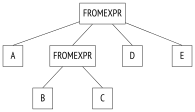
The from_collapse_limit parameter controls subquery flattening in a similar way. Although subqueries do not look like JOIN clauses, the similarity becomes apparent at the parse tree level. (default: 8)
Here is a sample query:
The corresponding join tree is shown below. The only difference here is that this tree contains the FROMEXPR node instead of JOINEXPR (hence the parameter name).
Genetic query optimization. Once flattened, the tree may contain too many elements at one level—either tables or join results, which have to be optimized separately. Planning time depends exponentially on the number of data sets that have to be joined, so it can grow beyond all reasonable limits.
If the geqo parameter is enabled and the number of elements at one level exceeds the geqo_threshold value, the planner will use the genetic algorithm to optimize the query.22 This algorithm is much faster than its dynamic programming counterpart, but it cannot guarantee that the found plan will be optimal. So the rule of thumb is to avoid using the genetic algorithm by reducing the number of elements that have to be optimized. (default: on) (default: 12)
The genetic algorithm has several configurable parameters,23 but I am not going to cover them here.
Choosing the best plan. Whether the plan can be considered optimal or not depends on how a particular client is going to use the query result. If the client needs the full result at once (for example, to create a report), the plan should optimize retrieval of all the rows. But if the priority is to return the first rows as soon as possible (for example, to display them on screen), the optimal plan might be completely different.
To make this choice, PostgreSQL calculates two components of the cost:
The first component (the startup cost) represents the price you pay to prepare for node execution, while the second component (the total cost) comprises all the expenses incurred by fetching the result.
It is sometimes stated that the startup cost is the cost of retrieving the first row of the result set, but it is not quite accurate.
To single out the preferred plans, the optimizer checks whether the query uses a cursor (either via the DECLARE command provided in SQL or declared explicitly in PL/pgSQL).24 If not, the client is assumed to need the whole result at once, and the optimizer chooses the plan with the least total cost.
If the query is executed with a cursor, the selected plan must optimize retrieval of only cursor_tuple_fraction of all rows. To be more exact, PostgreSQL chooses the plan with the smallest value of the following expression:25 (default: 0.1)
startup cost + cursor_tuple_fraction (total cost − startup cost)
An outline of cost estimation. To estimate the total cost of a plan, we have to get cost estimations for all its nodes. The cost of a node depends on its type (it is obvious that the cost of reading heap data is not the same as the sorting cost) and on the amount of data processed by this node (larger data volumes typically incur higher costs). While node types are known, the amount of data can only be projected based on the estimated cardinality of input sets (the number of rows the node takes as input) and the selectivity of the node (the fraction of rows remaining at the output). These calculations rely on the collected statistics, such as table sizes and data distribution in table columns. (p. 271)
Thus, the performed optimization depends on correctness of statistical data that is gathered and updated by autovacuum.
If cardinality estimation is accurate for each node, the calculated cost is likely to adequately reflect the actual cost. The main planning flaws usually result from incorrect estimation of cardinality and selectivity, which can be caused by inaccurate or outdated statistics, inability to use it, or—to a lesser extent—by imperfect planning models.
Cardinality estimation. To calculate the cardinality of a node, the planner has to recursively complete the following steps:
Estimate the cardinality of each child node and assess the number of input rows that the node will receive from them.
Estimate the selectivity of the node, that is, the fraction of input rows that will remain at the output.
The cardinality of the node is the product of these two values.
Selectivity is represented by a number from 0 to 1. The smaller the number, the higher the selectivity, and vice versa, a number that is close to one denotes low selectivity. It may seem illogical, but the idea is that a highly selective condition rejects almost all the rows, while the one that dismisses only a few has low selectivity.
First, the planner estimates cardinalities of leaf nodes that define data access methods. These calculations rely on the collected statistics, such as the total size of the table.
Selectivity of filter conditions depends on their types. In the most trivial case, it can be assumed to be a constant value, although the planner tries to use all the available information to refine the estimation. In general, it is enough to know how to estimate simple filter conditions; if a condition includes logical operations, its selectivity is calculated by the following formulas:26
selx and y = selx sely selx or y = 1 −(1 − selx)(1 − sely) = selx + sely − selx sely
Unfortunately, these formulas assume that predicates x and y do not depend on each other. For correlated predicates, such estimations will be inaccurate. (p. 288)
To estimate the cardinality of joins, the planner has to get the cardinality of the Cartesian product (that is, the product of cardinalities of two data sets) and estimate the selectivity of join conditions, which is again dependent on condition types.
Cardinality of other nodes (such as sorting or aggregation) is estimated in a similar way.
It is important to note that incorrect cardinality estimation for lower plan nodes affects all the subsequent calculations, leading to inaccurate total cost estimation and a poor plan choice. To make things worse, the planner has no statistics on join results, only on tables.
Cost estimation. The process of estimating the cost is also recursive. To calculate the cost of a subtree, it is required to calculate and sum up the costs of all its child nodes and then add the cost of the parent node itself.
To estimate the cost of a node, PostgreSQL applies the mathematical model of the operation performed by this node, using the already estimated node cardinality as input. For each node, both startup and total costs are calculated.
Some operations have no prerequisites, so their execution starts immediately; such nodes have zero startup cost.
Other operations, on the contrary, need to wait for some preliminary actions to complete. For example, a sort node usually has to wait for all the data from its child nodes before it can proceed to its own tasks. The startup cost of such nodes is usually higher than zero: this price has to be paid even if the above node (or the client) needs only one row of the whole output.
All calculations performed by the planner are simply estimations, which may have nothing to do with the actual execution time. Their only purpose is to enable comparison of different plans for the same query in the same conditions. In other cases, it makes no sense to compare queries (especially different ones) in terms of their cost. For example, the cost could have been underestimated because of outdated statistics; once the statistics are refreshed, the calculated figure may rise, but since the estimation becomes more accurate, the server will choose a better plan.
Execution
The plan built during query optimization now has to be executed.27
The executor opens a portal in the backend’s memory;28 it is an object that keeps the state of the query currently being executed. This state is represented as a tree that repeats the structure of the plan tree. The nodes of this tree operate like an assembly line, requesting and sending rows from one another.
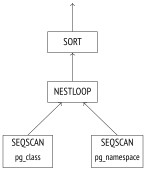
Query execution starts at the root. The root node (which represents the SORT operation in this example) pulls the data from its child node. Having received all the rows, it sorts them and passes them on to the client.
Some nodes (like the NESTLOOP node shown in this illustration) join data sets received from different sources. Such a node pulls the data from two child nodes, and, having received a pair of rows that satisfy the join condition, passes the resulting row upwards right away (unlike sorting, which has to get all the rows first). At this point, the execution of the node is interrupted until its parent requests the next row. If only a partial result is required (for example, there is a LIMIT clause in the query), the operation will not be performed in full.
The two SEQSCAN leaf nodes of the tree are responsible for table scans. When the parent node requests the data from these nodes, they fetch the subsequent row from the corresponding table.
Thus, some nodes do not store any rows, passing them upwards immediately, but others (such as SORT) have to keep potentially large volumes of data. For this purpose, a work_mem chunk is allocated in the backend’s memory; if it is not enough, the remaining data is spilled into temporary files on disk.29 (default: 4MB)
A plan can have several nodes that need a data storage, so PostgreSQL may allocate several memory chunks, each of the work_mem size. The total size of RAM that a query can use is not limited in any way.
16.3 Extended Query Protocol
When using the simple query protocol, each command (even if it is being repeated multiple times) has to go through all the aforementioned stages:
1 parsing
2 transformation
3 planning
4 execution
However, there is no point in parsing the same query time and again. Repeated parsing of queries that differ only in constants does not make much sense either—the parse tree structure still remains the same.
Another downside of the simple query protocol is that the client receives the whole result at once, regardless of the number of rows it may contain.
In general, it is possible to get over these limitations using SQL commands. To deal with the first one, you can PREPARE the query before running the EXECUTE command; the second concern can be addressed by creating a cursor with DECLARE and returning rows via FETCH. But in this case, naming of these newly created objects must be handled by the client, while the server gets additional overhead of parsing extra commands.
The extended client-server protocol provides an alternative solution, enabling precise control over separate operator execution stages at the command level of the protocol itself.
Preparation
During the preparation stage, the query is parsed and transformed as usual, but the resulting parse tree is kept in the backend’s memory.
PostgreSQL has no global cache for queries. The disadvantage of this architecture is obvious: each backend has to parse all the incoming queries, even if the same query has been already parsed by another backend. But there are some benefits too. Global cache can easily become a bottleneck because of locks. A client running multiple small but different queries (like the ones varying only in constants) generates much traffic and can negatively affect performance of the whole instance. In PostgreSQL, queries are parsed locally, so there is no impact on other processes. (p. 240)
A prepared query can be parameterized. Here is a simple example using SQL commands (although it is not the same as preparation at the protocol level, the ultimate effect is the same):
All the named prepared statements are shown in the pg_prepared_statements view:
You will not find any unnamed statements here (the ones that use the extended query protocol or PL/pgSQL). The statements prepared by other backends are not displayed either: it is impossible to access the other session’s memory.
Parameter Binding
Before a prepared statement gets executed, the actual parameter values have to be bound.
The advantage of binding parameters in prepared statements over concatenating literals with query strings is that it makes SQL injections absolutely impossible: a bound parameter value cannot modify the already built parse tree in any way. To reach the same security level without prepared statements, you would have to carefully escape each value received from an untrusted source.
Planning and Execution
When it comes to prepared statement execution, query planning is performed based on the actual parameter values; then the plan is passed on to the executor.
Different parameter values may imply different optimal plans, so it is important to take the exact values into account. For example, when looking for expensive bookings, the planner assumes that there are not so many matching rows and uses an index scan:
But if the provided condition is satisfied by all the bookings, there is no point in using an index, as the whole table has to be scanned:
In some cases, the planner may keep both the parse tree and the query plan to avoid repeated planning. Such a plan does not take parameter values into account, so it is called a generic plan (as compared to custom plans based on the actual values).30
An obvious case when the server can use a generic plan without compromising performance is a query with no parameters.
The first five optimizations of parameterized prepared statements always rely on the actual parameter values; the planner calculates the average cost of custom plans based on these values. Starting from the sixth execution, if the generic plan turns out to be more efficient than custom plans on average (taking into account that custom plans have to be built anew every time),31 the planner keeps the generic plan and continues using it, skipping the optimization stage.
The plane prepared statement has already been executed once. After the next three executions, the server still uses custom plans—you can tell by the parameter value in the query plan:
After the fifth execution, the planner switches to the generic plan: it does not differ from the custom ones and has the same cost, but the backend can build it once and skip the optimization stage, thus reducing planning overhead. The EXPLAIN command now shows that the parameter is referred to by position rather than by its value:
We can easily imagine an unhappy turn of events when the first several custom plans are more expensive than the generic plan; subsequent plans could have been more efficient, but the planner will not consider them at all. Besides, it compares estimations rather than actual costs, which can also lead to miscalculations.
However, if the planner makes a mistake, you can override the automatic decision and select either the generic or a custom plan by setting the plan_cache_mode parameter accordingly: (v. 12) (default: auto)
Among other things, the pg_prepared_statements view shows statistics on chosen plans: (v. 14)
Getting the Results
The extended query protocol allows retrieving data in batches rather than all at once. SQL cursors have almost the same effect (except that there is some extra work for the server, and the planner optimizes fetching of the first cursor_tuple_fraction rows, not the whole result set):
If the query returns many rows and the client needs them all, the system throughput highly depends on the batch size. The more rows in a batch, the less communication overhead is incurred by accessing the server and getting the response. But as the batch size grows, these benefits become less tangible: while the difference between fetching rows one by one and in batches of ten rows can be enormous, it is much less noticeable if you compare batches of 100 and 1000 rows.
backend/tcop/postgres.c, exec_simple_query function ↩︎
postgresql.org/docs/14/parser-stage.html backend/parser/README ↩︎
backend/optimizer/plan/initsplan.c, deconstruct_jointree function ↩︎
postgresql.org/docs/14/geqo.html backend/optimizer/geqo/geqo_main.c ↩︎
postgresql.org/docs/14/runtime-config-query.html#RUNTIME-CONFIG-QUERY-GEQO ↩︎
backend/optimizer/plan/planner.c, standard_planner function ↩︎
backend/optimizer/util/pathnode.c, compare_fractional_path_costs function ↩︎
backend/optimizer/path/clausesel.c, clauselist_selectivity_ext & clauselist_selectivity_or functions ↩︎
postgresql.org/docs/14/executor.html backend/executor/README ↩︎
backend/utils/cache/plancache.c, choose_custom_plan function ↩︎
backend/utils/cache/plancache.c, cached_plan_cost function ↩︎