13 Row-Level Locks
PostgreSQL 14 · Translated from Russian by Liudmila Mantrova · Chinese translation by Xiong Cancan
13.1 Lock Design
Thanks to snapshot isolation, heap tuples do not have to be locked for reading. However, two write transactions must not be allowed to modify the same row at the same time. Rows must be locked in this case, but heavyweight locks are not a very good choice for this purpose: each of them takes space in the server’s shared memory (hundreds of bytes, not to mention all the supporting infrastructure), and PostgreSQL internal mechanisms are not designed to handle a huge number of concurrent heavyweight locks.
Some database systems solve this problem by lock escalation: if row-level locks are too many, they are replaced by a single lock of finer granularity (for example, by a page-level or table-level lock). It simplifies the implementation, but can greatly limit system throughput at the same time.
In PostgreSQL, the information on whether a particular row is locked is kept only in the header of its current heap tuple. Row-level locks are virtually attributes in heap pages rather than actual locks, and they are not reflected in RAM in any way.
A row is typically locked when it is being updated or deleted. In both cases, the current version of the row is marked as deleted. The attribute used for this purpose is the current transaction’s ID specified in the xmax field, and it is the same ID (combined with additional hint bits) that indicates that the row is locked. If a transaction wants to modify a row but sees an active transaction ID in the xmax field of its current version, it has to wait for this transaction to complete. Once it is over, all the locks are released, and the waiting transaction can proceed. (p. 72)
This mechanism allows locking as many rows as required at no extra cost.
The downside of this solution is that other processes cannot form a queue, as RAM contains no information about such locks. Therefore, heavyweight locks are still required: a process waiting for a row to be released requests a lock on the ID of the transaction currently busy with this row. Once the transaction completes, the row becomes available again. Thus, the number of heavyweight locks is proportional to the number of concurrent processes rather than rows being modified.
13.2 Row-Level Locking Modes
Row-level locks support four modes.1 Two of them implement exclusive locks that can be acquired by only one transaction at a time, while the other two provide shared locks that can be held by several transactions simultaneously.
Here is the compatibility matrix of these modes:
| Mode | Key Share | Share | No Key Update | Update |
|---|---|---|---|---|
| Key Share | × | |||
| Share | × | × | ||
| No Key Update | × | × | × | |
| Update | × | × | × | × |
Exclusive Modes
The Update mode allows modifying any tuple fields and even deleting the whole tuple, while the No Key Update mode permits only those changes that do not involve any fields related to unique indexes (in other words, foreign keys must not be affected).
The UPDATE command automatically chooses the weakest locking mode possible; keys usually remain unchanged, so rows are typically locked in the No Key Update mode.
Let’s create a function that uses pageinspect to display some tuple metadata that we are interested in, namely the xmax field and several hint bits:
Now start a transaction on the accounts table to update the balance of the first account (the key remains the same) and the ID of the second account (the key gets updated):
The page now contains the following metadata:
The locking mode is defined by the keys_updated hint bit.
The SELECT FOR command uses the same xmax field as a locking attribute, but in this case the xmax_lock_only hint bit must also be set. This bit indicates that the tuple is locked but not deleted, which means that it is still current:
Shared Modes
The Share mode can be applied when a row needs to be read, but its modification by another transaction must be forbidden. The Key Share mode allows updating any tuple fields except key attributes.
Of all the shared modes, the PostgreSQL core uses only Key Share, which is applied when foreign keys are being checked. Since it is compatible with the No Key Update exclusive mode, foreign key checks do not interfere with concurrent updates of non-key attributes. As for applications, they can use any shared modes they like.
Let me stress once again that simple SELECT commands never use row-level locks.
Here is what we see in the heap tuples:
The xmax_keyshr_lock bit is set for both operations, but you can recognize the Share mode by other hint bits.2
13.3 Multitransactions
As we have seen, the locking attribute is represented by the xmax field, which is set to the ID of the transaction that has acquired the lock. So how is this attribute set for a shared lock held by several transactions at a time?
When dealing with shared locks, PostgreSQL applies so-called multitransactions (multixacts).3 A multitransaction is a group of transactions that is assigned a separate ID. Detailed information on group members and their locking modes is stored in files under the PGDATA/pg_multixact directory. For faster access, locked pages are cached in the shared memory of the server;4 all changes are logged to ensure fault tolerance.
Multixact IDs have the same 32-bit length as regular transaction IDs, but they are issued independently. It means that transactions and multitransactions can potentially have the same IDs. To differentiate between the two, PostgreSQL uses an additional hint bit: xmax_is_multi.
Let’s add one more exclusive lock acquired by another transaction (Key Share and No Key Update modes are compatible):
The xmax_is_multi bit shows that the first row uses a multitransaction ID instead of a regular one.
Without going into further implementation details, let’s display the information on all the possible row-level locks using the pgrowlocks extension:
It looks a lot like querying the pg_locks view, but the pgrowlocks function has to access heap pages, as RAM contains no information on row-level locks.
Since multixact IDs are 32-bit, they are subject to wraparound because of counter limits, just like regular transaction IDs. Therefore, PostgreSQL has to process multixact IDs in a way similar to freezing: old multixact IDs are replaced with new ones (or with a regular transaction ID if only one transaction is holding the lock by that time).5 (p. 123)
But while regular transaction IDs are frozen only in the xmin field (as a non-empty xmax indicates that the tuple is outdated and will soon be removed), it is the xmax field that has to be frozen for multitransactions: the current row version may be repeatedly locked by new transactions in a shared mode.
Freezing of multitransactions can be managed via configuration parameters, which are quite similar to those provided for regular freezing: vacuum_multixact_freeze_min_age, vacuum_multixact_freeze_table_age, autovacuum_multixact_freeze_max_age, and the newly added vacuum_multixact_failsafe_age parameter. (v. 14)
13.4 Wait Queue
Exclusive Modes
Since a row-level lock is just an attribute, the queue is arranged in a not-so-trivial way. When a transaction is about to modify a row, it has to follow these steps:6
- If the
xmaxfield and the hint bits indicate that the row is locked in an incompatible mode, acquire an exclusive heavyweight lock on the tuple that is being modified.
- If necessary, wait until all the incompatible locks are released by requesting a lock on the ID of the
xmaxtransaction (or several transactions ifxmaxcontains a mutixact ID).
Write its own ID into
xmaxin the tuple header and set the required hint bits.Release the tuple lock if it was acquired in the first step.
A tuple lock is yet another kind of heavyweight locks, which has the tuple type (not to be confused with a regular row-level lock).
It may seem that steps 1 and 4 are redundant and it is enough to simply wait until all the locking transactions are over. However, if several transactions are trying to update the same row, all of them will be waiting on the transaction currently processing this row. Once it completes, they will find themselves in a race condition for the right to lock the row, and some “unlucky” transactions may have to wait for an indefinitely long time. Such a situation is called resource starvation.
A tuple lock identifies the first transaction in the queue and guarantees that it will be the next one to get the lock.
But you can see it for yourself. Since PostgreSQL acquires many different locks during its operation, and each of them is reflected in a separate row in the pg_locks table, I am going to create yet another view on top of pg_locks. It will show this information in a more concise form, keeping only those locks that we are currently interested in (the ones related to the accounts table and to the transaction itself, except for any locks on virtual IDs):
Let’s start the first transaction and update a row:
The transaction has completed all the four steps of the workflow and is now holding a lock on the table:
Start the second transaction and try to update the same row. The transaction will hang, waiting on a lock:
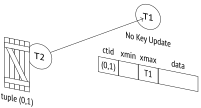
The second transaction only gets as far as the second step. For this reason, apart from locking the table and its own ID, it adds two more locks, which are also reflected in the pg_locks view: the tuple lock acquired at the first step and the lock of the ID of the second transaction requested at the second step:
The third transaction will get stuck on the first step. It will try to acquire a lock on the tuple and will stop at this point:
The fourth and all the subsequent transactions trying to update this row will not differ from the third transaction in this respect: all of them will be waiting on the same tuple lock.
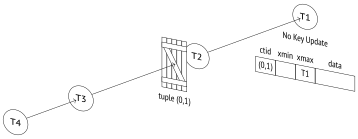
To get the full picture of the current waits, you can extend the pg_stat_activity view with the information on locking processes:
If the first transaction is aborted, everything will work as expected: all the subsequent transactions will move one step further without jumping the queue.
And yet it is more likely that the first transaction will be committed. At the Repeatable Read or Serializable isolation levels, it would result in a serialization failure, so the second transaction would have to be aborted7 (and all the subsequent transactions in the queue would get aborted too). But at the Read Committed isolation level the modified row will be re-read, and its update will be retried.
So, the first transaction is committed:
The second transaction wakes up and successfully completes the third and the fourth steps of the workflow:
As soon as the second transaction releases the tuple lock, the third one also wakes up, but it sees that the xmax field of the new tuple contains a different ID already. At this point, the above workflow is over. At the Read Committed isolation level, one more attempt to lock the row is performed,8 but it does not follow the outlined steps. The third transaction is now waiting for the second one to complete without trying to acquire a tuple lock:
The fourth transaction does the same:
Now both the third and the fourth transactions are waiting for the second one to complete, risking to get into a race condition. The queue has virtually fallen apart.
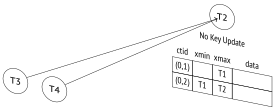
If other transactions had joined the queue while it still existed, all of them would have been dragged into this race.
Conclusion: it is not a good idea to update the same table row in multiple concurrent processes. Under high load, this hotspot can quickly turn into a bottleneck that causes performance issues.
Let’s commit all the started transactions.
Shared Modes
PostgreSQL acquires shared locks only for referential integrity checks. Using them in a high-load application can lead to resource starvation, and a two-level locking model cannot prevent such an outcome.
Let’s recall the steps a transaction should take to lock a row:
- If the
xmaxfield and hint bits indicate that the row is locked in the exclusive mode, acquire an exclusive heavyweight tuple lock.
- If required, wait for all the incompatible locks to be released by requesting a lock on the ID of the
xmaxtransaction (or several transactions ifxmaxcontains a multixact ID).
Write its own ID into
xmaxin the tuple header and set the required hint bits.Release the tuple lock if it was acquired in the first step.
The first two steps imply that if the locking modes are compatible, the transaction will jump the queue.
Let’s repeat our experiment from the very beginning.
Start the first transaction:
The row is now locked in a shared mode:
The second transaction tries to update the same row, but it is not allowed: Share and No Key Update modes are incompatible:
Waiting for the first transaction to complete, the second transaction is holding the tuple lock, just like in the previous example:
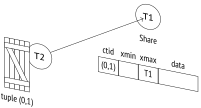
Now let the third transaction lock the row in a shared mode. Such a lock is compatible with the already acquired lock, so this transaction jumps the queue:
We have got two transactions locking the same row:
T1 T3
Share ctid xmin xmax T2 data (0,1) multi
tuple (0,1)
If the first transaction completes at this point, the second one will wake up to see that the row is still locked and will get back to the queue—but this time it will find itself behind the third transaction:
And only when the third transaction completes will the second one be able to perform an update (unless other shared locks appear within this time interval).
Foreign key checks are unlikely to cause any issues, as key attributes usually remain unchanged and Key Share can be used together with No Key Update. But in most cases, you should avoid shared row-level locks in applications.
13.5 No-Wait Locks
SQL commands usually wait for the requested resources to be freed. But sometimes it makes sense to cancel the operation if the lock cannot be acquired immediately. For this purpose, commands like SELECT, LOCK, and ALTER offer the NOWAIT clause.
Let’s lock a row:
The command with the NOWAIT clause immediately completes with an error if the requested resource is locked:
Such an error can be captured and handled by the application code.
The UPDATE and DELETE commands do not have the NOWAIT clause. Instead, you can try to lock the row using the SELECT FOR UPDATE NOWAIT command and then update or delete it if the attempt is successful.
In some rare cases, it may be convenient to skip the already locked rows and start processing the available ones right away. This is exactly what SELECT FOR does when run with the SKIP LOCKED clause:
In this example, the first (already locked) row was skipped, and the query locked and returned the second row.
This approach enables us to process rows in batches or set up parallel processing of event queues. However, avoid inventing other use cases for this command—most tasks can be addressed using much simpler methods. (p. 142)
Last but not least, you can avoid long waits by setting a timeout:
The command completes with an error because it has failed to acquire a lock within one second. A timeout can be set not only at the session level, but also at lower levels, for example, for a particular transaction.
This method prevents long waits during table processing when the command requiring an exclusive lock is executed under load. If an error occurs, this command can be retried after a while.
While statement_timeout limits the total time of operator execution, the lock_timeout parameter defines the maximum time that can be spent waiting on a lock.
13.6 Deadlocks
A transaction may sometimes require a resource that is currently being used by another transaction, which, in its turn, may be waiting on a resource locked by the third transaction, and so on. Such transactions get queued using heavyweight locks.
But occasionally a transaction already in the queue may need yet another resource, so it has to join the same queue again and wait for this resource to be released. A deadlock9 occurs: the queue now has a circular dependency that cannot resolve on its own.
For better visualization, let’s draw a wait-for graph. Its nodes represent active processes, while the edges shown as arrows point from the processes waiting on locks to the processes holding these locks. If the graph has a cycle, that is, a node can reach itself following the arrows, it means that a deadlock has occurred.
The illustrations here show transactions rather than processes. This substitution is usually acceptable because one transaction is executed by one process, and locks can only be acquired within a transaction. But in general, it is more correct to talk about processes, as some locks may not be released right away when the transaction is complete.
If a deadlock has occurred, and none of its participants has set a timeout, transactions will be waiting on each other forever. That’s why the lock manager10 performs automatic deadlock detection.
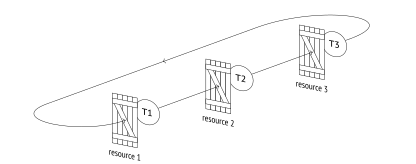
However, this check requires some effort, which should not be wasted each time a lock is requested (after all, deadlocks do not happen too often). So if the process makes an unsuccessful attempt to acquire a lock and falls asleep after joining the queue, PostgreSQL automatically sets a timeout as defined by the deadlock_timeout parameter.11 If the resource becomes available earlier—great, then the extra cost of the check will be avoided. But if the wait continues after the deadlock_timeout units of time, the waiting process wakes up and initiates the check.12 (default: 1s)
This check effectively consists in building a wait-for graph and searching it for cycles.13 To “freeze” the current state of the graph, PostgreSQL stops any processing of heavyweight locks for the whole duration of the check.
If no deadlocks are detected, the process falls asleep again; sooner or later its turn will come.
If a deadlock is detected, one of the transactions will be forced to terminate, thus releasing its locks and enabling other transactions to continue their execution. In most cases, it is the transaction initiating the check that gets interrupted, but if the cycle includes an autovacuum process that is not currently freezing tuples to prevent wraparound, the server terminates autovacuum as having lower priority.
Deadlocks usually indicate bad application design. To discover such situations, you have two things to watch out for: the corresponding messages in the server log and an increasing deadlocks value in the pg_stat_database table.
Deadlocks by Row Updates
Although deadlocks are ultimately caused by heavyweight locks, it is mostly row-level locks acquired in different order that lead to them.
Suppose a transaction is going to transfer $100 between two accounts. It starts by drawing this sum from the first account:
At the same time, another transaction is going to transfer $10 from the second account to the first one. It begins by drawing this sum from the second account:
Now the first transaction attempts to increase the amount in the second account but sees that the corresponding row is locked:
Then the second transaction tries to update the first account but also gets locked:
This circular wait will never resolve on its own. Unable to obtain the resource within one second, the first transaction initiates a deadlock check and gets aborted by the server:
Now the second transaction can continue. It wakes up and performs an update:
Let’s complete the transactions.
The right way to perform such operations is to lock resources in the same order. For example, in this particular case the accounts could have been locked in ascending order based on their numbers.
Deadlocks Between Two UPDATE Statements
In some cases deadlocks seem impossible, and yet they do occur.
We usually assume that SQL commands are atomic, but are they really? Let’s take a closer look at UPDATE: this command locks rows as they are being updated rather than all at once, and it does not happen simultaneously. So if one UPDATE command modifies several rows in one order while the other is doing the same in a different order, a deadlock can occur.
Let’s reproduce this scenario. First, we are going to build an index on the amount column, in descending order:
To be able to observe the process, we can write a function that slows things down:
The first UPDATE command is going to update all the tuples. The execution plan relies on a sequential scan of the whole table.
To make sure that the heap page stores the rows in ascending order based on the amount column, we have to truncate the table and insert the rows anew:
The sequential scan will update the rows in the same order (it is not always true for large tables though). (p. 156)
Let’s start the update:
Meanwhile, we are going to forbid sequential scans in another session:
As a result, the planner chooses an index scan for the next UPDATE command.
The second and third rows satisfy the condition; since the index is descending, the rows will get updated in the reverse order.
Let’s start the next update:
The pgrowlocks extension shows that the first operator has already updated the first row (0,1), while the second one has managed to update the last row (0,3):
(0,1) | 122883 | {"No Key Update"} first (0,3) | 122884 | {"No Key Update"} second
Another second passes. The first operator has updated the second row, and the other one would like to do it too, but it is not allowed.
(0,2) | 122883 | {"No Key Update"} the first one wins
Now the first operator would like to update the last table row, but it is already locked by the second operator. A deadlock has occurred.
One of the transactions is aborted:
And the other completes its execution:
Although such situations seem impossible, they do occur in high-load systems when batch row updates are performed.
postgresql.org/docs/14/explicit-locking.html#LOCKING-ROWS ↩︎
backend/access/heap/heapam.c, FreezeMultiXactId function ↩︎
backend/executor/nodeModifyTable.c, ExecUpdate function ↩︎
backend/access/heap/heapam_handler.c, heapam_tuple_lock function ↩︎
postgresql.org/docs/14/explicit-locking.html#LOCKING-DEADLOCKS ↩︎
backend/storage/lmgr/proc.c, ProcSleep function ↩︎
backend/storage/lmgr/proc.c, CheckDeadLock function ↩︎