# Write-Ahead Log
LLMS index: [llms.txt](/en/llms.txt)
---
## 10.1 Logging {#internal-section-10-1}
In case of a failure, such as a power outage, an OS error, or a database server crash, all the contents of RAM will be lost; only the data written to disk will persist. To start the server after a failure, you have to restore data consistency. If the disk itself has been damaged, the same issue has to be resolved by backup recovery.
In theory, you could maintain data consistency on disk at all times. But in practice it means that the server has to constantly write random pages to disk (even though sequential writing is cheaper), and the order of such writes must guarantee that consistency is not compromised at any particular moment (which is hard to achieve, especially if you deal with complex index structures).
Just like the majority of database systems, PostgreSQL uses a different approach.
While the server is running, some of the current data is available only in RAM, its writing to permanent storage being deferred. Therefore, the data stored on disk is always inconsistent during server operation, as pages are never flushed all at once. But each change that happens in RAM (such as a page update performed in the buffer cache) is *logged*: PostgreSQL creates a log entry that contains all the essential information required to repeat this operation if the need arises.[^internal-164-1]
A log entry related to a page modification must be written to disk *ahead* of the modified page itself. Hence the name of the log: *write-ahead log*, or WAL. This requirement guarantees that in case of a failure PostgreSQL can read WAL entries from disk and *replay* them to repeat the already completed operations whose results were still in RAM and did not make it to disk before the crash.
Keeping a write-ahead log is usually more efficient than writing random pages to disk. WAL entries constitute a continuous stream of data, which can be handled even by HDDs. Besides, WAL entries are often smaller than the page size.
It is required to log all operations that can potentially break data consistency in case of a failure. In particular, the following actions are recorded in WAL:
- page modifications performed in the buffer cache—since writes are deferred
- transaction commits and rollbacks—since the status change happens in CLOG buffers and does not make it to disk right away
- file operations (like creation and deletion of files and directories when tables get added or removed)—since such operations must be in sync with data changes
The following actions are not logged:
- operations on `UNLOGGED` tables
- operations on temporary tables—since their lifetime is anyway limited by the session that spawns them
> [!NOTE]
> Prior to PostgreSQL 10, hash indexes were not logged either. Their only purpose was to match hash functions to different data types.
Apart from crash recovery, WAL can also be used for point-in-time recovery from a backup and replication.
## 10.2 WAL Structure {#internal-section-10-2}
### Logical Structure {#internal-section-star-83}
Speaking about its logical structure, we can describe WAL[^internal-165-1] as a stream of log entries of variable length. Each entry contains some *data* about a particular operation preceded by a standard *header*.[^internal-165-2] Among other things, the header provides the following information:
- transaction ID related to the entry
- the resource manager that interprets the entry[^internal-165-3]
- the checksum to detect data corruption
- entry length
- a reference to the previous WAL entry
> [!NOTE]
> WAL is usually read in the forward direction, but some utilities like pg\_rewind may scan it backwards.
WAL data itself can have different formats and meaning. For example, it can be a page fragment that has to replace some part of the page at the specified offset. The corresponding resource manager must know how to interpret and replay a particular entry. There are separate managers for tables, various index types, transaction status, and other entities.
WAL files take up special buffers in the server’s shared memory. The size of the cache used by WAL is defined by the *wal\_buffers* parameter. By default, this size is chosen automatically as \(\frac{1}{32}\) of the total buffer cache size. (*default:* `-1`)
WAL cache is quite similar to buffer cache, but it usually operates in the ring buffer mode: new entries are added to its head, while older entries are saved to disk starting at the tail. If WAL cache is too small, disk synchronization will be performed more often than necessary.
Under low load, the insert position (the buffer’s head) is almost always the same as the position of the entries that have already been saved to disk (the buffer’s tail):
```psql
=> SELECT pg_current_wal_lsn(), pg_current_wal_insert_lsn();
pg_current_wal_lsn | pg_current_wal_insert_lsn
--------------------+---------------------------
0/3DF56000 | 0/3DF57968
(1 row)
```
> [!NOTE]
> Prior to PostgreSQL 10, all function names contained the XLOG acronym instead of WAL.
To refer to a particular entry, PostgreSQL uses a special data type: `pg_lsn` (log sequence number, LSN). It represents a 64-bit offset in bytes from the start of the WAL to an entry. An LSN is displayed as two 32-bit numbers in the hexadecimal notation separated by a slash.
Let’s create a table:
```psql
=> CREATE TABLE wal(id integer);
=> INSERT INTO wal VALUES (1);
```
Start a transaction and note the LSN of the WAL insert position:
```psql
=> BEGIN;
=> SELECT pg_current_wal_insert_lsn();
pg_current_wal_insert_lsn
---------------------------
0/3DF708D8
(1 row)
```
Now run some arbitrary command, for example, update a row:
```psql
=> UPDATE wal SET id = id + 1;
```
The page modification is performed in the buffer cache in RAM. This change is logged in a WAL page, also in RAM. As a result, the insert LSN is advanced:
```psql
=> SELECT pg_current_wal_insert_lsn();
pg_current_wal_insert_lsn
---------------------------
0/3DF70920
(1 row)
```
To ensure that the modified data page is flushed to disk strictly after the corresponding WAL entry, the page header stores the LSN of the latest WAL entry related to this page. You can view this LSN using `pageinspect`:
```psql
=> SELECT lsn FROM page_header(get_raw_page('wal',0));
lsn
------------
0/3DF70920
(1 row)
```
There is only one WAL for the whole database cluster, and new entries constantly get appended to it. For this reason, the LSN stored in the page may turn out to be smaller than the one returned by the `pg_current_wal_insert_lsn` function some time ago. But if nothing has happened in the system, these numbers will be the same.
Now let’s commit the transaction:
```psql
=> COMMIT;
```
The commit operation is also logged, and the insert LSN changes again:
```psql
=> SELECT pg_current_wal_insert_lsn();
pg_current_wal_insert_lsn
---------------------------
0/3DF70948
(1 row)
```
A commit updates transaction status in CLOG pages, which are kept in their own cache.[^internal-167-1] The CLOG cache usually takes 128 pages in the shared memory.[^internal-167-2] To make sure that a CLOG page is not flushed to disk before the corresponding WAL entry, the LSN of the latest WAL (*p.* [70](/en/03-pages-and-tuples/#internal-page-70))
entry has to be tracked for CLOG pages too. But this information is stored in RAM, not in the page itself.
At some point WAL entries will make it to disk; then it will be possible to evict CLOG and data pages from the cache. If they had to be evicted earlier, it would have been discovered, and WAL entries would have been forced to disk first.[^internal-168-1] (*p.* [182](/en/11-wal-modes/#internal-page-182))
If you know two LSN positions, you can calculate the size of WAL entries between them (in bytes) by simply subtracting one position from the other. You just have to cast them to the `pg_lsn` type:
```psql
=> SELECT '0/3DF70948'::pg_lsn - '0/3DF708D8'::pg_lsn;
?column?
----------
112
(1 row)
```
In this particular case, WAL entries related to `UPDATE` and `COMMIT` operations took about a hundred of bytes.
You can use the same approach to estimate the volume of WAL entries generated by a particular workload per unit of time. This information will be required for the checkpoint setup.
### Physical Structure {#internal-section-star-84}
On disk, the WAL is stored in the `PGDATA/pg_wal` directory as separate files, or segments. Their size is shown by the read-only *wal\_segment\_size* parameter. (*default:* `16MB`)
For high-load systems, it makes sense to increase the segment size since it may reduce the overhead, but this setting can be modified only during cluster initialization (`initdb --wal-segsize`). (v. 11)
WAL entries get into the current file until it runs out of space; then PostgreSQL starts a new file.
We can learn in which file a particular entry is located, and at what offset from the start of the file:
```psql
=> SELECT file_name, upper(to_hex(file_offset)) file_offset
FROM pg_walfile_name_offset('0/3DF708D8');
file_name | file_offset
--------------------------+-------------
00000001000000000000003D | F708D8
(1 row)
```
timeline log sequence number
The name of the file consists of two parts. The highest eight hexadecimal digits define the *timeline* used for recovery from a backup, while the rest represent the highest LSN bits (the lowest LSN bits are shown in the `file_offset` field).
To view the current WAL files, you can call the following function: (v. 10)
```psql
=> SELECT *
FROM pg_ls_waldir()
WHERE name = '00000001000000000000003D';
name | size | modification
--------------------------+----------+------------------------
00000001000000000000003D | 16777216 | 2023-03-06 14:01:48+03
(1 row)
```
Now let’s take a look at the headers of the newly created WAL entries using the `pg_waldump` utility, which can filter WAL entries both by the LSN range (like in this example) and by a particular transaction ID.
The `pg_waldump` utility should be started on behalf of the `postgres` OS user, as it needs access to WAL files on disk.
```sql
postgres$ /usr/local/pgsql/bin/pg_waldump \
-p /usr/local/pgsql/data/pg_wal -s 0/3DF708D8 -e 0/3DF70948#
rmgr: Heap len (rec/tot): 69/ 69, tx: 886, lsn:
0/3DF708D8, prev 0/3DF708B0, desc: HOT_UPDATE off 1 xmax 886 flags
0x40 ; new off 2 xmax 0, blkref #0: rel 1663/16391/16562 blk 0
rmgr: Transaction len (rec/tot): 34/ 34, tx: 886, lsn:
0/3DF70920, prev 0/3DF708D8, desc: COMMIT 2023-03-06 14:01:48.875861
MSK
```
Here we can see the headers of two entries.
The first one is the `HOT_UPDATE` operation handled by the `Heap` resource manager. The `blkref` field shows the filename and the page ID of the updated heap page: (*p.* [95](/en/05-page-pruning-and-hot-updates/#internal-page-95))
```psql
=> SELECT pg_relation_filepath('wal');
pg_relation_filepath
----------------------
base/16391/16562
(1 row)
```
The second entry is the `COMMIT` operation supervised by the `Transaction` resource manager.
## 10.3 Checkpoint {#internal-section-10-3}
To restore data consistency after a failure (that is, to perform recovery), PostgreSQL has to replay the WAL in the forward direction and apply the entries that represent lost changes to the corresponding pages. To find out what has been lost, the LSN of the page stored on disk is compared to the LSN of the WAL entry. But at which point should we start the recovery? If we start too late, the pages written to disk before this point will fail to receive all the changes, which will lead to irreversible data corruption. Starting from the very beginning is unrealistic: it is impossible to store such a potentially huge volume of data, and neither is it possible to accept such a long recovery time. We need a *checkpoint* that is gradually moving forward, thus making it safe to start the recovery from this point and remove all the previous WAL entries.
The most straightforward way to create a checkpoint is to periodically suspend all system operations and force all dirty pages to disk. This approach is of course unacceptable, as the system will hang for an indefinite but quite significant time.
For this reason, the checkpoint is spread out over time, virtually constituting an interval. Checkpoint execution is performed by a special background process called `checkpointer`.[^internal-170-1]
**Checkpoint start.** The `checkpointer` process flushes to disk everything that can be written instantaneously: CLOG transaction status, subtransactions’metadata, and a few other structures.
**Checkpoint execution.** Most of the checkpoint execution time is spent on flushing dirty pages to disk.[^internal-170-2]
First, a special tag is set in the headers of all the buffers that were dirty at the checkpoint start. It happens very fast since no I/O operations are involved.
Then `checkpointer` traverses all the buffers and writes the tagged ones to disk. Their pages are not evicted from the cache: they are simply written down, so usage and pin counts can be ignored.
Pages are processed in the order of their IDs to avoid random writing if possible. For better load balancing, PostgreSQL alternates between different tablespaces (as they may be located on different physical devices). (v. 9.6)
Backends can also write tagged buffers to disk—if they get to them first. In any case, buffer tags are removed at this stage, so for the purpose of the checkpoint each buffer will be written only once.
Naturally, pages can still be modified in the buffer cache while the checkpoint is in progress. But since new dirty buffers are not tagged, `checkpointer` will ignore them.
**Checkpoint completion.** When all the buffers that were dirty *at the start* of the checkpoint are written to disk, the checkpoint is considered *complete*. From now on (but not earlier!), the *start* of the checkpoint will be used as a new starting point of recovery. All the WAL entries written before this point are not required anymore.
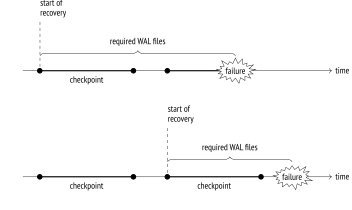
{#internal-fig-10-1 num="10.1" caption="10.3 Checkpoint" .book-original-figure width=704 height=420}
Finally, `checkpointer` creates a WAL entry that corresponds to the checkpoint completion, specifying the checkpoint’s start LSN. Since the checkpoint logs nothing when it starts, this LSN can belong to a WAL entry of any type.
The `PGDATA/global/pg_control` file also gets updated to refer to the latest completed checkpoint. (Until this process is over, `pg_control` keeps the previous checkpoint.)
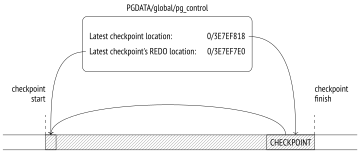
{#internal-fig-10-2 num="10.2" caption="10.3 Checkpoint" .book-original-figure width=724 height=310}
To figure out once and for all what points where, let’s take a look at a simple example. We will make several cached pages dirty:
```psql
=> UPDATE big SET s = 'FOO';
=> SELECT count(*) FROM pg_buffercache WHERE isdirty;
count
-------
4119
(1 row)
```
Note the current WAL position:
```psql
=> SELECT pg_current_wal_insert_lsn();
pg_current_wal_insert_lsn
---------------------------
0/3E7EF7E0
(1 row)
```
Now let’s complete the checkpoint manually. All the dirty pages will be flushed to disk; since nothing happens in the system, new dirty pages will not appear:
```psql
=> CHECKPOINT;
=> SELECT count(*) FROM pg_buffercache WHERE isdirty;
count
-------
0
(1 row)
```
Let’s see how the checkpoint is reflected in the WAL:
```psql
=> SELECT pg_current_wal_insert_lsn();
pg_current_wal_insert_lsn
---------------------------
0/3E7EF890
(1 row)
postgres$ /usr/local/pgsql/bin/pg_waldump \
-p /usr/local/pgsql/data/pg_wal -s 0/3E7EF7E0 -e 0/3E7EF890
rmgr: Standby len (rec/tot): 50/ 50, tx: 0, lsn:
0/3E7EF7E0, prev 0/3E7EF7B8, desc: RUNNING_XACTS nextXid 888
latestCompletedXid 887 oldestRunningXid 888
rmgr: XLOG len (rec/tot): 114/ 114, tx: 0, lsn:
0/3E7EF818, prev 0/3E7EF7E0, desc: CHECKPOINT_ONLINE redo
0/3E7EF7E0; tli 1; prev tli 1; fpw true; xid 0:888; oid 24754; multi
1; offset 0; oldest xid 726 in DB 1; oldest multi 1 in DB 1;
oldest/newest commit timestamp xid: 0/0; oldest running xid 888;
online
```
The latest WAL entry is related to the checkpoint completion (`CHECKPOINT_ONLINE`). The start LSN of this checkpoint is specified after the word `redo`; this position corresponds to the latest inserted WAL entry at the time of the checkpoint start.
The same information can also be found in the `pg_control` file:
```text
postgres$ /usr/local/pgsql/bin/pg_controldata \
-D /usr/local/pgsql/data | egrep 'Latest.*location'
Latest checkpoint location: 0/3E7EF818
Latest checkpoint's REDO location: 0/3E7EF7E0
```
## 10.4 Recovery {#internal-section-10-4}
The first process launched at the server start is `postmaster`. In its turn, `postmaster` spawns the `startup` process,[^internal-173-1] which takes care of data recovery in case of a failure.
To determine whether recovery is needed, the `startup` process reads the `pg_control` file and checks the cluster status. The `pg_controldata` utility enables us to view the content of this file:
```text
postgres$ /usr/local/pgsql/bin/pg_controldata \
-D /usr/local/pgsql/data | grep state
Database cluster state: in production
```
A properly stopped server has the “shut down” status; the “in production” status of a non-running server indicates a failure. In this case, the `startup` process will automatically initiate recovery from the start LSN of the latest completed checkpoint found in the same `pg_control` file.
> [!NOTE]
> If the PGDATA directory contains a backup\_label file related to a backup, the start LSN position is taken from that file.
The `startup` process reads WAL entries one by one, starting from the defined position, and applies them to data pages if the LSN of the page is smaller than the LSN of the WAL entry. If the page contains a bigger LSN, WAL should not be applied; in fact, it *must not* be applied because its entries are designed to be replayed strictly sequentially.
However, some WAL entries constitute a *full page image*, or FPI. Entries of this type can be applied to any state of the page since all the page contents will be erased anyway. Such modifications are called *idempotent*. Another example of an idempotent operation is registering transaction status changes: each transaction status is defined in CLOG by certain bits that are set regardless of their previous values, so there is no need to keep the LSN of the latest change in CLOG pages.
WAL entries are applied to pages in the buffer cache, just like regular page updates during normal operation.
Files get restored from WAL in a similar manner: for example, if a WAL entry shows that the file must exit, but it is missing for some reason, it will be created anew.
Once the recovery is over, all unlogged relations are overwritten by the corresponding initialization forks. (*p.* [26](/en/01-introduction/#internal-page-26))
Finally, the checkpoint is executed to secure the recovered state on disk.
The job of the `startup` process is now complete.
> [!NOTE]
> In its classic form, the recovery process consists of two phases. In the roll-forward phase, WAL entries are replayed, repeating the lost operations. In the roll-back phase, the server aborts the transactions that were not yet committed at the time of the failure.
>
> In PostgreSQL, the second phase is not required. After the recovery, the CLOG will contain neither commit nor abort bits for an unfinished transaction (which technically denotes an active transaction),but since it is known for sure that the transaction is not running anymore, it will be considered aborted.[^internal-174-1]
We can simulate a failure by forcing the server to stop in the immediate mode:
```bash
postgres$ pg_ctl stop -m immediate
```
Here is the new cluster state:
```text
postgres$ /usr/local/pgsql/bin/pg_controldata \
-D /usr/local/pgsql/data | grep 'state'
Database cluster state: in production
```
When we launch the server, the `startup` process sees that a failure has occurred and enters the recovery mode:
```bash
postgres$ pg_ctl start -l /home/postgres/logfile
postgres$ tail -n 6 /home/postgres/logfile
LOG: database system was interrupted; last known up at 2023-03-06
14:01:49 MSK
LOG: database system was not properly shut down; automatic recovery
in progress
LOG: redo starts at 0/3E7EF7E0
LOG: invalid record length at 0/3E7EF890: wanted 24, got 0
LOG: redo done at 0/3E7EF818 system usage: CPU: user: 0.00 s,
system: 0.00 s, elapsed: 0.00 s
LOG: database system is ready to accept connections
```
If the server is being stopped normally, `postmaster` disconnects all clients and then executes the final checkpoint to flush all dirty pages to disk.
Note the current WAL position:
```psql
=> SELECT pg_current_wal_insert_lsn();
pg_current_wal_insert_lsn
---------------------------
0/3E7EF908
(1 row)
```
Now let’s stop the server properly:
```bash
postgres$ pg_ctl stop
```
Here is the new cluster state:
```text
postgres$ /usr/local/pgsql/bin/pg_controldata \
-D /usr/local/pgsql/data | grep state
Database cluster state: shut down
```
At the end of the WAL, we can see the `CHECKPOINT_SHUTDOWN` entry, which denotes the final checkpoint:
```text
postgres$ /usr/local/pgsql/bin/pg_waldump \
-p /usr/local/pgsql/data/pg_wal -s 0/3E7EF908
rmgr: XLOG len (rec/tot): 114/ 114, tx: 0, lsn:
0/3E7EF908, prev 0/3E7EF890, desc: CHECKPOINT_SHUTDOWN redo
0/3E7EF908; tli 1; prev tli 1; fpw true; xid 0:888; oid 24754; multi
1; offset 0; oldest xid 726 in DB 1; oldest multi 1 in DB 1;
oldest/newest commit timestamp xid: 0/0; oldest running xid 0;
shutdown
pg_waldump: fatal: error in WAL record at 0/3E7EF908: invalid record
length at 0/3E7EF980: wanted 24, got 0
```
The latest `pg_waldump` message shows that the utility has read the WAL to the end.
Let’s start the instance again:
```bash
postgres$ pg_ctl start -l /home/postgres/logfile
```
## 10.5 Background Writing {#internal-section-10-5}
If the backend needs to evict a dirty page from a buffer, it has to write this page to disk. Such a situation is undesired because it leads to waits—it is much better to perform writing asynchronously in the background.
This job is partially handled by `checkpointer`, but it is still not enough.
Therefore, PostgreSQL provides another process called `bgwriter`,[^internal-176-1] specifically for *background writing*. It relies on the same buffer search algorithm as eviction, except for the two main differences:
- The `bgwriter` process uses its own clock hand that never lags behind that of eviction and typically overtakes it.
- As the buffers are being traversed, the usage count is not reduced.
A dirty page is flushed to disk if the buffer is not pinned and has zero usage count. Thus, `bgwriter` runs before eviction and proactively writes to disk those pages that are highly likely to be evicted soon.
It raises the odds of the buffers selected for eviction being clean.
## 10.6 WAL Setup {#internal-section-10-6}
### Configuring Checkpoints {#internal-section-star-85}
The checkpoint duration (to be more exact, the duration of writing dirty buffers to disk) is defined by the *checkpoint\_completion\_target* parameter. Its value specifies the fraction of time between the starts of two neighboring checkpoints that is allotted to writing. Avoid setting this parameter to one: as a result, the next checkpoint may be due before the previous one is complete. No disaster will happen, as it is impossible to execute more than one checkpoint at a time, but normal operation may still be disrupted. (*default:* `0.9`) (v. 14)
When configuring other parameters, we can use the following approach. First, we define an appropriate volume of WAL files to be stored between two neighboring checkpoints. The bigger the volume, the smaller the overhead, but this value will anyway be limited by the available free space and the acceptable recovery time.
To estimate the time required to generate this volume by *normal* load, you need to note the initial insert LSN and check the difference between this and the current insert positions from time to time.
The received figure is assumed to be a typical interval between checkpoints, so we will use it as the *checkpoint\_timeout* parameter value. The default setting is likely to be too small; it is usually increased, for example, to 30 minutes. (*default:* `5min`) (*p.* [190](/en/11-wal-modes/#internal-page-190))
However, it is quite possible (and even probable) that the load will *sometimes* be higher, so the size of WAL files generated during this interval will be too big. In this case, the checkpoint must be executed more often. To set up such a trigger, we will limit the size of WAL files required for recovery by the *max\_wal\_size* parameter. When this threshold is exceeded, the server invokes an extra checkpoint.[^internal-177-1] (*default:* `1GB`)
WAL files required for recovery contain all the entries both for the latest completed checkpoint and for the current one, which is not completed yet. Therefore, to estimate their total volume you should multiply the calculated WAL size between checkpoints by 1 + *checkpoint\_completion\_target*. (v. 11)
> [!NOTE]
> Prior to version 11, PostgreSQL kept WAL files for two completed checkpoints, so the multiplier was 2 + *checkpoint\_completion\_target*.
Following this approach, most checkpoints are executed on schedule, once per the *checkpoint\_timeout* interval; but should the load increase, the checkpoint is triggered when WAL size exceeds the *max\_wal\_size* value.
The actual progress is periodically checked against the expected figures:[^internal-178-1]
**The actual progress** is defined by the fraction of cached pages that have already been processed.
**The expected progress (by time)** is defined by the fraction of time that has already elapsed, proceeding from the assumption that the checkpoint must be completed within the *checkpoint\_timeout* × *checkpoint\_completion\_target* interval.
**The expected progress (by size)** is defined by the fraction of WAL files that are filled already, their expected number being estimated based on the *max\_wal\_size* × *checkpoint\_completion\_target* value.
If dirty pages get written to disk ahead of schedule, `checkpointer` is paused for a while; if there is any delay by either of the parameters, it catches up as soon as possible.[^internal-178-2] Since both time and data size are taken into account, PostgreSQL can manage scheduled and on-demand checkpoints using the same approach.
Once the checkpoint has been completed, WAL files that are not required for recovery anymore are deleted;[^internal-178-3] however, several files (up to *min\_wal\_size* in total) are kept for reuse and are simply renamed. (*default:* `80MB`)
Such renaming reduces the overhead incurred by constant file creation and deletion, but you can turn off this feature using the *wal\_recycle* parameter if you do not need it. (v. 12) (*default:* `on`)
The following figure shows how the size of WAL files stored on disk changes under normal conditions.
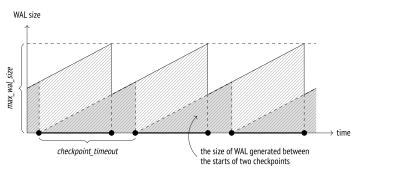
{#internal-fig-10-3 num="10.3" caption="Configuring Checkpoints" .book-original-figure width=814 height=364}
It is important to keep in mind that the actual size of WAL files on disk may exceed the *max\_wal\_size* value:
- The *max\_wal\_size* parameter specifies the desired target value rather than a hard limit. If the load spikes, writing may lag behind the schedule.
- The server has no right to delete WAL files that are yet to be replicated or handled by continuous archiving. If enabled, this functionality must be constantly monitored, as it can easily cause a disk overflow.
- You can reserve a certain amount of space for storing WAL files by configuring the *wal\_keep\_size* parameter. (v. 12) (*default:* `0MB`)
### Configuring Background Writing {#internal-section-star-86}
Once `checkpointer` is configured, you should also set up `bgwriter`. Together, these processes must be able to cope with writing dirty buffers to disk before backends need to reuse them.
During its operation, `bgwriter` makes periodic pauses, sleeping for *bgwriter\_delay* units of time. (*default:* `200ms`)
The number of pages written between two pauses depends on the average number of buffers accessed by backends since the previous run (PostgreSQL uses a moving average to level out possible spikes and avoid depending on very old data at the same time). The calculated number is then multiplied by *bgwriter\_lru\_multiplier*. But in any case, the number of pages written in a single run cannot exceed the *bgwriter\_lru\_maxpages* value. (*default:* `2`) (*default:* `100`)
If no dirty buffers are detected (that is, nothing happens in the system), `bgwriter` sleeps until one of the backends accesses a buffer. Then it wakes up and continues its regular operation.
### Monitoring {#internal-section-star-87}
Checkpoint settings can and should be tuned based on monitoring data.
If size-triggered checkpoints have to be performed more often than defined by the value of the *checkpoint\_warning* parameter, PostgreSQL issues a warning. This setting should be brought in line with the expected peak load. (*default:* `30s`)
The *log\_checkpoints* parameter enables printing checkpoint-related information into the server log. Let’s turn it on: (*default:* `off`)
```psql
=> ALTER SYSTEM SET log_checkpoints = on;
=> SELECT pg_reload_conf();
```
Now we will modify some data and execute a checkpoint:
```psql
=> UPDATE big SET s = 'BAR';
=> CHECKPOINT;
```
The server log shows the number of written buffers, some statistics on WAL file changes after the checkpoint, the duration of the checkpoint, and the distance (in bytes) between the starts of two neighboring checkpoints:
```text
postgres$ tail -n 2 /home/postgres/logfile
LOG: checkpoint starting: immediate force wait
LOG: checkpoint complete: wrote 4100 buffers (25.0%); 0 WAL file(s)
added, 1 removed, 0 recycled; write=0.076 s, sync=0.009 s,
total=0.099 s; sync files=3, longest=0.007 s, average=0.003 s;
distance=9213 kB, estimate=9213 kB
```
The most useful data that can affect your configuration decisions is statistics on background writing and checkpoint execution provided in the `pg_stat_bgwriter` view.
> [!NOTE]
> Prior to version 9.2, both tasks were performed by bgwriter; then a separate checkpointer process was introduced, but the common view remained unchanged.
```psql
=> SELECT * FROM pg_stat_bgwriter \gx
-[ RECORD 1 ]---------+------------------------------
checkpoints_timed | 0
checkpoints_req | 14
checkpoint_write_time | 33111
checkpoint_sync_time | 221
buffers_checkpoint | 14253
buffers_clean | 13066
maxwritten_clean | 122
buffers_backend | 84226
buffers_backend_fsync | 0
buffers_alloc | 86700
stats_reset | 2023-03-06 14:00:07.369124+03
```
Among other things, this view displays the number of completed checkpoints:
- The `checkpoints_timed` field shows scheduled checkpoints (which are triggered when the *checkpoint\_timeout* interval is reached).
- The `checkpoints_req` field shows on-demand checkpoints (including those triggered when the *max\_wal\_size* size is reached).
A large `checkpoint_req` value (as compared to `checkpoints_timed`) indicates that checkpoints are performed more often than expected.
The following statistics on the number of written pages are also very important:
- `buffers_checkpoint` pages written by `checkpointer`
- `buffers_backend` pages written by backends
- `buffers_clean` pages written by `bgwriter`
In a well-configured system, the `buffers_backend` value must be considerably lower than the sum of `buffers_checkpoint` and `buffers_clean`.
When setting up background writing, pay attention to the `maxwritten_clean` value: it shows how many times `bgwriter` had to stop because of exceeding the threshold defined by *bgwriter\_lru\_maxpages*.
The following call will drop the collected statistics:
```psql
=> SELECT pg_stat_reset_shared('bgwriter');
```
[^internal-164-1]: [postgresql.org/docs/14/wal-intro.html]()
[^internal-165-1]: [postgresql.org/docs/14/wal-internals.html]() [backend/access/transam/README]()
[^internal-165-2]: [include/access/xlogrecord.h]()
[^internal-165-3]: [include/access/rmgrlist.h]()
[^internal-167-1]: [backend/access/transam/slru.c]()
[^internal-167-2]: [backend/access/transam/clog.c](), CLOGShmemBuffers function
[^internal-168-1]: [backend/storage/buffer/bufmgr.c](), FlushBuffer function
[^internal-170-1]: [backend/postmaster/checkpointer.c]() [backend/access/transam/xlog.c](), CreateCheckPoint function
[^internal-170-2]: [backend/storage/buffer/bufmgr.c](), BufferSync function
[^internal-173-1]: [backend/postmaster/startup.c]() [backend/access/transam/xlog.c](), StartupXLOG function
[^internal-174-1]: [backend/access/heap/heapam\_visibility.c](), HeapTupleSatisfiesMVCC function
[^internal-176-1]: [backend/postmaster/bgwriter.c]()
[^internal-177-1]: [backend/access/transam/xlog.c](), LogCheckpointNeeded & CalculateCheckpointSegments functions
[^internal-178-1]: [backend/postmaster/checkpointer.c](), IsCheckpointOnSchedule function
[^internal-178-2]: [backend/postmaster/checkpointer.c](), CheckpointWriteDelay function
[^internal-178-3]: [backend/access/transam/xlog.c](), RemoveOldXlogFiles function