9 Buffer Cache
PostgreSQL 14 · Translated from Russian by Liudmila Mantrova · Chinese translation by Xiong Cancan
9.1 Caching
In modern computing systems, caching is omnipresent—both at the hardware and at the software level. The processor alone can have up to three or four levels of cache. RAID controllers and disks add their own cache too.
Caching is used to even out performance difference between fast and slow types of memory. Fast memory is expensive and has smaller volume, while slow memory is bigger and cheaper. Therefore, fast memory cannot accommodate all the data stored in slow memory. But in most cases only a small portion of data is being actively used at each particular moment, so allocating some fast memory for cache to keep hot data can significantly reduce the overhead incurred by slow memory access.
In PostgreSQL, buffer cache1 holds relation pages, thus balancing access times to disks (milliseconds) and RAM (nanoseconds).
The operating system has its own cache that serves the same purpose. For this reason, database systems are usually designed to avoid double caching: the data stored on disk is usually queried directly, bypassing the OS cache. But PostgreSQL uses a different approach: it reads and writes all data via buffered file operations. (p. 341)
Double caching can be avoided if you apply direct I/O. It will reduce the overhead, as PostgreSQL will use direct memory access (DMA) instead of copying buffered pages into the OS address space; besides, you will gain immediate control over physical writes on disk. However, direct I/O does not support data prefetching enabled by bufferization, so you have to implement it separately via asynchronous I/O, which requires massive code modifications in PostgreSQL core, as well as handling OS incompatibilities when it comes to direct and asynchronous I/O support. But once the asynchronous communication is set up, you can enjoy additional benefits of no-wait disk access.
The PostgreSQL community has already started this major effort,2 but it will take a long time for the actual results to appear.
9.2 Buffer Cache Design
Buffer cache is located in the server’s shared memory, where it is accessible to all the processes. It takes the major part of the shared memory and is surely one of the most important and complex data structures in PostgreSQL. Understanding how cache works is important in its own right, but even more so as many other structures (such as subtransactions, CLOG transaction status, and WAL entries) use a similar caching mechanism, albeit a simpler one.
The name of this cache is inspired by its inner structure, as it consists of an array of buffers. Each buffer reserves a memory chuck that can accommodate a single data page together with its header.3
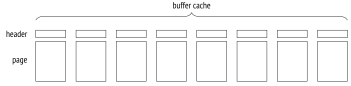
A header contains some information about the buffer and the page in it, such as:
physical location of the page (file ID, fork, and block number in the fork)
the attribute showing that the data in the page has been modified and sooner or later has to be written back to disk (such a page is called dirty)
buffer usage count
pin count (or reference count)
To get access to a relation’s data page, a process requests it from the buffer manager4 and receives the ID of the buffer that contains this page. Then it reads the cached data and modifies it right in the cache if needed. While the page is in use, its buffer is pinned. Pins forbid eviction of the cached page and can be applied together with other locks. Each pin increments the usage count as well. (p. 241)
As long as the page is cached, its usage does not incur any file operations.
We can explore the buffer cache using the pg_buffercache extension:
Let’s create a table and insert a row:
Now the buffer cache contains a heap page with the newly inserted row. You can see it for yourself by selecting all the buffers related to a particular table. We will need such a query again, so let’s wrap it into a function:
The page is dirty: it has been modified, but is not written to disk yet. Its usage count is set to one.
9.3 Cache Hits
When the buffer manager has to read a page,5 it first checks the buffer cache.
All buffer IDs are stored in a hash table,6 which is used to speed up their search.
Many modern programming languages include hash tables as one of the basic data types. Hash tables are often called associative arrays, and indeed, from the user’s perspective they do look like an array; however, their index (a hash key) can be of any data type, for example, a text string rather than an integer.
While the range of possible key values can be quite large, hash tables never contain that many different values at a time. The idea of hashing is to convert a key value into an integer number using a hash function. This number (or some of its bits) is used as an index of a regular array. The elements of this array are called hash table buckets.
A good hash function distributes hash keys between buckets more or less uniformly, but it can still assign the same number to different keys, thus placing them into the same bucket; it is called a collision. For this reason, values are stored in buckets together with hash keys; to access a hashed value by its key, PostgreSQL has to check all the keys in the bucket.
There are multiple implementations of hash tables; of all the possible options, the buffer cache uses the extendible table that resolves hash collisions by chaining.7
A hash key consists of the ID of the relation file, the type of the fork, and the ID of the page within this fork’s file. Thus, knowing the page, PostgreSQL can quickly find the buffer containing this page or make sure that the page is not currently cached.
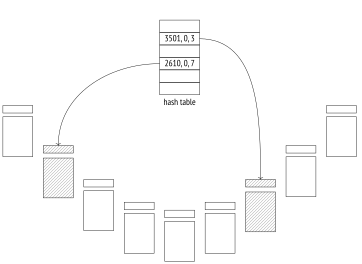
The buffer cache implementation has long been criticized for relying on a hash table: this structure is of no use when it comes to finding all the buffers taken by pages of a particular relation, which is required to remove pages from cache when running DROP and TRUNCATE commands or truncating a table during vacuuming.8 Yet no one has suggested an adequate alternative so far.
If the hash table contains the required buffer ID, the buffer manager pins this buffer and returns its ID to the process. Then this process can start using the cached page without incurring any I/O traffic.
To pin a buffer, PostgreSQL has to increment the pin counter in its header; a buffer can be pinned by several processes at a time. While its pin counter is greater than zero, the buffer is assumed to be in use, and no radical changes in its contents are allowed. For example, a new tuple can appear (it will be invisible following the visibility rules), but the page itself cannot be replaced.
When run with the analyze and buffers options, the EXPLAIN command executes the displayed query plan and shows the number of used buffers:
Here hit=1 means that the only page that had to be read was found in the cache.
Buffer pinning increases the usage count by one:
To observe pinning in action during query execution, let’s open a cursor—it will hold the buffer pin, as it has to provide quick access to the next row in the result set:
If a process cannot use a pinned buffer, it usually skips it and simply chooses another one. We can see it during table vacuuming:
The page was skipped because its tuples could not be physically removed from the pinned buffer.
But if it is exactly this buffer that is required, the process joins the queue and waits for getting exclusive access to this buffer. An example of such an operation is vacuuming with freezing.9 (p. 123)
Once the cursor closes or moves on to another page, the buffer gets unpinned. In this example, it happens at the end of the transaction:
Page modifications are protected by the same pinning mechanism. For example, let’s insert another row into the table (it will get into the same page):
PostgreSQL does not perform any immediate writes to disk: a page remains dirty in the buffer cache for a while, providing some performance gains for both reads and writes.
9.4 Cache Misses
If the hash table has no entry related to the queried page, it means that this page is not cached. In this case, a new buffer is assigned (and immediately pinned), the page is read into this buffer, and the hash table references are modified accordingly.
Let’s restart the instance to clear its buffer cache:
An attempt to read a page will result in a cache miss, and the page will be loaded into a new buffer:
Instead of hit, the plan now shows the read status, which denotes a cache miss. Besides, this page has become dirty, as the query has modified some hint bits. (p. 71)
A buffer cache query shows that the usage count for the newly added page is set to one:
The pg_statio_all_tables view contains the complete statistics on buffer cache usage by tables:
PostgreSQL provides similar views for indexes and sequences. They can also display statistics on I/O operations, but only if track_io_timing is enabled. (default: off)
Buffer Search and Eviction
Choosing a buffer for a page is not so trivial.10 There are two possible scenarios:
- Right after the server start all the buffers are empty and are bound into a list.
While some buffers are still free, the next page read from disk will occupy the first buffer, and it will be removed from the list.
A buffer can return to the list11 only if its page disappears, without being replaced by another page. It can happen if you call DROP or TRUNCATE commands, or if the table is truncated during vacuuming.
- Sooner or later no free buffers will be left (since the size of the database is usually bigger than the memory chunk allocated for cache). Then the buffer manager will have to select one of the buffers that is already in use and evict the cached page from this buffer. It is performed using the clock sweep algorithm, which is well illustrated by the clock metaphor. Pointing to one of the buffers, the clock hand starts going around the buffer cache and reduces the usage count for each cached page by one as it passes. The first unpinned buffer with the zero count found by the clock hand will be cleared.
Thus, the usage count is incremented each time the buffer is accessed (that is, pinned), and reduced when the buffer manager is searching for pages to evict. As a result, the least recently used pages are evicted first, while those that have been accessed more often will remain in the cache longer.
As you can guess, if all the buffers have a non-zero usage count, the clock hand has to complete more than one full circle before any of them finally reaches the zero value. To avoid running multiple laps, PostgreSQL limits the usage count by 5.
Once the buffer to evict is found, the reference to the page that is still in this buffer must be removed from the hash table.
But if this buffer is dirty, that is, it contains some modified data, the old page cannot be simply thrown away—the buffer manager has to write it to disk first. (p. 176)
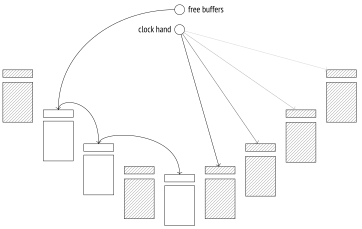
Then the buffer manager reads a new page into the found buffer—no matter if it had to be cleared or was still free. It uses buffered I/O for this purpose, so the page will be read from disk only if the operating system cannot find it in its own cache.
Those database systems that use direct I/O and do not depend on the OS cache differentiate between logical reads (from RAM, that is, from the buffer cache) and physical reads (from disk). From the standpoint of PostgreSQL, a page can be either read from the buffer cache or requested from the operating system, but there is no way to tell whether it was found in RAM or read from disk in the latter case.
The hash table is updated to refer to the new page, and the buffer gets pinned. Its usage count is incremented and is now set to one, which gives this buffer some time to increase this value while the clock hand is traversing the buffer cache.
9.5 Bulk Eviction
If bulk reads or writes are performed, there is a risk that one-time data can quickly oust useful pages from the buffer cache.
As a precaution, bulk operations use rather small buffer rings, and eviction is performed within their boundaries, without affecting other buffers.
Alongside the “buffer ring,” the code also uses the term “ring buffer”. However, this synonym is rather ambiguous because the ring buffer itself consists of several buffers (that belong to the buffer cache). The term “buffer ring” is more accurate in this respect.
A buffer ring of a particular size consists of an array of buffers that are used one after another. At first, the buffer ring is empty, and individual buffers join it one by one, after being selected from the buffer cache in the usual manner. Then eviction comes into play, but only within the ring limits.12
Buffers added into a ring are not excluded from the buffer cache and can still be used by other operations. So if the buffer to be reused turns out to be pinned, or its usage count is higher than one, it will be simply detached from the ring and replaced by another buffer.
PostgreSQL supports three eviction strategies.
Bulk reads strategy is used for sequential scans of large tables if their size exceeds of the buffer cache. The ring buffer takes 256 kB (32 standard pages). (p. 296)
This strategy does not allow writing dirty pages to disk to free a buffer; instead, the buffer is excluded from the ring and replaced by another one. As a result, reading does not have to wait for writing to complete, so it is performed faster.
If it turns out that the table is already being scanned, the process that starts another scan joins the existing buffer ring and gets access to the currently available data, without incurring extra I/O operations.13 When the first process completes the scan, the second one gets back to the skipped part of the table.
Bulk writes strategy is applied by COPY FROM, CREATE TABLE AS SELECT, and CREATE MATERIALIZED VIEW commands, as well as by those ALTER TABLE flavors that cause table rewrites. The allocated ring is quite big, its default size being 16 MB (2048 standard pages), but it never exceeds of the total size of the buffer cache.
Vacuuming strategy is used by the process of vacuuming when it performs a full table scan without taking the visibility map into account. The ring buffer is assigned 256 kB of RAM (32 standard pages).
Buffer rings do not always prevent undesired eviction. If UPDATE or DELETE commands affect a lot of rows, the performed table scan applies the bulk reads strategy, but since the pages are constantly being modified, buffer rings virtually become useless.
Another example worth mentioning is storing oversized data in TOAST tables. In spite of a potentially large volume of data that has to be read, toasted values are always accessed via an index, so they bypass buffer rings. (p. 28)
Let’s take a closer look at the bulk reads strategy. For simplicity, we will create a table in such a way that an inserted row takes the whole page. By default, the buffer cache size is 16,384 pages, 8 kB each. So the table must take more than 4096 pages for the scan to use a buffer ring.
Let’s analyze the table:
Restart the server to clear the cache, as now it contains some heap pages that have been read during analysis.
Once the server is restarted, let’s read the whole table:
Heap pages take only 32 buffers, which make up the buffer ring for this operation:
But in the case of an index scan the buffer ring is not used:
As a result, the buffer cache ends up containing the whole table and the whole index:
9.6 Choosing the Buffer Cache Size
The size of the buffer cache is defined by the shared_buffers parameter. Its default value is known to be low, so it makes sense to increase it right after the PostgreSQL installation. (default: 128MB)
You will have to reload the server in this case because shared memory is allocated for cache at the server start.
But how can we determine an appropriate value?
Even a very large database has a limited set of hot data that is being used simultaneously. In the perfect world, it is this set that must fit the buffer cache (with some space being reserved for one-time data). If the cache size is smaller, the actively used pages will be evicting each other all the time, thus leading to excessive I/O operations. But thoughtless increase of the cache size is not a good idea either: RAM is a scarce resource, and besides, larger cache incurs higher maintenance costs.
The optimal buffer cache size differs from system to system: it depends on things like the total size of the available memory, data profiles, and workload types. Unfortunately, there is no magic value or formula to suit everyone equally well.
You should also keep in mind that a cache miss in PostgreSQL does not necessarily trigger a physical I/O operation. If the buffer cache is quite small, the OS cache uses the remaining free memory and can smooth things out to some extent. But unlike the database, the operating system knows nothing about the read data, so it applies a different eviction strategy.
A typical recommendation is to start with of RAM and then adjust this setting as required.
The best approach is experimentation: you can increase or decrease the cache size and compare the system performance. Naturally, it requires having a test system that is fully analogous to the production one, and you must be able to reproduce typical workloads.
You can also run some analysis using the pg_buffercache extension. For example, explore buffer distribution depending on their usage:
NULL usage count values correspond to free buffers. They are quite expected in this case because the server was restarted and remained idle most of the time. The majority of the used buffers contain pages of the system catalog tables read by the backend to fill its system catalog cache and to perform queries.
We can check what fraction of each relation is cached, and whether this data is hot (a page is considered hot here if its usage count is bigger than one):
This example shows that the big table and its index are fully cached, but their pages are not being actively used.
Analyzing data from different angles, you can gain some useful insights. However, make sure to follow these simple rules when running pg_buffercache queries:
Repeat such queries several times since the returned figures will vary to some extent.
Do not run such queries non-stop because the
pg_buffercacheextension locks the viewed buffers, even if only briefly.
9.7 Cache Warming
After a server restart, the cache requires some time to warm up, that is, to accumulate the actively used data. It may be helpful to cache certain tables right away, and the pg_prewarm extension serves exactly this purpose:
Apart from loading tables into the buffer cache (or into the OS cache only), this extension can write the current cache state to disk and then restore it after the server restart. To enable this functionality, you have to add this extension’s library to shared_preload_libraries and restart the server: (v. 11)
If the pg_prewarm.autoprewarm setting has not changed, a process called autoprewarm leader will be started automatically after the server is reloaded; this process will flush the list of cached pages to disk once in pg_prewarm.autoprewarm_interval seconds (using one of the max_parallel_processes slots). (default: on) (default: 300s)
Now that the server has been restarted, the big table is not cached anymore:
If you have well-grounded assumptions that the whole table is going to be actively used and disk access will make response times unacceptably high, you can load this table into the buffer cache in advance:
The list of pages is dumped into the PGDATA/autoprewarm.blocks file. You can wait until the autoprewarm leader completes for the first time, but we will initiate the dump manually:
The number of flushed pages is bigger than 4097 because all the used buffers are taken into account. The file is written in a text format; it contains the IDs of the database, tablespace, and file, as well as the fork and segment numbers:
Let’s restart the server again.
The table appears in the cache right away:
It is again the autoprewarm leader that does all the preliminary work: it reads the file, sorts the pages by databases, reorders them (so that disk reads happen sequentially if possible), and then passes them to the autoprewarm worker for processing.
9.8 Local Cache
Temporary tables do not follow the workflow described above. Since temporary data is visible to a single process only, there is no point in loading it into the shared buffer cache. Therefore, temporary data uses the local cache of the process that owns the table.14
In general, local buffer cache works similar to the shared one:
Page search is performed via a hash table.
Eviction follows the standard algorithm (except that buffer rings are not used).
Pages can be pinned to avoid eviction.
However, local cache implementation is much simpler because it has to handle neither locks on memory structures (buffers can be accessed by a single process only) nor fault tolerance (temporary data exists till the end of the session at the most). (p. 241) (p. 164)
Since only few sessions typically use temporary tables, local cache memory is assigned on demand. The maximum size of the local cache available to a session is limited by the temp_buffers parameter. (default: 8MB)
Despite a similar name, the temp_file_limit parameter has nothing to do with temporary tables; it is related to files that may be created during query execution to temporarily store intermediate data.
In the EXPLAIN command output, all calls to the local buffer cache are tagged as local instead of shared:
www.postgresql.org/message-id/flat/20210223100344.llw5an2aklengrmn%40alap3.anarazel.de ↩︎
backend/storage/buffer/bufmgr.c, ReadBuffer_common function ↩︎
backend/storage/buffer/bufmgr.c, DropRelFileNodeBuffers function ↩︎
backend/storage/buffer/bufmgr.c, LockBufferForCleanup function ↩︎
backend/storage/buffer/freelist.c, StrategyGetBuffer function ↩︎
backend/storage/buffer/freelist.c, StrategyFreeBuffer function ↩︎
backend/storage/buffer/freelist.c, GetBufferFromRing function ↩︎