7 Freezing
PostgreSQL 14 · Translated from Russian by Liudmila Mantrova · Chinese translation by Xiong Cancan
7.1 Transaction ID Wraparound
In PostgreSQL, a transaction ID takes 32 bits. Four billions seems to be quite a big number, but it can be exhausted very fast if the system is being actively used. For example, for an average load of 1,000 transactions per second (excluding virtual ones), it will happen in about six weeks of continuous operation.
Once all the numbers are used up, the counter has to be reset to start the next round (this situation is called a “wraparound”). But a transaction with a smaller ID can only be considered older than another transaction with a bigger ID if the assigned numbers are always increasing. So the counter cannot simply start using the same numbers anew after being reset.
Allocating 64 bits for transaction IDs would have eliminated this problem altogether, so why doesn’t PostgreSQL take advantage of it? The thing is that each tuple header has to store IDs for two transactions: xmin and xmax. The header is quite big already (at least 24 bytes if data alignment is taken into account), and adding more bits would have given another 8 bytes. (p. 62)
PostgreSQL does implement 64-bit transaction IDs1 that extend a regular ID by a 32-bit epoch, but they are used only internally and never get into data pages.
To correctly handle wraparound, PostgreSQL has to compare the age of transactions (defined as the number of subsequent transactions that have appeared since the start of this transaction) rather than transaction IDs. Thus, instead of the terms less than and greater than we should use the concepts of older (precedes) and younger (follows).
In the code, this comparison is implemented by simply using the 32-bit arithmetic: first the difference between 32-bit transaction IDs is found, and then this result is compared to zero.2
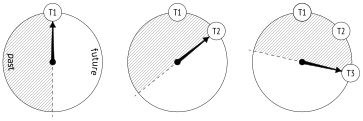
To better visualize this idea, you can imagine a sequence of transaction IDs as a clock face. For each transaction, half of the circle in the clockwise direction will be in the future, while the other half will be in the past.
However, this visualization has an unpleasant catch. An old transaction (T1) is in the remote past as compared to more recent transactions. But sooner or later a new transaction will see it in the half of the circle related to the future. If it were really so, it would have a catastrophic impact: from now on, all newer transactions would not see the changes made by transaction T1.
7.2 Tuple Freezing and Visibility Rules
To prevent such “time travel,” vacuuming performs one more task (in addition to page cleanup):3 it searches for tuples that are beyond the database horizon (so they are visible in all snapshots) and tags them in a special way, that is, freezes them. (p. 215)
For frozen tuples, visibility rules do not have to take xmin into account since such tuples are known to be visible in all snapshots, so this transaction ID can be safely reused.
You can imagine that the xmin transaction ID is replaced in frozen tuples by a hypothetical “minus infinity” (pictured as a snowflake below); it is a sign that this tuple is created by a transaction that is so far in the past that its actual ID does not matter anymore. Yet in reality xmin remains unchanged, whereas the freezing attribute is defined by a combination of two hint bits: committed and aborted.
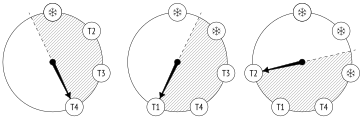
Many sources (including the documentation) mention FrozenTransactionId = 2. It is the “minus infinity”that I have already referred to—this value used to replace xmin in versions prior to 9.4, but now hint bits are employed instead. As a result, the original transaction ID remains in the tuple, which is convenient for both debugging and support. Old systems can still contain the obsolete FrozenTransactionId, even if they have been upgraded to higher versions.
The xmax transaction ID does not participate in freezing in any way. It is only present in outdated tuples, and once such tuples stop being visible in all snapshots (which means that the xmax ID is beyond the database horizon), they will be vacuumed away.
Let’s create a new table for our experiments. The fillfactor parameter should be set to the lowest value so that each page can accommodate only two tuples—it will be easier to track the progress this way. We will also disable autovacuum to make sure that the table is only cleaned up on demand.
We are going to create yet another flavor of the function that displays heap pages using pageinspect. Dealing with a range of pages, it will show the values of the freezing attribute (f) and the xmin transaction age for each tuple (it will have to call the age system function—the age itself is not stored in heap pages, of course):
Now let’s insert some rows into the table and run the VACUUM command that will immediately create the visibility map.
We are going to observe the first two heap pages using the pg_visibility extension. When vacuuming completes, both pages get tagged in the visibility map (all_visible) but not in the freeze map (all_frozen), as they still contain some unfrozen tuples: (v. 9.6)
The xmin_age of the transaction that has created the rows equals 1 because it is the latest transaction performed in the system:
7.3 Managing Freezing
There are four main parameters that control freezing. All of them represent transaction age and define when the following events happen:
Freezing starts (vacuum_freeze_min_age).
Aggressive freezing is performed (vacuum_freeze_table_age).
Freezing is forced (autovacuum_freeze_max_age).
Freezing receives priority (vacuum_failsafe_age). (v. 14)
Minimal Freezing Age
The vacuum_freeze_min_age parameter defines the minimal freezing age of xmin transactions. The lower its value, the higher the overhead: if a row is “hot” and is actively being changed, then freezing all its newly created versions will be a wasted effort. Setting this parameter to a relatively high value allows you to wait for a while. (default: 50 million)
To observe the freezing process, let’s reduce this parameter value to one:
Now update one row in the zero page. The new row version will get into the same page because the fillfactor value is quite small:
The age of all transactions has been increased by one, and the heap pages now look as follows:
At this point, the tuples that are older than vacuum_freeze_min_age = 1 are subject to freezing. But vacuum will not process any pages tagged in the visibility map: (p. 107)
The previous UPDATE command has removed the visibility bit of the zero page, so the tuple that has an appropriate xmin age in this page will be frozen. But the first page will be skipped altogether:
Now the zero page appears in the visibility map again, and if nothing changes in it, vacuuming will not return to this page anymore:
Age for Aggressive Freezing
As we have just seen, if a page contains only the current tuples that are visible in all snapshots, vacuuming will not freeze them. To overcome this constraint, PostgreSQL provides the vacuum_freeze_table_age parameter. It defines the transaction age that allows vacuuming to ignore the visibility map, so any heap page can be frozen. (default: 150 million)
For each table, the system catalog keeps a transaction ID for which it is known that all the older transactions are sure to be frozen. It is stored as relfrozenxid:
It is the age of this transaction that is compared to the vacuum_freeze_table_age value to decide whether the time has come for aggressive freezing.
Thanks to the freeze map, there is no need to perform a full table scan during vacuuming: it is enough to check only those pages that do not appear in the map. Apart from this important optimization, the freeze map also brings fault tolerance: if vacuuming is interrupted, its next run will not have to get back to the pages that have already been processed and are tagged in the map. (v. 9.6)
PostgreSQL performs aggressive freezing of all pages in a table each time when the number of transactions in the system reaches the vacuum_freeze_table_age−vacuum_freeze_min_age limit (if the default values are used, it happens after each 100 million transactions). Thus, if the vacuum_freeze_min_age value is too big, it can lead to excessive freezing and increased overhead.
To freeze the whole table, let’s reduce the vacuum_freeze_table_age value to four; then the condition for aggressive freezing will be satisfied:
Run the VACUUM command:
Now that the whole table has been analyzed, the relfrozenxid value can be advanced—heap pages are guaranteed to have no older unfrozen xmin transactions:
The first page now contains only frozen tuples:
Besides, this page is tagged in the freeze map:
Age for Forced Autovacuum
Sometimes it is not enough to configure the two parameters discussed above to timely freeze tuples. Autovacuum might be switched off, while regular VACUUM is not being called at all (it is a very bad idea, but technically it is possible). Besides, some inactive databases (like template0) may not be vacuumed. PostgreSQL can handle such situations by forcing autovacuum in the aggressive mode. (p. 110)
Autovacuum is forced4 (even if it is switched off) when there is a risk that the age of some unfrozen transaction IDs in the database will exceed the autovacuum_freeze_max_age value. The decision is taken based on the age of the oldest pg_class.relfrozenxid transaction in all the tables, as all the older transactions are guaranteed to be frozen. The ID of this transaction is stored in the system catalog: (default: 200 million)
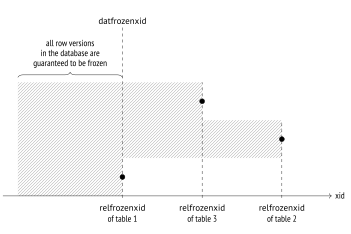
The autovacuum_freeze_max_age limit is set to 2 billion transactions (a bit less than half of the circle), while the default value is 10 times smaller. It is done for good reason: a big value increases the risk of transaction ID wraparound, as PostgreSQL may fail to timely freeze all the required tuples. In this case, the server must stop immediately to prevent possible issues and will have to be restarted by an administrator.
The autovacuum_freeze_max_age value also affects the size of CLOG. There is no need to keep the status of frozen transactions, and all the transactions that precede the one with the oldest datfrozenxid in the cluster are sure to be frozen. Those CLOG files that are not required anymore are removed by autovacuum.5 (p. 70)
Changing the autovacuum_freeze_max_age parameter requires a server restart. However, all the freezing settings discussed above can also be adjusted at the table level via the corresponding storage parameters. Note that the names of all these parameters start with “auto”:
autovacuum_freeze_min_age and toast.autovacuum_freeze_min_age
autovacuum_freeze_table_age and toast.autovacuum_freeze_table_age
autovacuum_freeze_max_age and toast.autovacuum_freeze_max_age
Age for Failsafe Freezing
If autovacuum is already struggling to prevent transaction ID wraparound and it is clearly a race against time, a safety switch is pulled: autovacuum will ignore the value of the autovacuum_vacuum_cost_delay (vacuum_cost_delay) parameter and will stop vacuuming indexes to freeze heap tuples as soon as possible. (v. 14)
A failsafe freezing mode6 is enabled if there is a risk that the age of an unfrozen transaction in the database will exceed the vacuum_failsafe_age value. It is assumed that this value must be higher than autovacuum_freeze_max_age. (default: 1.6 billion)
7.4 Manual Freezing
It is sometimes more convenient to manage freezing manually rather than rely on autovacuum.
Freezing by Vacuum
You can initiate freezing by calling the VACUUM FREEZE command. It will freeze all the heap tuples regardless of their transaction age, as if vacuum_freeze_min_age = 0.
If the purpose of such a call is to freeze heap tuples as soon as possible, it makes sense to disable index vacuuming altogether, like it is done in the failsafe mode. You can do it either explicitly, by running the VACUUM (freeze, index_cleanup false) command, or via the vacuum_index_cleanup storage parameter. It is rather obvious that it should not be done on a regular basis since in this case VACUUM will not be coping well with its main task of page cleanup. (v. 12)
Freezing Data at the Initial Loading
The data that is not expected to change can be frozen at once, while it is being loaded into the database. It is done by running the COPY command with the FREEZE option.
Tuples can be frozen during the initial loading only if the resulting table has been created or truncated within the same transaction, as both these operations acquire an exclusive lock on the table. This restriction is necessary because frozen tuples are expected to be visible in all snapshots, regardless of the isolation level; otherwise, transactions would suddenly see freshly-frozen tuples right as they are being uploaded. But if the lock is acquired, other transactions will not be able to get access to this table. (p. 204)
Nevertheless, it is still technically possible to break isolation. Let’s start a new transaction at the Repeatable Read isolation level in a separate session:
Truncate the tfreeze table and insert new rows into this table within the same transaction. (If the read-only transaction had already accessed the tfreeze table, the TRUNCATE command will be blocked.)
Now the reading transaction sees the new data as well:
It does break isolation, but since data loading is unlikely to happen regularly, in most cases it will not cause any issues.
If you load data with freezing, the visibility map is created at once, and page headers receive the visibility attribute: (v. 14) (p. 104)
Thus, if the data has been loaded with freezing, the table will not be processed by vacuum (as long as the data remains unchanged). Unfortunately, this functionality is not supported for TOAST tables yet: if an oversized value is loaded, vacuum will have to rewrite the whole TOAST table to set visibility attributes in all page headers. (v. 14)
include/access/transam.h, FullTransactionId type ↩︎
backend/access/transam/transam.c, TransactionIdPrecedes function ↩︎
postgresql.org/docs/14/routine-vacuuming.html#VACUUM-FOR-WRAPAROUND ↩︎
backend/access/transam/varsup.c, SetTransactionIdLimit function ↩︎
backend/commands/vacuum.c, vac_truncate_clog function ↩︎
backend/access/heap/vacuumlazy.c, lazy_check_wraparound_failsafe function ↩︎