1 Introduction
PostgreSQL 14 · Translated from Russian by Liudmila Mantrova · Chinese translation by Xiong Cancan
1.1 Data Organization
Databases
PostgreSQL is a program that belongs to the class of database management systems. When this program is running, we call it a PostgreSQL server, or instance.
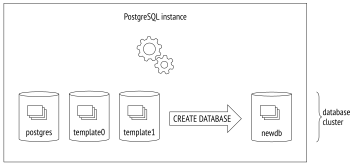
Data managed by PostgreSQL is stored in databases.1 A single PostgreSQL instance can serve several databases at a time; together they are called a database cluster.
To be able to use the cluster, you must first initialize2 (create) it. The directory that contains all the files related to the cluster is usually called PGDATA, after the name of the environment variable pointing to this directory.
Installations from pre-built packages can add their own “abstraction layers” over the regular PostgreSQL mechanism by explicitly setting all the parameters required by utilities. In this case, the database server runs as an operating system service, and you may never come across the PGDATA variable directly. But the term itself is well-established, so I am going to use it.
After cluster initialization, PGDATA contains three identical databases:
template0 is used for cases like restoring data from a logical backup or creating a database with a different encoding; it must never be modified.
template1 serves as a template for all the other databases that a user can create in the cluster.
postgres is a regular database that you can use at your discretion.
System Catalog
Metadata of all cluster objects (such as tables, indexes, data types, or functions) is stored in tables that belong to the system catalog.3 Each database has its own set of tables (and views) that describe the objects of this database. Several system catalog tables are common to the whole cluster; they do not belong to any particular database (technically, a dummy database with a zero ID is used), but can be accessed from all of them.
The system catalog can be viewed using regular SQL queries, while all modifications in it are performed by DDL commands. The psql client also offers a whole range of commands that display the contents of the system catalog.
Names of all system catalog tables begin with pg_,like in pg_database. Column names start with a three-letter prefix that usually corresponds to the table name, like in datname.
In all system catalog tables, the column declared as the primary key is called oid (object identifier); its type, which is also called oid, is a 32-bit integer.
The implementation of oid object identifiers is virtually the same as that of sequences, but it appeared in PostgreSQL much earlier. What makes it special is that the generated unique IDs issued by a common counter are used in different tables of the system catalog. When an assigned ID exceeds the maximum value, the counter is reset. To ensure that all values in a particular table are unique, the next issued oid is checked by the unique index; if it is already used in this table, the counter is incremented, and the check is repeated.4
Schemas
Schemas5 are namespaces that store all objects of a database. Apart from user schemas, PostgreSQL offers several predefined ones:
public is the default schema for user objects unless other settings are specified.
pg_catalog is used for system catalog tables.
information_schema provides an alternative view for the system catalog as defined by the SQL standard.
pg_toast is used for objects related to TOAST. (p. 28)
pg_temp comprises temporary tables. Although different users create temporary tables in different schemas called pg_temp_N, everyone refers to their objects using the pg_temp alias.
Each schema is confined to a particular database, and all database objects belong to this or that schema.
If the schema is not specified explicitly when an object is accessed, PostgreSQL selects the first suitable schema from the search path. The search path is based on the value of the search_path parameter, which is implicitly extended with pg_catalog and (if necessary) pg_temp schemas. It means that different schemas can contain objects with the same names.
Tablespaces
Unlike databases and schemas, which determine logical distribution of database objects, tablespaces define physical data layout. A tablespace is virtually a directory in a file system. You can distribute your data between tablespaces in such a way that archive data is stored on slow disks, while the data that is being actively updated goes to fast disks.
One tablespace can be used by different databases, and each database can store data in several tablespaces. It means that logical structure and physical data layout do not depend on each other.
Each database has the so-called default tablespace. All database objects are created in this tablespace unless another location is specified. System catalog objects related to this database are also stored there.
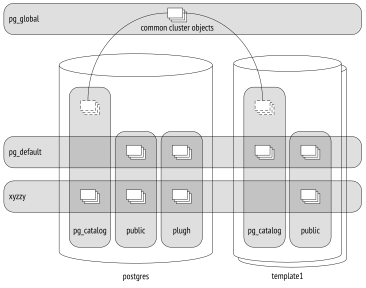
During cluster initialization, two tablespaces are created:
pg_default is located in the PGDATA/base directory; it is used as the default tablespace unless another tablespace is explicitly selected for this purpose.
pg_global is located in the PGDATA/global directory; it stores system catalog objects that are common to the whole cluster.
When creating a custom tablespace, you can specify any directory; PostgreSQL will create a symbolic link to this location in the PGDATA/pg_tblspc directory. In fact, all paths used by PostgreSQL are relative to the PGDATA directory, which allows you to move it to a different location (provided that you have stopped the server, of course).
The illustration above puts together databases, schemas, and tablespaces. Here the postgres database uses tablespace xyzzy as the default one, whereas the template1 database uses pg_default. Various database objects are shown at the intersections of tablespaces and schemas.
Relations
For all of their differences, tables and indexes—the most important database objects—have one thing in common: they consist of rows. This point is quite self-evident when we think of tables, but it is equally true for B-tree nodes, which contain indexed values and references to other nodes or table rows.
Some other objects also have the same structure; for example, sequences (virtually one-row tables) and materialized views (which can be thought of as tables that “keep” the corresponding queries). Besides, there are regular views, which do not store any data but otherwise are very similar to tables.
In PostgreSQL, all these objects are referred to by the generic term relation.
In my opinion, it is not a happy term because it confuses database tables with “genuine” relations defined in the relational theory. Here we can feel the academic legacy of the project and the inclination of its founder, Michael Stonebraker, to see everything as a relation. In one of his works, he even introduced the concept of an “ordered relation” to denote a table in which the order of rows is defined by an index.
The system catalog table for relations was originally called pg_relation, but following the object orientation trend, it was soon renamed to pg_class, which we are now used to. Its columns still have the REL prefix though.
Files and Forks
All information associated with a relation is stored in several different forks,6 each containing data of a particular type.
At first, a fork is represented by a single file. Its filename consists of a numeric ID (oid), which can be extended by a suffix that corresponds to the fork’s type.
The file grows over time, and when its size reaches 1 GB, another file of this fork is created (such files are sometimes called segments). The sequence number of the segment is added to the end of its filename.
The file size limit of 1 GB was historically established to support various file systems that could not handle large files. You can change this limit when you are building PostgreSQL (./configure --with-segsize).
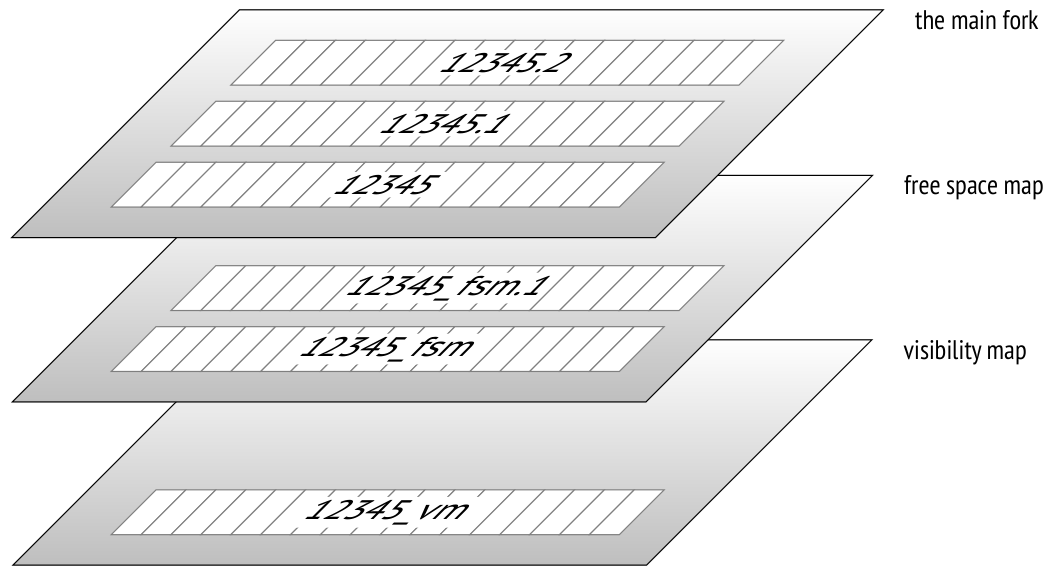
Thus, a single relation is represented on disk by several files. Even a small table without indexes will have at least three files, by the number of mandatory forks.
Each tablespace directory (except for pg_global) contains separate subdirectories for particular databases. All files of the objects belonging to the same tablespace and database are located in the same subdirectory. You must take it into account because too many files in a single directory may not be handled well by file systems.
There are several standard types of forks.
The main fork represents actual data: table rows or index rows. This fork is available for any relations (except for views, which contain no data).
Files of the main fork are named by their numeric IDs, which are stored as relfilenode values in the pg_class table.
Let’s take a look at the path to a file that belongs to a table created in the pg_default tablespace:
The base directory corresponds to the pg_default tablespace, the next subdirectory is used for the database, and it is here that we find the file we are looking for:
Here is the corresponding file in the file system:
The initialization fork7 is available only for unlogged tables (created with the UNLOGGED clause) and their indexes. Such objects are the same as regular ones, except that any actions performed on them are not written into the write-ahead log. It makes these operations considerably faster, but you will not be able to restore consistent data in case of a failure. Therefore, PostgreSQL simply deletes all forks of such objects during recovery and overwrites the main fork with the initialization fork, thus creating a dummy file. (p. 164)
The t table is created as unlogged, so the initialization fork is present. It has the same name as the main fork, but with the _init suffix:
The free space map8 keeps track of available space within pages. Its volume changes all the time, growing after vacuuming and getting smaller when new row versions appear. The free space map is used to quickly find a page that can accommodate new data being inserted.
All files related to the free space map have the _fsm suffix. Initially, no such files are created; they appear only when necessary. The easiest way to get them is to vacuum a table: (p. 108)
To speed up search, the free space map is organized as a tree; it takes at least three pages (hence its file size for an almost empty table).
The free space map is provided for both tables and indexes. But since an index row cannot be added into an arbitrary page (for example, B-trees define the place of insertion by the sort order), PostgreSQL tracks only those pages that have been fully emptied and can be reused in the index structure.
The visibility map9 can quickly show whether a page needs to be vacuumed or frozen. For this purpose, it provides two bits for each table page.
The first bit is set for pages that contain only up-to-date row versions. Vacuum skips such pages because there is nothing to clean up. Besides, when a transaction tries to read a row from such a page, there is no point in checking its visibility, so an index-only scan can be used. (p. 107) (p. 337)
The second bit is set for pages that contain only frozen row versions. I will use the term freeze map to refer to this part of the fork. (v. 9.6) (p. 123)
Visibility map files have the _vm suffix. They are usually the smallest ones:
The visibility map is provided for tables, but not for indexes. (p. 74)
Pages
To facilitate I/O, all files are logically split into pages (or blocks), which represent the minimum amount of data that can be read or written. Consequently, many internal PostgreSQL algorithms are tuned for page processing. (p. 62)
The page size is usually 8 kB. It can be configured to some extent (up to 32 kB), but only at build time (./configure --with-blocksize), and nobody usually does it. Once built and launched, the instance can work only with pages of the same size; it is impossible to create tablespaces that support different page sizes.
Regardless of the fork they belong to, all the files are handled by the server in roughly the same way. Pages are first moved to the buffer cache (where they can be read and updated by processes) and then flushed back to disk as required. (p. 147)
TOAST
Each row must fit a single page: there is no way to continue a row on the next page. To store long rows, PostgreSQL uses a special mechanism called TOAST10 (The Oversized Attributes Storage Technique).
TOAST implies several strategies. You can move long attribute values into a separate service table, having sliced them into smaller “toasts.” Another option is to compress a long value in such a way that the row fits the page. Or you can do both: first compress the value, and then slice and move it.
If the main table contains potentially long attributes, a separate TOAST table is created for it right away, one for all the attributes. For example, if a table has a column of the numeric or text type, a TOAST table will be created even if this column will never store any long values.
For indexes, the TOAST mechanism can offer only compression; moving long attributes into a separate table is not supported. It limits the size of the keys that can be indexed (the actual implementation depends on a particular operator class). (p. 315)
By default, the TOAST strategy is selected based on the data type of a column. The easiest way to review the used strategies is to run the \d+ command in psql, but I will query the system catalog to get an uncluttered output:
PostgreSQL supports the following strategies:
plain means that TOAST is not used (this strategy is applied to data types that are known to be “short,” such as the integer type).
extended allows both compressing attributes and storing them in a separate TOAST table.
external implies that long attributes are stored in the TOAST table in an uncompressed state.
main requires long attributes to be compressed first; they will be moved to the TOAST table only if compression did not help.
In general terms, the algorithm looks as follows.11 PostgreSQL aims at having at least four rows in a page. So if the size of the row exceeds one fourth of the page, excluding the header (for a standard-size page it is about 2000 bytes), we must apply the TOAST mechanism to some of the values. Following the workflow described below, we stop as soon as the row length does not exceed the threshold anymore:
First of all, we go through attributes with
externalandextendedstrategies, starting from the longest ones.Extendedattributes get compressed, and if the resulting value (on its own, without taking other attributes into account) exceeds one fourth of the page, it is moved to the TOAST table right away.Externalattributes are handled in the same way, except that the compression stage is skipped.If the row still does not fit the page after the first pass, we move the remaining attributes that use
externalorextendedstrategies into the TOAST table, one by one.
If it did not help either, we try to compress the attributes that use the
mainstrategy, keeping them in the table page.If the row is still not short enough, the
mainattributes are moved into the TOAST table.
The threshold value is 2000 bytes, but it can be redefined at the table level using the toast_tuple_target storage parameter. (v. 11)
It may sometimes be useful to change the default strategy for some of the columns. If it is known in advance that the data in a particular column cannot be compressed (for example, the column stores JPEG images), you can set the external strategy for this column; it allows you to avoid futile attempts to compress the data. The strategy can be changed as follows:
If we repeat the query, we will get the following result:
TOAST tables reside in a separate schema called pg_toast; it is not included into the search path, so TOAST tables are usually hidden. For temporary tables, pg_toast_temp_N schemas are used, by analogy with pg_temp_N.
Let’s take a look at the inner mechanics of the process. Suppose table t contains three potentially long attributes; it means that there must be a corresponding TOAST table. Here it is:
It is only logical that the resulting chunks of the toasted row use the plain strategy: there is no second-level TOAST.
Apart from the TOAST table itself, PostgreSQL creates the corresponding index in the same schema. This index is always used to access TOAST chunks. The name of the index is displayed in the output, but you can also view it by running the following query:
Thus, a TOAST table increases the minimum number of fork files used by the table up to eight: three for the main table, three for the TOAST table, and two for the TOAST index.
Column c uses the extended strategy, so its values will be compressed:
The TOAST table is empty: repeated symbols have been compressed by the LZ algorithm, so the value fits the table page.
And now let’s construct this value of random symbols:
This sequence cannot be compressed, so it gets into the TOAST table:
We can see that the characters are sliced into chunks. The chunk size is selected in such a way that the page of the TOAST table can accommodate four rows. This value varies a little from version to version depending on the size of the page header.
When a long attribute is accessed, PostgreSQL automatically restores the original value and returns it to the client; it all happens seamlessly for the application. If long attributes do not participate in the query, the TOAST table will not be read at all. It is one of the reasons why you should avoid using the asterisk in production solutions.
If the client queries one of the first chunks of a long value, PostgreSQL will read the required chunks only, even if the value has been compressed. (v. 13)
Nevertheless, data compression and slicing require a lot of resources; the same goes for restoring the original values. That’s why it is not a good idea to keep bulky data in PostgreSQL, especially if this data is being actively used and does not require transactional logic (like scanned accounting documents). A potentially better alternative is to store such data in the file system, keeping in the database only the names of the corresponding files. But then the database system cannot guarantee data consistency.
1.2 Processes and Memory
A PostgreSQL server instance consists of several interacting processes.
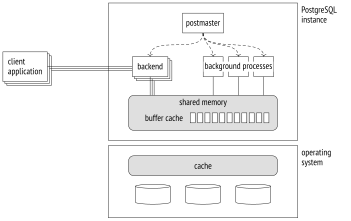
The first process launched at the server start is postgres, which is traditionally called postmaster. It spawns all the other processes (Unix-like systems use the fork system call for this purpose) and supervises them: if any process fails, postmaster restarts it (or the whole server if there is a risk that the shared data has been damaged).
Because of its simplicity, the process model has been used in PostgreSQL from the very beginning, and ever since there have been unending discussions about switching over to threads.
The current model has several drawbacks: static shared memory allocation does not allow resizing structures like buffer cache on the fly; parallel algorithms are hard to implement and less efficient than they could be; sessions are tightly bound to processes. Using threads sounds promising, even though it involves some challenges related to isolation, OS compatibility, and resource management. However, their implementation would require a radical code overhaul and years of work, so conservative views prevail for now: no such changes are expected in the near future.
Server operation is maintained by background processes. Here are the main ones:
startup restores the system after a failure.
autovacuum removes stale data from tables and indexes. (p. 109)
wal writer writes WAL entries to disk. (p. 183)
checkpointer executes checkpoints. (p. 170)
writer flushes dirty pages to disk. (p. 176)
stats collector collects usage statistics for the instance.
wal sender sends WAL entries to a replica.
wal receiver gets WAL entries on a replica.
Some of these processes are terminated once the task is complete, others run in the background all the time, and some can be switched off.
Each process is managed by configuration parameters, sometimes by dozens of them. To set up the server in a comprehensive manner, you have to be aware of its inner workings. But general considerations will only help you select more or less adequate initial values; later on, these settings have to be fine-tuned based on monitoring data.
To enable process interaction, postmaster allocates shared memory, which is available to all the processes.
Since disks (especially HDD, but SSD too) are much slower than RAM, PostgreSQL uses caching: some part of the shared RAM is reserved for recently read pages, in hope that they will be needed more than once and the overhead of repeated disk access will be reduced. Modified data is also flushed to disk after some delay, not immediately. (p. 147)
Buffer cache takes the greater part of the shared memory, which also contains other buffers used by the server to speed up disk access.
The operating system has its own cache too. PostgreSQL (almost) never bypasses the operating system mechanisms to use direct I/O, so it results in double caching.
In case of a failure (such as a power outage or an operating system crash), the data kept in RAM is lost, including that of the buffer cache. The files that remain on disk have their pages written at different points in time. To be able to restore data consistency, PostgreSQL maintains the write-ahead log (WAL) during its operation, which makes it possible to repeat lost operations when necessary. (p. 164)
1.3 Clients and the Client-Server Protocol
Another task of the postmaster process is to listen for incoming connections. Once a new client appears, postmaster spawns a separate backend process.12 The client establishes a connection and starts a session with this backend. The session continues until the client disconnects or the connection is lost.
The server has to spawn a separate backend for each client. If many clients are trying to connect, it can turn out to be a problem.
Each process needs RAM to cache catalog tables, prepared statements, intermediate query results, and other data. The more connections are open, the more memory is required. (p. 266) (p. 265)
If connections are short and frequent (a client performs a small query and disconnects), the cost of establishing a connection, spawning a new process, and performing pointless local caching is unreasonably high.
The more processes are started, the more time is required to scan their list, and this operation is performed very often. As a result, performance may decline as the number of clients grows. (p. 82)
This problem can be resolved by connection pooling, which limits the number of spawned backends. PostgreSQL has no such built-in functionality, so we have to rely on third-party solutions: pooling managers integrated into the application server or external tools (such as PgBouncer13 or Odyssey14). This approach usually means that each server backend can execute transactions of different clients, one after another. It imposes some restrictions on application development since it is only allowed to use resources that are local to a transaction, not to the whole session.
To understand each other, a client and a server must use the same interfacing protocol.15 It is usually based on the standard libpq library, but there are also other custom implementations.
Speaking in the most general terms, the protocol allows clients to connect to the server and execute SQL queries.
A connection is always established to a particular database on behalf of a particular role, or user. Although the server supports a database cluster, it is required to establish a separate connection to each database that you would like to use in your application. At this point, authentication is performed: the backend process verifies the user’s identity (for example, by asking for the password) and checks whether this user has the right to connect to the server and to the specified database.
SQL queries are passed to the backend process as text strings. The process parses the text, optimizes the query, executes it, and returns the result to the client.
backend/catalog/catalog.c, GetNewOidWithIndex function ↩︎
postgresql.org/docs/14/storage-fsm.html backend/storage/freespace/README ↩︎
postgresql.org/docs/14/storage-toast.html include/access/heaptoast.h ↩︎
backend/tcop/postgres.c, PostgresMain function ↩︎